
OSGI嵌入jetty应用服务器
1、搭建osgi基础环境,参考:https://www.cnblogs.com/dyh004/p/10642383.html
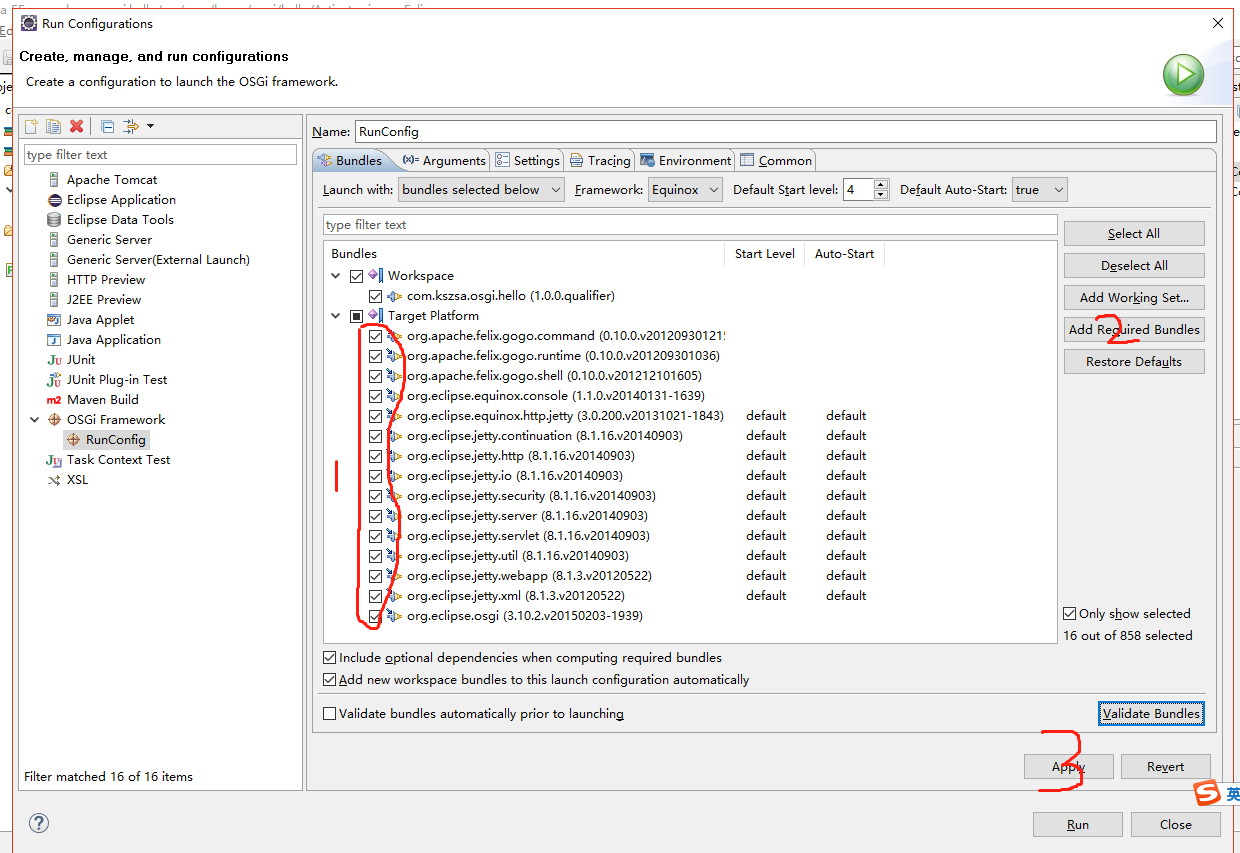
2、引入jetty相关的依赖包
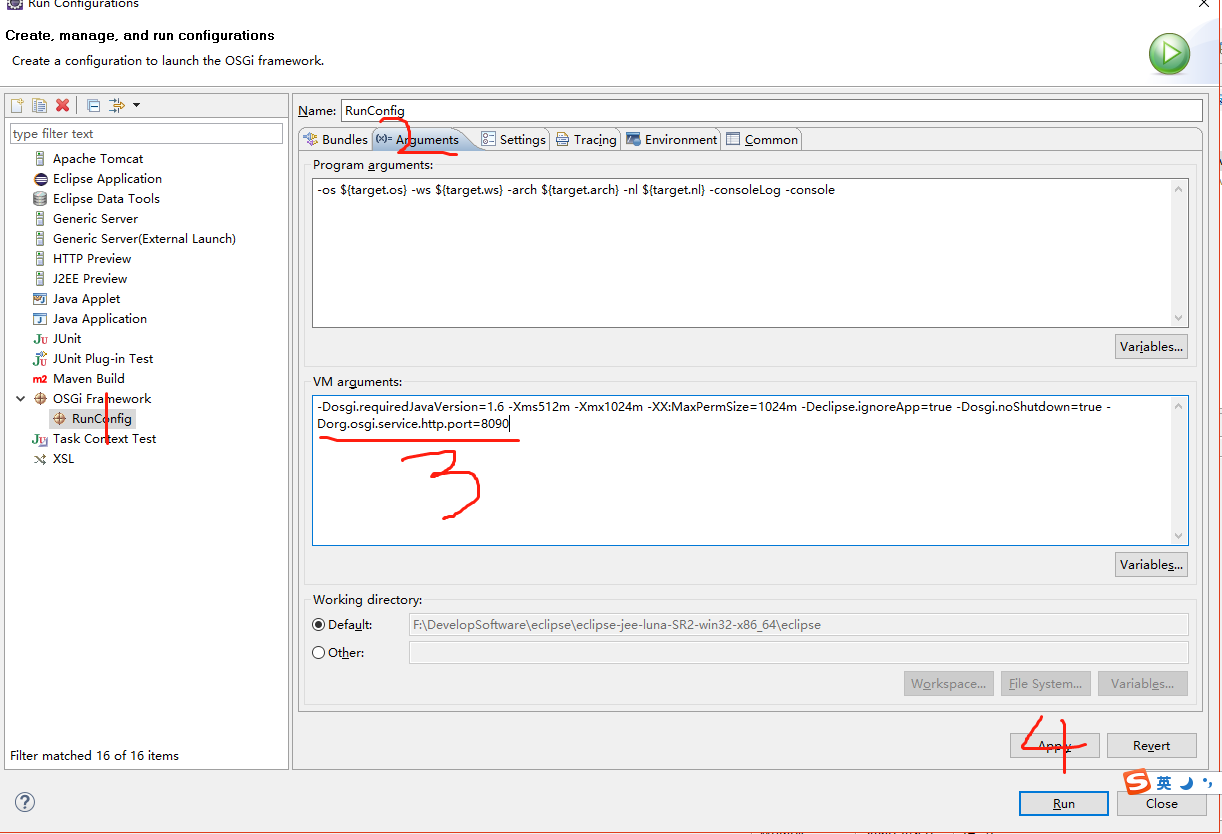
修改jetty启动端口
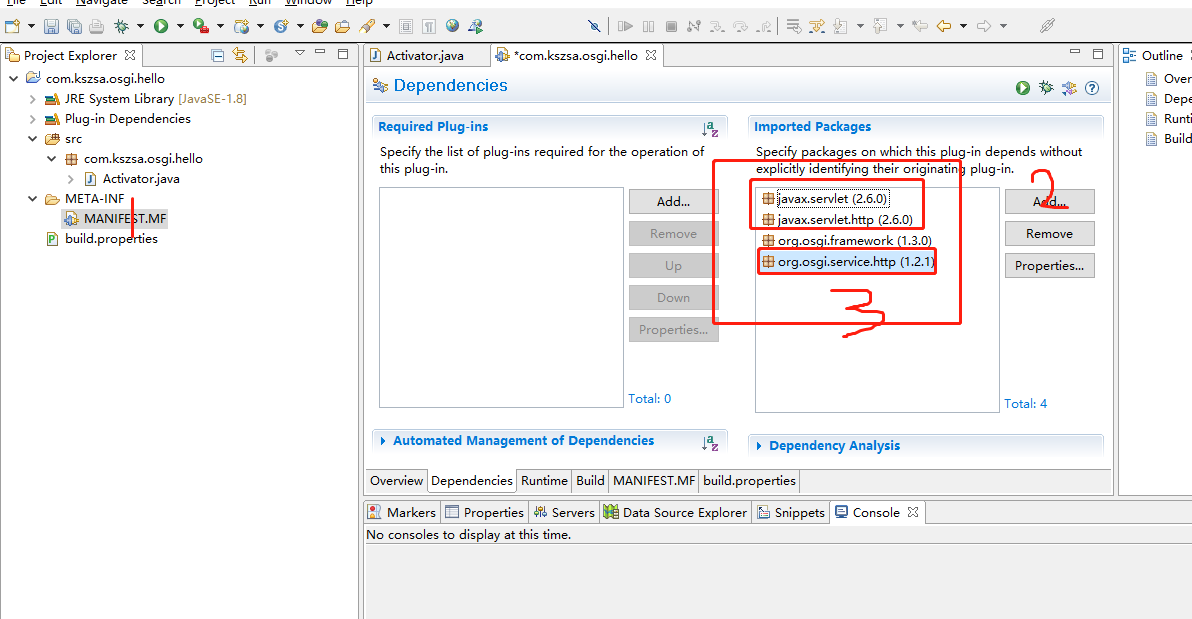
3、com.kszsa.osgi.hello这个bundle中,引入相关的依赖
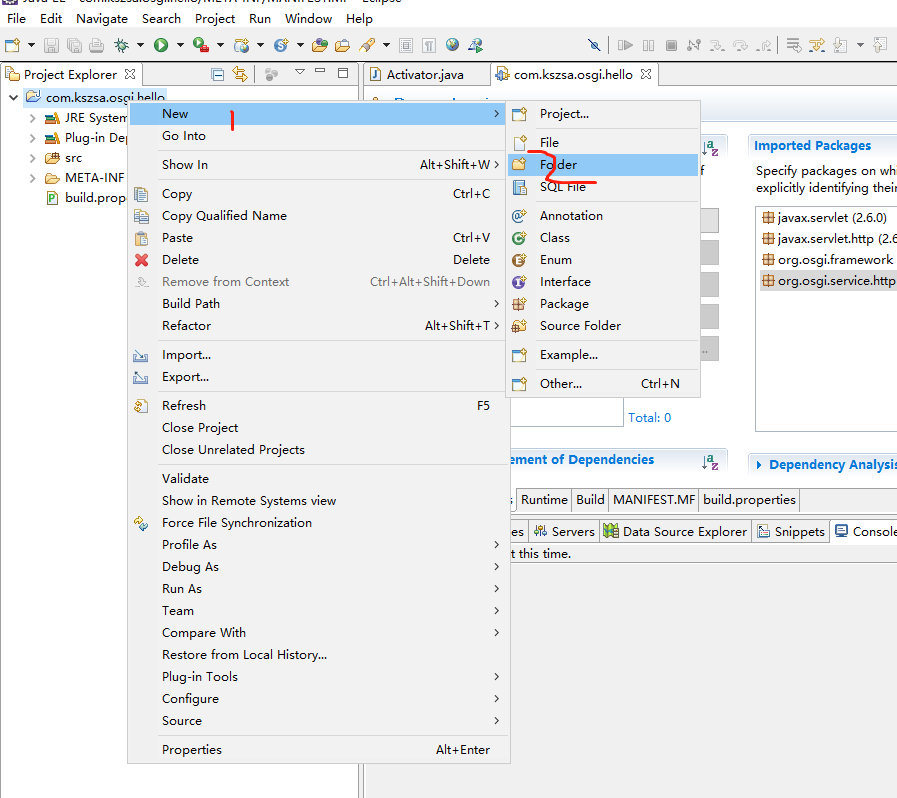
4、准备静态页面
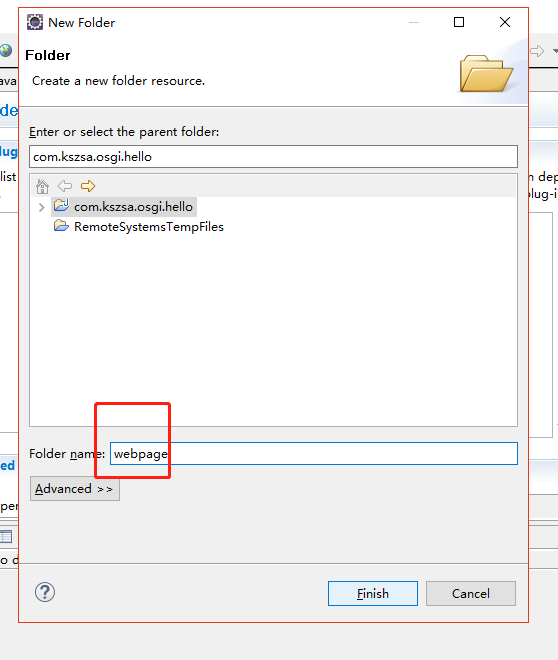
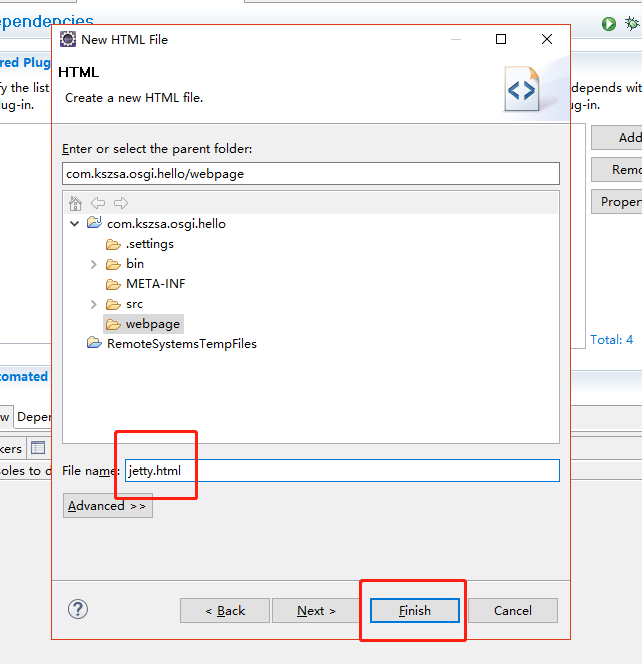
jetty.html内容如下
<!DOCTYPE html>

<html>

<head>

<meta charset="UTF-8">

<title>jetty说明</title>

</head>

<body>

<h2>这是jetty使用说明</h2>

<font color="green">//用来注册诸如表态页面等等</font><br>

registerResources(String alias, String name, HttpContext context) <br><br>

<font color="green">//用来注册servlet类</font><br>

registerServlet(String alias, Servlet servlet, Dictionary initparams, HttpContext context)

</body>

</html>
5、注册静态资源,修改Activator.java
package com.kszsa.osgi.hello;

import org.osgi.framework.BundleActivator;

import org.osgi.framework.BundleContext;

import org.osgi.framework.ServiceReference;

import org.osgi.service.http.HttpContext;

import org.osgi.service.http.HttpService;

public class Activator implements BundleActivator {

    private static BundleContext context;

    private HttpService service;

    static BundleContext getContext() {

        return context;

    }

    /**

     * 启动bundle

     */

    public void start(BundleContext bundleContext) throws Exception {

        Activator.context = bundleContext;

        ServiceReference serviceReference = bundleContext

                .getServiceReference(HttpService.class.getName());

        service = (HttpService) bundleContext.getService(serviceReference);

        // 注册

        HttpContext httpContext = service.createDefaultHttpContext();

        // 用来注册诸如表态页面等等

        // 设置别名,所有对"/osgi"映射到"web"目录

        service.registerResources("/osgi", "/webpage", httpContext);

    }

    /**

     * 停止bundle

     */

    public void stop(BundleContext bundleContext) throws Exception {

        service.unregister("/osgi");

        Activator.context = null;

    }

}
6、启动osgi项目,查看结果,访问http://127.0.0.1:8090/osgi/jetty.html
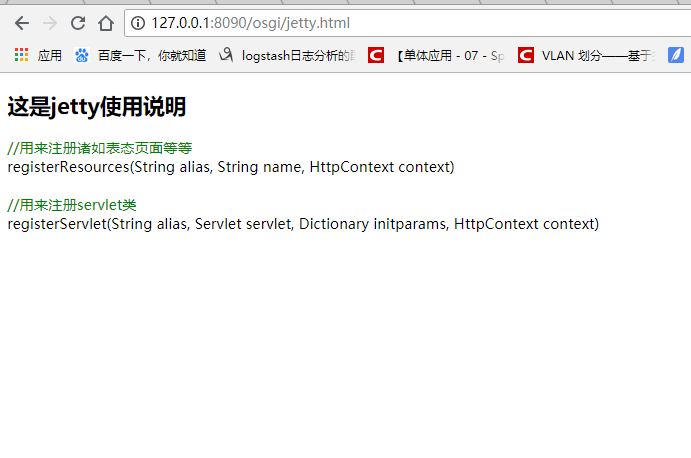
说明静态资源访问成功。
7、注册servlet资源,新建servlet
package com.kszsa.osgi.servlet;

import java.io.BufferedWriter;

import java.io.IOException;

import java.io.OutputStreamWriter;

import javax.servlet.ServletException;

import javax.servlet.http.HttpServlet;

import javax.servlet.http.HttpServletRequest;

import javax.servlet.http.HttpServletResponse;

import org.osgi.framework.BundleContext;

public class PrintNameServlet extends HttpServlet{

    private static final long serialVersionUID = -9080875068147052401L;

    private BundleContext context;

    public PrintNameServlet(BundleContext context) {

        super();

        this.context = context;

    }

    @Override

    protected void doPost(HttpServletRequest req, HttpServletResponse resp)

            throws ServletException, IOException {

        doGet(req, resp);

    }

    @Override

    protected void doGet(HttpServletRequest req, HttpServletResponse resp)

            throws ServletException, IOException {

        resp.setCharacterEncoding("UTF-8");

        String name = req.getParameter("name");

        System.out.println(name);

        String s = "Hello,world!";

        StringBuilder sb = new StringBuilder();

        sb.append("<html><title>Response</title><meta http-equiv=\"Content-Type\" content=\"text/html; charset=utf-8\" />");

        sb.append("<body>");

        sb.append(s);

        sb.append("</body></html>");

        BufferedWriter bw = new BufferedWriter(new OutputStreamWriter(resp.getOutputStream(),"UTF-8"));

        bw.write(sb.toString());

        bw.flush();

        bw.close();

    }

}
8、修改修改Activator.java,注册servlet
package com.kszsa.osgi.hello;

import org.osgi.framework.BundleActivator;

import org.osgi.framework.BundleContext;

import org.osgi.framework.ServiceReference;

import org.osgi.service.http.HttpContext;

import org.osgi.service.http.HttpService;

import com.kszsa.osgi.servlet.PrintNameServlet;

public class Activator implements BundleActivator {

    private static BundleContext context;

    private HttpService service;

    static BundleContext getContext() {

        return context;

    }

    /**

     * 启动bundle

     */

    public void start(BundleContext bundleContext) throws Exception {

        Activator.context = bundleContext;

        ServiceReference serviceReference = bundleContext

                .getServiceReference(HttpService.class.getName());

        service = (HttpService) bundleContext.getService(serviceReference);

        // 注册

        HttpContext httpContext = service.createDefaultHttpContext();

        // 用来注册诸如表态页面等等

        // 设置别名,所有对"/osgi"映射到"web"目录

        service.registerResources("/osgi", "/webpage", httpContext);

        // 注册servlet

        // 设置servlet别名,'/osgi/print"映射到servlet的实现

        service.registerServlet("/osgi/print", new PrintNameServlet(

                bundleContext), null, httpContext);

    }

    /**

     * 停止bundle

     */

    public void stop(BundleContext bundleContext) throws Exception {

        service.unregister("/osgi");

        Activator.context = null;

    }

}
9、重启osgi,访问http://127.0.0.1:8090/osgi/print
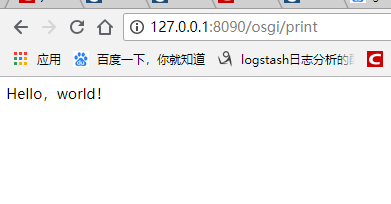
参考地址:https://liugang594.iteye.com/blog/1328050
OSGI嵌入jetty应用服务器的更多相关文章
- OSGI嵌入tomcat应用服务器(gem-web)——tomcat插件环境搭建
相关的资源下载,参考:https://www.cnblogs.com/dyh004/p/10642769.html 新建普通的plugin工程 新建工程运行环境 在工程中,新建运行环境 新建存放运行环 ...
- OSGI嵌入tomcat应用服务器(gem-web)——资源下载
Gem-Web官网介绍: 官网地址:https://www.eclipse.org/gemini/web/download/milestones.php 1.1. 官方正式发布版 https://ww ...
- Jetty应用服务器的安装详解
Jetty是一个开源的Servlet容器和应用服务器,它极度轻量级.高便携性.功能强大.灵活和扩展性好,而且支持各种技术如SPDY.WebSocket.OSGi.JMX.JNDI和JAAS.Jetty ...
- web项目嵌入Jetty运行的两种方式(Jetty插件和自制Jetty服务器)
在开发Java web项目时候,可以在项目中嵌入Jetty服务的方式来运行web程序. 由于最近开发web项目,自己使用的是比较旧的eclipse不支持导入tomcat来运行项目,于是就学习了下使用项 ...
- eclipse 项目中嵌入jetty
Jetty是一个提供HHTP服务器.HTTP客户端和javax.servlet容器的开源项目,Jetty 目前的是一个比较被看好的 Servlet 引擎,它的架构比较简单,也是一个可扩展性和非常灵活的 ...
- 润乾在jetty应用服务器下的JNDI配置一
一. 此处绑定的数据源是以 DBCP 为实现.首先必须将数据库驱动(这里用了MYSQL数据库)和DBCP所需要的 Jar 包复制到 Jetty 根目录的 lib 目录下.DBCP主要需要以下3个 ...
- 嵌入jetty到Java代码
在做Demo实例时,使用的jetty版本号为8.x. 为了避免麻烦,将全部的包都导入到MyEclipse的lib文件夹下. 实例1:自己定义handler的服务器 package com.jetty. ...
- 将jetty嵌入到应用中的简单案例
前面说过jetty最广泛的应用是可以方便的嵌入到应用程序中,而不是作为应用服务器,下面就用最简单的demo来演示一个最简单的应用 1.下载并导入依赖 首先应该建立一个普通的java项目,然后把依赖包导 ...
- Jetty 9嵌入式开发
官方网址:http://www.eclipse.org/jetty/ 下载地址:http://download.eclipse.org/jetty/stable-9/dist/ 文档网址:http:/ ...
随机推荐
- 餐饮ERP相关问题FAQ
1.订单无法自动上传,手动上传也是失败. 检查网络是否有问题,网络如果正常,打开本地连接-属性-internet协议版本4-首选DNS服务器设置为(114.114.114.114) 然后再打开IE浏览 ...
- MySQL优化技巧【持续更新】
前言 应用程序或web网页有时慢的像蜗牛爬似的,可能是网络原因,可能是系统架构原因,还有可能是数据库原因.那么如何提高数据库SQL语句执行速度呢?下面是积累的一些优化技巧,望对君有用. 正文 1.比较 ...
- Linux中对swap分区的配置
swap分区的安装与正常分区的安装大致相同,我这里就只说一下不同 大家可先看我上一篇的安装:https://www.cnblogs.com/feiquan/p/9219447.html 1.查看swa ...
- echo 在shell及脚本中显示色彩及闪烁警告效果
在shell脚本编写中,echo用于输出字符串等提示信息,当我们需要格外显示色彩及闪烁效果如下: 一.在执行shell中显示色彩: 语法格式: echo -e "\033[颜色1:颜色2m ...
- php函数long2ip与ip2long()
long2ip - Converts an long integer address into a string in (IPv4) Internet standard dotted format s ...
- Linux 小知识翻译 - 「如何成为 Linux 内核开发者」
新年的开始,聊聊「怎么做才能成为Linux内核开发者」. Linux内核的开发都是由志愿开发者们完成的.他们并不属于某些特定的企业. 因此,你也有参加Linux内核开发的资格.不用说,卓越的编码技术以 ...
- Linux 小知识翻译 - 「cron」
这次说说「cron」. 「cron」就是「定期自动执行任务的工具」(相当于windows中的计划任务).读做「库隆」.使用「cron」,可以预先指定任务在某个时间执行. 时间的指定并不只是「一小时一次 ...
- shopkeep/spark Dockerfile示例
FROM java:openjdk- ENV HADOOP_HOME /opt/spark/hadoop- ENV MESOS_NATIVE_LIBRARY /opt/libmesos-.so ENV ...
- Vue指令v-for之遍历输出JavaScript数组,json对象的几种方式
定义数据: <script> new Vue({ el:"#test", data:{ message:"infor", list:["a ...
- vue获取当前元素
Html: <li><a href="#" v-on:click="typeStyle">萨克斯萨克<span></s ...