
Qt中使用Boost库
关于boost库的编译,请看https://www.cnblogs.com/HackerArt/p/10539516.html
网上可以查到很多介绍qt使用库文件的教程,但是大多都没有注意到,qt中支持设置环境变量这个特性。
这里我拿boost库来举例说明。
qt creator创建项目,设置boost库文件的引入。
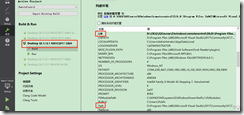
将编译生成好的lib目录,添加到LIB或者Path,
boost库头文件不要添加到INCLUDE中,加到这里qt会提示不识别,
需要将boost库头文件添加到qt的pro配置文件中。
提示:boost源目录下的boost目录中的文件 就可以作为include头文件,不需要额外生成,
# Boost 1_69

# boost头文件目录

INCLUDEPATH += D:\boost\include
qt项目中添加测试代码
#include "MainWindow.h"

#include "ui_MainWindow.h"

#include <boost/lexical_cast.hpp>

#include <boost/regex.hpp>

#include <iostream>

#include <Windows.h>

#include <qdebug.h>

using namespace std;

void TestBoost()

{

    using boost::lexical_cast;

    int a = lexical_cast<int>("123");

    double b = lexical_cast<double>("123.0123456789");

    string s0 = lexical_cast<string>(a);

    string s1 = lexical_cast<string>(b);

    //cout << "number: " << a << "  " << b << endl;

    //cout << "string: " << s0 << "  " << s1 << endl;

    //OutputDebugStringA(a);

    qDebug() << a << b << endl;

    qDebug() << s0.c_str() << s1.c_str() << endl;

    //OutputDebugStringA(s1);

    int c = 0;

    try {

        c = lexical_cast<int>("abcd");

    }

    catch (boost::bad_lexical_cast& e) {

        //cout << e.what() << endl;

    }

}

MainWindow::MainWindow(QWidget *parent) :

    QMainWindow(parent),

    ui(new Ui::MainWindow)

{

    ui->setupUi(this);

    TestBoost();

}

MainWindow::~MainWindow()

{

    delete ui;

}
清理,重新构建(如果没效果执行qmake)打开debugView查看输出
Qt中使用Boost库的更多相关文章
- 在Visual Sutdio 2017中使用boost库
在Visual Sutdio 2017中使用boost库 转载 https://blog.csdn.net/u011054333/article/details/78648294 对C++有一 ...
- 在RedHat 7.2中安装boost库
在RedHat 7.2中安装boost库 环境,其它版本类似 Redhat7.2 64bit boost 1.64.0 步骤 去 boost官网 下载想要版本的.tar.gz,如下图 解压tar -v ...
- Qt中使用Boost
编译BOOST库 bjam stage --toolset=qcc --without-graph --without-graph_parallel --without-math --without- ...
- VS2012中使用Boost库的方法(超级简单)
很不错的博客一定得看 http://my.csdn.net/caimouse 1.下载boost库 从http://www.boost.org上下载到目前最新的boost库,快速传送门:boost_1 ...
- QT中使用Glut库
用Qt中的QGLWidget窗体类中是不包括glut工具库的,难怪在myGLWidget(在我的程序中是QGLWidget的派生类)中绘制实心球体是说“glutSolidSphere”: 找不到标识符 ...
- Qt中调用PolarSSL库(一)
最近一直在学习SSL相关的知识,也是先了解理论相关的知识,主要是SSL相关的基本概念和连接建立过程,主要是基于PolarSSL开源库进行学习.学习完了之后就希望能给有所运用,就想用Qt写一个简单的程序 ...
- Qt中添加OpenCV库
配置在Qt中的OpenCV,看了很多“教程”,最终成功.记一下过程. 本机配置: window7 32位系统: qt-opensource-windows-x86-mingw492-5.5.1: Op ...
- Qt中使用OpenCV库
原地址:http://blog.sina.com.cn/s/blog_5c70dfc80100qwi3.html 心情真是好啊,曾经一度想放弃使用Qt加OpenCV进行数字图像处理了,幸好坚持住了,今 ...
- 在Qt中调用Mupdf库进行pdf显示
2018.5.10 更新内存对齐说明 感谢知乎网友@孤独子狮 指出QImage处需要考虑内存对齐的问题.因为本人缺乏跨平台.图形库开发经验,所以在调试成功后就没有深入探究. 主要修改了QImage的构 ...
随机推荐
- BZOJ 2463: [中山市选2009]谁能赢呢?(智商)
Time Limit: 10 Sec Memory Limit: 128 MBSubmit: 3110 Solved: 2250[Submit][Status][Discuss] Descript ...
- windows10系统关闭自动更新服务
一.关闭Windows10系统的自动更新服务 1:使用快捷键Win+R,打开运行 2:输入命令:services.msc,打开系统服务界面 找到Windows Update双击 将启动类型改为[禁用] ...
- 几个时间:UTC、GMT、本地时间、Unix时间戳
UTC(Coordinated Universal Time)时间:协调世界时,即世界标准时间 GMT(Greenwich Mean Time):格林威治/格林尼治时间 GMT=UTC,均使用秒数来计 ...
- Asp.Net WebApi 项目及依赖整理
一.目前版本 Microsoft ASP.NET Web API 2.2 对应程序集版本5.2.3 二.默认生成的配置文件中的内容 <packages> <package id=&q ...
- IDLE提供的常用快捷键
IDLE提供的常用快捷键 快捷键 说明 适用于 F1 打开Python帮助文档 Python文件窗口和shell窗口均可用 Alt+P 浏览历史命令(上一条) 仅Python Shell窗口可用 Al ...
- June 7. 2018 Week 23rd Thursday
Half is worse than none at all. 一知半解比一无所知更痛苦. From Westworld. If we go looking for the truth, get th ...
- 在线编辑器ACE Editor的使用
ACE 是一个开源的.独立的.基于浏览器的代码编辑器,可以嵌入到任何web页面或JavaScript应用程序中.ACE支持超过60种语言语法高亮,并能够处理代码多达400万行的大型文档.ACE开发团队 ...
- python的各种推导式
python的各种推导式(列表推导式.字典推导式.集合推导式) 推导式comprehensions(又称解析式),是Python的一种独有特性.推导式是可以从一个数据序列构建另一个新的数据序列的结构体 ...
- C#事件の事件聚合器(二)
WPF中时常会遇到ViewModel之间的通讯,ViewModel并不知道自己的View,但是一个View发生的更改需要通知另外一个View. 举一个例子,软件界面上有个人信息,打开一个界面更改用户的 ...
- linux学习笔记整理(六)
第七章 Centos7-文件权限管理本节所讲内容:7.1文件的基本权限:r w x (UGO)7.2文件的特殊权限:suid sgid sticky和文件扩展权限ACL7.3实战:创建一个让root都 ...