
Open-sourcing sso, the way we secure services at BuzzFeed
文章来源: https://tech.buzzfeed.com/unleashing-the-a6a1a5da39d6
说明: 设计有好多地方值得借鉴,粘贴过来的排版不好
Today we are open-sourcingsso, our single-sign-on authentication proxy — known internally as the S.S. Octopus — used to secure access to internal services at BuzzFeed. This post will cover an overview of the history of authentication at BuzzFeed, why we wrote sso, and a little bit about how it works.
We think sso is a useful solution to a problem that many organizations face. Because we’ve benefited so much from the open source community, we’re excited to give back by making it available for anyone to use!

Why sso?
BuzzFeed’s software ecosystem is comprised of hundreds of microservices that interact with each other in a variety of ways. A subset of those services are applications exposed on the public internet which must only be accessible to privileged users.
As BuzzFeed’s global employee base grew, the need to expose tools to the internet for internal use became more apparent, which created an equally growing need to secure those applications with user authentication. To establish a single source of truth for identity, we standardized on how we protect each of those applications by using Bitly’s open source oauth2_proxyservice, which is a reverse proxy that uses third party OAuth2 providers (Google, GitHub, and others) to authenticate and authorize requests.
Google’s identity aware proxy, which embodies their Beyond Corp philosophy, was an inspiration for us. It’s a generally effective pattern for microservices because it allows the developers to focus on their services’ primary functionality instead of reimplementing authentication every time. BuzzFeed’s use of oauth2_proxy allowed developers to rapidly grow the number of internal applications deployed on the platform.
For a while, using oauth2_proxy in front of services was an easy drop-in solution for developers creating services; however, as the number of services grew more rapidly over the years, the solution was not as scalable as we had hoped.

As operators, managing the proliferation of boilerplate auth proxy services proved difficult. Critical security fixes required 100+ patches and deploys, since each protected microservice had its own auth proxy service to go with it. Auditing and controlling access across those services was also an ongoing challenge.
Scalability issues were not exclusive to the operators and developers. End users were required to sign into each application separately, which could be frustrating and confusing. These separate logins also prevented the development of seamless workflows between related tools. Finally, this had the unintended side effect of training users to blindly click through the OAuth2 login flow, instilling bad security habits.

Our solution to these pain points is sso, which allowed us to replace every individual oauth2_proxy service with a single system providing a seamless and secure single sign-on experience, easy auditing, rich instrumentation, and a painless developer experience.
How does sso work?
sso is an OAuth2-friendly adaptation of the Central Authentication Service protocol (CAS). The CAS protocol uses a “federated” approach, where all authentication is handled by a centralized service, instead of individual applications.
Our implementation is comprised of two services, sso-auth and sso-proxy, that cooperate to perform a nested authentication flow and proxy requests:
sso-authis the central authentication service, which directs a user through an OAuth flow with a third-party provider (e.g. Google).sso-proxyensures all requests are authenticated and authorized according tosso-authbefore proxying them to upstream services, and signs requests to allow verification that the requests originate fromsso-proxy- Both
sso-authandsso-proxystore user session information in long-lived, encrypted cookies, butsso-proxytransparently re-validates the user’s session withsso-authon a short, configurable interval to ensure quick propagation of authentication/authorization changes.

Setting up sso
- When an organization would like to secure their services behind sso, they create a wildcard DNS entry
*.sso.pacworld.comwhich points at their deployment ofsso-proxy* - They want to use
ssoto secure their service, which is deployed atghost-land-internal.pacworld.com - So, they add
ghost-landto theirsso-proxyconfiguration** file:
- service: ghost-land
  default:
    from: ghost-land.sso.pacworld.com
    to: ghost-land-internal.pacworld.com
  allowed_groups:
    - ghosts@pacworld.com
4. Now, their employees can securely access Ghost Land at ghost-land.sso.pacworld.com
* In practice, we usually create a more user-friendly domain like
ghost-land.pacworld.comthat points toghost-land.sso.pacworld.com.
** sso upstreams are defined using a static config file, and ‘service discovery’ is handled by DNS.
The user experience
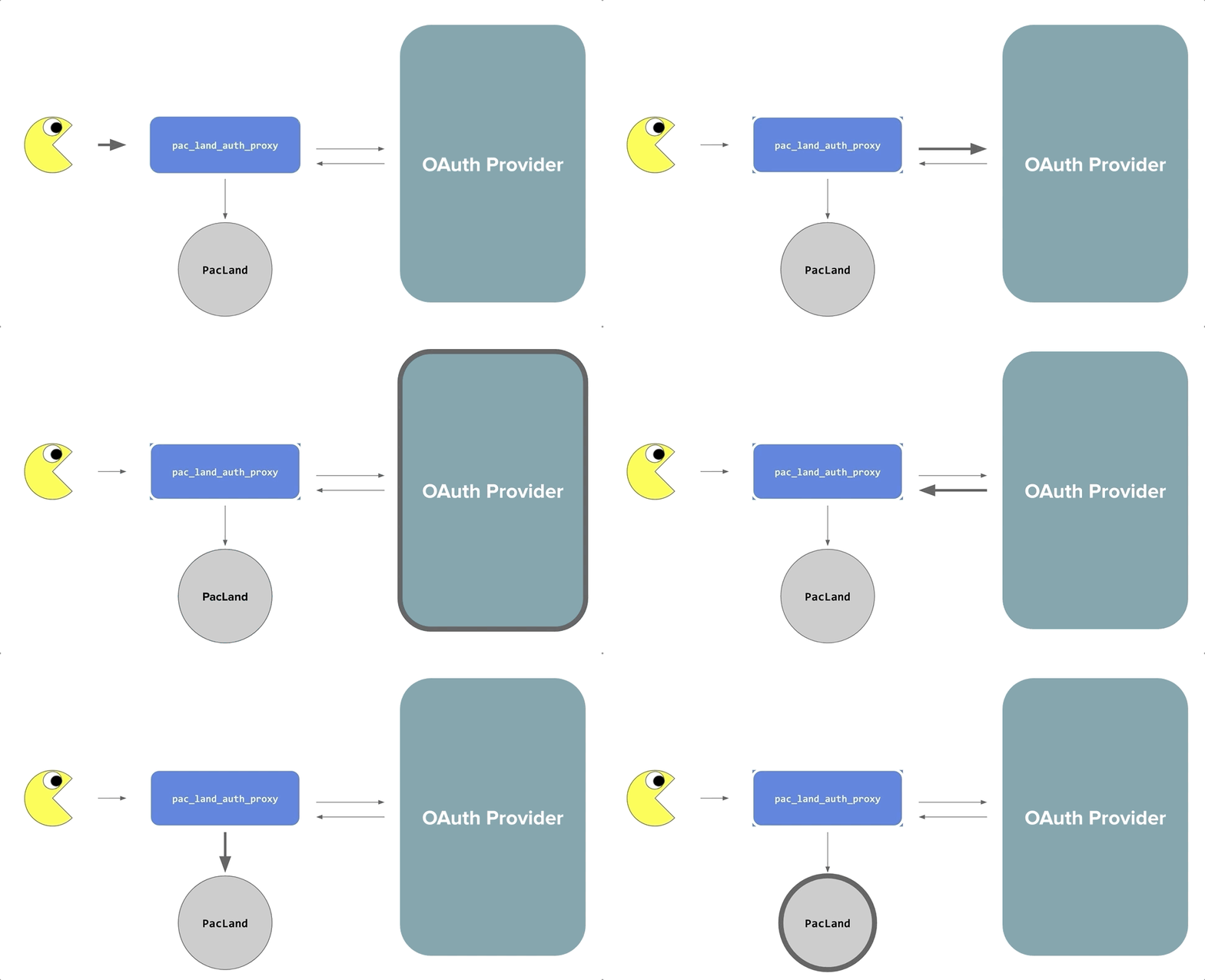
When a user visits an sso-protected site for the first time, they are redirected to sso-auth and prompted to authenticate with an authoritative third party provider (Google) before proceeding to their destination.
When Pinky visits a different sso-protected site for the first time, their browser will be redirected to sso-auth, and will immediately be redirected back to sso-proxy because they have already authenticated, logging them in automatically and transparently.
Every step along the way, sso-auth ensures that the user is authenticated against the authoritative third party OAuth provider, and sso-proxy ensures that the user is authorized to access each specific upstream based on their email address and group membership.
sso in practice
With sso, the process for adding authentication to service is now much more straightforward — just a simple configuration change. Maintaining the security of our services is also much simpler; a security bug fix now only needs to made in one place, rather than 100. Users love it too — they only have to login once to be able to access all of the services behind sso, rather than having to login many times!
We have clear visibility into sso because of the rich instrumentation baked into the system, including statsd metrics and structured logging, that allows us to have a better understanding of our internal services.

Detailed instrumentation gives us great visibility into the usage and performance of our internal applications
We’d love your feedback!
As mentioned above, sso is built on top of Bitly’s open source oauth2_proxy, which has been community verified and hardened. Throughout its development at BuzzFeed we have made sso a priority target for penetration testing by researchers on our bug bounty program — we’ve paid bounties for a number of reported issues!
In preparation for open sourcing we also engaged with Security Innovation, a widely respected agency who count Microsoft, Symantec, and Amazon as clients, to do a more in-depth, week long assessment, with full access to source code and design documents. This found no major issues, which gives us the confidence to open source sso today. However, being mindful that the security landscape changes rapidly, we will continue to make sso available for BuzzFeed’s bug bounty program and encourage responsible disclosure of any security issues there!
Here is the link to the GitHub repo and quickstart guide. We’d love your feedback, so please try it out and open some issues (or pull requests)!
Shoutouts!
First of all, this project would not exist if it weren’t for Justin Hines, who developed the central ideas and helped bring it to life with our original founding team, Michael Hansen, Will McCutchen, and myself. We’d also like to thank Andrew Mulholland, Dan Katz, Dan Meruelo, Eleanor Saitta, Logan McDonald, Lystra Batchoo, and Matt Reiferson, for their work on open sourcing this project. Thanks to Kelsey Scherer for our amazing octoboi logo, which we love very much. Finally, we extend a huge thank you to the BuzzFeed organization as a whole for valuing open source work and supporting our team throughout this process, especially the Infrastructure squads!
<wiz_tmp_tag id="wiz-table-range-border" contenteditable="false" style="display: none;">
Open-sourcing sso, the way we secure services at BuzzFeed的更多相关文章
- Secure services with TLS ---Docker配置https
官方文档:https://docs.docker.com/ee/ucp/interlock/usage/tls/
- 基于IdentityServer4的OIDC实现单点登录(SSO)原理简析
写着前面 IdentityServer4的学习断断续续,兜兜转转,走了不少弯路,也花了不少时间.可能是因为没有阅读源码,也没有特别系统的学习资料,相关文章很多园子里的大佬都有涉及,有系列文章,比如: ...
- Azure Site to Site VPN 配置手册
目录 1 Azure Site to Site VPN配置前的准备 1 1.1 设备兼容 1 1.2 网络要求和注意事项 1 2 配置Azure site t ...
- cacert.pem
## ## Bundle of CA Root Certificates ## ## Certificate data from Mozilla as of: Wed Sep 14 03:12:05 ...
- squid ACL 大全
Access Controls in Squid Contents Access Controls in Squid The Basics: How the parts fit together AC ...
- 单点登录CAS使用记(一):前期准备以及为CAS-Server配置SSL协议
知识点: SSO:单点登录(Single Sign On),是目前比较流行的企业业务整合的解决方案之一.SSO的定义是在多个应用系统中,用户只需要登录一次就可以访问所有相互信任的应用系统. CAS:耶 ...
- kerberos环境storm配置:Running Apache Storm Securely
Running Apache Storm Securely Apache Storm offers a range of configuration options when trying to se ...
- Service Mesh服务网格清单
Service Mesh服务网格清单 Istio Istio官网 Istio中文官网 Istio开源 无需太多介绍Service Mesh明日之星,扛把子,截止2019.11还有太多问题没解决 复杂性 ...
- CAS+SSO原理浅谈
http://www.cnblogs.com/yonsin/archive/2009/08/29/1556423.htmlSSO 是一个非常大的主题,我对这个主题有着深深的感受,自从广州 UserGr ...
随机推荐
- 开发shellcode的艺术
专业术语 ShellCode:实际是一段代码(也可以是填充数据) exploit:攻击通过ShellCode等方法攻击漏洞 栈帧移位与jmp esp 一般情况下,ESP寄存器中的地址总是指向系统栈且不 ...
- LeetCode--070--爬楼梯
problem description: 假设你正在爬楼梯.需要 n 阶你才能到达楼顶. 每次你可以爬 1 或 2 个台阶.你有多少种不同的方法可以爬到楼顶呢? 注意:给定 n 是一个正整数. 示例 ...
- Confluence 6 LDAP 高级设置
启用嵌套组(Enable Nested Groups) 为嵌套组启用或禁用支持. 一些目录服务器能够允许你在一个组中定义另外一个组.在这种结构下的用户组称为用户组嵌套.嵌套组的配置能够让子用户组继承上 ...
- synchronized同步代码块锁释放
今天发现自己写的线上程序出现数据库不能同步的问题,查看日志已经停止记录,随后使用jstack查看线程的运行状况,发现有个同步线程锁住了. 以下是jstack -l 637 问题线程的内容. &quo ...
- sqlite 查询数据库中所有的表名,判断某表是否存在,将某列所有数值去重后获得数量
1.列出当前db文件中所有的表的表名 SQL语句:SELECT * FROM sqlite_master WHERE type='table'; 结构如下: 注:网上有人说可以带上db文件的名称,如: ...
- UVALive 2318 水题
给出c 个竞争者.v 个投票人.每个投票人的投票顺序.问你谁会胜出.在第几轮.完全是个水题.比赛的时候debug接近两个点没过.因此差点放弃了整场比赛.猜测是错在找最大和第二大的序号哪里错的.因为我换 ...
- 使用 ADOX 将 Table 添加到 Catalog 时报“类型无效”的原因和解决方法
http://blog.csdn.net/kfhzy/article/details/6020283 http://blog.csdn.net/kfhzy/article/details/602054 ...
- apsx 页面 if(!ispostback)其用法和作用 什么时候该用?
一个页面第一次显示的时候 isPostBack=false 然后你在这个页面上点击按钮或其它东西提交的时候, isPostBack=true 一般这个函数里面的内容是指第一次打开这个页面的时候要做的事 ...
- Android RIL结构分析与移植
介绍 本文档对Android RIL部分的内容进行了介绍,其重点放在了Android RIL的原生代码部分. 包括四个主题: 1.Android RIL框架介绍 2.Android RIL与 Wind ...
- java解决高并发
1.redis ----------linkedblockQueue rpop lpush 2. 使用消息队列MQ 考虑到数据的一致性,队列的容量就是商品的剩余数量,队列采用的是线程安全的队列Li ...