
The system cannot find the file specified
在家工作,程序在家里的电脑运行时,出现一个异常,还是第一见到:
Server Error in '/' Application.
The system cannot find the file specified
Description: An unhandled exception occurred during the execution of the current web request. Please review the stack trace for more information about the error and where it originated in the code.
Exception Details: System.ComponentModel.Win32Exception: The system cannot find the file specified
Source Error:
An unhandled exception was generated during the execution of the current web request. Information regarding the origin and location of the exception can be identified using the exception stack trace below. |
Stack Trace:
[Win32Exception (0x80004005): The system cannot find the file specified] [SqlException (0x80131904): A network-related or instance-specific error occurred while establishing a connection to SQL Server. The server was not found or was not accessible. Verify that the instance name is correct and that SQL Server is configured to allow remote connections. (provider: Named Pipes Provider, error: 40 - Could not open a connection to SQL Server)] |
Version Information: Microsoft .NET Framework Version:4.0.30319; ASP.NET Version:4.6.1073.0
仔细阅读上面的异常信息,像是与SQL有关,试先启动与远行SQL看看: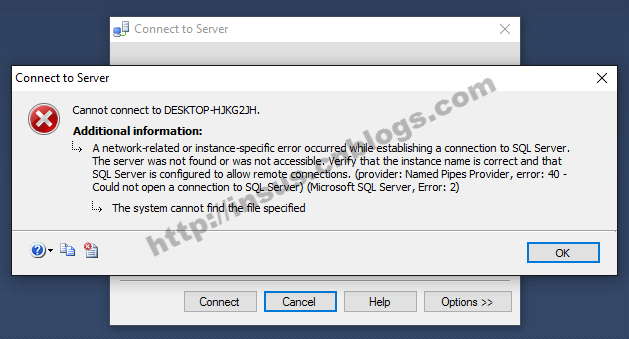
果然有问题,无法启动,马上去查看MS SQL Server的Service是否有启动?
把服务启之后,问题随之解决......
The system cannot find the file specified的更多相关文章
- ERROR: “System.Web.Mvc.Controller.File(string, string, string)”是一个“方法”
ERROR: “System.Web.Mvc.Controller.File(string, string, string)”是一个“方法”,这在给定的上下文中无效 这是一个与Controller.F ...
- Unable to chmod /system/build.prop.: Read-only file system
Unable to chmod /system/build.prop.: Read-only file system 只读文件系统 所以需要更改 使用下面的命令 mount -o remount,rw ...
- Docker 报错 error during connect: Get pipe/docker_engine: The system cannot find the file specified. - 摘要: 本文讲的是Docker 报错 error during connect: Get pipe/dock
error during connect: Get http://%2F%2F.%2Fpipe%2Fdocker_engine/v1.37/version: open //./pipe/docker_ ...
- Fixed: The Windows Process Activation Service service terminated with the following error: The system cannot find the file specified
I'm not yet clear what I did, but I'm blogging it so it can be found if someone else has this issue. ...
- Nginx错误:nginx: [error] OpenEvent("Global\ngx_reload_6252") failed (2: The system cannot find the file specified)
执行nginx -s reload命令: nginx: [error] OpenEvent("Global\ngx_reload_6252") failed (2: The sys ...
- CMake error:System Error:No such file or directory CMake error:Could not open file for write in copy operation xxxx.ros_Config.cmake.tmp.
微型电脑或嵌入式与电脑还是有点不同的,在微型电脑上ros indigo 版本下利用catkin编译如果你遇到如下错误: CMake error:System Error:No such file or ...
- Cannot set web app root system property when WAR file is not expanded
Cannot set web app root system property when WAR file is not expanded 在tomcat下面可以,在weblogic下面不行的处理方法 ...
- open abc.txt: The system cannot find the file specified
使用io/ioutil包读取文件时报错:open abc.txt: The system cannot find the file specified 原因是:ioutil.ReadFile()这个方 ...
- Anaconda Jupyter WinError2:The system cannot find the file specified
Traceback (most recent call last): File "C:\Users\builder\Miniconda3\Scripts\conda-build-script ...
随机推荐
- Java中文编码小结
Java中文编码小结 1. 只有 字符到字节 或者 字节到字符 的转换才存在编码转码; 2. Java String 采用 UTF-16 编码方式存储所有字符.unicode体系采用唯一的码点表示唯一 ...
- Windows进程通信 -- 共享内存(1)
共享内存的方式原理就是将一份物理内存映射到不同进程各自的虚拟地址空间上,这样每个进程都可以读取同一份数据,从而实现进程通信.因为是通过内存操作实现通信,因此是一种最高效的数据交换方法. 共享内存在 W ...
- java 锁2
并发,其实是多线程才有的场景... java 多线程? 锁? 现在看来,即使已经工作了4.5年,这仍然不是一个简单的问题. 其实java 本身有提供锁的机制. 比如 Object对象的 wait .n ...
- java.util.Properties
1 Properties文件中分隔符及空格的处理 因为 Properties 继承于 Hashtable,所以可对 Properties 对象应用 put 和 putAll 方法.但强烈反对使用这两个 ...
- Java构造函数
构造函数的定义: 构造函数 ,是一种特殊的方法.主要用来在创建对象时初始化对象, 即为对象成员变量赋初始值,总与new运算符一起使用在创建对象的语句中.特别的一个类可以有多个构造函数 ,可根据其参数个 ...
- 模拟淘宝登录和购物车功能:使用cookie记录登录名,下次登录时能够记得上次的登录名,使用cookie模拟购物车功能,使用session记住登录信息并验证是否登录,防止利用url打开网站,并实现退出登录功能
Login <%@ page language="java" contentType="text/html; charset=UTF-8" pageEnc ...
- [Linux基础]Linux基础知识入门及常见命令.
前言:最近刚安装了Linux系统, 所以学了一些最基本的操作, 在这里把自己总结的笔记记录在这里. 1,V8:192.168.40.10V1:192.168.40.11Linux ip:192.168 ...
- [Java面试五]Spring总结以及在面试中的一些问题.
1.谈谈你对spring IOC和DI的理解,它们有什么区别? IoC Inverse of Control 反转控制的概念,就是将原本在程序中手动创建UserService对象的控制权,交由Spri ...
- salesforce 零基础学习(三十七) DML及Database方法简单描述
在apex中通过soql查询可以使用两种方式,使用DML语句或者使用Database的方法. 使用DML语句和使用Database类的方法对于我们来说用的都很多,并且都很常见.对于数据库常见的操作:增 ...
- 客户端向服务端传送特殊字符解决方法(检测到有潜在危险的 Request.Form 值)
当客户端向服务端传输特殊字符时报错,错误信息如下图: