
Hibernate框架之入门
1.Hibernate框架简述
Hibernate的核心组件
在基于MVC设计模式的JAVA WEB应用中,Hibernate可以作为模型层/数据访问层。它通过配置文件(hibernate.properties或hibernate.cfg.xml)和映射文件(***.hbm.xml)把JAVA对象或PO(Persistent Object,持久化对象)映射到数据库中的数据库,然后通过操作PO,对数据表中的数据进行增,删,改,查等操作。
除配置文件,映射文件和持久化类外,Hibernate的核心组件包括以下几部分:
a)Configuration类:用来读取Hibernate配置文件,并生成SessionFactory对象。
b)SessionFactory接口:产生Session实例工厂。
c)Session接口:用来操作PO。它有get(),load(),save(),update()和delete()等方法用来对PO进行加载,保存,更新及删除等操作。它是Hibernate的核心接口。
d)Query接口:用来对PO进行查询操。它可以从Session的createQuery()方法生成。
e)Transaction接口:用来管理Hibernate事务,它主要方法有commit()和rollback(),可以从Session的beginTrancation()方法生成。
Persistent Object
持久化对象可以是普通的Javabeans,惟一特殊的是它们与(仅一个)Session相关联。JavaBeans在Hibernate中存在三种状态:
1.临时状态(transient):当一个JavaBean对象在内存中孤立存在,不与数据库中的数据有任何关联关系时,那么这个JavaBeans对象就称为临时对象(Transient Object)。
2.持久化状态(persistent):当一个JavaBean对象与一个Session相关联时,就变成持久化对象(Persistent Object)
3.脱管状态(detached):在这个Session被关闭的同时,这个对象也会脱离持久化状态,就变成脱管状态(Detached Object),可以被应用程序的任何层自由使用,例如可以做与表示层打交道的数据舆对象(Data Transfer Object)。
Hibernate的运行过程
Hibernate的运行过程如下:
A:应用程序先调用Configration类,该类读取Hibernate的配置文件及映射文件中的信息,并用这些信息生成一个SessionFactpry对象。
B:然后从SessionFactory对象生成一个Session对象,并用Session对象生成Transaction对象;可通过Session对象的get(),load(),save(),update(),delete()和saveOrUpdate()等方法对PO进行加载,保存,更新,删除等操作;在查询的情况下,可通过Session对象生成一个Query对象,然后利用Query对象执行查询操作;如果没有异常,Transaction对象将 提交这些操作结果到数据库中。
Hibernate的运行过程如下图: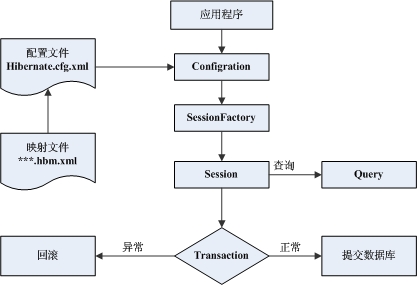
2.入门案例
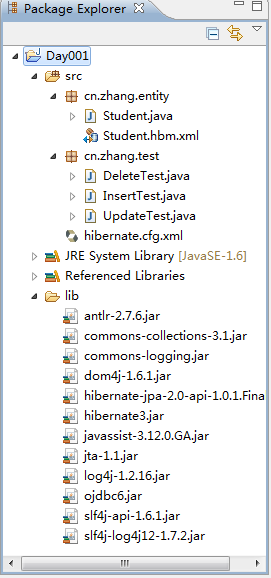
01.准备各种jar包(我想就不用我教了吧)
02.准备学生实体类(用于操作对应数据库)
package cn.zhang.entity;

//实体类

public class Student {

    private int stuno;

    private String stuname;

    private int stuage;

    private int stuid;

    private int stuseat;

    public Student() {

        super();

        // TODO Auto-generated constructor stub

    }

    public Student(String stuname, int stuage, int stuid, int stuseat) {

        super();

        this.stuname = stuname;

        this.stuage = stuage;

        this.stuid = stuid;

        this.stuseat = stuseat;

    }

    public Student(int stuno, String stuname, int stuage, int stuid, int stuseat) {

        super();

        this.stuno = stuno;

        this.stuname = stuname;

        this.stuage = stuage;

        this.stuid = stuid;

        this.stuseat = stuseat;

    }

    public int getStuid() {

        return stuid;

    }

    public void setStuid(int stuid) {

        this.stuid = stuid;

    }

    public int getStuseat() {

        return stuseat;

    }

    public void setStuseat(int stuseat) {

        this.stuseat = stuseat;

    }

    public int getStuno() {

        return stuno;

    }

    public void setStuno(int stuno) {

        this.stuno = stuno;

    }

    public String getStuname() {

        return stuname;

    }

    public void setStuname(String stuname) {

        this.stuname = stuname;

    }

    public int getStuage() {

        return stuage;

    }

    public void setStuage(int stuage) {

        this.stuage = stuage;

    }

}
03.在src下设计Hibernate配置文件hibernate.cfg.xml
<?xml version='1.0' encoding='utf-8'?>

<!DOCTYPE hibernate-configuration PUBLIC

        "-//Hibernate/Hibernate Configuration DTD 3.0//EN"

        "http://www.hibernate.org/dtd/hibernate-configuration-3.0.dtd">

<hibernate-configuration>

    <session-factory>

        <!-- Database connection settings -->

        <property name="connection.driver_class">oracle.jdbc.OracleDriver</property>

        <property name="connection.url">jdbc:oracle:thin:@localhost:1521:orcl</property>

        <property name="connection.username">zhangzong</property>

        <property name="connection.password">123</property>

        <!-- SQL dialect (SQL 方言)-->

        <property name="dialect">org.hibernate.dialect.Oracle10gDialect</property>

        <!-- Drop and re-create the database schema on startup -->

         <property name="hbm2ddl.auto">update</property>

        <!-- Echo all executed SQL to stdout  在控制台打印后台的SQL语句-->

        <property name="show_sql">true</property>

        <!-- 格式化显示SQL -->

        <property name="format_sql">true</property>

        <!-- JDBC connection pool (use the built-in) -->

        <!-- <property name="connection.pool_size">1</property> -->

        <!-- Enable Hibernate's automatic session context management -->

        <!--  <property name="current_session_context_class">thread</property> -->

        <!-- Disable the second-level cache -->

        <!-- <property name="cache.provider_class">org.hibernate.cache.NoCacheProvider</property>-->

        <mapping resource="cn/zhang/entity/Student.hbm.xml" />

    </session-factory>

</hibernate-configuration>
04.在实体类下设计映射文件Student.hbm.xml(在配置文件hibernate.cfg.xml使用)
<?xml version="1.0"?>

<!DOCTYPE hibernate-mapping PUBLIC

        "-//Hibernate/Hibernate Mapping DTD 3.0//EN"

        "http://www.hibernate.org/dtd/hibernate-mapping-3.0.dtd">

    <hibernate-mapping package="cn.zhang.entity">

        <class name="Student" table="stuinfo">

        <id name="stuno" column="stuno">

           <!-- 主键生成策略:native:

           native:如果后台是Oracle

                      后台是MySQL,自动应用自增 -->

            <generator class="native"/>

        </id>

        <property name="stuname" type="string" column="stuname"/>

        <property name="stuage"/>

        <property name="stuid" type="int" column="stuid"/>

        <property name="stuseat"/>

    </class>

</hibernate-mapping>
05.添加测试类
001.更新(新增)一个学生记录
package cn.zhang.test;

//新增一条数据

import org.hibernate.SessionFactory;

import org.hibernate.Transaction;

import org.hibernate.cfg.Configuration;

import org.hibernate.classic.Session;

import cn.zhang.entity.Student;

public class InsertTest {

    public static void main(String[] args) {

        //准备对象

        Student student=new Student("光衣", 12,112333,2);//Student.hbm.xml已配置编号为自增,所以这里不用添加编号了

         //读取大配置文件,获取要连接的数据库信息

        Configuration configuration=new Configuration().configure();

         //创建SessionFactory

        SessionFactory factory = configuration.buildSessionFactory();

        //加工session

        Session openSession = factory.openSession();

        Transaction beginTransaction = openSession.beginTransaction();

        openSession.save(student);

        beginTransaction.commit();

        System.out.println("成功");

    }

}
002.修改一个学生信息
package cn.zhang.test;

import org.hibernate.SessionFactory;

import org.hibernate.Transaction;

import org.hibernate.cfg.Configuration;

import org.hibernate.classic.Session;

import cn.zhang.entity.Student;

public class UpdateTest {

    /**

     * @param args

     */

    public static void main(String[] args) {

        //1.读取大配置文件,获取要连接的数据库信息

        Configuration conf=new Configuration().configure();

        //2.创建SessionFactory

        SessionFactory factory =conf.buildSessionFactory();

        //3加工session

        Session session = factory.openSession();

        Transaction tx=session.beginTransaction();

        //获取对象

        Student stu =new Student(1,"光衣", 12,112333,2);

        //更新

        session.update(stu);

        //提交事务

        tx.commit();

        System.out.println("更新成功");

    }

}
003.删除一个指定学生信息
package cn.zhang.test;

import org.hibernate.SessionFactory;

import org.hibernate.Transaction;

import org.hibernate.cfg.Configuration;

import org.hibernate.classic.Session;

import cn.zhang.entity.Student;

public class DeleteTest {

    public static void main(String[] args) {

        //1.读取大配置文件,获取要连接的数据库信息

        Configuration conf=new Configuration().configure();

        //2.创建SessionFactory

        SessionFactory factory =conf.buildSessionFactory();

        //3.加工session

        Session session = factory.openSession();

        Transaction tx=session.beginTransaction();

        //获取对象

        Student stu =new Student();

        stu.setStuno(3);//指定要删除的编号

        //删除指定

        session.delete(stu);

        //提交事务

        tx.commit();

        System.out.println("删除成功");

    }

}
004.查询一个指定学生信息
package cn.zhang.test;

import org.hibernate.SessionFactory;

import org.hibernate.cfg.Configuration;

import org.hibernate.classic.Session;

import cn.zhang.entity.Student;

public class SelectTest {

    public static void main(String[] args) {

        //1.读取大配置文件,获取要连接的数据库信息

        Configuration conf=new Configuration().configure();

        //2.创建SessionFactory

        SessionFactory factory =conf.buildSessionFactory();

        //3.打开session

        Session session = factory.openSession();

        //4.加载数据操作

           //如果表中没有你指定的主键列,get()方法的是null

        Student student =(Student)session.get(Student.class, 4);

           //如果表中没有你指定的主键列,程序运行到student.getStuname()时会抛出异常

       //Student student =(Student)session.load(Student.class, 4);

        //5.输出数据

        System.out.println(student.getStuname());

        //6.关闭session

        session.close();

    }

}
Hibernate框架之入门的更多相关文章
- Hibernate框架之入门案例
今天终于开始学习了三大框架的其中一个框架,Hibernate框架,在这里不去讲Hibernate框架的一些基础概念了,直接切入代码,带大家了解一下Hibernate能干什么, Hibernate的人们 ...
- Hibernate 框架入门
接着上一篇的 Hibernate 框架的了解,我们就继续学习 Hibernate 框架.这次就进入 Hibernate 框架的入门学习. 首先在学习 Hibernate 框架之前,我们要准备好我们需要 ...
- Hibernate框架进阶(上篇)
导读 前面一片文章介绍了Hibernate框架的入门,主要是讲解Hibernate的环境搭建和简单测试,有兴趣的童鞋出门左转.本文在入门的基础上进行Hibernate的进阶讲解,分为上中下三篇,本篇为 ...
- Hibernate框架入门
导读 本文主要介绍hibernate的入门,主要包括以下内容:hibernate介绍.hibernate环境搭建.hibernate简单测试.测试涉及的api详解. 一.hibernate介绍 JDB ...
- Java - Struts框架教程 Hibernate框架教程 Spring框架入门教程(新版) sping mvc spring boot spring cloud Mybatis
https://www.zhihu.com/question/21142149 http://how2j.cn/k/hibernate/hibernate-tutorial/31.html?tid=6 ...
- Hibernate 框架入门(一)
1. SSH Web 层: Struts2 业务层: Spring 持久层: Hibernate 2. Hibernate 概述 概述 Hibernate 是一个对象关系映射框架(ORM 框架); 对 ...
- Hibernate入门第一讲——Hibernate框架的快速入门
Hibernate框架的概述 什么是框架? 框架指的是软件的半成品,已经完成了部分功能. JavaEE开发的三层架构 了解框架的基本概念之后,我们就来看看Hibernate框架处于JavaEE开发的经 ...
- hibernate框架的简单入门
1.什么是框架 框架是一个半成品,框架帮我们实现了一部分的功能. 2.使用框架的最大好处 使用框架的最大好处就是,少写一部分代码但仍能实现我们所需要实现的功能. 3.什么是hiberbnate框架 ( ...
- Hibernate框架学习(一)——入门
一.框架是什么 1.框架是用来提高开发效率的 2.封装好了一些功能,我们需要使用这些功能时,调用即可,不需要手动实现 3.框架可以理解成一个半成品的项目,只要懂得如何驾驭这些功能即可 二.hibern ...
随机推荐
- Spring3系列12- Spring AOP AspectJ
Spring3系列12- Spring AOP AspectJ 本文讲述使用AspectJ框架实现Spring AOP. 再重复一下Spring AOP中的三个概念, Advice:向程序内部注入的代 ...
- 从今天起,记录CEF使用开发心得经验
已经使用CEF来呈现桌面程序界面大半年了,从来没有写过相关博文.发现网上的中文资料甚至英文已经无法满足我的开发需求,不少问题只得自己探索.在此先谢过网络上各位CEF使用开发博文的贡献者,没有你们我也难 ...
- 多线程锁--怎么理解Condition
在java.util.concurrent包中,有两个很特殊的工具类,Condition和ReentrantLock,使用过的人都知道,ReentrantLock(重入锁)是jdk的concurren ...
- 关于Parallel.For/Foreach并行方法中的localInit, body, localFinally使用
对集合成员的操作往往可以通过并行来提高效率,.NET Parallel类提供了简单的方法来帮助我们实现这种并行,比如Paralle.For/ForEach/Invoke方法. 其中,For/ForEa ...
- JavaScript - 2个等号与3个等号的区别
简言之,== equality 等同,=== identity 恒等. ==, 两边值类型不同的时候,要先进行类型转换,再比较. ===,不做类型转换,类型不同的一定不等. 或: = 赋值运算符 == ...
- libevent源码深度剖析
原文地址: http://blog.csdn.net/sparkliang/article/details/4957667 第一章 1,前言 Libevent是一个轻量级的开源高性能网络库,使用者众多 ...
- JAVA 多线程编程之一(基础)
1.原子变量(java.util.concurrent.atomic) 原子状态,变化不会被打断,如 AtomicLong , AtomicInteger 2.内部锁 synchronized 块 ...
- 2^x mod n = 1(欧拉定理,欧拉函数,快速幂乘)
2^x mod n = 1 Time Limit: 2000/1000 MS (Java/Others) Memory Limit: 65536/32768 K (Java/Others)Tot ...
- MFC ADO连接Oracle12c数据库 类库文件
Stdafx.h Stdafx.h libado.h libado.h libado.cpp libado.cpp 参考网址如下:http://www.cnblogs.com/livewithnore ...
- 修改efi分区
换了ssd硬盘,速度真快! 我特意准备了一个efi分区(fat32,忘记指定efi了),然而win10安装时不能指定启动位置,自己创建了一块. 下面我们把让win10使用自己创建的efi分区. 以管理 ...