
spring事件通知机制详解
优势
- 解耦
- 对同一种事件有多种处理方式
- 不干扰主线(main line)
起源
要讲spring的事件通知机制,就要先了解一下spring中的这些接口和抽象类:
ApplicationEventPublisherAware 接口:用来 publish event
ApplicationEvent 抽象类,记录了source和初始化时间戳:用来定义Event
ApplicationListener<E extends ApplicationEvent> :用来监听事件
构建自己的事件机制案例
测试案例
测试入口
 package com.meituan.spring.testcase.listener;

 import org.springframework.context.support.ClassPathXmlApplicationContext;

 import java.util.concurrent.TimeUnit;

 /**

  * Created by zhangxiaoguang on 16/1/27 下午11:40.

  * -----------------------------

  * Desc:

  */

 public class TestPortal {

    public static void main(String[] args) throws InterruptedException {

       final ClassPathXmlApplicationContext applicationContext = new ClassPathXmlApplicationContext("spring-config.xml");

       String[] definitionNames = applicationContext.getBeanDefinitionNames();

       System.out.println("==============bean====start=================");

       for (String definitionName : definitionNames) {

          System.out.println("bean----:" + definitionName);

       }

       System.out.println("==============bean====end=================");

       System.out.println();

       final CustomizePublisher customizePublisher = applicationContext.getBean(CustomizePublisher.class);

       Thread thread = new Thread(new Runnable() {

          @Override

          public void run() {

             try {

                System.out.println("开始吃饭:");

                MealEvent lunchEvent = new MealEvent("A吃午饭了", MealEnum.lunch);

                MealEvent breakfastEvent = new MealEvent("B吃早饭了", MealEnum.breakfast);

                MealEvent dinnerEvent = new MealEvent("C吃晚饭了", MealEnum.dinner);

                customizePublisher.publish(lunchEvent);

                TimeUnit.SECONDS.sleep(1l);

                customizePublisher.publish(breakfastEvent);

                TimeUnit.SECONDS.sleep(1l);

                customizePublisher.publish(dinnerEvent);

                TimeUnit.SECONDS.sleep(1l);

                System.out.println("他们吃完了!");

             } catch (InterruptedException e) {

                e.printStackTrace();

             }

          }

       });

       thread.setName("meal-thread");

       thread.start();

       System.out.println(Thread.currentThread().getName() + " is waiting for ....");

       thread.join();

       System.out.println("Done!!!!!!!!!!!!");

    }

 }
TestPortal
测试结果

测试成员
MealListener :MealEvent 演员
TroubleListener :TroubleEvent 演员
AllAcceptedListener 演员
MealEnum 道具
TestPortal 入口
CustomizePublisher 导演
成员代码
接受全部事件的演员(很负责任啊)
 package com.meituan.spring.testcase.listener;

 import org.springframework.context.ApplicationEvent;

 import org.springframework.context.ApplicationListener;

 import org.springframework.stereotype.Component;

 /**

  * Created by zhangxiaoguang on 16/1/27 下午11:27.

  * -----------------------------

  * Desc:

  */

 @Component

 public class AllAcceptedListener implements ApplicationListener<ApplicationEvent> {

    @Override

    public void onApplicationEvent(ApplicationEvent event) {

       System.out.println(">>>>>>>>>>>>>>>>event:" + event);

    }

 }
AllAcceptedListener
导演负责分发事件
 package com.meituan.spring.testcase.listener;

 import org.springframework.context.ApplicationEventPublisher;

 import org.springframework.context.ApplicationEventPublisherAware;

 import org.springframework.stereotype.Component;

 /**

  * Created by zhangxiaoguang on 16/1/28 上午1:41.

  * -----------------------------

  * Desc:

  */

 @Component

 public class CustomizePublisher implements ApplicationEventPublisherAware {

    private ApplicationEventPublisher applicationEventPublisher;

    public void publish(MealEvent event) {

       applicationEventPublisher.publishEvent(event);

    }

    @Override

    public void setApplicationEventPublisher(ApplicationEventPublisher applicationEventPublisher) {

       this.applicationEventPublisher = applicationEventPublisher;

    }

 }
CustomizePublisher
负责处理吃饭事件的演员
 package com.meituan.spring.testcase.listener;

 import org.springframework.context.ApplicationListener;

 import org.springframework.stereotype.Component;

 /**

  * Created by zhangxiaoguang on 16/1/27 下午11:27.

  * -----------------------------

  * Desc:

  */

 @Component

 public class MealListener implements ApplicationListener<MealEvent> {

    @Override

    public void onApplicationEvent(MealEvent event) {

       System.out.println(String.format(">>>>>>>>>>>thread:%s,type:%s,event:%s",

             Thread.currentThread().getName(), event.getMealEnum(), event));

       dispatchEvent(event);

    }

    private void dispatchEvent(MealEvent event) {

       switch (event.getMealEnum()) {

          case breakfast:

             System.out.println(event.getMealEnum() + " to handle!!!");

             break;

          case lunch:

             System.out.println(event.getMealEnum() + " to handle!!!");

             break;

          case dinner:

             System.out.println(event.getMealEnum() + " to handle!!!");

             break;

          default:

             System.out.println(event.getMealEnum() + " error!!!");

             break;

       }

    }

 }
MealListener
吃饭消息
 package com.meituan.spring.testcase.listener;

 import org.springframework.context.ApplicationEvent;

 /**

  * Created by zhangxiaoguang on 16/1/27 下午11:24.

  * -----------------------------

  * Desc:吃饭事件

  */

 public class MealEvent extends ApplicationEvent {

    private MealEnum mealEnum;

    /**

     * @param mealContent

     *        吃什么

     * @param mealEnum

     *        早餐还是午餐?

     */

    public MealEvent(String mealContent, MealEnum mealEnum) {

       super(mealContent);

       this.mealEnum = mealEnum;

    }

    public MealEnum getMealEnum() {

       return mealEnum;

    }

 }
MealEvent
工具
 package com.meituan.spring.testcase.listener;

 /**

  * Created by zhangxiaoguang on 16/1/27 下午11:29.

  * -----------------------------

  * Desc:

  */

 public enum MealEnum {

    breakfast,

    lunch,

    dinner

 }
MealEnum
令人厌烦的演员
 package com.meituan.spring.testcase.listener;

 import org.springframework.context.ApplicationListener;

 import org.springframework.stereotype.Component;

 /**

  * Created by zhangxiaoguang on 16/1/27 下午11:27.

  * -----------------------------

  * Desc:

  */

 @Component

 public class TroubleListener implements ApplicationListener<TroubleEvent> {

    @Override

    public void onApplicationEvent(TroubleEvent event) {

       System.out.println(">>>>>>>>>>>>>>>>event:" + event);

    }

 }
TroubleListener
令人厌烦的事件
 package com.meituan.spring.testcase.listener;

 import org.springframework.context.ApplicationEvent;

 /**

  * Created by zhangxiaoguang on 16/1/27 下午11:24.

  * -----------------------------

  * Desc:令人厌烦的事件

  */

 public class TroubleEvent extends ApplicationEvent {

    public TroubleEvent(Object source) {

       super(source);

    }

 }
TroubleEvent
总结
详细定制 event 类型的,则相关定制的listener会处理对应的消息,其他listener不会管闲事;
制定顶级 event 类型的,ApplicationEvent的,则会处理所有的事件。
ApplicationEvent
依赖关系

ContextEvent事件机制简介
ContextRefreshedEvent:当整个ApplicationContext容器初始化完毕或者刷新时触发该事件;
 @Override

 public void refresh() throws BeansException, IllegalStateException {

    synchronized (this.startupShutdownMonitor) {

       ......

       try {

          ......

          // Last step: publish corresponding event.

          finishRefresh();

       }

       catch (BeansException ex) {

          ......

       }

    }

 }

 protected void finishRefresh() {

    // Initialize lifecycle processor for this context.

    initLifecycleProcessor();

    // Propagate refresh to lifecycle processor first.

    getLifecycleProcessor().onRefresh();

    // Publish the final event.

    publishEvent(new ContextRefreshedEvent(this));

    // Participate in LiveBeansView MBean, if active.

    LiveBeansView.registerApplicationContext(this);

 }
ContextClosedEvent:当ApplicationContext doClose时触发该事件,这个时候会销毁所有的单例bean;
 @Override

 public void registerShutdownHook() {

    if (this.shutdownHook == null) {

       // No shutdown hook registered yet.

       this.shutdownHook = new Thread() {

          @Override

          public void run() {

             doClose();

          }

       };

       Runtime.getRuntime().addShutdownHook(this.shutdownHook);

    }

 }

 @Override

 public void close() {

    synchronized (this.startupShutdownMonitor) {

       doClose();

       // If we registered a JVM shutdown hook, we don't need it anymore now:

       // We've already explicitly closed the context.

       if (this.shutdownHook != null) {

          try {

             Runtime.getRuntime().removeShutdownHook(this.shutdownHook);

          }

          catch (IllegalStateException ex) {

             // ignore - VM is already shutting down

          }

       }

    }

 }

 protected void doClose() {

    if (this.active.get() && this.closed.compareAndSet(false, true)) {

       ......


       try {

          // Publish shutdown event.

          publishEvent(new ContextClosedEvent(this));

       }

       catch (Throwable ex) {

          logger.warn("Exception thrown from ApplicationListener handling ContextClosedEvent", ex);

       }


       ......

    }

 }
ContextStartedEvent:当ApplicationContext start时触发该事件;
 @Override

 public void start() {

    getLifecycleProcessor().start();

    publishEvent(new ContextStartedEvent(this));

 }
ContextStoppedEvent:当ApplicationContext stop时触发该事件;
 @Override

 public void stop() {

    getLifecycleProcessor().stop();

    publishEvent(new ContextStoppedEvent(this));

 }
ApplicationListener
依赖关系

带你一步步走向源码的世界
从上边打印的线程信息可以知道,spring处理事件通知采用的是当前线程,并没有为为我们启动新的线程,所以,如果需要,你要自己处理线程信息哦,当然也可以设定(如何设置?)!
AbstractApplicationContext

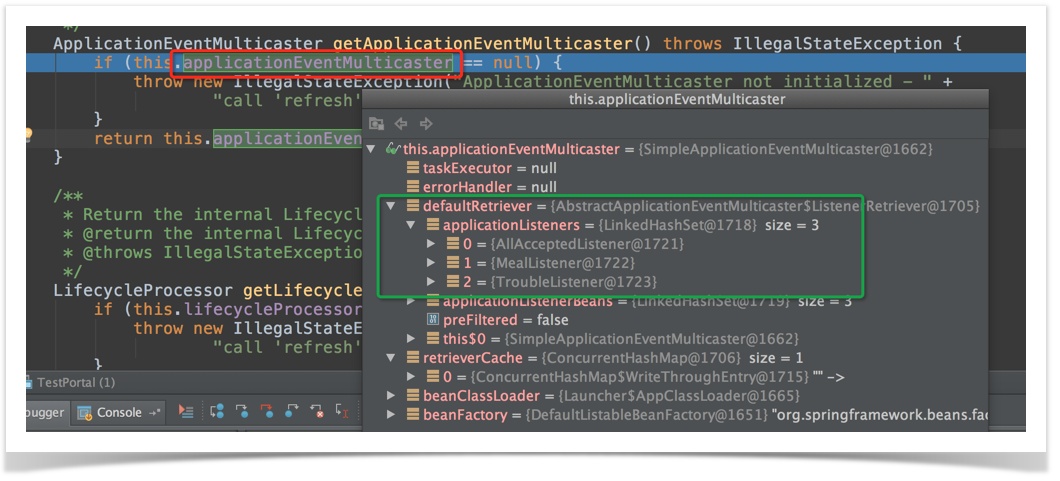
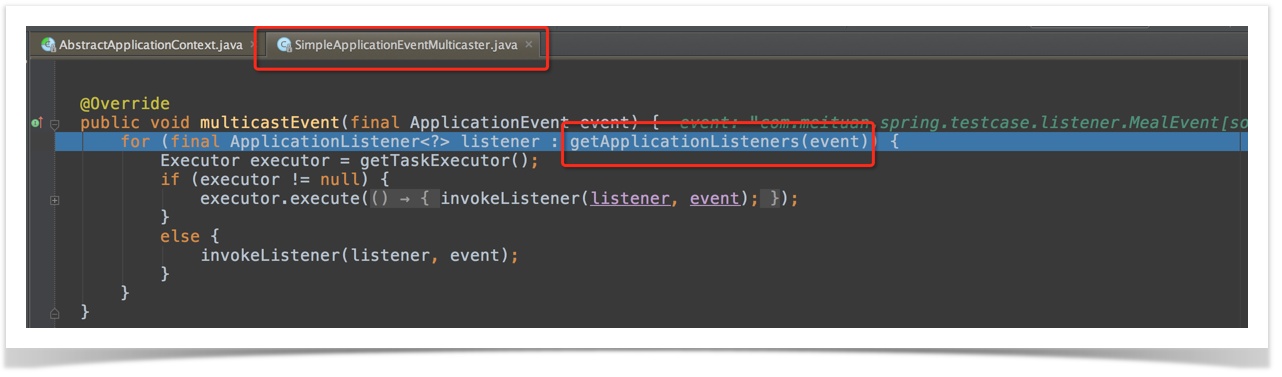


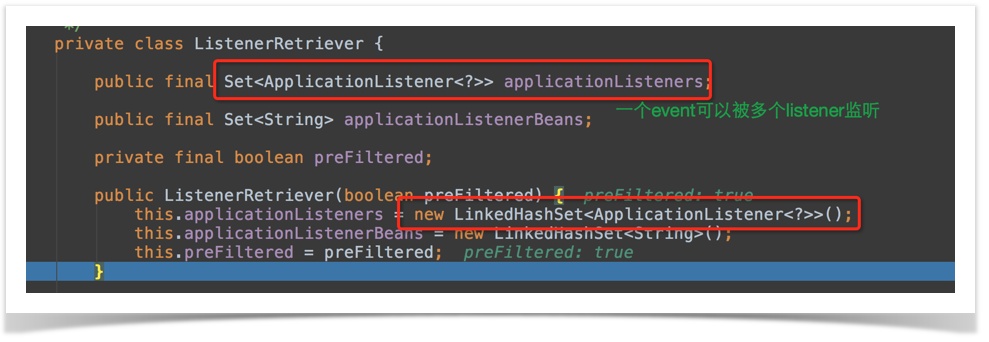


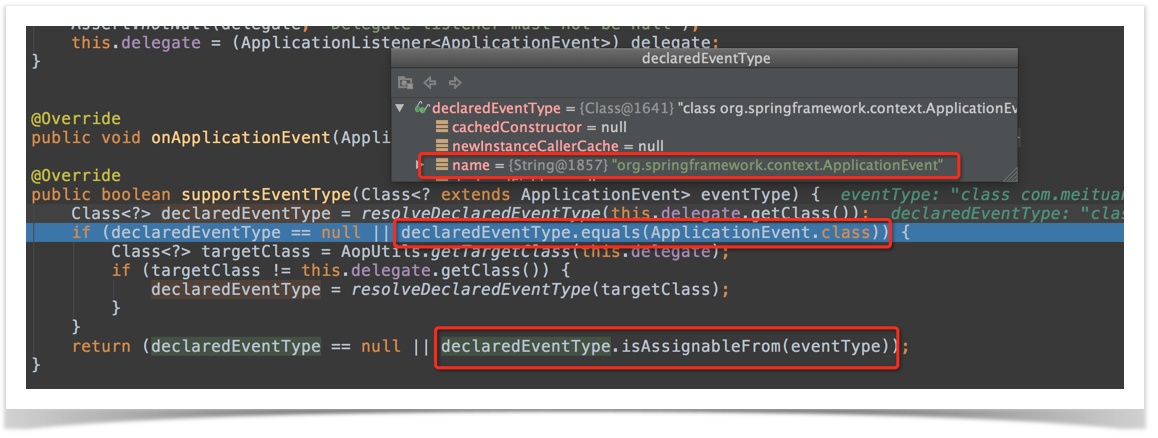

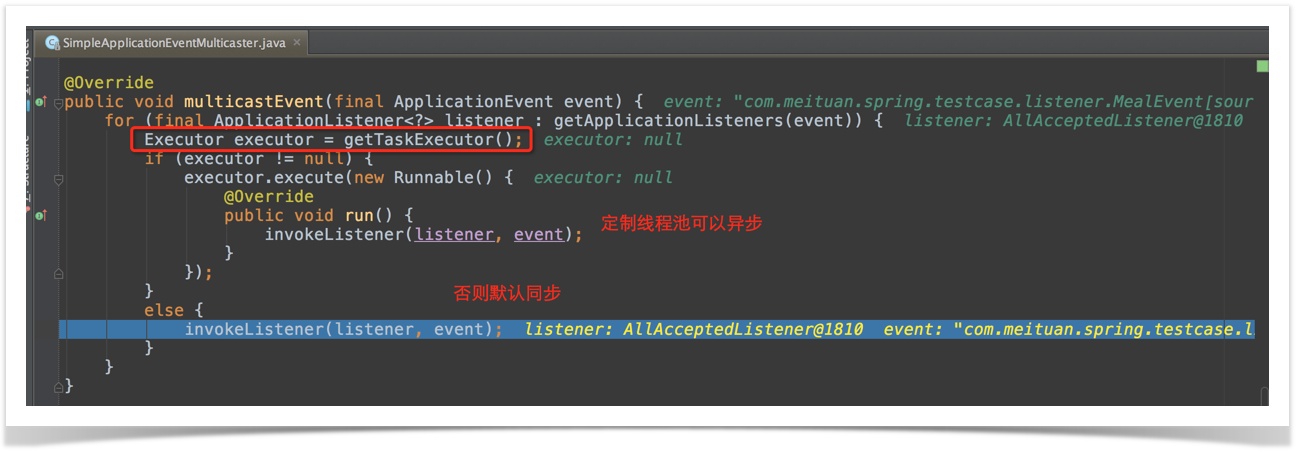
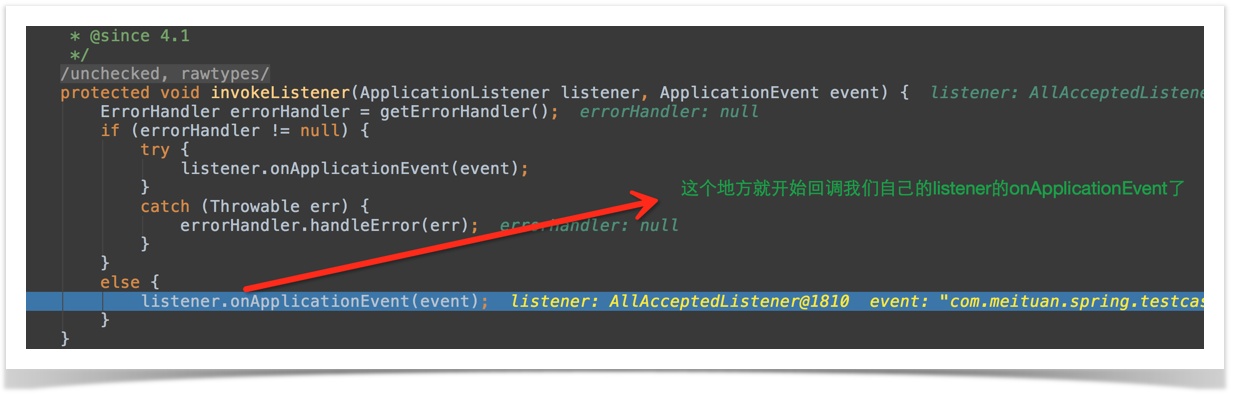
补齐:同一个event,被多个listener监听,先被哪个listener执行是由下边的代码决定的:

如何设置线程池?
回到上边的问题,到底该如何设置线程池呢?
AbstractApplicationEventMulticaster 是private的,并且没有提供写入方法...
实际案例
用在自己的代码里就是最好的例子了 ^_^
spring事件通知机制详解的更多相关文章
- Android事件分发机制详解
事件分发机制详解 一.基础知识介绍 1.经常用的事件有:MotionEvent.ACTION_DOWN,MotionEvent.ACTION_MOVE,MotionEvent.ACTION_UP等 2 ...
- Android事件传递机制详解及最新源码分析——ViewGroup篇
版权声明:本文出自汪磊的博客,转载请务必注明出处. 在上一篇<Android事件传递机制详解及最新源码分析--View篇>中,详细讲解了View事件的传递机制,没掌握或者掌握不扎实的小伙伴 ...
- Android 的事件传递机制,详解
Android 的事件传递机制,详解 前两天和一个朋友聊天的时候.然后说到事件传递机制.然后让我说的时候,忽然发现说的不是非常清楚,事实上Android 的事件传递机制也是知道一些,可是感觉自己知道的 ...
- Android Touch事件传递机制详解 下
尊重原创:http://blog.csdn.net/yuanzeyao/article/details/38025165 资源下载:http://download.csdn.net/detail/yu ...
- Android开发——事件分发机制详解
0. 前言 转载请注明出处:http://blog.csdn.net/seu_calvin/article/details/52566965 深入学习事件分发机制,是为了解决在Android开发中 ...
- IOS 触摸事件分发机制详解
欢迎大家前往云+社区,获取更多腾讯海量技术实践干货哦~ 作者:MelonTeam 前言 很多时候大家都不关心IOS触摸事件的分发机制的实现原理,当遇到以下几种情形的时候你很可能抓破头皮都找不到解决方案 ...
- 【Android面试查漏补缺】之事件分发机制详解
前言 查漏补缺,查漏补缺,你不知道哪里漏了,怎么补缺呢?本文属于[Android面试查漏补缺]系列文章第一篇,持续更新中,感兴趣的朋友可以[关注+收藏]哦~ 本系列文章是对自己的前段时间面试经历的总结 ...
- android 事件分发机制详解(OnTouchListener,OnClick)
昨天做东西做到触摸事件冲突,以前也经常碰到事件冲突,想到要研究一下Android的事件冲突机制,于是从昨天开始到今天整整一天时间都要了解这方面的知识,这才懂了安卓的触摸和点击事件的机制.探究如下: 首 ...
- Android View 事件分发机制详解
想必很多android开发者都遇到过手势冲突的情况,我们一般都是通过内部拦截和外部拦截法解决此类问题.要想搞明白原理就必须了解View的分发机制.在此之前我们先来了解一下以下三个非常重要的方法: di ...
随机推荐
- java中的==和equals
1,==用于比较基本数据类型,和引用类型.而equals是Object上的方法,可以被子类重写,用于判断内容一致. 比较奇葩的是,java基本数据类型(byte,short,int,long,floa ...
- sizeof and strlen整理
sizeof 定义 计算对象或类型所占用的字节数(byte) 记住是字节数,而不是个数 语法 sizeof(对象) int i; sizeof(i); sizeof(类型) sizeof(int); ...
- 解决clone问题之外的体会
adlnkoh.sh started at Thu Aug 25 15:42:51 CST 2016 Log file located at /u02/db/testdb/11.1.0/appsuti ...
- Outer Join Query Over Dblink Can Fail With ORA-904 (Doc ID 730256.1)
Outer Join Query Over Dblink Can Fail With ORA-904 (Doc ID 730256.1) To Bottom Modified:03-May-2013T ...
- 再说 c++11 内存模型
可见性与乱序 在说到内存模型相关的东西时,我们常常会说到两个名词:乱序与可见性,且两者经常交错着使用,容易给人错觉仿佛是两个不同的东西,其实不是这样,他们只是从不同的角度来描述一个事情,本质是相同的. ...
- 【Machine Learning】机器学习の特征
绘制了一张导图,有不对的地方欢迎指正: 下载地址 机器学习中,特征是很关键的.其中包括,特征的提取和特征的选择.他们是降维的两种方法,但又有所不同: 特征抽取(Feature Extraction): ...
- 解决Eclipse报errors running builder ‘javascript validator’ on project
导入jquery的js到项目中,Eclipse每次检测到功能代码变化(保存动作触发)就报错: errors running builder ‘javascript validator’ on proj ...
- 关于win7和xp的屏设置类
DisplayInfo.h #pragma once enum WinVerDef { WIN_VER_UNKNOWN = -, WIN_VER_95 = , WIN_VER_98, WIN_VER_ ...
- Visual Studio 2013 Preview对C++11的支持
为期3天的微软Build 2013大会结束了,作为微软一年一度的开发者大会,微软也做足了功夫:很多产品(包括Windows 8.1和Visual Studio 2013 Preview)发布,chan ...
- 【转载】Linux i386+源码中常见宏标识tag的定义
转载自:http://blog.chinaunix.net/uid-20729583-id-1884553.html 这 些宏包括 __init.__initdata.__initfunc().asm ...