
spring-boot-plus后台快速开发脚手架之代码生成器使用
Generator 代码生成
                 _                    _                 _                _

                (_)                  | |               | |              | |

  ___ _ __  _ __ _ _ __   __ _ ______| |__   ___   ___ | |_ ______ _ __ | |_   _ ___

 / __| '_ \| '__| | '_ \ / _` |______| '_ \ / _ \ / _ \| __|______| '_ \| | | | / __|

 \__ \ |_) | |  | | | | | (_| |      | |_) | (_) | (_) | |_       | |_) | | |_| \__ \

 |___/ .__/|_|  |_|_| |_|\__, |      |_.__/ \___/ \___/ \__|      | .__/|_|\__,_|___/

     | |                  __/ |                                   | |

     |_|                 |___/                                    |_|

      :: Spring Boot ::             (v2.1.6.RELEASE)

      :: Spring Boot Plus ::        (v1.0.0.RELEASE)
代码生成内容
spring-boot-plus在mybatis-plus基础上,新增param/vo等模板
拓展controller/service/mapper/xml方法
Purpose
数据库新建表,即可生成后台CRUD/分页基础代码,还有swagger!
官网地址:springboot.plus
GITHUB:https://github.com/geekidea/spring-boot-plus
GITEE:https://gitee.com/geekidea/spring-boot-plus
代码生成步骤
- 创建数据库表,例如:sys_log
注意:记得加上表注释,字段列注释,方便生成类注释、swagger注释
-- ----------------------------

-- Table structure for sys_log

-- ----------------------------

DROP TABLE IF EXISTS `sys_log`;

CREATE TABLE `sys_log`  (

  `log_id` bigint(18) NOT NULL COMMENT '主键',

  `type` tinyint(1) NULL DEFAULT NULL COMMENT '类型',

  `content` varchar(255) CHARACTER SET utf8 COLLATE utf8_general_ci NULL DEFAULT NULL COMMENT '内容',

  `create_id` bigint(18) NULL DEFAULT NULL COMMENT '创建人ID',

  `create_time` datetime(0) NULL DEFAULT CURRENT_TIMESTAMP COMMENT '创建时间',

  PRIMARY KEY (`log_id`) USING BTREE

) ENGINE = InnoDB CHARACTER SET = utf8 COLLATE = utf8_general_ci COMMENT = '系统日志' ROW_FORMAT = Dynamic;
- 代码生成配置
spring-boot-plus/src/test/java/io/geekidea/springbootplus/test/CodeGenerator.java
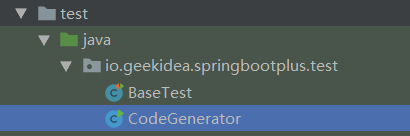
2.1 修改数据库连接配置
private static final String USER_NAME = "root";

private static final String PASSWORD = "rootroot";

private static final String DRIVER_NAME = "com.mysql.jdbc.Driver";

private static final String DRIVER_URL = "jdbc:mysql://localhost:3306/spring_boot_plus?useUnicode=true&characterEncoding=UTF-8&useSSL=false";
2.2 修改模块、表、作者等配置
// ############################ 配置部分 start ############################

// 模块名称

private static final String MODULE_NAME = "system";

// 作者

private static final String AUTHOR = "geekidea";

// 生成的表名称

private static final String TABLE_NAME = "sys_log";

// 主键数据库列名称

private static final String PK_ID_COLUMN_NAME = "id";

// ############################ 配置部分 end ############################
- MODULE_NAME 模块名称,在目前项目上以单独的文件夹形式体现
- AUTHOR 作者名称,在类的注释上体现
- TABLE_NAME 表名称,当前需要生成的表名称,关联实体类等
- PK_ID_COLUMN_NAME 主键列名称,默认是id,如果是其它名称,可在这里配置
- 运行CodeGenerator.java
3.1 控制台输出生成日志
11:33:43.442 [main] DEBUG com.baomidou.mybatisplus.generator.AutoGenerator - ==========================准备生成文件...==========================

11:33:44.167 [main] DEBUG com.baomidou.mybatisplus.generator.engine.AbstractTemplateEngine - 创建目录: [E:\github\spring-boot-plus/src/main/java\io\geekidea\springbootplus\system\entity]

11:33:44.169 [main] DEBUG com.baomidou.mybatisplus.generator.engine.AbstractTemplateEngine - 创建目录: [E:\github\spring-boot-plus/src/main/java\io\geekidea\springbootplus\system\web\controller]

11:33:44.170 [main] DEBUG com.baomidou.mybatisplus.generator.engine.AbstractTemplateEngine - 创建目录: [E:\github\spring-boot-plus/src/main/java\io\geekidea\springbootplus\system\service]

11:33:44.170 [main] DEBUG com.baomidou.mybatisplus.generator.engine.AbstractTemplateEngine - 创建目录: [E:\github\spring-boot-plus/src/main/java\io\geekidea\springbootplus\system\mapper]

11:33:44.171 [main] DEBUG com.baomidou.mybatisplus.generator.engine.AbstractTemplateEngine - 创建目录: [E:\github\spring-boot-plus/src/main/java\io\geekidea\springbootplus\system\service\impl]

...

11:33:44.294 [main] DEBUG org.apache.velocity - ResourceManager : found /templates/mapper.xml.vm with loader org.apache.velocity.runtime.resource.loader.ClasspathResourceLoader

11:33:44.308 [main] DEBUG com.baomidou.mybatisplus.generator.engine.AbstractTemplateEngine - 模板:/templates/mapper.xml.vm;  文件:E:\github\spring-boot-plus/src/main/resources/mapper/system/SysLogMapper.xml

11:33:44.313 [main] DEBUG org.apache.velocity - ResourceManager : found /templates/queryParam.java.vm with loader org.apache.velocity.runtime.resource.loader.ClasspathResourceLoader

11:33:44.314 [main] DEBUG com.baomidou.mybatisplus.generator.engine.AbstractTemplateEngine - 模板:/templates/queryParam.java.vm;  文件:E:\github\spring-boot-plus/src/main/java/io/geekidea/springbootplus/system/web/param/SysLogQueryParam.java

11:33:44.332 [main] DEBUG org.apache.velocity - ResourceManager : found /templates/queryVo.java.vm with loader org.apache.velocity.runtime.resource.loader.ClasspathResourceLoader

11:33:44.337 [main] DEBUG com.baomidou.mybatisplus.generator.engine.AbstractTemplateEngine - 模板:/templates/queryVo.java.vm;  文件:E:\github\spring-boot-plus/src/main/java/io/geekidea/springbootplus/system/web/vo/SysLogQueryVo.java

11:33:44.347 [main] DEBUG org.apache.velocity - ResourceManager : found /templates/entity.java.vm with loader org.apache.velocity.runtime.resource.loader.ClasspathResourceLoader

11:33:44.357 [main] DEBUG com.baomidou.mybatisplus.generator.engine.AbstractTemplateEngine - 模板:/templates/entity.java.vm;  文件:E:\github\spring-boot-plus/src/main/java\io\geekidea\springbootplus\system\entity\SysLog.java

11:33:44.359 [main] DEBUG org.apache.velocity - ResourceManager : found /templates/mapper.java.vm with loader org.apache.velocity.runtime.resource.loader.ClasspathResourceLoader

11:33:44.360 [main] DEBUG com.baomidou.mybatisplus.generator.engine.AbstractTemplateEngine - 模板:/templates/mapper.java.vm;  文件:E:\github\spring-boot-plus/src/main/java\io\geekidea\springbootplus\system\mapper\SysLogMapper.java

11:33:44.362 [main] DEBUG org.apache.velocity - ResourceManager : found /templates/service.java.vm with loader org.apache.velocity.runtime.resource.loader.ClasspathResourceLoader

11:33:44.364 [main] DEBUG com.baomidou.mybatisplus.generator.engine.AbstractTemplateEngine - 模板:/templates/service.java.vm;  文件:E:\github\spring-boot-plus/src/main/java\io\geekidea\springbootplus\system\service\SysLogService.java

11:33:44.367 [main] DEBUG org.apache.velocity - ResourceManager : found /templates/serviceImpl.java.vm with loader org.apache.velocity.runtime.resource.loader.ClasspathResourceLoader

11:33:44.369 [main] DEBUG com.baomidou.mybatisplus.generator.engine.AbstractTemplateEngine - 模板:/templates/serviceImpl.java.vm;  文件:E:\github\spring-boot-plus/src/main/java\io\geekidea\springbootplus\system\service\impl\SysLogServiceImpl.java

11:33:44.373 [main] DEBUG org.apache.velocity - ResourceManager : found /templates/controller.java.vm with loader org.apache.velocity.runtime.resource.loader.ClasspathResourceLoader

11:33:44.376 [main] DEBUG com.baomidou.mybatisplus.generator.engine.AbstractTemplateEngine - 模板:/templates/controller.java.vm;  文件:E:\github\spring-boot-plus/src/main/java\io\geekidea\springbootplus\system\web\controller\SysLogController.java

11:33:44.376 [main] DEBUG com.baomidou.mybatisplus.generator.AutoGenerator - ==========================文件生成完成!!!==========================

Process finished with exit code 0
3.2 生成的模块和包结构
├─system                模块包

│  ├─entity             实体类包

│  ├─mapper             mybatis mapper接口包

│  ├─service            服务接口包

│  │  └─impl            服务实现包

│  └─web                提供前端结果相关包

│      ├─controller     控制器包

│      ├─param          参数包

│      └─vo             值对象,响应结果包
3.3 生成的包及相关的类
├─system

│  ├─entity

│  │      SysLog.java                   实体类,已生成swagger注释

│  ├─mapper

│  │      SysLogMapper.java             mapper接口

│  ├─service

│  │  │  SysLogService.java             服务接口,已继承公共service

│  │  └─impl

│  │          SysLogServiceImpl.java    服务实现类,已继承公共service impl

│  └─web

│      ├─controller

│      │      SysLogController.java     控制器类,已生成CRUD,分页controller方法,已生成swagger文档

│      ├─param

│      │      SysLogQueryParam.java     请求参数类,用于条件分页查询等

│      └─vo

│              SysLogQueryVo.java       响应结果类,用于自定义查询响应结果等
3.4 启动项目
SpringBootPlusApplication.java
2019-07-27 12:11:45.298  INFO 21856 --- [           main] o.s.b.w.embedded.tomcat.TomcatWebServer  : Tomcat started on port(s): 8888 (http) with context path ''

2019-07-27 12:11:45.301  INFO 21856 --- [           main] i.g.s.SpringBootPlusApplication          : Started SpringBootPlusApplication in 9.66 seconds (JVM running for 10.988)

2019-07-27 12:11:45.304  INFO 21856 --- [           main] i.g.s.util.PrintApplicationInfo          : projectFinalName : spring-boot-plus

2019-07-27 12:11:45.305  INFO 21856 --- [           main] i.g.s.util.PrintApplicationInfo          : projectVersion : 1.0.0.RELEASE

2019-07-27 12:11:45.305  INFO 21856 --- [           main] i.g.s.util.PrintApplicationInfo          : profileActive : local

2019-07-27 12:11:45.305  INFO 21856 --- [           main] i.g.s.util.PrintApplicationInfo          : contextPath : /

2019-07-27 12:11:45.305  INFO 21856 --- [           main] i.g.s.util.PrintApplicationInfo          : port : 8888

2019-07-27 12:11:45.308  INFO 21856 --- [           main] i.g.s.util.PrintApplicationInfo          : home:http://192.168.1.168:8888/

2019-07-27 12:11:45.308  INFO 21856 --- [           main] i.g.s.util.PrintApplicationInfo          : docs:http://192.168.1.168:8888/docs

2019-07-27 12:11:45.308  INFO 21856 --- [           main] i.g.s.util.PrintApplicationInfo          : spring-boot-plus project start success...........

2019-07-27 12:11:45.309  INFO 21856 --- [           main] i.g.s.util.PrintApplicationInfo          :

 ____    __                    __        ____

/\  _`\ /\ \__                /\ \__    /\  _`\

\ \,\L\_\ \ ,_\    __     _ __\ \ ,_\   \ \,\L\_\  __  __    ___    ___     __    ____    ____

 \/_\__ \\ \ \/  /'__`\  /\`'__\ \ \/    \/_\__ \ /\ \/\ \  /'___\ /'___\ /'__`\ /',__\  /',__\

   /\ \L\ \ \ \_/\ \L\.\_\ \ \/ \ \ \_     /\ \L\ \ \ \_\ \/\ \__//\ \__//\  __//\__, `\/\__, `\

   \ `\____\ \__\ \__/.\_\\ \_\  \ \__\    \ `\____\ \____/\ \____\ \____\ \____\/\____/\/\____/

    \/_____/\/__/\/__/\/_/ \/_/   \/__/     \/_____/\/___/  \/____/\/____/\/____/\/___/  \/___/
3.5 访问项目
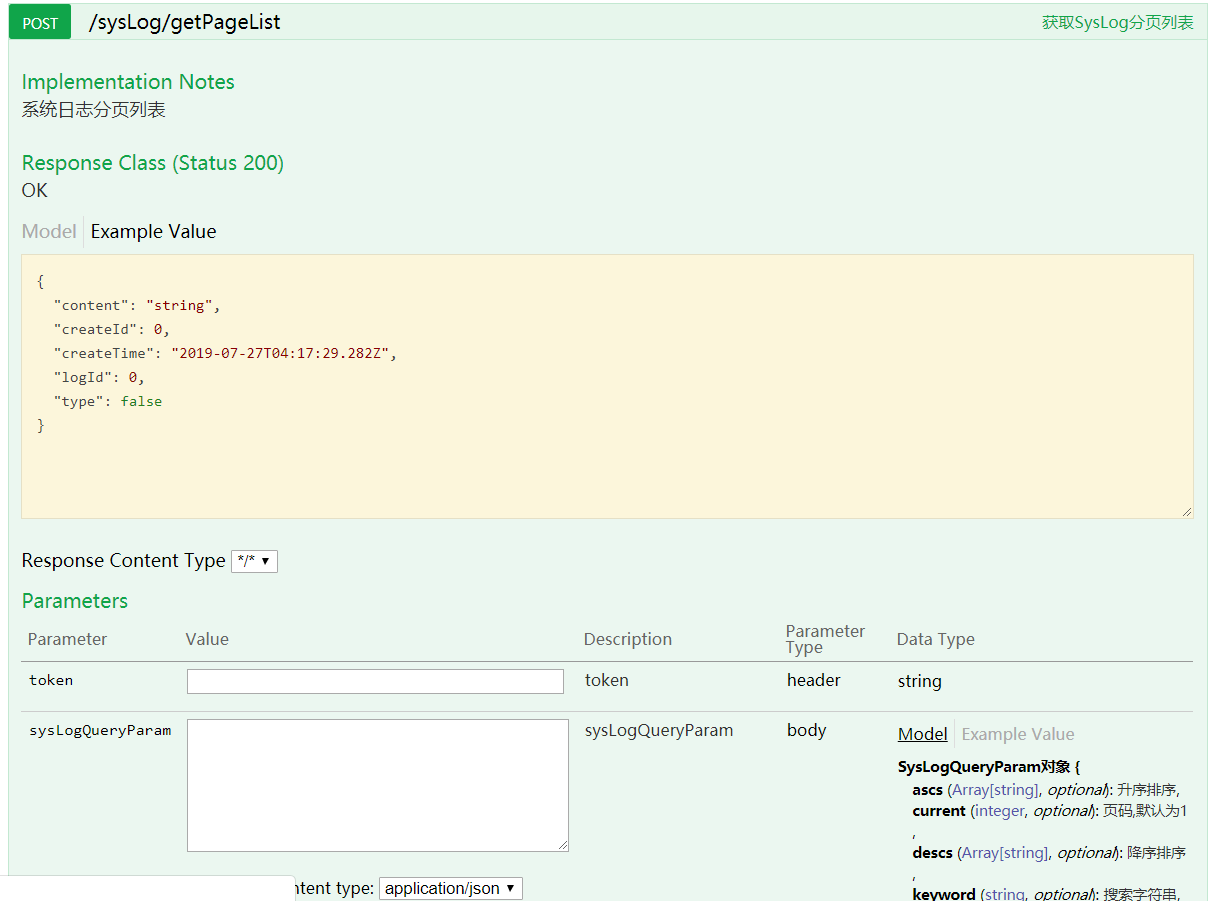
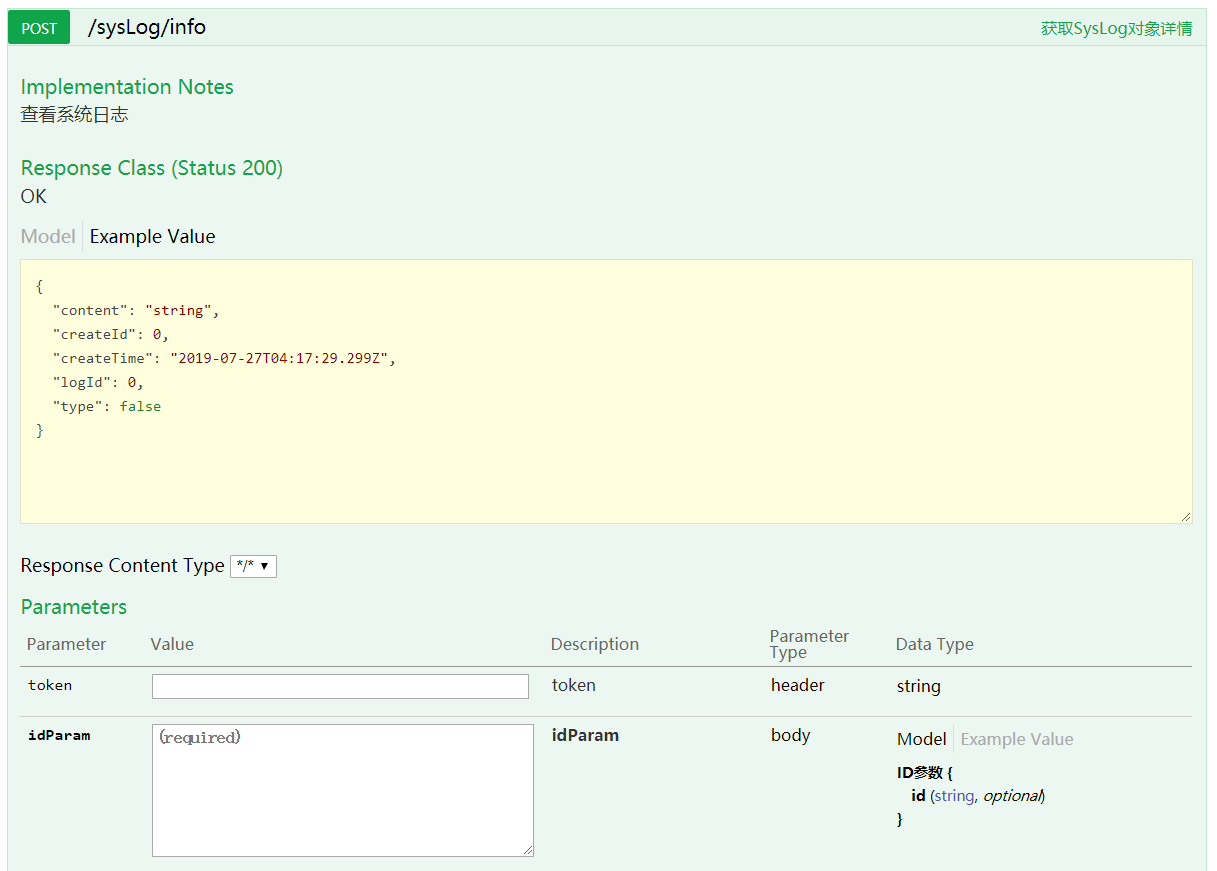
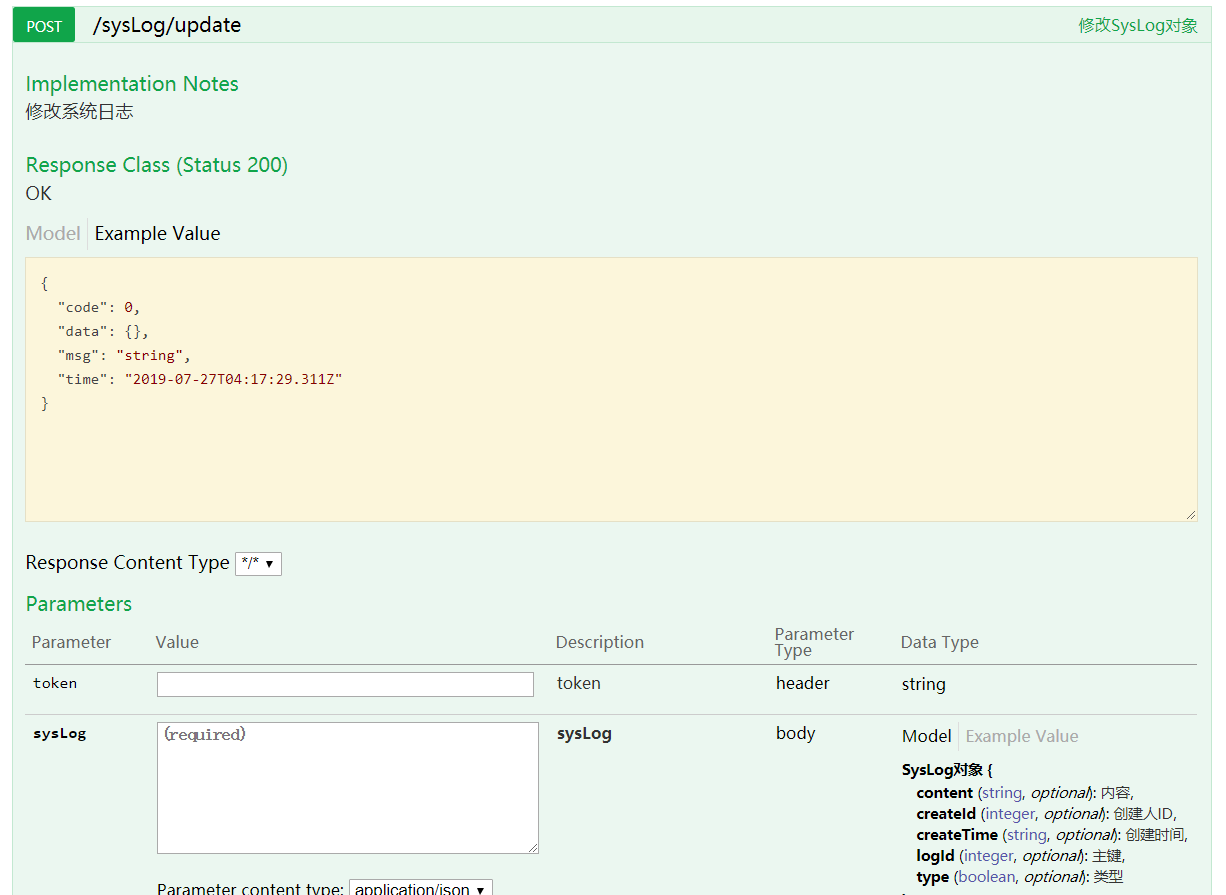
- 自动生成swagger CRUD、分页接口文档
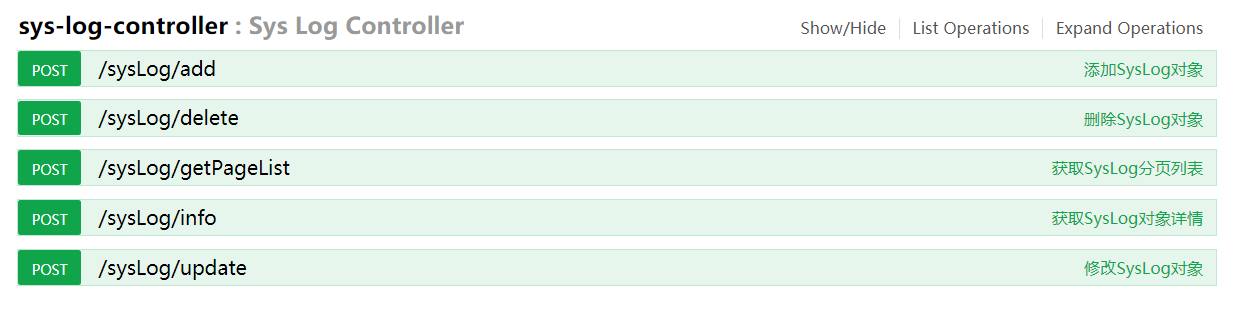
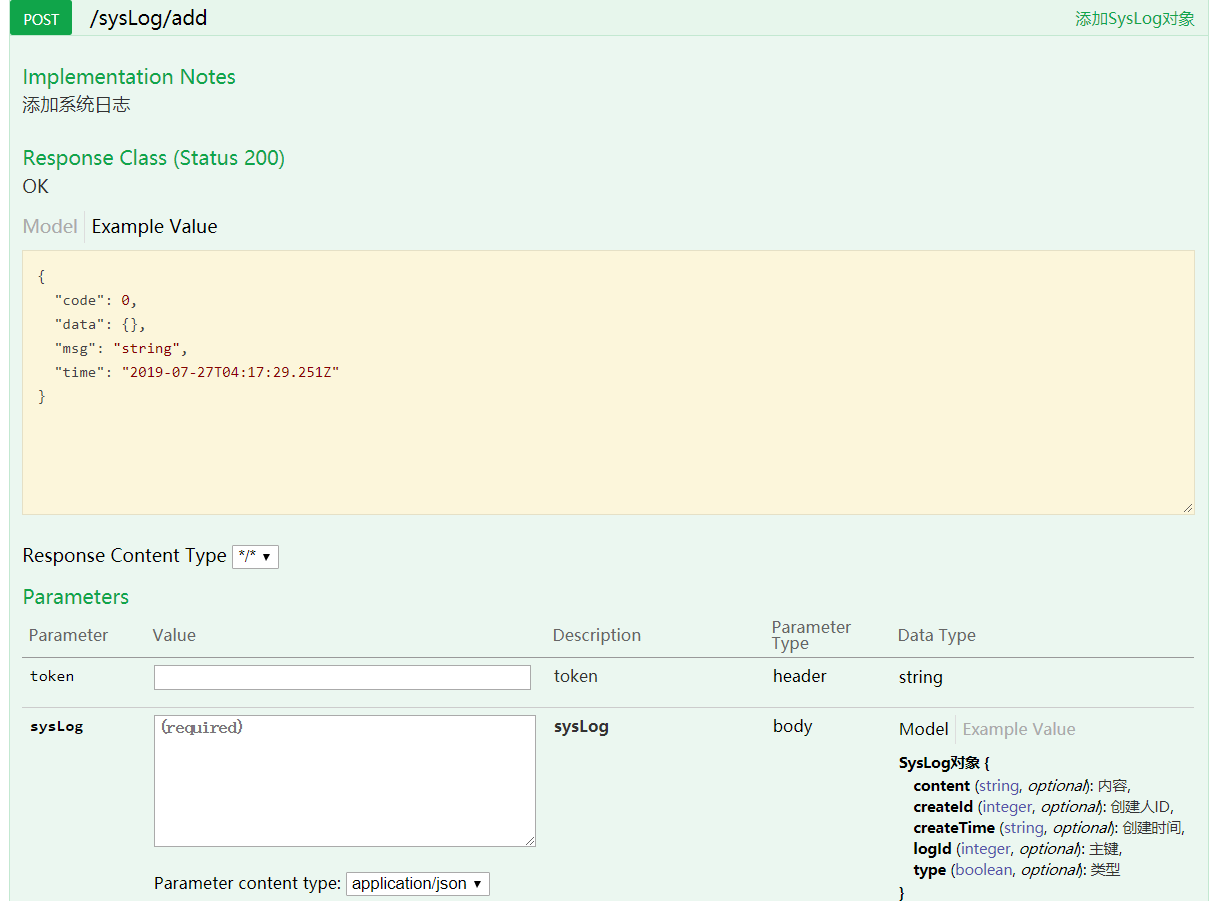
add 添加接口swagger
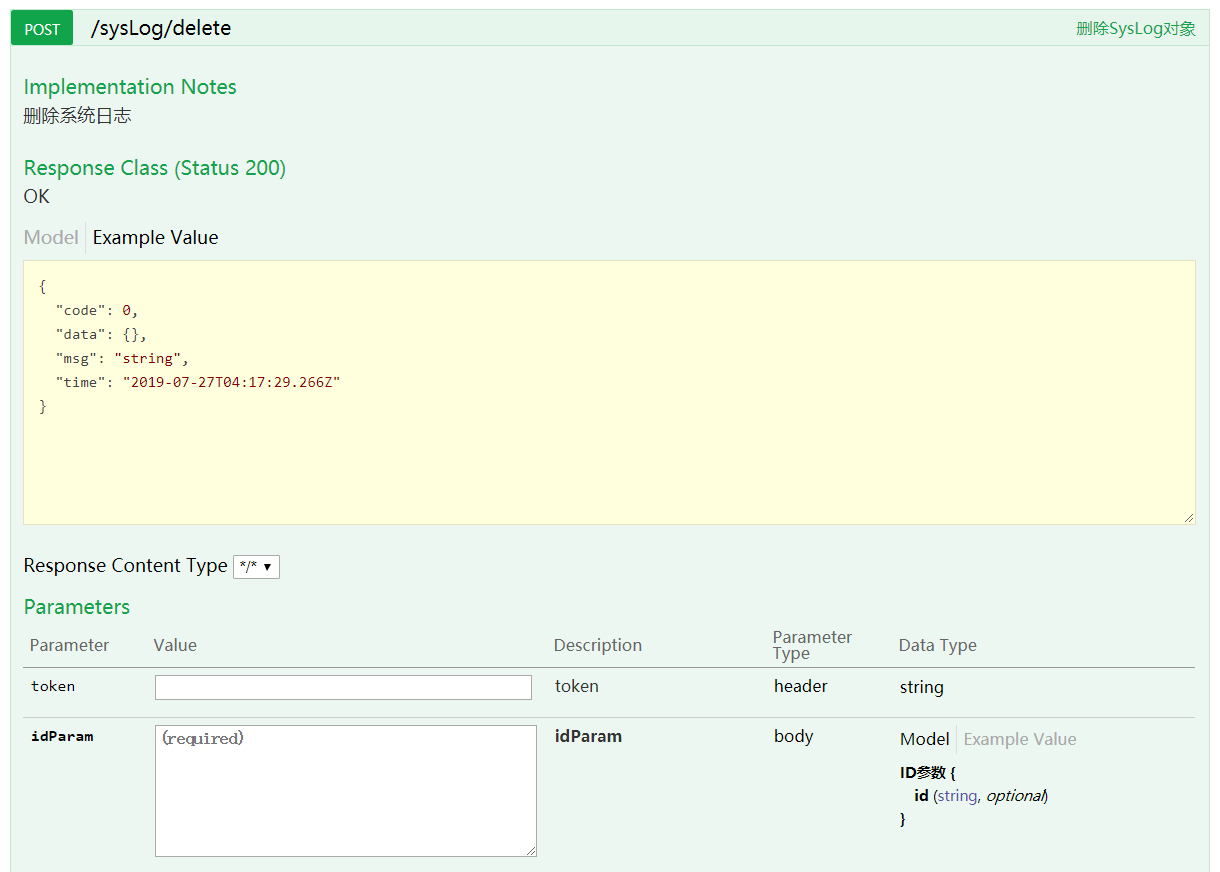
delete 删除接口swagger
getPageList 分页接口swagger
info 详情接口swagger
update 修改接口swagger
官网地址:springboot.plus
spring-boot-plus后台快速开发脚手架之代码生成器使用的更多相关文章
- spring-boot-plus后台快速开发脚手架之代码生成器使用(十)
spring-boot-plus 代码生成 Generator 代码生成内容 spring-boot-plus在mybatis-plus基础上,新增param/vo等模板 拓展controller/s ...
- (7)java Spring Cloud+Spring boot+mybatis企业快速开发架构之SpringCloud-Spring Boot Starter的介绍及使用
Spring Boot 的便利性体现在,它简化了很多烦琐的配置,这对于开发人员来说是一个福音,通过引入各种 Spring Boot Starter 包可以快速搭建出一个项目的脚手架推荐分布式架构源 ...
- (6)java Spring Cloud+Spring boot+mybatis企业快速开发架构之SpringCloud-Spring Boot项目详细搭建步骤
在 Spring Tools 4 for Eclipse 中依次选择 File->New->Maven Project,然后在出现的界面中按图所示增加相关信息. <paren ...
- (5)java Spring Cloud+Spring boot+mybatis企业快速开发架构之SpringCloud-Spring Boot简介
Spring Boot 是由 Pivotal 团队提供的全新框架,其设计目的是简化新 Spring 应用的初始搭建以及开发过程.该框架使用了特定的方式进行配置,从而使开发人员不再需要定义样板化的配置 ...
- (3)java Spring Cloud+Spring boot+mybatis企业快速开发架构之SpringCloud-Spring Cloud和Dubbo的区别及各自的优缺点
我们先从 Nginx 说起,了解为什么需要微服务.最初的服务化解决方案是给相同服务提供一个统一的域名,然后服务调用者向这个域发送 HTTP 请求,由 Nginx 负责请求的分发和跳转. 这种架构存 ...
- (2)java Spring Cloud+Spring boot+mybatis企业快速开发架构之SpringCloud-Spring Cloud是什么?Spring Cloud版本介绍
Spring Cloud 是一系列框架的有序集合.它利用 Spring Boot 的开发便利性,巧妙地简化了分布式系统基础设施的开发,如服务注册.服务发现.配置中心.消息总线.负载均衡.断路器.数 ...
- (9)java Spring Cloud+Spring boot+mybatis企业快速开发架构之SpringCloud-搭建Eureka服务注册中心
首先创建一个 Maven 项目,取名为 eureka-server,在 pom.xml 中配置 Eureka 的依赖信息,代码如下所示. <!-- Spring Boot --> &l ...
- (4)java Spring Cloud+Spring boot+mybatis企业快速开发架构之SpringCloud-Spring Cloud开发环境的准备和Lombok安装步骤
开发环境的准备主要涉及三个方面:JDK.Maven.Spring Tools 4 for Eclipse. 1.JDK JDK 的版本用 1.8 即可,环境变量大家自行去配置.配置好环境变量,在命 ...
- (1)java Spring Cloud+Spring boot+mybatis企业快速开发架构之微服务是什么?它的优缺点有哪些?
"微服务"一词来源于 Martin Fowler 的<Microservices>一文.微服务是一种架构风格,即将单体应用划分为小型的服务单元,微服务之间使用 HT ...
随机推荐
- 宜信开源|数据库审核软件Themis的规则解析与部署攻略
一.介绍 Themis是宜信公司DBA团队开发的一款数据库审核产品,可帮助DBA.开发人员快速发现数据库质量问题,提升工作效率.其名称源自希腊神话中的正义与法律女神.项目取此名称,寓意此平台对数据库质 ...
- 电商、P2P等大型互联网系统包含哪些业务模块?
01 前言 在互联网飞速发展的时代,各大互联网公司正在进行激烈的竞争,业务模式也在不断的扩张,这种现状使得目前各大公司的架构系统面临着极大的挑战,而对于我们普通的软件开发者而言,如果你仅仅了解过一些关 ...
- Scala 学习之路(四)—— 数组Array
一.定长数组 在Scala中,如果你需要一个长度不变的数组,可以使用Array.但需要注意以下两点: 在Scala中使用(index)而不是[index]来访问数组中的元素,因为访问元素,对于Scal ...
- 修改npm默认安装路径
npm config ls npm config set prefix D:\ag\npm
- mac下mysql的卸载和安装
1. mysql的卸载 1 sudo rm /usr/local/mysql 2 sudo rm -rf /usr/local/mysql* 3 sudo rm -rf /Library/Startu ...
- Linux上安装Nginx依赖环境和库、Nginx安装,Nginx服务命令
安装Nginx依赖环境和库.Nginx安装,Nginx服务命令 因为Nginx官方提供的是C源码,要自己进行编译,所以需要自己拥有编译所依赖的环境和库才可正常编译 安装gcc yum -y insta ...
- AD域控制器安装使用
AD域控制器安装使用 一. 在服务器上安装域控制器 二. 将此服务器提升为域控制器 三. 将主机加入到我们创建的域中 在AD域控制器上查看加入的主机
- vue接入萤石云视频
在萤石云开放平台注册开发者账号,网址:https://open.ys7.com/guide.html 在“开发者服务”-->“我的设备”里添加已有设备或者申请一个试用设备 然后点击“我的应用”里 ...
- Ubuntu 16.4-desktop系统安装显卡CUDA具体步骤!
1.禁用nouveau驱动(切换至tty界面) sudo vim /etc/modprobe.d/blacklist.conf 在文本最后添加:blacklist nouveau options no ...
- Git小技巧之使用Rebase命令合并提交
想要获取更多文章可以访问我的博客 - 代码无止境. 在日常的开发过程中,我们一个功能可能会有很多次提交.而且我们公司的开发是不允许直接往公司仓库提交代码,所以需要fork到自己的仓库然后merge过去 ...