
SSM(二)MyBatis多表联查
这篇文章写了以下几个简单的例子,用来说明MyBatis多标联查基本语法
1.sql片段的用法
2.一对多查询
3.多条sql的一对多查询
4.多对一查询
5.多条sql一对多查询
6、多对多查询
这里沿着接口→小配置的路线写了,测试类就是遍历输出结果:
一、接口:
 package cn.sohappy.acourses.course0921;

 import cn.sohappy.acourses.bean.BillManyToOne;

 import cn.sohappy.acourses.bean.UserOneToMany;

 import cn.sohappy.bean.Smbms_user;

 import java.util.List;

 public interface IUserDAO {

     //01.sql片段,查询所有user

     List<Smbms_user> findAll();

     //02.oneToMany,传入user,返回包含账单信息的user

     UserOneToMany getUserOneToManyBills(UserOneToMany user);

     //03.oneToMany,多条sql查询,传入user,返回包含账单信息的user

     UserOneToMany getUserOneToManyBillsMultiSQL(UserOneToMany user);

     //04.manyToOne,传入bill,返回包含用户信息的bill

     BillManyToOne getBillManyToOneUser(BillManyToOne bill);

     //05.manyToOne,多条sql查询,传入bill,返回包含用户信息的bill

     BillManyToOne getBillManyToOneUserMultiSQL(BillManyToOne bill);

 }
二、小配置
先实现第一个方法
1、List<Smbms_user> findAll();查询所有user的编号,名字,密码
小配置的配置头
<?xml version="1.0" encoding="UTF-8" ?>

<!DOCTYPE mapper

        PUBLIC "-//mybatis.org//DTD Mapper 3.0//EN"

        "http://mybatis.org/dtd/mybatis-3-mapper.dtd">

<mapper namespace="cn.sohappy.acourses.course0921.IUserDAO">

    <!--此处是代码-->

</mapper>
以下省略配置头
  <sql id="columns">

        userCode,userName,userPassword

    </sql>

    <resultMap id="mUser" type="cn.sohappy.bean.Smbms_user" autoMapping="false">

        <id property="username" column="userName"/>

        <result property="userpassword" column="userPassword"/>

        <result property="usercode" column="userCode"/>

    </resultMap>

    <!--用<include refid="columns"/>代替*-->

    <select id="findAll" resultMap="mUser">

        select <include refid="columns"/> from smbms_user

    </select>
2、UserOneToMany getUserOneToManyBills(UserOneToMany user);
查询某个用户的账单信息,首先将账单List植入用户类中(第11行)
 package cn.sohappy.acourses.bean;

 import java.util.List;

 public class UserOneToMany {

     private Long id;

     private String usercode;

     private String username;

     //a user has lots of bills

     private List<BillManyToOne> bills;

     //getter and setter

 }
小配置代码:
resultMap中property是对象的属性名,column是数据表中的字段名。collection是UserOneToMany对象中植入的泛型集合属性List<BillManyToOne> bills
语法是:<collection property="bills" ofType="cn.sohappy.acourses.bean.BillManyToOne">...code...</collection>
 <!--.oneToMany-->

     <resultMap id="UserOneToManyBills" type="cn.sohappy.acourses.bean.UserOneToMany" autoMapping="false">

         <id property="id" column="u_id"/>

         <result property="username" column="userName"/>

         <collection property="bills" ofType="cn.sohappy.acourses.bean.BillManyToOne">

             <id property="id" column="b_id"/>

             <result property="productname" column="productName"/>

             <result property="billcode" column="billCode"/>

         </collection>

     </resultMap>

     <select id="getUserOneToManyBills" resultMap="UserOneToManyBills">

         <!--不好,id重名了,起个别名吧-->

         select smbms_user.id as u_id,userName,smbms_bill.id as b_id,productName,billCode from smbms_user,smbms_bill

         where smbms_user.id=smbms_bill.createdBy and userCode=#{usercode}

     </select>
3、UserOneToMany getUserOneToManyBillsMultiSQL(UserOneToMany user);
该方法通过多条sql查询user和其账单
小配置代码:其中#{**}是占位符
 <!--.oneToMany多条sql-->

     <resultMap id="UserOneToManyBillsMultiSQL" type="cn.sohappy.acourses.bean.UserOneToMany" autoMapping="false">

         <id property="id" column="id"/>

         <result property="username" column="userName"/>

         <!--下行的select为第二条sql名,column为第一条sql的字段名,其唯一值作为第二条sql的条件-->

         <collection property="bills" ofType="cn.sohappy.acourses.bean.BillManyToOne" select="selectBillsByUser" column="id"/>

     </resultMap>

     <select id="selectBillsByUser" resultType="cn.sohappy.acourses.bean.BillManyToOne">

         select * from smbms_bill where createdBy=#{**}

     </select>

     <select id="getUserOneToManyBillsMultiSQL" resultMap="UserOneToManyBillsMultiSQL">

         select * from smbms_user where userCode=#{usercode}

     </select>
4、BillManyToOne getBillManyToOneUser(BillManyToOne bill);
传入bill,返回包含用户信息的bill,这里需要在bill类中植入user属性及相应getter and setter:private UserOneToMany user;
小配置代码:这里使用的语法是:<association property="user" javaType="cn.sohappy.acourses.bean.UserOneToMany">...code...</association>
 <!--.manyToOne-->

     <resultMap id="BillManyToOneUser" type="cn.sohappy.acourses.bean.BillManyToOne" autoMapping="false">

         <id property="id" column="b_id"/>

         <result property="billcode" column="billCode"/>

         <association property="user" javaType="cn.sohappy.acourses.bean.UserOneToMany">

             <id property="id" column="u_id"/>

             <result property="usercode" column="userCode"/>

             <result property="username" column="userName"/>

         </association>

     </resultMap>

     <select id="getBillManyToOneUser" resultMap="BillManyToOneUser">

         select smbms_user.id as u_id,userCode,userName,smbms_bill.id as b_id,billCode from smbms_user,smbms_bill

         where smbms_user.id=smbms_bill.createdBy and billCode=#{billcode}

     </select>
5.BillManyToOne getBillManyToOneUserMultiSQL(BillManyToOne bill);多条sql多对一查询
小配置代码:
 <!--.manyToOne多条sql-->

     <resultMap id="BillManyToOneUserMultiSQL" type="cn.sohappy.acourses.bean.BillManyToOne" autoMapping="false">

         <id property="id" column="id"/>

         <result property="billcode" column="billCode"/>

         <association property="user" javaType="cn.sohappy.acourses.bean.UserOneToMany" autoMapping="false" select="selectUserByCreatedBy" column="CreatedBy">

             <id property="id" column="id"/>

             <result property="usercode" column="userCode"/>

             <result property="username" column="userName"/>

         </association>

     </resultMap>

     <select id="selectUserByCreatedBy" resultType="cn.sohappy.acourses.bean.UserOneToMany">

         select * from smbms_user where id=#{**}

     </select>

     <!--这里需要查找公共字段createdBy作为association中的column参数-->

     <select id="getBillManyToOneUserMultiSQL" resultMap="BillManyToOneUserMultiSQL">

         select id,billCode,createdBy from smbms_bill where billCode=#{billcode}

     </select>
最后写下多对多查询
其实多对多查询和一对多查询是一样的,只不过表中可能没有公共字段,要借助第三张表。
举个例子:根据老师id查询他所教授学生的id
下面建立三张表:
这是student表
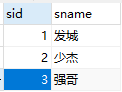
这是老师表

这是第三张表
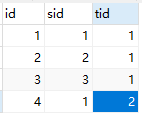
步骤和一对多是一样的,先生成实体类,然后在老师中植入学生List
创建接口,写个方法:
 package cn.sohappy.acourses.course0923;

 import cn.sohappy.acourses.bean.Teachert14;

 public interface ITeacherDAO {

     Teachert14 findStudentsByTeacher(Teachert14 teacher);

 }
下面直接写小配置了:
 <?xml version="1.0" encoding="UTF-8" ?>

 <!DOCTYPE mapper

         PUBLIC "-//mybatis.org//DTD Mapper 3.0//EN"

         "http://mybatis.org/dtd/mybatis-3-mapper.dtd">

 <mapper namespace="cn.sohappy.acourses.course0923.ITeacherDAO">

     <resultMap id="mTeacher" type="cn.sohappy.acourses.bean.Teachert14">

         <id property="tid" column="tid"/>

         <result property="tname" column="tname"/>

         <collection property="studentt14s" ofType="cn.sohappy.acourses.bean.Studentt14">

             <id property="sid" column="sid"/>

             <result property="sname" column="sname"/>

         </collection>

     </resultMap>

     <select id="findStudentsByTeacher" resultMap="mTeacher">

         select studentt14.sid,sname,teachert14.tid,tname from studentt14,teachert14,teacher_studentt14

         where studentt14.sid=teacher_studentt14.sid and teachert14.tid=teacher_studentt14.tid

         and teachert14.tid=#{tid}

     </select>

 </mapper>
最后附上测试类和MyBatis工具类:
测试类:
 package cn.test;

 import cn.sohappy.acourses.bean.Studentt14;

 import cn.sohappy.acourses.bean.Teachert14;

 import cn.sohappy.acourses.course0923.ITeacherDAO;

 import cn.sohappy.util.MyBatisUtil;

 import org.apache.ibatis.session.SqlSession;

 import org.junit.Test;

 public class test20170923 {

     //多对多,借助第三张表

     @Test

     public void findStudentsByTeacher(){

         SqlSession session = MyBatisUtil.getSession();

         ITeacherDAO mapper = session.getMapper(ITeacherDAO.class);

         Teachert14 teachert14 = new Teachert14();

         teachert14.setTid(1L);

         Teachert14 teacher = mapper.findStudentsByTeacher(teachert14);

         for (Studentt14 item:teacher.getStudentt14s()) {

             System.out.println(item.getSname());

         }

     }

 }
MyBatis工具类:
 package cn.sohappy.util;

 import org.apache.ibatis.io.Resources;

 import org.apache.ibatis.session.SqlSession;

 import org.apache.ibatis.session.SqlSessionFactory;

 import org.apache.ibatis.session.SqlSessionFactoryBuilder;

 import java.io.IOException;

 import java.io.InputStream;

 public class MyBatisUtil {

     private static InputStream is;

     private static SqlSessionFactory sqlSessionFactory;

     static {

         try {

             is=Resources.getResourceAsStream("mybatis-config.xml");

         } catch (IOException e) {

             e.printStackTrace();

         }

         sqlSessionFactory= new SqlSessionFactoryBuilder().build(is);

     }

     private MyBatisUtil(){}

     public static SqlSession getSession(){

         return sqlSessionFactory.openSession();

     }

 }
SSM(二)MyBatis多表联查的更多相关文章
- 使用mybatis多表联查的时候结果异常及springmvc的理解
今天使用mybatis多表联查的时候,在dos窗口查询时可以出结果集,但是使用mybatis查询的时候最后返回的结果只有最后一个结果 然后研究了半天没弄出来,后来无意中发现添加了最外层从表的ID字段后 ...
- 【mybatis】mybatis多表联查,存在一对多关系的,实体中使用List作为字段接收查询结果的写法
实体如下: IntegralGoods 积分商品 IntegralGoodsImg 积分商品图片 ShelfLog 积分商品自动上架记录 IntegralGoods :IntegralGoodsIm ...
- mybatis 多表联查,多个实体类,如何返回一个List?(表太多,字段太多的问题)
原文:https://ask.csdn.net/questions/674166 自己重新定义一个实体类 把查询结果放到这个实体类中,实体类包含所有的查询结果的字段 一个更好的办法,我发现你这关联表所 ...
- mybatis.net 多表联查
mybatis.net针对多表联查,其实不用讲联查出的所有的列全部做一个新的resultMap,我们完全可以通过集成关系来实现,真是上一次说的懒加载,在一定程度上可以提高其性能,但这并不是说懒加载性能 ...
- Mybatis中多表联查,查询出来的字段出现重名,造成数据异常的解决方法!
在做一对多出现的问题,引发的思考:当数据库表中,主表的主键id和明细表的中的字段名相同时怎么办?Mybatis进行自动映射赋值的时候会不会出现异常? 注意:M ...
- Java基础-SSM之mybatis一对一关联
Java基础-SSM之mybatis一对一关联 作者:尹正杰 版权声明:原创作品,谢绝转载!否则将追究法律责任. 一.准备测试环境(创建数据库表) 1>.创建husbands和wifes表并建 ...
- Java基础-SSM之mybatis多对多关联
Java基础-SSM之mybatis多对多关联 作者:尹正杰 版权声明:原创作品,谢绝转载!否则将追究法律责任. 一.准备测试环境(创建数据库表) 1>.创建teas,stus,links表 u ...
- Java基础-SSM之mybatis一对多和多对一关系映射
Java基础-SSM之mybatis一对多和多对一关系映射 作者:尹正杰 版权声明:原创作品,谢绝转载!否则将追究法律责任. 一.准备测试环境(创建数据库表) 1>.创建customers表: ...
- Java基础-SSM之mybatis的树形控件(自关联)
Java基础-SSM之mybatis的树形控件(自关联) 作者:尹正杰 版权声明:原创作品,谢绝转载!否则将追究法律责任. 一.准备测试环境(创建数据库表) 1>.创建areas表: use y ...
随机推荐
- Java Swing界面编程(29)---JCheckBox事件处理
JCheckBox和JRadioButton的事件处理监听接口是一样的,都是使用ItemListener接口. package com.beyole.util; import java.awt.Con ...
- UVa 11400 Lighting System Design(DP 照明设计)
意甲冠军 地方照明系统设计 总共需要n不同类型的灯泡 然后进入 每个灯电压v 相应电压电源的价格k 每一个灯泡的价格c 须要这样的灯泡的数量l 电压低的灯泡能够用电压高的灯泡替换 ...
- QSplitter实现自由伸缩滑动窗口部件(要在m_pSplitter中加入frame_4之前,给frame_4设置样式;之后设置无效)
实现代码如下: #include <QSplitter> QSplitter *m_pSplitter; m_pSplitter = new QSplitter(ui->frame_ ...
- 【读书笔记】——《A Brief History of Humankind》
I encourage all of us, whatever our beliefs, to question the basic narratives of our world, to conne ...
- PO、VO、BO、DTO、POJO、DAO之间的关系
J2EE开发中大量的专业缩略语很是让人迷惑,尤其是跟一些高手讨论问题的时候,三分钟就被人家满口的专业术语喷晕了,PO VO BO DTO POJO DAO,一大堆的就来了(听过老罗对这种现象的批判的朋 ...
- 源码编译路径错误导致的Apache 无法重启问题解决方法
问题现象: 第一次源码编译安装Apache设置路径错误,安装到/usr/local/src/ 目录下了. 删掉该目录下的安装文件,重新编译安装到/usr/local/目录下 重启apache服务时报这 ...
- iphone开发技巧整合
1.NSCalendar用法 -(NSString *) getWeek:(NSDate *)d { NSCalendar *calendar = [[NSCalendar alloc] initWi ...
- ntp时间同步,各种配置方法
1 Windows xp NTP服务器的配置(2003配置方式一样) 1) 首先需要关闭作为NTP服务器的windows系统自带的防火墙,否则将同步不成功. 2) 单击“开始”,单击“运行”,键入 r ...
- JDK源码阅读——LinkedList实现
1 继承结构图 LinkedList是List的另一种实现.继承自AbstractSequentialList 2 数据结构 LinkedList与ArrayList不同的是LinkedList底层使 ...
- String 源码分析
Java 源码阅读 - String String 类型看起来简单,实际上背后的复杂性基本可以涵盖了整个 Java 设计,涉及到设计模式(不可变对象).缓存(String Pool 的理念).JVM( ...