
【第十篇】easyui-datagrid排序 (转)
本文体验datagrid的排序。
□ 思路
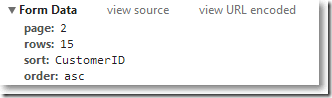
当点击datagrid的标题,视图传递给Controller的Form Data类似这样:page=1&rows=10&sort=CustomerID&order=asc。为了应对变化,把关于分页的封装成基类,其他关于排序或搜索的封装成继承该基类的子类。再把这些子类对象实例传递给服务层方法。
相关Model
    //显示表相关

    public class Customer

    {

        public int CustomerID { get; set; }

        public string CompanyName { get; set; }

        public string ContactName { get; set; }

        public string ContactTitle { get; set; }

        public string Address { get; set; }

        public string City { get; set; }

        public string Region { get; set; }

        public string Country { get; set; }

        public string Phone { get; set; }

        public string Fax { get; set; }

    }

    //关于分页封装成基类

    public class PageParam { public int PageSize { get; set; }

        public int PageIndex { get; set; }

    }

    //关于搜索或排序封装成子类

    public class CustomerParam : PageParam

    {

        public string SortProperty { get; set; }

        public bool Order { get; set; }

    }
服务层根据CustomerParam返回Customer集合,并返回一个输出总记录数
在进行分类的时候,用到了针对 IEnumerable<Customer>扩展方法OrderByWithDirection,如下:
using System.Linq;
namespace DataGridInMVC2.Helpers
{
public static class SortExtension
{
public static IOrderedEnumerable<TSource> OrderByWithDirection<TSource, TKey>(
this IEnumerable<TSource> source,
System.Func<TSource, TKey> keySelector,
bool descending)
{
return descending ? source.OrderByDescending(keySelector) : source.OrderBy(keySelector);
}
}
}
CustomerController
using System;

using System.Collections.Generic;

using System.Linq;

using System.Web;

using System.Web.Mvc;

using DataGridInMVC2.Helpers;

using DataGridInMVC2.Models;

namespace DataGridInMVC2.Controllers

{

    public class CustomerController : Controller

    {

        public ActionResult Index()

        {

            return View();

        }

        public ActionResult GetData()

        {

            //接收datagrid传来的参数

            //page=1&rows=10&sort=CustomerID&order=asc

            int pageIndex = int.Parse(Request["page"]);

            int pageSize = int.Parse(Request["rows"]);

            string sortProperty = Request["sort"];

            bool order = Request["order"] == "asc" ? false : true;


            //构建服务类方法所需要的参数实例

            var temp = new CustomerParam()

            {

                PageIndex = pageIndex,

                PageSize = pageSize,

                SortProperty = sortProperty,

                Order = order

            };

            var service = new Service();

            int totalNum = 0;

            var customers = service.LoadPageCustomers(temp, out totalNum);

            var result = from customer in customers

                select new

                {

                    customer.CustomerID,

                    customer.CompanyName,

                    customer.ContactName,

                    customer.ContactTitle,

                    customer.Country,

                    customer.Region,

                    customer.Address,

                    customer.Fax,

                    customer.Phone,

                    customer.City

                };

            var jsonResult = new {total = totalNum, rows = result};

            //序列化成json字符串

            string str = JsonSerializeHelper.SerializeToJson(jsonResult);

            return Content(str);

        }

    }

}
Customer/Index 视图
@{

    ViewBag.Title = "Index";

    Layout = "~/Views/Shared/_Layout.cshtml";

}

<link href="~/Content/themes/default/easyui.css" rel="stylesheet" />

<link href="~/Content/themes/icon.css" rel="stylesheet" />

<table id="tt"></table>

@section scripts

{

    <script src="~/Scripts/jquery.easyui.min.js"></script>

    <script src="~/Scripts/easyui-lang-zh_CN.js"></script>

    <script type="text/javascript">

        $(function () {

            initData();

        });

        function initData(params) {

            $('#tt').datagrid({

                url: '@Url.Action("GetData","Customer")',

                width: 730,

                height: 400,

                title: 'Customer列表',

                fitColumns: true,

                rownumbers: true, //是否加行号

                pagination: true, //是否显式分页

                pageSize: 15, //页容量,必须和pageList对应起来,否则会报错

                pageNumber: 2, //默认显示第几页

                pageList: [15, 30, 45],//分页中下拉选项的数值

                columns: [[

                    //CustomerID,CompanyName,ContactName,ContactTitle,Country,Region,Address,Fax,Phone,City

                    { field: 'CustomerID', title: '编号',sortable: true },

                    { field: 'CompanyName', title: '客户名称', sortable: true },

                    { field: 'ContactName', title: '联系人名称', sortable: true },

                    { field: 'ContactTitle', title: '职位', sortable: true },

                    { field: 'Address', title: '地址', sortable: true },

                    { field: 'City', title: '城市名称', sortable: true },

                    { field: 'Region', title: '区域' },

                    { field: 'Country', title: '国家' },

                    { field: 'Phone', title: '电话', sortable: true },

                    { field: 'Fax', title: '传真', sortable: true }

                ]],

                queryParams: params, //搜索json对象

                sortName: 'CustomerID', //初始排序字段

                sortOrder: 'asc' //初始排序方式

            });

        }

    </script>

}
最终效果:
【第十篇】easyui-datagrid排序 (转)的更多相关文章
- easyUI datagrid 排序
easyUI datagrid 排序 1.首先设置datagrid属性sortName 2.设置sortOrder 3.设置remoteSort(注:此属性默认为true,如果如果是对本地数据排序必须 ...
- easyui datagrid client搜索、分页、排序
easyui datagrid的排序默认是server端排序.能够用sorter实现client排序[2].client分页可用filter实现[3].client搜索相同能够用filter实现. 不 ...
- easyui datagrid导出excel
[第十四篇]easyui datagrid导出excel <a class="btn btn-app" onclick="exportExcel()" ...
- easyui datagrid的列编辑
[第十五篇]easyui datagrid的列编辑,同时插入两张表的数据进去 看图说话. 需求:插入两张表,上面的表单是第一张表的内容,下面的两个表格是第二张详情表的内容,跟第一张表的id关联 第 ...
- 反射实体自动生成EasyUi DataGrid模板 第二版--附项目源码
之前写过一篇文章,地址 http://www.cnblogs.com/Bond/p/3469798.html 大概说了下怎么通过反射来自动生成对应EasyUi datagrid的模板,然后贴了很多 ...
- DataTables VS EasyUI DataGrid 基础应用 转
DataTables中文网推出了 第一篇 关于DataTables和其他表格插件比较后,为了把让这个比较更有意义,更能帮助到大家,DataTables中文网 做了问卷调查,根据小伙伴们的填写我归纳了一 ...
- 构建ASP.NET MVC4+EF5+EasyUI+Unity2.x注入的后台管理系统(8)-MVC与EasyUI DataGrid 分页
系列目录 前言 为了符合后面更新后的重构系统,文章于2016-11-1日重写 EasyUI Datagrid在加载的时候会提交一些分页的信息到后台,我们需要根据这些信息来进行数据分页再次返回到前台 实 ...
- jquery easyui datagrid翻页后再查询始终从第一页开始
在查询之前将datagrid的属性pageNumber重新设置为1 var opts = grid.datagrid('options'); opts.pageNumber = 1; easyui d ...
- EasyUI datagrid优化
easyui datagrid 在IE上加载速度慢, 150行数据就无法忍受了. firefox加载速度还可以. jquery easyui datagrid使用参考 http://www.cnblo ...
随机推荐
- Compatibility模式安装windows7后改为AHCI模式无法启动Windows7的解决办法
在用Compatibility模式安装Windows 7后,再在BIOS中去开启SATA硬盘的AHCI功能的话,就会出现无法启动的情况.只有改回Compatibility模式后,系统才恢复正常.经过试 ...
- DT-06 For AT
乐鑫官方AT指令固件- 最新1.5.4版本 此固件仅支持AT指令对模块进行操作. 1.DT-06固件的烧录 1.1打开ESP模块下载工具ESPFlashDownloadTool,选择需要下载的固件,填 ...
- json操作与使用 小白
json使用广可以和很多语言进行互换,把json序列化成字符串,可以反序列化回去 dumps(传入的类型,'ensure_ascii=False') loads网络传输 dump load文件写读 p ...
- 从零写一个编译器(十一):代码生成之Java字节码基础
项目的完整代码在 C2j-Compiler 前言 第十一篇,终于要进入代码生成部分了,但是但是在此之前,因为我们要做的是C语言到字节码的编译,所以自然要了解一些字节码,但是由于C语言比较简单,所以只需 ...
- AQS源码解析(一)-AtomicBoolean源码解析
基本类: AtomicInteger AtomicLong AtomicBoolean 数组类型: AtomicIntegerArray AtomicLongArray AtomicReference ...
- Python 创建目录 and 删除目录
import os import shutil #删除并创建目录 def rmdir(path): try: shutil.rmtree(path) print(path+':删除成功') os.ma ...
- Liunx软件安装之Tomcat
一.Tomcat 安装 1.1 yum 安装 1) 安装 tomcat 基础服务 sudo yum -y install tomcat 2) 安装管理界面 sudo yum -y install to ...
- 马蜂窝视频编辑框架设计及在 iOS 端的业务实践
(马蜂窝技术公众号原创内容,ID: mfwtech) 熟悉马蜂窝的朋友一定知道,点击马蜂窝 App 首页的发布按钮,会发现发布的内容已经被简化成「图文」或者「视频」. 长期以来,游记.问答.攻略等图文 ...
- [Python] Django框架入门
说明:Django框架入门 当前项目环境:python3.5.django-1.11 项目名:test1 应用名:booktest 命令可简写为:python manager.py xxx => ...
- MSIL实用指南-返回结果
一个方法体执行完指令后,必须要完成调用并返回,这是要使用Ret指令.Ret指令的详细解释是从当前方法返回,并将返回值(如果存在)从被调用方的计算堆栈推送到调用方的计算堆栈上.就是说如果计算堆栈上没有变 ...