
构建ASP.NET MVC4+EF5+EasyUI+Unity2.x注入的后台管理系统(8)-MVC与EasyUI DataGrid 分页
前言
为了符合后面更新后的重构系统,文章于2016-11-1日重写
EasyUI Datagrid在加载的时候会提交一些分页的信息到后台,我们需要根据这些信息来进行数据分页再次返回到前台
实现
首先要让DataGrid支持分页,我们需要在JS Datagrid中加入下列几个属性
- 是否启用分页:pagination 默认是false
- 每页数量:pageSize 默认10
- 可选择每页数量:pageList 默认[10,20,30,40,50]
- 排序字段:sortName 默认null
- 排序类型:sortOrder 默认asc
OK加入后的代码变成这样
  $(function () {

        $('#List').datagrid({

            url: '/SysSample/GetList',

            width: $(window).width() - 10,

            methord: 'post',

            height: $(window).height() - 35,

            fitColumns: true,

            sortName: 'Id',

            sortOrder: 'desc',

            idField: 'Id',

            pageSize: 15,

            pageList: [15, 20, 30, 40, 50],

            pagination: true,

            striped: true, //奇偶行是否区分

            singleSelect: true,//单选模式

            rownumbers: true,//行号

            columns: [[

                { field: 'Id', title: 'ID', width: 80 },

                { field: 'Name', title: '名称', width: 120 },

                { field: 'Age', title: '年龄', width: 80, align: 'right' },

                { field: 'Bir', title: '生日', width: 80, align: 'right' },

                { field: 'Photo', title: '照片', width: 250 },

                { field: 'Note', title: '说明', width: 60, align: 'center' },

                { field: 'CreateTime', title: '创建时间', width: 60, align: 'center' }

            ]]

        });

    });
Index
预览一下
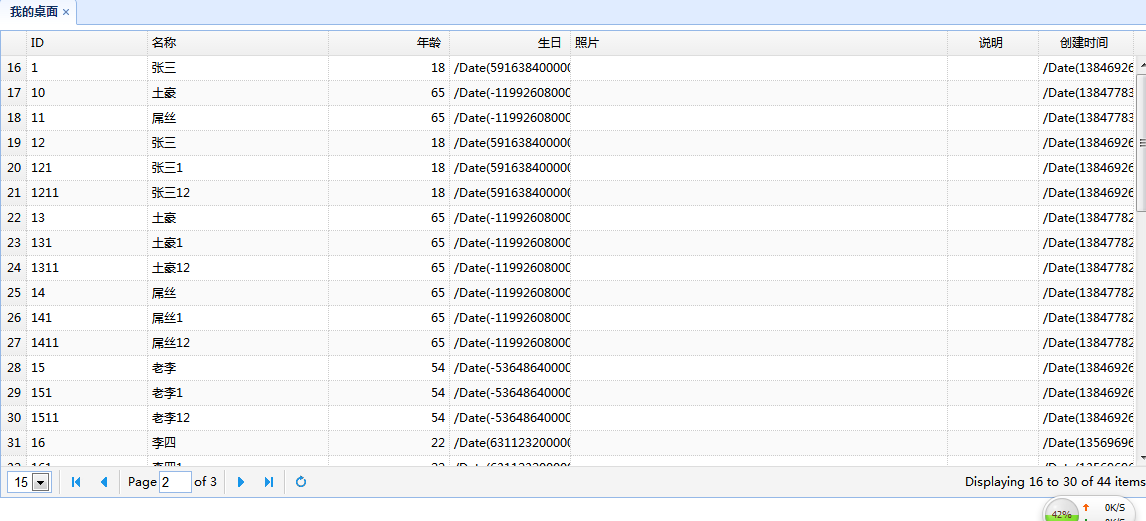
实际已经分页,但是不正确的,每一页的数据一样。我们要根据分页的参数去取
查看技巧
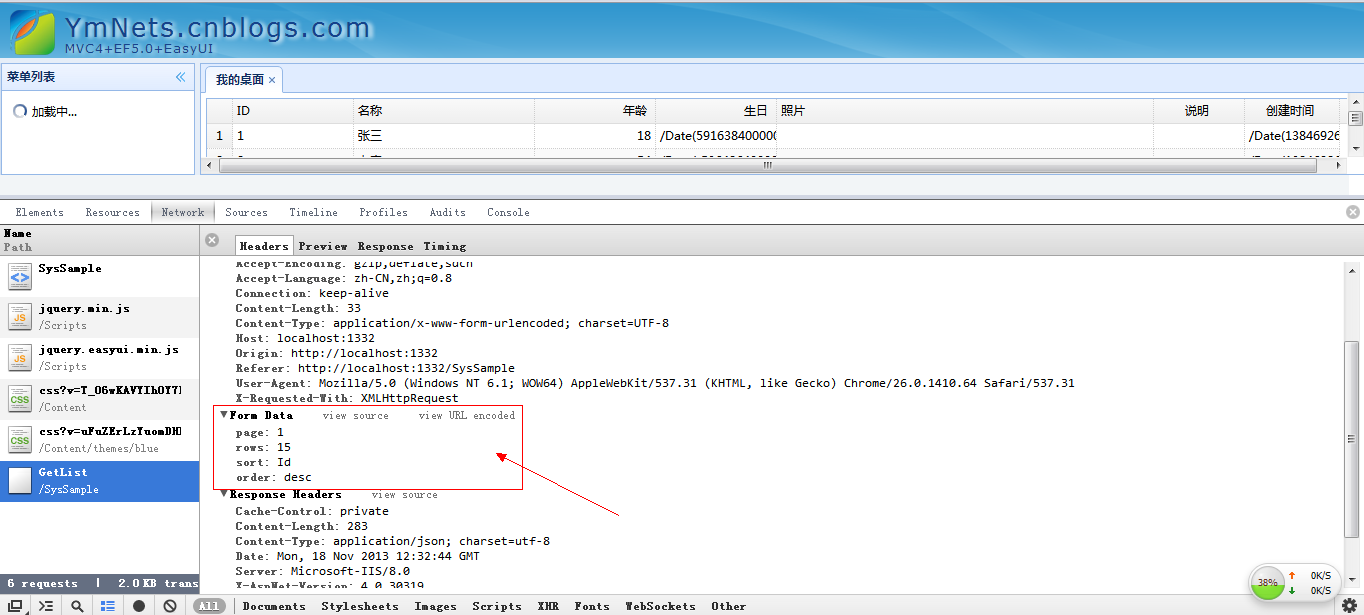
OK我们控制器要根据他传递的参数写同样的参数名称,否则获取不到
看我们的SysSampleController 下的GetList方法,加入参数
using System;

using System.Collections.Generic;

using System.Linq;

using System.Web;

using System.Web.Mvc;

using App.BLL;

using App.IBLL;

using App.Models;

using App.Models.Sys;

using Microsoft.Practices.Unity;

namespace App.Admin.Controllers

{

    public class SysSampleController : Controller

    {

        //

        // GET: /SysSample/

        /// <summary>

        /// 业务层注入

        /// </summary>

        [Dependency]

        public ISysSampleBLL m_BLL { get; set; }

        public ActionResult Index()

        {

            return View();

        }

        [HttpPost]

        public JsonResult GetList(int page = , int rows = , string sort = "Id", string order = "desc")

        {

            int total = ;

            List<SysSampleModel> list = m_BLL.GetList(page, rows, sort, order, ref total);

            var json = new

            {

                total = total,

                rows = (from r in list

                        select new SysSampleModel()

                        {

                            Id = r.Id,

                            Name = r.Name,

                            Age = r.Age,

                            Bir = r.Bir,

                            Photo = r.Photo,

                            Note = r.Note,

                            CreateTime = r.CreateTime,

                        }).ToArray()

            };

            return Json(json, JsonRequestBehavior.AllowGet);

        }

    }

}
SysSampleController
BLL代码修改(IBLL也要修改参数 List<SysSampleModel> GetList(int page, int rows, string sort, string order,ref int total);)
using System;

using System.Collections.Generic;

using System.Linq;

using Microsoft.Practices.Unity;

using App.Models;

using App.Common;

using App.Models.Sys;

using App.IBLL;

using App.IDAL;

namespace App.BLL

{

    public class SysSampleBLL : ISysSampleBLL

    {

        DBContainer db = new DBContainer();

        [Dependency]

        public ISysSampleRepository Rep { get; set; }

        /// <summary>

        /// 获取列表

        /// </summary>

        /// <param name="pager">JQgrid分页</param>

        /// <param name="queryStr">搜索条件</param>

        /// <returns>列表</returns>

        public List<SysSampleModel> GetList(int page, int rows, string sort, string order, ref int total)

        {

            IQueryable<SysSample> queryData = null;

            queryData = Rep.GetList(db);

            //排序

            if (order == "desc")

            {

                switch (order)

                {

                    case "Id":

                        queryData = queryData.OrderByDescending(c => c.Id);

                        break;

                    case "Name":

                        queryData = queryData.OrderByDescending(c => c.Name);

                        break;

                    default:

                        queryData = queryData.OrderByDescending(c => c.CreateTime);

                        break;

                }

            }

            else

            {

                switch (order)

                {

                    case "Id":

                        queryData = queryData.OrderBy(c => c.Id);

                        break;

                    case "Name":

                        queryData = queryData.OrderBy(c => c.Name);

                        break;

                    default:

                        queryData = queryData.OrderBy(c => c.CreateTime);

                        break;

                }

            }

            return CreateModelList(ref queryData,page,rows,ref total);

        }

        private List<SysSampleModel> CreateModelList(ref IQueryable<SysSample> queryData,int page,int rows,ref int total)

        {

            total = queryData.Count();

            if (total > )

            {

                if (page <= )

                {

                    queryData = queryData.Take(rows);

                }

                else

                {

                    queryData = queryData.Skip((page - ) * rows).Take(rows);

                }

            }

            List<SysSampleModel> modelList = (from r in queryData

                                              select new SysSampleModel

                                              {

                                                  Id = r.Id,

                                                  Name = r.Name,

                                                  Age = r.Age,

                                                  Bir = r.Bir,

                                                  Photo = r.Photo,

                                                  Note = r.Note,

                                                  CreateTime = r.CreateTime,

                                              }).ToList();

            return modelList;

        }

        /// <summary>

        /// 创建一个实体

        /// </summary>

        /// <param name="errors">持久的错误信息</param>

        /// <param name="model">模型</param>

        /// <returns>是否成功</returns>

        public bool Create( SysSampleModel model)

        {

            try

            {

                SysSample entity = Rep.GetById(model.Id);

                if (entity != null)

                {

                    return false;

                }

                entity = new SysSample();

                entity.Id = model.Id;

                entity.Name = model.Name;

                entity.Age = model.Age;

                entity.Bir = model.Bir;

                entity.Photo = model.Photo;

                entity.Note = model.Note;

                entity.CreateTime = model.CreateTime;

                if (Rep.Create(entity) == )

                {

                    return true;

                }

                else

                {

                    return false;

                }

            }

            catch (Exception ex)

            {

                //ExceptionHander.WriteException(ex);

                return false;

            }

        }

        /// <summary>

        /// 删除一个实体

        /// </summary>

        /// <param name="errors">持久的错误信息</param>

        /// <param name="id">id</param>

        /// <returns>是否成功</returns>

        public bool Delete(string id)

        {

            try

            {

                if (Rep.Delete(id) == )

                {

                    return true;

                }

                else

                {

                    return false;

                }

            }

            catch (Exception ex)

            {

                return false;

            }

        }

        /// <summary>

        /// 修改一个实体

        /// </summary>

        /// <param name="errors">持久的错误信息</param>

        /// <param name="model">模型</param>

        /// <returns>是否成功</returns>

        public bool Edit(SysSampleModel model)

        {

            try

            {

                SysSample entity = Rep.GetById(model.Id);

                if (entity == null)

                {

                    return false;

                }

                entity.Name = model.Name;

                entity.Age = model.Age;

                entity.Bir = model.Bir;

                entity.Photo = model.Photo;

                entity.Note = model.Note;

                if (Rep.Edit(entity) == )

                {

                    return true;

                }

                else

                {

                    return false;

                }

            }

            catch (Exception ex)

            {

                //ExceptionHander.WriteException(ex);

                return false;

            }

        }

        /// <summary>

        /// 判断是否存在实体

        /// </summary>

        /// <param name="id">主键ID</param>

        /// <returns>是否存在</returns>

        public bool IsExists(string id)

        {

            if (db.SysSample.SingleOrDefault(a => a.Id == id) != null)

            {

                return true;

            }

            return false;

        }

        /// <summary>

        /// 根据ID获得一个实体

        /// </summary>

        /// <param name="id">id</param>

        /// <returns>实体</returns>

        public SysSampleModel GetById(string id)

        {

            if (IsExist(id))

            {

                SysSample entity = Rep.GetById(id);

                SysSampleModel model = new SysSampleModel();

                model.Id = entity.Id;

                model.Name = entity.Name;

                model.Age = entity.Age;

                model.Bir = entity.Bir;

                model.Photo = entity.Photo;

                model.Note = entity.Note;

                model.CreateTime = entity.CreateTime;

                return model;

            }

            else

            {

                return new SysSampleModel();

            }

        }

        /// <summary>

        /// 判断一个实体是否存在

        /// </summary>

        /// <param name="id">id</param>

        /// <returns>是否存在 true or false</returns>

        public bool IsExist(string id)

        {

            return Rep.IsExist(id);

        }

    }

}
SysSampleBLL
我们要在BLL层返回当前查询的全部条数,还要返回当前页得数据
补脑:ref关键字使参数按引用传递。其效果是,当控制权传递回调用方法时,在方法中对参数所做的任何更改都将反映在该变量中。若要使用ref参数,则方法定义和调用方法都必须显式使用ref关键字。
大家看出这样太麻烦了,代码太不漂亮了,我们把常用的参数给封装了。
分装分页
using System;

using System.Collections.Generic;

using System.Linq;

using System.Text;

namespace App.Common

{

     public class GridPager

    {

         public int rows { get; set; }//每页行数

         public int page { get; set; }//当前页是第几页

         public string order { get; set; }//排序方式

         public string sord { get; set; }//排序列

         public int totalRows { get; set; }//总行数

         public int totalPages //总页数

         {

             get

             {

                 return (int)Math.Ceiling((float)totalRows / (float)rows);

             }

         }

    }

}
GridPager
把这个类放到Apps.Common, 我们的Apps.Common终于用到了
再次修改Controller的GetList
   [HttpPost]

        public JsonResult GetList(GridPager pager)

        {

            List<SysSampleModel> list = m_BLL.GetList(ref pager);

            var json = new

            {

                total = pager.totalRows,

                rows = (from r in list

                        select new SysSampleModel()

                        {

                            Id = r.Id,

                            Name = r.Name,

                            Age = r.Age,

                            Bir = r.Bir,

                            Photo = r.Photo,

                            Note = r.Note,

                            CreateTime = r.CreateTime,

                        }).ToArray()

            };

            return Json(json, JsonRequestBehavior.AllowGet);

        }
SysSampleController
和修改BLL的GetList 还要修改IBLL --List<SysSampleModel> GetList(ref GridPager pager);
using System;

using System.Collections.Generic;

using System.Linq;

using Microsoft.Practices.Unity;

using App.Models;

using App.Common;

using App.Models.Sys;

using App.IBLL;

using App.IDAL;

namespace App.BLL

{

    public class SysSampleBLL : ISysSampleBLL

    {

        DBContainer db = new DBContainer();

        [Dependency]

        public ISysSampleRepository Rep { get; set; }

        /// <summary>

        /// 获取列表

        /// </summary>

        /// <param name="pager">JQgrid分页</param>

        /// <param name="queryStr">搜索条件</param>

        /// <returns>列表</returns>

        public List<SysSampleModel> GetList(ref GridPager pager)

        {

            IQueryable<SysSample> queryData = null;

                queryData = Rep.GetList(db);

            //排序

            if (pager.order == "desc")

            {

                switch (pager.order)

                {

                    case "CreateTime":

                        queryData = queryData.OrderByDescending(c => c.CreateTime);

                        break;

                    case "Name":

                        queryData = queryData.OrderByDescending(c => c.Name);

                        break;

                    default:

                        queryData = queryData.OrderByDescending(c => c.CreateTime);

                        break;

                }

            }

            else

            {

                switch (pager.order)

                {

                    case "CreateTime":

                        queryData = queryData.OrderBy(c => c.CreateTime);

                        break;

                    case "Name":

                        queryData = queryData.OrderBy(c => c.Name);

                        break;

                    default:

                        queryData = queryData.OrderBy(c => c.CreateTime);

                        break;

                }

            }

            return CreateModelList(ref pager, ref queryData);

        }

        private List<SysSampleModel> CreateModelList(ref GridPager pager, ref IQueryable<SysSample> queryData)

        {

            pager.totalRows = queryData.Count();

            if (pager.totalRows > )

            {

                if (pager.page <= )

                {

                    queryData = queryData.Take(pager.rows);

                }

                else

                {

                    queryData = queryData.Skip((pager.page - ) * pager.rows).Take(pager.rows);

                }

            }

            List<SysSampleModel> modelList = (from r in queryData

                                              select new SysSampleModel

                                              {

                                                  Id = r.Id,

                                                  Name = r.Name,

                                                  Age = r.Age,

                                                  Bir = r.Bir,

                                                  Photo = r.Photo,

                                                  Note = r.Note,

                                                  CreateTime = r.CreateTime,

                                              }).ToList();

            return modelList;

        }

        /// <summary>

        /// 创建一个实体

        /// </summary>

        /// <param name="errors">持久的错误信息</param>

        /// <param name="model">模型</param>

        /// <returns>是否成功</returns>

        public bool Create( SysSampleModel model)

        {

            try

            {

                SysSample entity = Rep.GetById(model.Id);

                if (entity != null)

                {

                    return false;

                }

                entity = new SysSample();

                entity.Id = model.Id;

                entity.Name = model.Name;

                entity.Age = model.Age;

                entity.Bir = model.Bir;

                entity.Photo = model.Photo;

                entity.Note = model.Note;

                entity.CreateTime = model.CreateTime;

                if (Rep.Create(entity) == )

                {

                    return true;

                }

                else

                {

                    return false;

                }

            }

            catch (Exception ex)

            {

                //ExceptionHander.WriteException(ex);

                return false;

            }

        }

        /// <summary>

        /// 删除一个实体

        /// </summary>

        /// <param name="errors">持久的错误信息</param>

        /// <param name="id">id</param>

        /// <returns>是否成功</returns>

        public bool Delete(string id)

        {

            try

            {

                if (Rep.Delete(id) == )

                {

                    return true;

                }

                else

                {

                    return false;

                }

            }

            catch (Exception ex)

            {

                return false;

            }

        }

        /// <summary>

        /// 修改一个实体

        /// </summary>

        /// <param name="errors">持久的错误信息</param>

        /// <param name="model">模型</param>

        /// <returns>是否成功</returns>

        public bool Edit(SysSampleModel model)

        {

            try

            {

                SysSample entity = Rep.GetById(model.Id);

                if (entity == null)

                {

                    return false;

                }

                entity.Name = model.Name;

                entity.Age = model.Age;

                entity.Bir = model.Bir;

                entity.Photo = model.Photo;

                entity.Note = model.Note;

                if (Rep.Edit(entity) == )

                {

                    return true;

                }

                else

                {

                    return false;

                }

            }

            catch (Exception ex)

            {

                //ExceptionHander.WriteException(ex);

                return false;

            }

        }

        /// <summary>

        /// 判断是否存在实体

        /// </summary>

        /// <param name="id">主键ID</param>

        /// <returns>是否存在</returns>

        public bool IsExists(string id)

        {

            if (db.SysSample.SingleOrDefault(a => a.Id == id) != null)

            {

                return true;

            }

            return false;

        }

        /// <summary>

        /// 根据ID获得一个实体

        /// </summary>

        /// <param name="id">id</param>

        /// <returns>实体</returns>

        public SysSampleModel GetById(string id)

        {

            if (IsExist(id))

            {

                SysSample entity = Rep.GetById(id);

                SysSampleModel model = new SysSampleModel();

                model.Id = entity.Id;

                model.Name = entity.Name;

                model.Age = entity.Age;

                model.Bir = entity.Bir;

                model.Photo = entity.Photo;

                model.Note = entity.Note;

                model.CreateTime = entity.CreateTime;

                return model;

            }

            else

            {

                return new SysSampleModel();

            }

        }

        /// <summary>

        /// 判断一个实体是否存在

        /// </summary>

        /// <param name="id">id</param>

        /// <returns>是否存在 true or false</returns>

        public bool IsExist(string id)

        {

            return Rep.IsExist(id);

        }

    }

}
SysSampleBLL
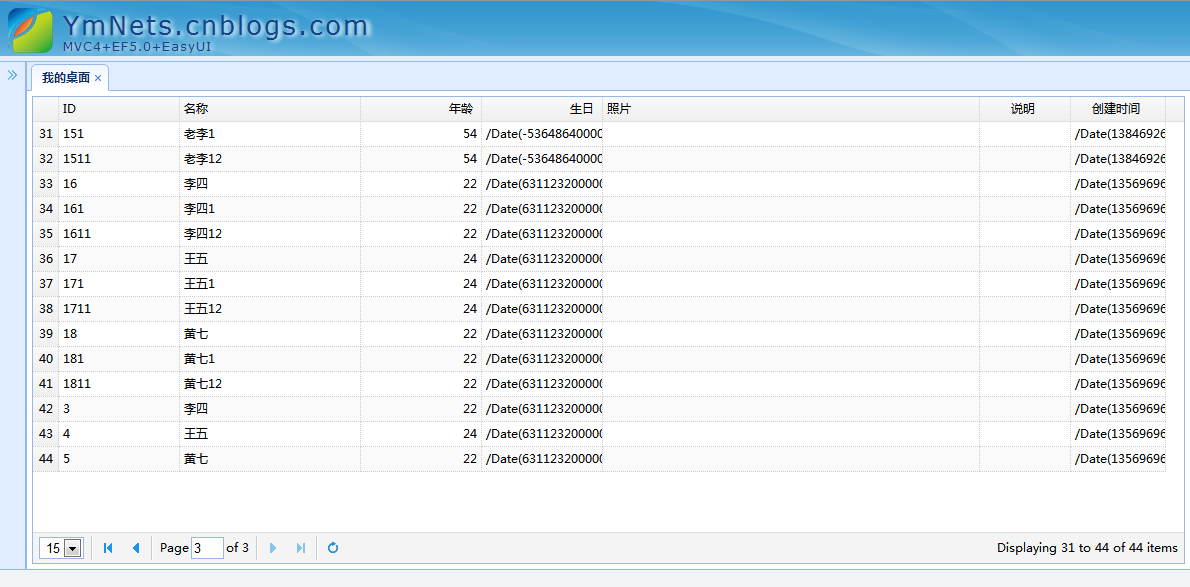
代码漂亮了不少,预览一下,还是正确的效果了。
总结
文章中一直演示做法,这种方式看起来非常反感,但是都是为了更好更仔细的了解系统,为后面快速开发做铺垫
构建ASP.NET MVC4+EF5+EasyUI+Unity2.x注入的后台管理系统(8)-MVC与EasyUI DataGrid 分页的更多相关文章
- 构建ASP.NET MVC4+EF5+EasyUI+Unity2.x注入的后台管理系统(2)-easyui构建前端页面框架[附源码]
原文:构建ASP.NET MVC4+EF5+EasyUI+Unity2.x注入的后台管理系统(2)-easyui构建前端页面框架[附源码] 开始,我们有了一系列的解决方案,我们将动手搭建新系统吧. 用 ...
- 构建ASP.NET MVC4+EF5+EasyUI+Unity2.x注入的后台管理系统(14)-EasyUI缺陷修复与扩展
系列目录 不知不觉已经过了13讲,(本来还要讲多一讲是,数据验证之自定义验证,基于园友还是对权限这块比较敢兴趣,讲不讲验证还是看大家的反映),我们应该对系统有一个小结.首先这是一个团队开发项目,基于接 ...
- 构建ASP.NET MVC4+EF5+EasyUI+Unity2.x注入的后台管理系统(1)-前言与目录(持续更新中...)
转自:http://www.cnblogs.com/ymnets/p/3424309.html 曾几何时我想写一个系列的文章,但是由于工作很忙,一直没有时间更新博客.博客园园龄都1年了,却一直都是空空 ...
- 构建ASP.NET MVC4+EF5+EasyUI+Unity2.x注入的后台管理系统(48)-工作流设计-起草新申请
原文:构建ASP.NET MVC4+EF5+EasyUI+Unity2.x注入的后台管理系统(48)-工作流设计-起草新申请 系列目录 创建新表单之后,我们就可以起草申请了,申请按照严格的表单步骤和分 ...
- 构建ASP.NET MVC4+EF5+EasyUI+Unity2.x注入的后台管理系统(47)-工作流设计-补充
原文:构建ASP.NET MVC4+EF5+EasyUI+Unity2.x注入的后台管理系统(47)-工作流设计-补充 系列目录 补充一下,有人要表单的代码,这个用代码生成器生成表Flow_Form表 ...
- 构建ASP.NET MVC4+EF5+EasyUI+Unity2.x注入的后台管理系统(46)-工作流设计-设计分支
原文:构建ASP.NET MVC4+EF5+EasyUI+Unity2.x注入的后台管理系统(46)-工作流设计-设计分支 系列目录 步骤设置完毕之后,就要设置好流转了,比如财务申请大于50000元( ...
- 构建ASP.NET MVC4+EF5+EasyUI+Unity2.x注入的后台管理系统(45)-工作流设计-设计步骤
原文:构建ASP.NET MVC4+EF5+EasyUI+Unity2.x注入的后台管理系统(45)-工作流设计-设计步骤 系列目录 步骤设计很重要,特别是规则的选择. 我这里分为几个规则 1.按自行 ...
- 构建ASP.NET MVC4+EF5+EasyUI+Unity2.x注入的后台管理系统(44)-工作流设计-设计表单
原文:构建ASP.NET MVC4+EF5+EasyUI+Unity2.x注入的后台管理系统(44)-工作流设计-设计表单 系列目录 设计表单是比较复杂的一步,完成一个表单的设计其实很漫长,主要分为四 ...
- 构建ASP.NET MVC4+EF5+EasyUI+Unity2.x注入的后台管理系统(43)-工作流设计-字段分类设计
原文:构建ASP.NET MVC4+EF5+EasyUI+Unity2.x注入的后台管理系统(43)-工作流设计-字段分类设计 系列目录 建立好42节的表之后,每个字段英文表示都是有意义的说明.先建立 ...
- 构建ASP.NET MVC4+EF5+EasyUI+Unity2.x注入的后台管理系统(42)-工作流设计01
原文:构建ASP.NET MVC4+EF5+EasyUI+Unity2.x注入的后台管理系统(42)-工作流设计01 工作流在实际应用中还是比较广泛,网络中存在很多工作流的图形化插件,可以做到拉拽的工 ...
随机推荐
- Shell特殊变量
$ 表示当前Shell进程的ID,即pid $echo $$ 运行结果 特殊变量列表 变量 含义 $0 当前脚本的文件名 $n 传递给脚本或函数的参数.n 是一个数字,表示第几个参数.例如,第一个参数 ...
- 【.net 深呼吸】跨应用程序域执行程序集
应用程序域,你在网上可以查到它的定义,凡是概念性的东西,大伙儿只需要会搜索就行,内容看了就罢,不用去记忆,更不用去背,“名词解释”是大学考试里面最无聊最没水平的题型. 简单地说,应用程序域让你可以在一 ...
- ASP.NET MVC5+EF6+EasyUI 后台管理系统(66)-MVC WebApi 用户验证 (2)
系列目录 前言: 回顾上一节,我们利用webapi简单的登录并进行了同域访问与跨域访问来获得Token,您可以跳转到上一节下载代码来一起动手. 继续上一篇的文章,我们接下来演示利用拿到的Token来访 ...
- [C#] 走进异步编程的世界 - 开始接触 async/await
走进异步编程的世界 - 开始接触 async/await 序 这是学习异步编程的入门篇. 涉及 C# 5.0 引入的 async/await,但在控制台输出示例时经常会采用 C# 6.0 的 $&qu ...
- javascript设计模式:策略模式
前言 策略模式有效利用组合.委托.多态等技术和思想,可以有效避免多重条件选择语句. 策略模式对开放-封闭原则提供了很好的支持,将算法封装在strategy中,使得他们易于切换.理解.扩展. 策略模式中 ...
- C++内联函数
在C语言中,我们使用宏定义函数这种借助编译器的优化技术来减少程序的执行时间,那么在C++中有没有相同的技术或者更好的实现方法呢?答案是有的,那就是内联函数.内联函数作为编译器优化手段的一种技术,在降低 ...
- MyBatis源码分析(二)语句处理器
StatementHandler 语句处理器,主要负责语句的创建.参数的设置.语句的执行.不负责结果集的处理. Statement prepare(Connection connection, Int ...
- Javascript中的valueOf与toString
基本上,javascript中所有数据类型都拥有valueOf和toString这两个方法,null除外.它们俩解决javascript值运算与显示的问题,本文将详细介绍,有需要的朋友可以参考下. t ...
- 使用DeviceOne实现微信小程序功能
微信小程序即将推出,还没推出就火的不行了.基于微信这个巨大平台,小程序必然能有巨大成功.不过它并不能完全取代App,该开发App还得开发.如果我们自己想实现一个基于自己的APP包含类似微信的小程序功能 ...
- 烂泥:wiki系统confluence5.6.6安装、中文、破解及迁移
本文由ilanniweb提供友情赞助,首发于烂泥行天下 想要获得更多的文章,可以关注我的微信ilanniweb confluence是一个专业的企业知识管理与协同软件,可以用于构建企业wiki.通过它 ...