
Entity Framework Code-First(9.9):DataAnnotations - ForeignKey Attribute
DataAnnotations - ForeignKey Attribute:
ForeignKey attribute can be applied to properties of a class. Default Code-First convention for ForeignKey relationship expects foreign key property name match with primary key property.
Consider the following example.
public class Student

{

    public Student()

    {

    }

    public int StudentID { get; set; }

    public string StudentName { get; set; }

    //Foreign key for Standard

    public int StandardId { get; set; }

    public Standard Standard { get; set; }

}

public class Standard

{

    public Standard()

    {

    }

    public int StandardId { get; set; }

    public string StandardName { get; set; }

    public ICollection<Student> Students { get; set; }

 }
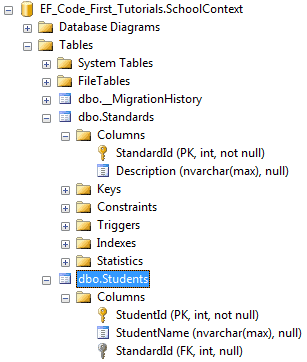
As you can see in the above code, Student class includes foreign key StandardId, which is key property in Standard class. So now, Code First will create StandardId column in Students class as shown below.
ForeignKey attribute overrides this convention. You can have a different name of a foreign key property name than the primary key of a dependent class.
public class Student

{

    public Student()

    {

    }

    public int StudentID { get; set; }

    public string StudentName { get; set; }

    //Foreign key for Standard

    public int StandardRefId { get; set; }

    [ForeignKey("StandardRefId")]

    public Standard Standard { get; set; }

}

public class Standard

{

    public Standard()

    {

    }

    public int StandardId { get; set; }

    public string StandardName { get; set; }

    public ICollection<Student> Students { get; set; }

}
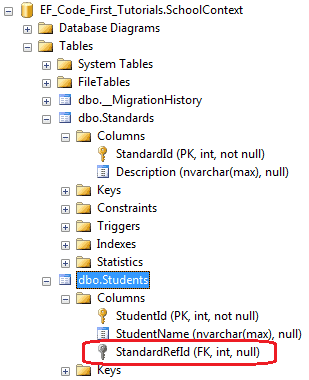
As you can see in the above example, Student class includes StandardRefId foreign key property name instead of StandardId. We specify it using ForeignKey attribute on Standard navigation property so that Code-First will consider StandardRefId as foreign key, as shown below.
ForeignKey attribute can be applied to key property to specify which navigation property it points to, as shown below.
public class Student

{

    public Student()

    {

    }

    public int StudentID { get; set; }

    public string StudentName { get; set; }

    //Foreign key for Standard

    [ForeignKey("Standard")]

    public int StandardRefId { get; set; }

    public Standard Standard { get; set; }

}

public class Standard

{

    public Standard()

    {

    }

    public int StandardId { get; set; }

    public string StandardName { get; set; }

    public ICollection<Student> Students { get; set; }

}
Thus, you can use ForeignKey attribute to give a different name to a foreign key property.
Entity Framework Code-First(9.9):DataAnnotations - ForeignKey Attribute的更多相关文章
- Entity Framework Code-First(9.6):DataAnnotations - StringLength Attribute
DataAnnotations - StringLength Attribute: StringLength attribute can be applied to a string type pro ...
- Entity Framework Code-First(9.5):DataAnnotations - MaxLength Attribute
DataAnnotations - MaxLength Attribute: MaxLength attribute can be applied to a string or array type ...
- Entity Framework Code-First(9.10):DataAnnotations - NotMapped Attribute
DataAnnotations - NotMapped Attribute: NotMapped attribute can be applied to properties of a class. ...
- Entity Framework Code-First(9.8):DataAnnotations - Column Attribute
DataAnnotations - Column Attribute: Column attribute can be applied to properties of a class. Defaul ...
- Entity Framework Code-First(9.7):DataAnnotations - Table Attribute
DataAnnotations - Table Attribute: Table attribute can be applied to a class. Default Code-First con ...
- Entity Framework Code-First(9.2):DataAnnotations - TimeStamp Attribute
DataAnnotations - TimeStamp Attribute: TimeStamp attribute can be applied to only one byte array pro ...
- Entity Framework Code-First(9.1):DataAnnotations - Key Attribute
DataAnnotations - Key Attribute: Key attribute can be applied to properties of a class. Default Code ...
- Entity Framework Code-First(9.4):DataAnnotations - Required Attribute
Required attribute can be applied to a property of a domain class. EF Code-First will create a NOT N ...
- Entity Framework Code-First(9.3):DataAnnotations - ConcurrencyCheck Attribute
ConcurrencyCheck Attribute: ConcurrencyCheck attribute can be applied to a property of a domain clas ...
随机推荐
- 【leetcode刷题笔记】Linked List Cycle
Given a linked list, determine if it has a cycle in it. Follow up:Can you solve it without using ext ...
- 前端开发笔记--flex布局
flex布局: 个人觉得flex布局比起传统布局要优先得多(主要是容易使用),缺点是IE10及以上版本才能使用,甚至某些属性只有在IE11才能使用(而且我发现凡是不兼容主要IE的坑来的多,不是说其他浏 ...
- python 常用的字符串方法
st = ' hello Kitty 'str = 'hello {name} {age}' #print(st.format(name='fadfa'))#常用的字符串方法print(st.coun ...
- Windows默认字符集_查询
https://zhidao.baidu.com/question/32462047.html Windows95. XP……7操作系统自带的都是GBK字符集(含2万余汉字),是完全兼容GB2312( ...
- Spark- RDD简介
Spark里面提供了一个比较重要的抽象——弹性分布式数据集(resilient distributed dataset),简称RDD.弹性:数据可大可小,可分布在内存或磁盘,当某台机器宕机时,能够按照 ...
- Tomcat翻译--Tomcat Web Application Deployment(Tomcat中部署web应用)
原文:http://tomcat.apache.org/tomcat-7.0-doc/deployer-howto.html Introduction(介绍) Deployment is the te ...
- Selenium-键盘操作
在webdriver的Keys类中提供了键盘所有的按键操作,当然也包括一些常见的组合操作如Ctrl+A全选),Ctrl+C(复制),Ctrl+V(粘贴).更多参考官方文档对应的编码http://sel ...
- Java企业微信开发_01_接收消息服务器配置
一.准备阶段 需要准备事项: 1.一个能在公网上访问的项目: 见:Java微信公众平台开发_01_本地服务器映射外网 2.一个企业微信账号: 去注册:(https://work.weixin.qq.c ...
- 直播推流实现RTMP协议的一些注意事项
—— 2017-2-12 更新RTMP 协议整理了一下,包括rtmp 消息类型,rtmp 如何分块,rtmp分块例子. 用脑图整理了一下,使用Xmind 打开,URL: https://github. ...
- D唐纳德和他的数学老师(华师网络赛)(二分匹配,最大流)
Time limit per test: 1.0 seconds Memory limit: 256 megabytes 唐纳德是一个数学天才.有一天,他的数学老师决定为难一下他.他跟唐纳德说:「现在 ...