
CentOS Linux 安装IPSec+L2TP
第二层隧道协议L2TP(Layer 2 Tunneling Protocol)是一种工业标准的Internet隧道协议,它使用UDP的1701端口进行通信。L2TP本身并没有任何加密,但是我们可以使用IPSec对L2TP包进行加密。L2TP VPN比PPTP VPN搭建复杂一些。
环境说明:
[root@l2tp_server ~]# cat /etc/redhat-release

CentOS release 6.9 (Final)

[root@l2tp_server ~]# uname -r

2.6.-696.10..el6.x86_64
1、需要先添加epel源:
rpm -ivh https://mirrors.aliyun.com/epel/epel-release-latest-6.noarch.rpm
yum -y install openswan ppp xl2tpd ##openswan是Linux系统上IPsec的一个实现 官网:http://www.openswan.org/
安装一些依赖包:
yum -y install make gcc gmp-devel bison flex lsof
2、配置IPsec
编辑配置文件/etc/ipsec.conf,只需要将最下面的"YOUR_SERVER_IP"改成你的公网IP即可:
[root@l2tp_server ~]# vim /etc/ipsec.conf

# /etc/ipsec.conf - Libreswan IPsec configuration file

# This file:  /etc/ipsec.conf

#

# Enable when using this configuration file with openswan instead of libreswan

#version

#

# Manual:     ipsec.conf.

# basic configuration

config setup

    # which IPsec stack to use, "netkey" (the default), "klips" or "mast".

    # For MacOSX use "bsd"

    protostack=netkey

    #

    # Normally, pluto logs via syslog. If you want to log to a file,

    # specify below or to disable logging, eg for embedded systems, use

    # the file name /dev/null

    # Note: SElinux policies might prevent pluto writing to a log file at

    #       an unusual location.

    logfile=/var/log/pluto.log

    #

    # The interfaces= line is only required for the klips/mast stack

    #interfaces="%defaultroute"

    #interfaces="ipsec0=eth0 ipsec1=ppp0"

    #

    # If you want to limit listening on a single IP - not required for

    # normal operation

    #listen=127.0.0.1

    #

    # Do not set debug options to debug configuration issues!

    #

    # plutodebug / klipsdebug = "all", "none" or a combation from below:

    # "raw crypt parsing emitting control kernel pfkey natt x509 dpd

    #  private".

    # Note: "crypt" is not included with "all", as it can show confidential

    #       information. It must be specifically specified

    # examples:

    # plutodebug="control parsing"

    # plutodebug="all crypt"

    # Again: only enable plutodebug or klipsdebug when asked by a developer

    #plutodebug=none

    #klipsdebug=none

    #

    # Enable core dumps (might require system changes, like ulimit -C)

    # This is required for abrtd to work properly

    # Note: SElinux policies might prevent pluto writing the core at

    #       unusual locations

    dumpdir=/var/run/pluto/

    #

    # NAT-TRAVERSAL support

    # exclude networks used on server side by adding %v4:!a.b.c./

    # It seems that T-Mobile in the US and Rogers/Fido in Canada are

    # using / as "private" address space on their wireless networks.

    # This range has never been announced via BGP (at least upto )

    virtual_private=%v4:10.0.0.0/,%v4:192.168.1.0/,%v4:172.16.0.0/,%v6:fd00::/,%v6:fe80::/

# For example connections, see your distribution's documentation directory,

# or https://libreswan.org/wiki/

#

# There is also a lot of information in the manual page, "man ipsec.conf"

#

# It is best to add your IPsec connections as separate files in /etc/ipsec.d/

include /etc/ipsec.d/*.conf

conn L2TP-PSK-NAT

   rightsubnet=vhost:%priv

   also=L2TP-PSK-noNAT

conn L2TP-PSK-noNAT

   authby=secret

   pfs=no

   auto=add

   keyingtries=5

   rekey=no

   ikelifetime=8h

   keylife=1h

   type=transport

   left=YOUR_SERVER_IP

   leftprotoport=17/1701

   right=%any

   rightprotoport=17/%any
3、设置预共享密钥PSK
[root@l2tp_server ~]# vim /etc/ipsec.secrets
YOUR_SERVER_IP.ADDRESS %any: PSK "YourSharedSecret"
4、修改包转发设置
[root@l2tp_server ~]# for each in /proc/sys/net/ipv4/conf/*; do echo 0 > $each/accept_redirects; echo 0 > $each/send_redirects; done
[root@l2tp_server ~]# echo 1 >/proc/sys/net/core/xfrm_larval_drop
修改内核设置,使其支持转发,编辑/etc/sysctl.conf文件:
[root@l2tp_server ~]# sed -i 's/net.ipv4.ip_forward = 0/net.ipv4.ip_forward = 1/' /etc/sysctl.conf
[root@l2tp_server ~]# sysctl -p
5、启动IPsec
/etc/init.d/ipsec start
查看系统IPSec安装和启动的正确性:
[root@l2tp_server ~]# ipsec verify
Verifying installed system and configuration files
Version check and ipsec on-path [OK]
Libreswan 3.15 (netkey) on 2.6.32-696.10.1.el6.x86_64
Checking for IPsec support in kernel [OK]
NETKEY: Testing XFRM related proc values
ICMP default/send_redirects [OK]
ICMP default/accept_redirects [OK]
XFRM larval drop [OK]
Pluto ipsec.conf syntax [OK]
Hardware random device [N/A]
Two or more interfaces found, checking IP forwarding [OK]
Checking rp_filter [ENABLED]
/proc/sys/net/ipv4/conf/default/rp_filter [ENABLED]
/proc/sys/net/ipv4/conf/lo/rp_filter [ENABLED]
/proc/sys/net/ipv4/conf/eth0/rp_filter [ENABLED]
/proc/sys/net/ipv4/conf/ppp0/rp_filter [ENABLED]
rp_filter is not fully aware of IPsec and should be disabled
Checking that pluto is running [OK]
Pluto listening for IKE on udp 500 [OK]
Pluto listening for IKE/NAT-T on udp 4500 [OK]
Pluto ipsec.secret syntax [OK]
Checking 'ip' command [OK]
Checking 'iptables' command [OK]
Checking 'prelink' command does not interfere with FIPSChecking for obsolete ipsec.conf options [OK]
Opportunistic Encryption [DISABLED]
没有FAILD报错就可以/
6、安装L2TP(xl2tpd和rp-l2tp) xl2tpd是由Xelerance Corporation维护的l2tpd应用。但是xl2tpd没有l2tp-control,需要从rp-l2tp这个里面提取。所以要装这两个软件包。
yum -y install libpcap-devel ppp policycoreutils #依赖软件
安装xl2tpd和rp-l2tp:
[root@localhost ~]# cd /usr/local/src/
[root@localhost src]# wget http://sourceforge.net/projects/rp-l2tp/files/rp-l2tp/0.4/rp-l2tp-0.4.tar.gz
[root@localhost src]# tar -zxvf rp-l2tp-0.4.tar.gz
[root@localhost src]# cd rp-l2tp-0.4
[root@localhost rp-l2tp-0.4]# ./configure  && make
[root@localhost rp-l2tp-0.4]# cp handlers/l2tp-control /usr/local/sbin/
[root@localhost rp-l2tp-0.4]# mkdir /var/run/xl2tpd/
[root@localhost rp-l2tp-0.4]# ln -s /usr/local/sbin/l2tp-control /var/run/xl2tpd/l2tp-control
##安装xl2tpd
[root@localhost ~]# cd /usr/local/src
[root@localhost src]# wget https://github.com/xelerance/xl2tpd/archive/v1.3.10.1.tar.gz
[root@localhost src]# tar xf v1.3.10.1.tar.gz && cd xl2tpd-1.3.10.1 && make && make install
7、编辑xl2tpd配置文件
[root@localhost ~]# mkdir /etc/xl2tpd/
[root@localhost ~]# vim /etc/xl2tpd/xl2tpd.conf
;

; This is a minimal sample xl2tpd configuration file for use

; with L2TP over IPsec.

;

; The idea is to provide an L2TP daemon to which remote Windows L2TP/IPsec

; clients connect. In this example, the internal (protected) network

; is 192.168.1.0/.  A special IP range within this network is reserved

; for the remote clients: 192.168.1.128/

; (i.e. 192.168.1.128 ... 192.168.1.254)

;

; The listen-addr parameter can be used if you want to bind the L2TP daemon

; to a specific IP address instead of to all interfaces. For instance,

; you could bind it to the interface of the internal LAN (e.g. 192.168.1.98

; in the example below). Yet another IP address (local ip, e.g. 192.168.1.99)

; will be used by xl2tpd as its address on pppX interfaces.

[global]
ipsec saref = yes

; listen-addr = 192.168.1.98

;

; requires openswan-2.5. or higher - Also does not yet work in combination

; with kernel mode l2tp as present in linux 2.6.+

; ipsec saref = yes

; Use refinfo of  if using an SAref kernel patch based on openswan 2.6. or

;  when using any of the SAref kernel patches for kernels up to 2.6..

; saref refinfo =

;

; force userspace = yes

;

; debug tunnel = yes

[lns default]

ip range = 192.168.20.2-192.168.20.220

local ip = 192.168.20.1

require chap = yes

refuse pap = yes

require authentication = yes

name = LinuxVPNserver

ppp debug = yes

pppoptfile = /etc/ppp/options.xl2tpd

length bit = yes
8、配置PPP
[root@localhost ~]# vim /etc/ppp/options.xl2tpd
require-mschap-v2

ms-dns 8.8.8.8
auth

mtu

mru

crtscts

hide-password

modem
lock

name l2tpd

proxyarp

lcp-echo-interval

lcp-echo-failure
9、设置拨号用户名和密码
[root@localhost ~]# vim /etc/ppp/chap-secrets
   # Secrets for authentication using CHAP

   # client        server  secret                  IP addresses

       test        l2tpd                     *
10、以debug方式启动l2tp,查看有无错误:
[root@localhost ~]# xl2tpd -D

xl2tpd[]: Enabling IPsec SAref processing for L2TP transport mode SAs

xl2tpd[]: IPsec SAref does not work with L2TP kernel mode yet, enabling force userspace=yes

xl2tpd[]: setsockopt recvref[]: Protocol not available

xl2tpd[]: Not looking for kernel support.

xl2tpd[]: xl2tpd version xl2tpd-1.3.10.1 started on localhost.localdomain PID:

xl2tpd[]: Written by Mark Spencer, Copyright (C) , Adtran, Inc.

xl2tpd[]: Forked by Scott Balmos and David Stipp, (C)

xl2tpd[]: Inherited by Jeff McAdams, (C)

xl2tpd[]: Forked again by Xelerance (www.xelerance.com) (C) -

xl2tpd[]: Listening on IP address 0.0.0.0, port
11、加入开机自启动
[root@localhost ~]# echo -e "/usr/local/sbin/xl2tpd\n/etc/init.d/ipsec restart\necho 1 >/proc/sys/net/core/xfrm_larval_drop"  >> /etc/rc.local
[root@localhost ~]# echo  "for each in /proc/sys/net/ipv4/conf/*; do echo 0 > $each/accept_redirects; echo 0 > $each/send_redirects; done" >> /etc/rc.local
12、添加iptables转发规则,如果服务端是在内网的话,需要在路由器上做1701端口的映射,以及添加到对应VPN网段的路由
iptables --table nat --append POSTROUTING --jump MASQUERADE
/etc/init.d/iptables save
/etc/init.d/iptables restart
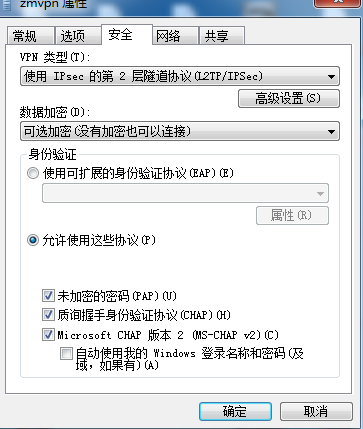
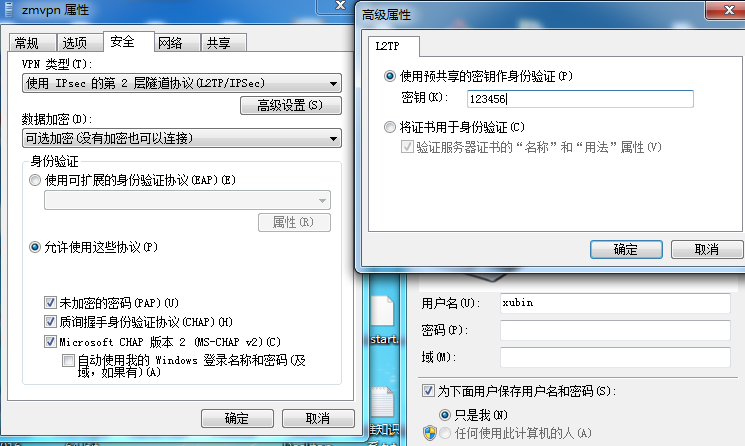
13、Windows端连接配置:
14、Win 10 连接vpn 输入用户名密码后没有反应的解决办法
单击开始—>运行,键入regedit,点击确定找到下面的注册表项 HKEY_LOCAL_MACHINE\System\CurrentControlSet\Services\Rasman\Parameters
在编辑菜单上,单击新建DWORD值
在名称框中键入“ProhibitIpSec”
在数值数据框中,键入1、然后确定’
继续找到下面的注册表项
HKEY_LOCAL_MACHINE\SYSTEM\CurrentControlSet\Services\PolicyAgent
新建一个DWORD类型的键AssumeUDPEncapsulationContextOnSendRule值为2
然后重启计算机。
CentOS Linux 安装IPSec+L2TP的更多相关文章
- CentOS Linux VPS安装IPSec+L2TP VPN
CentOS Linux VPS安装IPSec+L2TP VPN 时间 -- :: 天使羊波波闪耀光芒 相似文章 () 原文 http://www.live-in.org/archives/818.h ...
- CentOS Linux安装python3
本文的方法是在CentOS上新装了python3,如果本机安装了python2则保留,因为可能有程序依赖目前的python2环境,比如yum!!!!! 一.安装python3.7 1. 安装依赖环境 ...
- [转]CENTOS LINUX安装并使用NFS共享文件
FROM :http://www.qiansw.com/centos-linux-nfs.html NFS是linux常用的一种文件分享工具. 下面介绍安装及使用方法. CentOS 5.5 yum ...
- Docker 安装入门 Centos Linux安装Docker 部署mysql
这次购买了阿里云云服务器,并且安装了Centos 7.5 学习使用Docker, 确认版本信息 Docker 运行在 CentOS 7 上,要求系统为64位.系统内核版本为 3.10 以上. Dock ...
- centos linux安装telnet 过程及问题(源于内部tomcat网站,外部无法访问)
首先本地没有telnet客户端及服务器 root权限下安装 yum install telnet yum install telnet-server vi /etc/xinetd.d/telnet 这 ...
- CentOS/Linux安装VNCserver
VNC全称是Virtual Network Computing,属于远程控制类软件.其优点是支持跨操作系统的远程图形化控制.在日常工作中,服务器常常是存在机房,不可能每次需要图形界面操作就跑到机房,因 ...
- CentOs linux安装SVN服务
SVN服务器有2种运行方式:1.独立服务器(例如:svn://xxx.com/xxx):2.借助apache (例如:http://svn.xxx.com/xxx):为了不依赖apache,我选择 ...
- CentOs Linux 安装MySql服务失败 安装需要依靠包error:Failed dependencies
[root@sh158-xen data]#rpm -ivh MySQL-server-5.5.24-1.linux2.6.x86_64.rpm error: Failed dependencies: ...
- mac centos linux 安装PHP扩展 INTL(国际化) ———— error: 'ext/standard/php_smart_str.h'
PHP简单源码安装扩展 五个步骤: 详细说明下: cd /fujieace/php7.0/ext/intl:#进入INTL扩展目录? 在编译扩展时候需要phpize准备环境,准备程序需要获取这个目录的 ...
随机推荐
- 【C#】=>符号的使用
Lambda表达式.Lambda表达式是C#3.0的新内容,如果您之前学习的C#2.0,不认识也就不奇怪了.给您举个例子.例如,我定义一个委托:delegate int Method(int a, i ...
- 在loader程序中涉及到的CPU模式切换
在实模式下开启4GB的物理内存地址寻址(称之为Big Real Mode) 通过A20快速门(Fast Gate)修改0x90端口的数据, 对其进行置位(类似于打开一个开关), 开启 使用CLI汇编指 ...
- zk小结
一 ZooKeeper功能 1.文件系统 2.通知机制 二 Zookeeper文件系统 每个子目录项都被称作为znode,和文件系统一样,我们能够自由的增加.删除znode,在一个znode下增加.删 ...
- 使用 ViS2005 进行单元测试
1. 新建一个空白解决方案,命名为"单元测试- 01"吧. 2.在该解决方案下创建一个类库,作为此次单元测试的测试对象:我们就创建一个数学类(用于实现运算的简单类).命名为&quo ...
- log4net 最快速体验
本文供实习司机快速上手log4net最基本功能,共4步,3分钟搞定. 一.添加log4net.dll引用,可使用nuget安装或直接引用文件 二.添加配置 在app.config或web.config ...
- 映射部署tomcat
近期遇到问题总结[映射部署]2017年10月03日 10:16:54 守望dfdfdf 阅读数:108更多个人分类: Java知识编辑版权声明:本文为博主原创文章,转载请注明文章链接. https:/ ...
- MobaXterm连接远程Linux服务器
MobaXterm是一个X服务器和一组的Unix命令(GNU/ Cygwin的)封装在一个单一的便携式exe文件的增强终端. MobaXterm包括一个巨大的multitab原生的Windows终端. ...
- 《Unity預計算即時GI》笔记:三、Clusters和总结
Clusters 叢集,透過修改叢集(Clusters)也是一個降低Unity預計算流程所需要執行的工作數量的好方法.降低叢集數量也能提高執行時的效能. 當採用PRGI來計算場景光照時,Unity會簡 ...
- 几幅手稿讲解CNN
学习深度神经网络方面的算法已经有一段时间了,对目前比较经典的模型也有了一些了解.这种曾经一度低迷的方法现在已经吸引了很多领域的目光,在几年前仅仅存在于研究者想象中的应用,近几年也相继被深度学习方法实现 ...
- sql2012,返回数据多时不走索引
当数据达到一定值时,都会走表扫描旧版如SQL2005时就有计算选择性的比例为 满足条件的行数/总行数<=0.7181,会走索引,其它会走表扫描有兴趣可以自己去不同版本中去测试 Roy Wu(吴熹 ...