
Vuex基础-Mutation
借助官网的一张图,更改 Vuex 的 store 中的状态的唯一方法是提交 mutation。不可以直接对其进行赋值改变。需要注意的是,mutations只能做一些同步的操作。


代码结构:

index.js:
import Vue from 'vue'

import Vuex from 'vuex'

import state from "./state"

import getters from './getters'

import mutations from "./mutations"

import actions from "./actions"

import user from './module/user'

Vue.use(Vuex)

export default new Vuex.Store({

  state,

  getters,

  mutations,

  actions,

  modules: {

    user

  }

})
mutations.js
const mutations = {

  SET_APP_NAME(state, params) {

    //若params是对象格式

    state.appName = params.appName;

    //若params是字符串格式

    //state.appName = params;

  }

}

export default mutations;
state.js:
const state = {

  appName:'admin'

}

export default state
user.js:
const state = {

  //

  userName:'Caoqi'

}

const getters = {

  firstLetter: (state) => {

    return state.userName.substr(0, 1)

  }

}

const mutations = {

  //

  SET_USER_NAME(state, params) {

    state.userName = params.userName;

  }

}

const actions = {

  //

}

export default {

  //namespaced:true,//有利于模块更加密闭,不受外界的干扰

  state,

  getters,

  mutations,

  actions

}
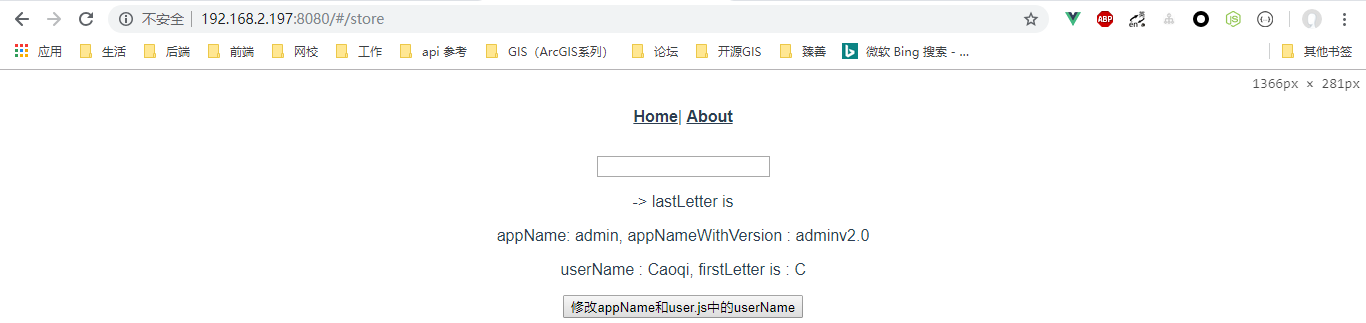
下面通过mutations.js修改state.js中的appName值,修改之前页面显示效果如下图所示,此时appName值为admin
store.vue代码:
<template>
<div>
<a-input :value="inputValue" @input="handlerInput"></a-input>
<p>{{ inputValue }} -> lastLetter is {{ inputValueLastLetter }}</p>
<p>appName: {{ appName }}, appNameWithVersion : {{ appNameWithVersion }}</p>
<p>userName : {{ userName }}, firstLetter is : {{ firstLetter }}</p>
<button @click="handleChangeAppName">修改appName和user.js中的userName</button>
</div>
</template>
<script>
import AInput from "_c/AInput.vue";
import AShow from "_c/AShow.vue";
//变量的解构赋值
import { mapState, mapGetters } from "vuex";
import { stat } from "fs";
export default {
name: "store",
data() {
return {
inputValue: ""
};
},
components: {
AInput: AInput,
AShow: AShow
},
computed: {
//ES6展开操作符 mapState展开会形成一个对象 使用对象展开运算符将此对象混入到外部对象中
...mapState({
appName: state => state.appName,
userName: state => state.user.userName
}),
// 使用对象展开运算符将 getter 混入 computed 对象中
// ...mapGetters(["appNameWithVersion"]),
appNameWithVersion() {
//通过属性访问getters,Getter 会暴露为 store.getters 对象,可以以属性的形式访问这些值:
return this.$store.getters.appNameWithVersion;
},
...mapGetters(["firstLetter"]),
inputValueLastLetter() {
return this.inputValue.substr(-1, 1);
}
},
methods: {
handlerInput(val) {
this.inputValue = val;
},
handleChangeAppName() {
//可以在组件中使用this.$store.commit('xxx')提交 mutation
//第一种修改appName的写法
//this.$store.commit("SET_APP_NAME", "newAppName");
//第二种修改appName的写法
this.$store.commit({
type: "SET_APP_NAME",
appName: "newAppName"
}); this.$store.commit({
type: "SET_USER_NAME",
userName: "shuyujie"
});
}
}
};
</script>
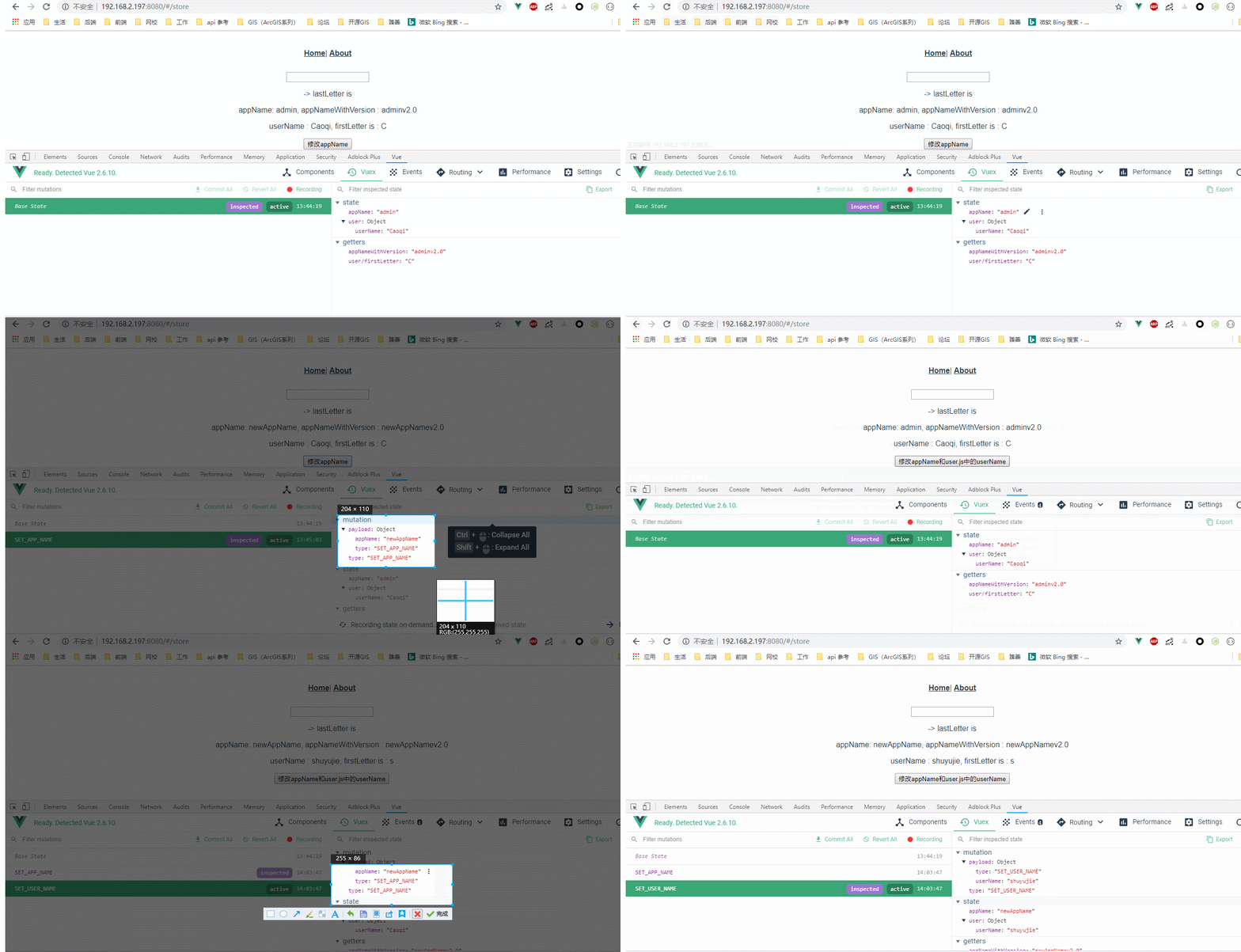
效果图:
还可以借助于在组件中提交 Mutation来实现,效果是一样的:
<template>

  <div>

    <a-input :value="inputValue" @input="handlerInput"></a-input>

    <p>{{ inputValue }} -> lastLetter is {{ inputValueLastLetter }}</p>

    <p>appName: {{ appName }}, appNameWithVersion : {{ appNameWithVersion }}</p>

    <p>userName : {{ userName }}, firstLetter is : {{ firstLetter }}</p>

    <button @click="handleChangeAppName">修改appName和user.js中的userName</button>

  </div>

</template>

<script>

import AInput from "_c/AInput.vue";

import AShow from "_c/AShow.vue";

//变量的解构赋值

import { mapState, mapGetters, mapMutations } from "vuex";

import { stat } from "fs";

export default {

  name: "store",

  data() {

    return {

      inputValue: ""

    };

  },

  components: {

    AInput: AInput,

    AShow: AShow

  },

  computed: {

    //ES6展开操作符 mapState展开会形成一个对象 使用对象展开运算符将此对象混入到外部对象中

    ...mapState({

      appName: state => state.appName,

      userName: state => state.user.userName

    }),

    // 使用对象展开运算符将 getter 混入 computed 对象中

    // ...mapGetters(["appNameWithVersion"]),

    appNameWithVersion() {

      //通过属性访问getters,Getter 会暴露为 store.getters 对象,可以以属性的形式访问这些值:

      return this.$store.getters.appNameWithVersion;

    },

    ...mapGetters(["firstLetter"]),

    inputValueLastLetter() {

      return this.inputValue.substr(-1, 1);

    }

  },

  methods: {

    handlerInput(val) {

      this.inputValue = val;

    },

    //

   ...mapMutations([

     "SET_USER_NAME", //将 `this.SET_USER_NAME()` 映射为 `this.$store.commit('SET_USER_NAME')`

     "SET_APP_NAME"//将 `this.SET_APP_NAME()` 映射为 `this.$store.commit('SET_APP_NAME')`

   ]),

    handleChangeAppName() {

      this.SET_APP_NAME({

        appName: "newAppName"

      });

      this.SET_USER_NAME({

        userName: "shuyujie"

      });

    }

  }

};

</script>
若要给state对象增加属性,则需要使用vue.set方法:
import vue from 'vue'

const mutations = {

  SET_APP_NAME(state, params) {

    //若params是对象格式

    state.appName = params.appName;

    //若params是字符串格式

    //state.appName = params;

  },

  SET_APP_VERSION(state) {

    vue.set(state, 'appVersion', 'v100.0')

    //state.appVersion = 'v2.0'

  }

}

export default mutations;
此时store.vue组件的代码如下,增加了对state对象增加属性的commit方法:
<template>

  <div>

    <a-input :value="inputValue" @input="handlerInput"></a-input>

    <p>{{ inputValue }} -> lastLetter is {{ inputValueLastLetter }}</p>

    <p>appName: {{ appName }}, appNameWithVersion : {{ appNameWithVersion }}</p>

    <p>userName : {{ userName }}, firstLetter is : {{ firstLetter }}</p>

    <button @click="handleChangeAppName">修改appName和user.js中的userName</button>

    <p>动态给state增加appVersion: {{ appVersion }}</p>

  </div>

</template>

<script>

import AInput from "_c/AInput.vue";

import AShow from "_c/AShow.vue";

//变量的解构赋值

import { mapState, mapGetters, mapMutations } from "vuex";

import { stat } from "fs";

export default {

  name: "store",

  data() {

    return {

      inputValue: ""

    };

  },

  components: {

    AInput: AInput,

    AShow: AShow

  },

  computed: {

    //ES6展开操作符 mapState展开会形成一个对象 使用对象展开运算符将此对象混入到外部对象中

    ...mapState({

      appName: state => state.appName,

      appVersion: state => state.appVersion,

      userName: state => state.user.userName

    }),

    // 使用对象展开运算符将 getter 混入 computed 对象中

    // ...mapGetters(["appNameWithVersion"]),

    appNameWithVersion() {

      //通过属性访问getters,Getter 会暴露为 store.getters 对象,可以以属性的形式访问这些值:

      return this.$store.getters.appNameWithVersion;

    },

    ...mapGetters(["firstLetter"]),

    inputValueLastLetter() {

      return this.inputValue.substr(-1, 1);

    }

  },

  methods: {

    handlerInput(val) {

      this.inputValue = val;

    },

    //

    ...mapMutations([

      "SET_USER_NAME", //将 `this.SET_USER_NAME()` 映射为 `this.$store.commit('SET_USER_NAME')`

      "SET_APP_NAME"//将 `this.SET_APP_NAME()` 映射为 `this.$store.commit('SET_APP_NAME')`

      ]),

    handleChangeAppName() {

      this.SET_APP_NAME({

        appName: "newAppName"

      });

      this.SET_USER_NAME({

        userName: "shuyujie"

      });

      this.$store.commit('SET_APP_VERSION')

    }

  }

};

</script>
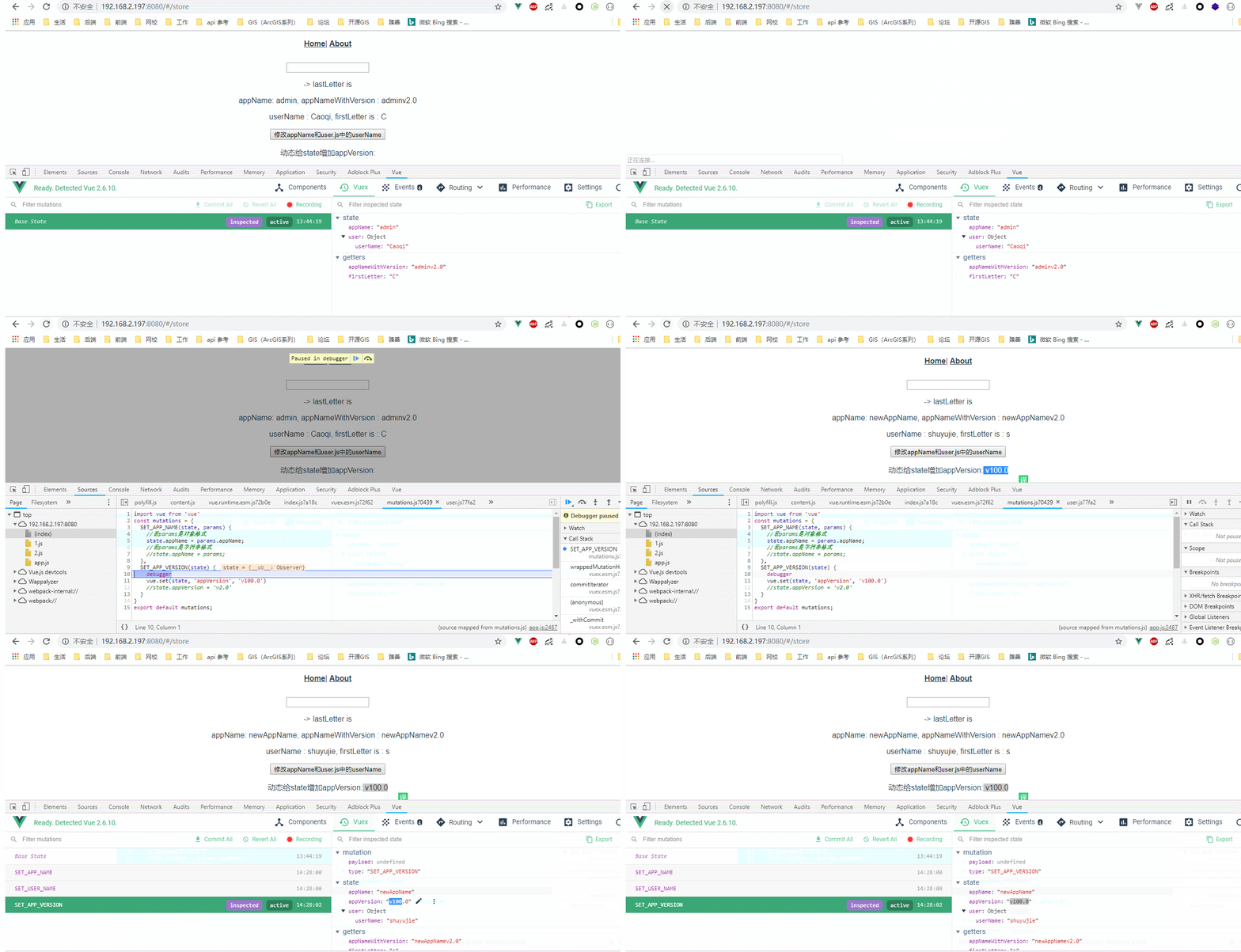
效果图如下所示:
Vuex基础-Mutation的更多相关文章
- Vuex 基础
其他章节请看: vue 快速入门 系列 Vuex 基础 Vuex 是 Vue.js 官方的状态管理器 在vue 的基础应用(上)一文中,我们已知道父子之间通信可以使用 props 和 $emit,而非 ...
- vuex 基础:教程和说明
作者注:[2016.11 更新]这篇文章是基于一个非常旧的 vuex api 版本而写的,代码来自于2015年12月.但是,它仍能针对下面几个问题深入探讨: vuex 为什么重要 vuex 如何工作 ...
- Vuex基础-Module
官方API地址:https://vuex.vuejs.org/zh/guide/modules.html 前面几节课写的user.js就称为一个module,这样做的原因是:由于使用单一状态树,应用的 ...
- Vuex基础-Action
在文章开始之前,再次强调一句:Vuex会把getter mutations action不管是在模块定义的还是在根级别定义的 都会注册在全局 官网API地址:https://vuex.vuejs.or ...
- 前端vuex基础入门
vuex简介 是一个专门为vue.应用程序开的状态管理模式 它采用集中式存储管理应用的所有组件的状态 (类似于全局变量) 并以相应的规则保证以一种可预测的方式发生改变(相应式变化) 应用场景 多个视图 ...
- Vuex之Mutation
[前言] 数据在页面是获取到了,但是如果需要修改count值怎么办?更改 Vuex 的 store 中的状态的唯一方法是提交 mutation.Vuex 中的 mutation 非常类似于事件:每个 ...
- vuex基础入门
Vuex简介 vuex的安装和组成介绍 [外链图片转存失败(img-nWQUUuyh-1565273314232)(https://upload-images.jianshu.io/upload_im ...
- Vuex基础 -01 -实现简易计数器 -支持 加数/ 减数/ 奇数再加/ 异步加法(setTimeout 1000ms) -单组件演示语法
Vuex 的结构图 工程组织 Vuex的核心管理程序 store.js /* vuex的核心管理程序 */ import Vue from 'vue' import Vuex from 'vuex' ...
- [Vuex系列] - Mutation的具体用法
更改 Vuex 的 store 中的状态的唯一方法是提交 mutation.Vuex 中的 mutation 非常类似于事件:每个 mutation 都有一个字符串的 事件类型 (type) 和 一个 ...
随机推荐
- swagger2使用日志
------------------------------------------------------------------------------------ 安装.配置.使用 参考:htt ...
- 移动测试之appium+python 导出报告(六)
下载 HTMLTestRunner.py python3可以参考这个地址 这是针对Python2.7版本 test.py from appium import webdriver import tim ...
- (转)Rsync 排错案例解析
Rsync 排错案例解析 原文:http://blog.51cto.com/irow10/1827306 错误一. 执行计划任务的备份脚本后没有看到备份的文件 1.首先查看crontab日志是否执行文 ...
- PV、UV、VV,CV的含义
其中VV和CV是播放类指标,PV和UV是浏览类指标. 1. 播放类指标 VV(Video View,播放数),是指在一个统计周期内,视频被打开的次数之和. CV(Connect Views,内容播放数 ...
- Kudu1.1.0 、 Kudu1.2.0 Kudu1.3.0的版本信息异同比较
不多说,直接上干货! Kudu1.1.0 新特性 python API升级,具备JAVA C++client一样的功能(从0.3版本直接升级到1.1),主要的点如下: 1.1. 改进了Parial ...
- verilog if语句
a.基本形式 1) if(表达式) 语句1: 2)if(表达式) 语句1: else 语句1 3) if(表达式1) 语句1: else if(表达式2) 语句2: else if(表达式3) ...
- contiki源码阅读之mmem.c
上次我们说了list,这次我们就借着mmem.c的代码来用一下这个链表. 代码目录是./core/lib/mmem.c 结构体定义如下 struct mmem { struct mmem *next; ...
- 使用Nginx、Keepalived构建文艺负载均衡
面对网站服务器端负载增大的问题,是"拿15万¥买一台服务器"来解决,还是靠"加三倍服务器"来解决?还是用其它一些办法? 对于一个访问量日益增加的网站架构而言,从 ...
- HDU 4738——Caocao's Bridges——————【求割边/桥的最小权值】
Caocao's Bridges Time Limit:1000MS Memory Limit:32768KB 64bit IO Format:%I64d & %I64u S ...
- js弹出页面
建立一个HTML文件,输入以下代码就能弹出页面 <!DOCTYPE html> <html lang="en"> <head> <meta ...