
Python数字、字符串
1. 数字
- byte
在python3中最重要的特性是对文本和二进制数据做了更加清晰的区分,python3不会以任意隐式方式混用字节型和字符型,也因此在python3中不能拼接字符串和字节包(python2中可以,会自动进行转换),也不能在字节包中搜索字符串,也不能将字符串传入参数为字节包的函数。
需要注意的是,在网络数据传输过程中,python2可以通过字符串(string)方式传输,但是python3只能通过二进制(bytes)方式来传输,因此要对传输文本进行转换。
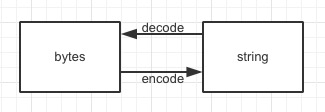
String与bytes转换:
sng = "人生苦短"

b_sng = sng.encode(encoding='utf-8')

print("byte:",b_sng)

s_sng = b_sng.decode(encoding="utf-8")

print("str:",s_sng)

#string类型---->byte类型  --encode

#byte类型 ----->string类型 --decode

#encode()和decode()方法中默认了编码为utf-8,建议将编码加上。

'''

结果:

byte: b'\xe4\xba\xba\xe7\x94\x9f\xe8\x8b\xa6\xe7\x9f\xad'

str: 人生苦短

'''
- 整型
i = 1

print(type(i))

'''

<class 'int'>

'''
- 浮点型
f = 3.0

print(type(f))

'''

<class 'float'>

'''
- 复数类型
c = 3+4j

print(type(c))

'''

<class 'complex'>

'''
- 布尔型
b = True

print(type(b))

b = False

print(type(b))

if 1 :

    print("1为True")

if 0 :

    print("0为Flase")

'''

<class 'bool'>

<class 'bool'>

1为True

'''
使用python不需要声明变量类型,由python内置的基本数据类型来管理变量,在程序后台实现数值与类型的关联,以及类型的转换等操作。
2. String
python有三种字符串表示方式:单引号、双引号、三引号。单引号和双引号作用一样。三引号可以输入单引号、双引号或换行等字符。三引号的另一个用法是制作文档字符串。python的每个对象都有一个属性__doc__,这个属性用于描述该对象的作用。
#单引号

s = 'hello'

#双引号

s = "hello"

#单引号双引号

s = "I'm a student!"

print(s)

#三引号

s = '''he say:"hello!"

    '''

print(s)

#三引号说明注释

class Hello:

    ''' hello class '''

    def printHello():

        ''' print hello '''

        print("Hello world")

print("__doc__:",Hello.__doc__)

Hello.printHello()
字符串拼接的几种方法
#!/usr/bin/env python

# -*- coding:utf-8 -*-

'''

字符串拼接的几种方法

1.+

2.%s

3.{_name}

4.{0}

'''

print("====输入个人信息====")

name = input("name:")

age = input("age:")

job = input("job:")

#方法一:+拼接(不建议使用该方法,占内存)

info1 = '''

****'''+name+'''的个人信息****

姓名:'''+name+'''

年龄:'''+age+'''

工作:'''+job+'''

'''

print(info1)

#方法二:%s

info2 = '''

****%s的个人信息****

姓名:%s

年龄:%s

工作:%s

'''%(name,name,age,job)

print(info2)

#方法三:{_name}

info3 = '''

****{_name}的个人信息****

姓名:{_name}

年龄:{_age}

工作:{_job}

'''.format(_name=name,_age=age,_job=job)

print(info3)

#方法四:{0}

info2 = '''

****{0}的个人信息****

姓名:{0}

年龄:{1}

工作:{2}

'''.format(name,age,job)

print(info2)
字符串操作
def capitalize(self): # real signature unknown; restored from __doc__

        """

        S.capitalize() -> str

        Return a capitalized version of S, i.e. make the first character

        have upper case and the rest lower case.

        """

        return ""

#将首字母大写,其他变小写

s = 'hEello World'

print(s.capitalize())

'''

Heello world

'''

def casefold(self): # real signature unknown; restored from __doc__

        """

        S.casefold() -> str

        Return a version of S suitable for caseless comparisons.

        """

        return ""

#将字符串转换为小写

s = 'Hello wORLD'

print(s.casefold())

'''

hello world

'''

def center(self, width, fillchar=None): # real signature unknown; restored from __doc__

        """

        S.center(width[, fillchar]) -> str

        Return S centered in a string of length width. Padding is

        done using the specified fill character (default is a space)

        """

        return ""

s = 'hello'

print(s.center(10,'*'))

'''

--hello---

'''

def count(self, sub, start=None, end=None): # real signature unknown; restored from __doc__

        """

        S.count(sub[, start[, end]]) -> int

        Return the number of non-overlapping occurrences of substring sub in

        string S[start:end].  Optional arguments start and end are

        interpreted as in slice notation.

        """

        return 0

#计数

s = 'hello world'

print(s.count('s'))

print(s.count('o'))

print(s.count('o',5,10))

'''

0

2

1

'''

def encode(self, encoding='utf-8', errors='strict'): # real signature unknown; restored from __doc__

        """

        S.encode(encoding='utf-8', errors='strict') -> bytes

        Encode S using the codec registered for encoding. Default encoding

        is 'utf-8'. errors may be given to set a different error

        handling scheme. Default is 'strict' meaning that encoding errors raise

        a UnicodeEncodeError. Other possible values are 'ignore', 'replace' and

        'xmlcharrefreplace' as well as any other name registered with

        codecs.register_error that can handle UnicodeEncodeErrors.

        """

        return b""

#转换成二进制

s = '你好, world'

print(s.encode(encoding='utf-8'))

print()

'''

b'\xe4\xbd\xa0\xe5\xa5\xbd, world'

'''

def endswith(self, suffix, start=None, end=None): # real signature unknown; restored from __doc__

        """

        S.endswith(suffix[, start[, end]]) -> bool

        Return True if S ends with the specified suffix, False otherwise.

        With optional start, test S beginning at that position.

        With optional end, stop comparing S at that position.

        suffix can also be a tuple of strings to try.

        """

        return False

s = 'hello world'

print(s.endswith('ld'))

print(s.endswith('lo'))

print(s.endswith('lo',3,5))

'''

True

False

True

'''

def expandtabs(self, tabsize=8): # real signature unknown; restored from __doc__

        """

        S.expandtabs(tabsize=8) -> str

        Return a copy of S where all tab characters are expanded using spaces.

        If tabsize is not given, a tab size of 8 characters is assumed.

        """

        return ""

#将字符串中的tab制表符转换为空格,默认为8个空格

s = 'hello \t world'

print(s.expandtabs())

print(s.expandtabs(20))

'''

hello    world

hello                world

'''

def find(self, sub, start=None, end=None): # real signature unknown; restored from __doc__

        """

        S.find(sub[, start[, end]]) -> int

        Return the lowest index in S where substring sub is found,

        such that sub is contained within S[start:end].  Optional

        arguments start and end are interpreted as in slice notation.

        Return -1 on failure.

        """

        return 0

#查找是否包含某个字符,不包含返回-1

s = "hello world"

print(s.find('lo'))

print(s.find('lood'))

print(s.find('o',4,8))

print(s.find('o',5,8))

'''

3

-1

4

7

'''

def format(self, *args, **kwargs): # known special case of str.format

        """

        S.format(*args, **kwargs) -> str

        Return a formatted version of S, using substitutions from args and kwargs.

        The substitutions are identified by braces ('{' and '}').

        """

        pass

#字符串格式化

s = "h{0}llo w{1}rld "

print(s.format('e','o'))

s = "h{a}llo w{b}rld"

print(s.format(a='e',b='o'))

def format_map(self, mapping): # real signature unknown; restored from __doc__

        """

        S.format_map(mapping) -> str

        Return a formatted version of S, using substitutions from mapping.

        The substitutions are identified by braces ('{' and '}').

        """

        return ""

#字符串格式化

s = 'hello w{k1}rl{k2}'

print(s.format_map({'k1':'o','k2':'d'}))

def index(self, sub, start=None, end=None): # real signature unknown; restored from __doc__

        """

        S.index(sub[, start[, end]]) -> int

        Return the lowest index in S where substring sub is found,

        such that sub is contained within S[start:end].  Optional

        arguments start and end are interpreted as in slice notation.

        Raises ValueError when the substring is not found.

        """

        return 0

#查找下标

s = "hello world"

print(s[0:5])

print(s.index('o'))

print(s.index('o',4,20))

print(s.index('o',5,10))

print(s.index('lo'))

# print(s.index('p'))  #不存在则会报错ValueError: substring not found

def isalnum(self): # real signature unknown; restored from __doc__

        """

        S.isalnum() -> bool

        Return True if all characters in S are alphanumeric

        and there is at least one character in S, False otherwise.

        """

        return False

#判断字符串是否都是数字或者字母组成

s = 'helloworld'

s1 = '1234'

s2 = 'hel123'

s3 = '12 he'

s4 = '\t'

print(s.isalnum())

print(s1.isalnum())

print(s2.isalnum())

print(s3.isalnum())

print(s4.isalnum())

'''

True

True

True

False

False

'''

def isalpha(self): # real signature unknown; restored from __doc__

        """

        S.isalpha() -> bool

        Return True if all characters in S are alphabetic

        and there is at least one character in S, False otherwise.

        """

        return False

#判断字符串是否是字母组成

s = 'hello world'

s1 = '134he'

s2 = '234'

s3 = 'helloworld'

print(s.isalpha())

print(s1.isalpha())

print(s2.isalpha())

print(s3.isalpha())

'''

False

False

False

True

'''

def isdecimal(self): # real signature unknown; restored from __doc__

        """

        S.isdecimal() -> bool

        Return True if there are only decimal characters in S,

        False otherwise.

        """

        return False

#判断是字符串是否由十进制组成

s = 'hello'

s1 = '10'

print(s.isdecimal())

print(s1.isdecimal())

'''

False

True

'''

def isdigit(self): # real signature unknown; restored from __doc__

        """

        S.isdigit() -> bool

        Return True if all characters in S are digits

        and there is at least one character in S, False otherwise.

        """

        return False

#判断是否由数字构成

s = '1234h'

s1 = '123'

s2 = '3.14'

s3 = '-1'

print(s.isdigit())

print(s1.isdigit())

print(s2.isdigit())

print(s3.isdigit())

'''

False

True

False

False

'''

def isidentifier(self): # real signature unknown; restored from __doc__

        """

        S.isidentifier() -> bool

        Return True if S is a valid identifier according

        to the language definition.

        Use keyword.iskeyword() to test for reserved identifiers

        such as "def" and "class".

        """

        return False

#判断字符串是否由合法标识符组成(python合法标识符由数字、字母、_组成,不能数字开头)

s = '123ab'

s1 = '_123ab'

s2 = 'abc*'

s3 = '中文'

print(s.isidentifier())

print(s1.isidentifier())

print(s2.isidentifier())

print(s3.isidentifier())

'''

False

True

False

True

'''

def islower(self): # real signature unknown; restored from __doc__

        """

        S.islower() -> bool

        Return True if all cased characters in S are lowercase and there is

        at least one cased character in S, False otherwise.

        """

        return False

#判断字符串是否都是小写

s = 'hello world'

s1 = 'Hello world'

s2 = 'hello234'

s3 = '123'

print(s.islower())

print(s1.islower())

print(s2.islower())

print(s3.islower())

'''

True

False

True

False

'''

def isnumeric(self): # real signature unknown; restored from __doc__

        """

        S.isnumeric() -> bool

        Return True if there are only numeric characters in S,

        False otherwise.

        """

        return False

#判断字符串是否由数字组成

s = '3.14'

s1 = 'df123'

s2 = '434'

s3 = '-1'

print(s.isnumeric())

print(s1.isnumeric())

print(s2.isnumeric())

print(s3.isnumeric())

'''

False

False

True

False

'''

def isprintable(self): # real signature unknown; restored from __doc__

        """

        S.isprintable() -> bool

        Return True if all characters in S are considered

        printable in repr() or S is empty, False otherwise.

        """

        return False

#判断字符串中所有字符是否都属于可见字符

s = "\n hello \t"

print(s.isprintable())

s1 = "abc  123"

print(s1.isprintable())

'''

False

True

'''

def isspace(self): # real signature unknown; restored from __doc__

        """

        S.isspace() -> bool

        Return True if all characters in S are whitespace

        and there is at least one character in S, False otherwise.

        """

        return False

#判断字符串是否是空格

s = ' '

s1 = 'h'

s2 = ''

s3 = ' df  '

print(s.isspace())

print(s1.isspace())

print(s2.isspace())

print(s3.isspace())

'''

True

False

False

False

'''

def istitle(self): # real signature unknown; restored from __doc__

        """

        S.istitle() -> bool

        Return True if S is a titlecased string and there is at least one

        character in S, i.e. upper- and titlecase characters may only

        follow uncased characters and lowercase characters only cased ones.

        Return False otherwise.

        """

        return False

#判断是否是标题,即每个首字母大写

s = 'hello world'

s1 = ' Hello World'

print(s.istitle())

print(s1.istitle())

'''

False

True

'''

def isupper(self): # real signature unknown; restored from __doc__

        """

        S.isupper() -> bool

        Return True if all cased characters in S are uppercase and there is

        at least one cased character in S, False otherwise.

        """

        return False

#判断是否是大写

s = 'Hello '

s1 = 'HELLO '

print(s.isupper())

print(s1.isupper())

'''

False

True

'''

def join(self, iterable): # real signature unknown; restored from __doc__

        """

        S.join(iterable) -> str

        Return a string which is the concatenation of the strings in the

        iterable.  The separator between elements is S.

        """

        return ""

#用于把字符串用指定的符号链接起来,返回字符串格式

s = '123'

print('+'.join(s))

'''

1+2+3

'''

def ljust(self, width, fillchar=None): # real signature unknown; restored from __doc__

        """

        S.ljust(width[, fillchar]) -> str

        Return S left-justified in a Unicode string of length width. Padding is

        done using the specified fill character (default is a space).

        """

        return ""

s = 'hello'

print(s.ljust(10,'-'))  #默认空格补全

'''

hello-----

'''

def lower(self): # real signature unknown; restored from __doc__

        """

        S.lower() -> str

        Return a copy of the string S converted to lowercase.

        """

        return ""

#转换成小写

s = 'HeLLO,wOrLD'

print(s.lower())

'''

hello,world

'''

def lstrip(self, chars=None): # real signature unknown; restored from __doc__

        """

        S.lstrip([chars]) -> str

        Return a copy of the string S with leading whitespace removed.

        If chars is given and not None, remove characters in chars instead.

        """

        return ""

#去掉左边的空格或字符

s = '  \n \r \t hello world   '

print(s.lstrip())

'''

hello world

'''

def maketrans(self, *args, **kwargs): # real signature unknown

        """

        Return a translation table usable for str.translate().

        If there is only one argument, it must be a dictionary mapping Unicode

        ordinals (integers) or characters to Unicode ordinals, strings or None.

        Character keys will be then converted to ordinals.

        If there are two arguments, they must be strings of equal length, and

        in the resulting dictionary, each character in x will be mapped to the

        character at the same position in y. If there is a third argument, it

        must be a string, whose characters will be mapped to None in the result.

        """

        pass

#配合translate

def translate(self, table): # real signature unknown; restored from __doc__

        """

        S.translate(table) -> str

        Return a copy of the string S in which each character has been mapped

        through the given translation table. The table must implement

        lookup/indexing via __getitem__, for instance a dictionary or list,

        mapping Unicode ordinals to Unicode ordinals, strings, or None. If

        this operation raises LookupError, the character is left untouched.

        Characters mapped to None are deleted.

        """

        return ""

intab = "abcd"

outtab = "ABCD"

s = str.maketrans(intab,outtab)

print('abcdefg'.translate(s))

'''

ABCDefg

'''

def partition(self, sep): # real signature unknown; restored from __doc__

        """

        S.partition(sep) -> (head, sep, tail)

        Search for the separator sep in S, and return the part before it,

        the separator itself, and the part after it.  If the separator is not

        found, return S and two empty strings.

        """

        pass

#用sep将字符串切割成一个元组(包含sep),从做开始匹配,rpartition从右开始匹配

s = 'hello'

print(s.partition('e'))

print(s.partition('l'))

'''

('h', 'e', 'llo')

('he', 'l', 'lo')

'''

def replace(self, old, new, count=None): # real signature unknown; restored from __doc__

        """

        S.replace(old, new[, count]) -> str

        Return a copy of S with all occurrences of substring

        old replaced by new.  If the optional argument count is

        given, only the first count occurrences are replaced.

        """

        return ""

#替换

s = 'hello world'

print(s.replace('l','L'))

'''

heLLo worLd

'''

def rfind(self, sub, start=None, end=None): # real signature unknown; restored from __doc__

        """

        S.rfind(sub[, start[, end]]) -> int

        Return the highest index in S where substring sub is found,

        such that sub is contained within S[start:end].  Optional

        arguments start and end are interpreted as in slice notation.

        Return -1 on failure.

        """

        return 0

#查找最右边包含的字符串,不包含结尾

s = 'hello world'

print(s.rfind('l'))

print(s.rfind('l',0,9))

'''

9

3

'''

def rindex(self, sub, start=None, end=None): # real signature unknown; restored from __doc__

        """

        S.rindex(sub[, start[, end]]) -> int

        Return the highest index in S where substring sub is found,

        such that sub is contained within S[start:end].  Optional

        arguments start and end are interpreted as in slice notation.

        Raises ValueError when the substring is not found.

        """

        return 0

#查找最右边包含的字符串,不包含结尾

s = 'hello world'

print(s.rindex('o'))

print(s.rindex('o',1,7))

'''

7

4

'''

def rjust(self, width, fillchar=None): # real signature unknown; restored from __doc__

        """

        S.rjust(width[, fillchar]) -> str

        Return S right-justified in a string of length width. Padding is

        done using the specified fill character (default is a space).

        """

        return ""

s = 'hello world'

print(s.rjust(20,'-')) #默认补全空格

'''

---------hello world

'''

def rpartition(self, sep): # real signature unknown; restored from __doc__

        """

        S.rpartition(sep) -> (head, sep, tail)

        Search for the separator sep in S, starting at the end of S, and return

        the part before it, the separator itself, and the part after it.  If the

        separator is not found, return two empty strings and S.

        """

        pass

#用sep将字符串切割成一个元组(包含sep),右开始匹配

s = 'hello world'

print(s.rpartition('o'))

'''

('hello w', 'o', 'rld')

'''

def rsplit(self, sep=None, maxsplit=-1): # real signature unknown; restored from __doc__

        """

        S.rsplit(sep=None, maxsplit=-1) -> list of strings

        Return a list of the words in S, using sep as the

        delimiter string, starting at the end of the string and

        working to the front.  If maxsplit is given, at most maxsplit

        splits are done. If sep is not specified, any whitespace string

        is a separator.

        """

        return []

#切割字符串,默认以空格切割,从右开始,maxsplit表示切割几份

def split(self, sep=None, maxsplit=-1): # real signature unknown; restored from __doc__

        """

        S.split(sep=None, maxsplit=-1) -> list of strings

        Return a list of the words in S, using sep as the

        delimiter string.  If maxsplit is given, at most maxsplit

        splits are done. If sep is not specified or is None, any

        whitespace string is a separator and empty strings are

        removed from the result.

        """

        return []

#切割字符串,默认以空格切割,从左开始,maxsplit表示切割几份

s = 'hello worlod'

print(s.rsplit())  #['hello', 'worlod']

print(s.split())   #['hello', 'worlod'],这样rsplit和split看不出分别

print(s.rsplit('o',1))   #['hello worl', 'd'] 默认从右第一个'o'开始分割成两份

print(s.split('o',1))    #['hell', ' worlod'] 默认从左第一个'o'开始分割成两份

def rstrip(self, chars=None): # real signature unknown; restored from __doc__

        """

        S.rstrip([chars]) -> str

        Return a copy of the string S with trailing whitespace removed.

        If chars is given and not None, remove characters in chars instead.

        """

        return ""

#去除右边的空格

s = '   \t hello world     \t '

print(s.rstrip())

'''

     hello world

'''

def splitlines(self, keepends=None): # real signature unknown; restored from __doc__

        """

        S.splitlines([keepends]) -> list of strings

        Return a list of the lines in S, breaking at line boundaries.

        Line breaks are not included in the resulting list unless keepends

        is given and true.

        """

        return []

#根据按照行('\r', '\r\n', \n')分隔,,返回一个包含各行作为元素的列表,如果参数 keepends为False,不包含换行符,如果为 True,则保留换行符。

s = 'hello \n wor\rld'

print(s.splitlines())

print(s.splitlines(keepends=0))

print(s.splitlines(keepends=1))

print(s.splitlines(keepends=-1))

'''

['hello ', ' wor', 'ld']

['hello ', ' wor', 'ld']

['hello \n', ' wor\r', 'ld']

['hello \n', ' wor\r', 'ld']

'''

def startswith(self, prefix, start=None, end=None): # real signature unknown; restored from __doc__

        """

        S.startswith(prefix[, start[, end]]) -> bool

        Return True if S starts with the specified prefix, False otherwise.

        With optional start, test S beginning at that position.

        With optional end, stop comparing S at that position.

        prefix can also be a tuple of strings to try.

        """

        return False

#查看是否以某字符串开头

s = 'hello world'

print(s.startswith('H'))

print(s.startswith('he'))

'''

False

True

'''

def strip(self, chars=None): # real signature unknown; restored from __doc__

        """

        S.strip([chars]) -> str

        Return a copy of the string S with leading and trailing

        whitespace removed.

        If chars is given and not None, remove characters in chars instead.

        """

        return ""

#去掉左右两边的空格符(包含\n\r\t)

s = '   \t hello world  \n \r   \t '

print(s.strip())

'''

hello world

'''

def swapcase(self): # real signature unknown; restored from __doc__

        """

        S.swapcase() -> str

        Return a copy of S with uppercase characters converted to lowercase

        and vice versa.

        """

        return ""

#大小写互换

s = 'HEllo,WoRLd'

print(s.swapcase())

'''

heLLO,wOrlD

'''

def title(self): # real signature unknown; restored from __doc__

        """

        S.title() -> str

        Return a titlecased version of S, i.e. words start with title case

        characters, all remaining cased characters have lower case.

        """

        return ""

#转换为标题,即首字母大写,其他小写

s = 'he lLO wo rLD'

print(s.title())

'''

He Llo Wo Rld

'''

def upper(self): # real signature unknown; restored from __doc__

        """

        S.upper() -> str

        Return a copy of S converted to uppercase.

        """

        return ""

#转换为大写

s = 'HeLLO,world'

print(s.upper())

'''

HELLO,WORLD

'''

def zfill(self, width): # real signature unknown; restored from __doc__

        """

        S.zfill(width) -> str

        Pad a numeric string S with zeros on the left, to fill a field

        of the specified width. The string S is never truncated.

        """

        return ""

#返回长度为 width 的字符串,原字符串右对齐,前面填充0

s = 'hello world'

print(s.zfill(20))

print(s.zfill(5))

'''

000000000hello world

hello world

'''
Python数字、字符串的更多相关文章
- Python数据类型-----数字&字符串
Python数字类型 int类型表示的范围:-2147483648至2147483648之间,超出这个范围的数字即视为long(长整形) 在Python中不需要事先声明数据类型,它是根据具体的赋值来进 ...
- python 数字和字符串转换问题
一.python中字符串转换成数字 (1)import string tt='555' ts=string.atoi(tt) ts即为tt转换成的数字 转换为浮点数 string.atof(tt) ( ...
- python3.4学习笔记(二十二) python 在字符串里面插入指定分割符,将list中的字符转为数字
python3.4学习笔记(二十二) python 在字符串里面插入指定分割符,将list中的字符转为数字在字符串里面插入指定分割符的方法,先把字符串变成list然后用join方法变成字符串str=' ...
- Python基础之:数字字符串和列表
目录 简介 数字 字符串 字符串对象str 列表 简介 Python的主要应用是进行科学计算,科学计算的基础就是数字,字符串和列表.本文将会详细的给大家介绍一下这三个数据类型的使用情况. 数字 数字是 ...
- Python格式化字符串~转
Python格式化字符串 在编写程序的过程中,经常需要进行格式化输出,每次用每次查.干脆就在这里整理一下,以便索引. 格式化操作符(%) "%"是Python风格的字符串格式化操作 ...
- Python格式化字符串和转义字符
地址:http://blog.chinaunix.net/uid-20794157-id-3038417.html Python格式化字符串的替代符以及含义 符 号 说 明 ...
- Python基础-字符串格式化_百分号方式_format方式
Python的字符串格式化有两种方式: 百分号方式.format方式 百分号的方式相对来说比较老,而format方式则是比较先进的方式,企图替换古老的方式,目前两者并存.[PEP-3101] This ...
- python判断字符串
python判断字符串 s为字符串s.isalnum() 所有字符都是数字或者字母s.isalpha() 所有字符都是字母s.isdigit() 所有字符都是数字s.islower() 所有字符都是小 ...
- Python格式化字符串
在编写程序的过程中,经常需要进行格式化输出,每次用每次查.干脆就在这里整理一下,以便索引. 格式化操作符(%) "%"是Python风格的字符串格式化操作符,非常类似C语言里的pr ...
随机推荐
- 读经典——《CLR via C#》(Jeffrey Richter著) 笔记_值类型的装箱和拆箱(二)
[注意]:如果知道自己写的代码会造成编译器反复对一个值类型进行装箱,请改成用手动方式对值类型进行装箱. [好处]:代码会变得更小.更快. [例子]: using System; public seal ...
- Folyd算法(转+适合问题 )
Folyd算法适合多源最短路的求解问题(时间复杂度(O(n^3)),单源无负权值的问题适合Dijstra(O(n^2)) 小Hi强行装作没听到,继续说道:"这个算法的核心之处在于数学归纳法- ...
- 线段树 区间更新(更新区间[x,y]的值,再求任意区间[x,y]的和)
#1078 : 线段树的区间修改 时间限制:10000ms 单点时限:1000ms 内存限制:256MB 描述 对于小Ho表现出的对线段树的理解,小Hi表示挺满意的,但是满意就够了么?于是小Hi将问题 ...
- 需要了解的几个Java基础点
关键字 native:表示要调用非Java语言写函数,比如用C语言使用JNI实现的接口.比如windows环境的dll文件.举例:Object.hashcode() 位运算 << n:左移 ...
- Appium——appium之mac环境安装
一.安装brew:Homebrew是一款Mac OS平台下的软件包管理工具执行:/usr/bin/ruby -e "$(curl -fsSL https://raw.githubuserco ...
- servlet3
亿级流量架构 http://www.iteye.com/blogs/subjects/as-core servlet3.1对比 http://jinnianshilongnian.iteye.com/ ...
- 用NaviCat创建存储过程批量添加测试数据
打开navicat连接上数据库,然后打开左上角函数,新建一个函数. BEGIN DECLARE i int; --声明变量 DECLARE groupid int; set i=LAST_INSERT ...
- 查看正在运行的sql
SELECT [Spid] = session_id ,ecid ,[Database] = DB_NAME(sp.dbid) ,[User] = nt_username ,[Status] = er ...
- spark RDD运算机制
- A. Yet Another Problem with Strings 分块 + hash
http://codeforces.com/gym/101138/problem/A 感觉有一种套路就是总长度 <= 某一个数的这类题,大多可以分块 首先把集合串按长度分块,对于每一个询问串, ...