
Mysql开发实践:error while loading shared libraries: libaio解决方案
摘要:Mysql出现问题:error while loading shared libraries: libaio解决方案。
本文分享自华为云社区《Mysql出现问题:error while loading shared libraries: libaio解决方案》,作者: 小虚竹。
问题
初始化数据库时
mysqld --initialize --user mysql

报错:
mysqld: error while loading shared libraries: libaio.so.1: cannot open shared object file: No such file or directory
执行这行命令报错了,原因是:新的服务器环境,上面很多依赖都没有,所以安装软件的时候遇到一大堆小问题,解决它很简单,它缺少啥就安装啥。
解决方案
yum install -y libaio.so.1

又报错了:
Errors during downloading metadata for repository ‘epel’:

Status code: 404 for http://archives.fedoraproject.org/pub/archive/epel/8/Everything/x86_64/repodata/repomd.xml (IP: **)

Error: Failed to download metadata for repo ‘epel’: Cannot download repomd.xml: Cannot download repodata/repomd.xml: All mirrors were tried
原因是:第三方的镜像站中均已移除CentOS 8的源,Centos 8版本已停止更新相应依赖导致的,下载新的yum源即可搞定。
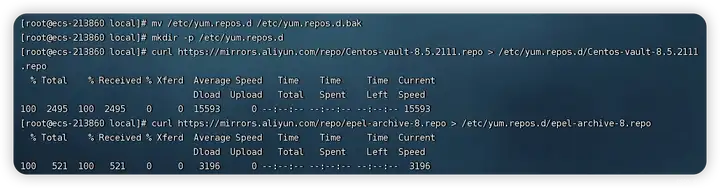
解决方案:备份之前的repo文件,命令:
mv /etc/yum.repos.d /etc/yum.repos.d.bak
创建源文件目录,命令:
mkdir -p /etc/yum.repos.d
下载新的yum源
curl https://mirrors.aliyun.com/repo/Centos-vault-8.5.2111.repo > /etc/yum.repos.d/Centos-vault-8.5.2111.repo

curl https://mirrors.aliyun.com/repo/epel-archive-8.repo > /etc/yum.repos.d/epel-archive-8.repo
如图所示操作:
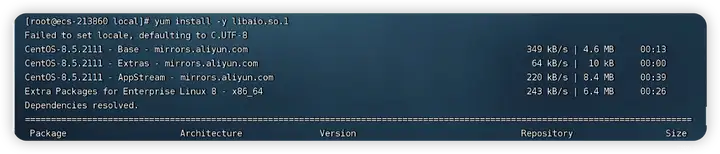
再下载依赖:
yum install -y libaio.so.1
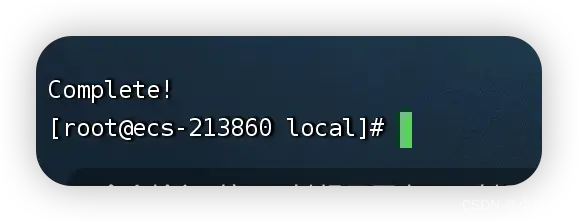
再安装
yum install -y libaio
提示成功后,初始化数据库:
mysqld --initialize --user mysql

Mysql开发实践:error while loading shared libraries: libaio解决方案的更多相关文章
- mysql 初始化报错 /usr/local/mysql/bin/mysqld:error while loading shared libraries :libaio.so.1
安装mysql在初始化的时候,出现/usr/local/mysql/bin/mysqld:error while loading shared libraries:libaio.so.1 :canno ...
- mysql初始化/usr/local/mysql/bin/mysqld: error while loading shared libraries: libnuma.so.1: cannot open shared object file: No such file or directory
[root@test153 ~]# /usr/local/mysql/bin/mysqld --initialize --user=mysql --basedir=/usr/local/mysql - ...
- error while loading shared libraries: libaio.so.1: cannot open shared object file: No such file or directory
编译出现如下错误: error while loading shared libraries: libaio.so.1: cannot open shared object file: No such ...
- 初始化mysql报错bin/mysqld: error while loading shared libraries: libaio.so.1: cannot open shared object file: No such file or directory
原因:缺少libaio.so.1 解决办法:安装即可 yum install -y libaio
- timesten报错:error while loading shared libraries: libaio.so.1: cannot open shared object file : No such file or directory
我遇到的这个错是因为缺少依赖:libaio 直接yum -y install libaio 然后重新安装就OK了
- mysql: error while loading shared libraries: libnuma.so
安装mysql后,执行初始化配置脚本,创建系统自带的数据库和表时报异常: [root@VM_0_12_centos mysql]# scripts/mysql_install_db --basedir ...
- ARM64架构下登录mysql出错:mysql: error while loading shared libraries: libncurses.so.5: cannot open shared object file:
Linux下登录mysql出错:mysql: error while loading shared libraries: libncurses.so.5: cannot open shared obj ...
- mysql: error while loading shared libraries: libmysqlclient.so.16
[root@host_41 mysql]# mysqlmysql: error while loading shared libraries: libmysqlclient.so.16: cannot ...
- MYSQL之 error while loading shared libraries: libtinfo.so.5: cannot open shared objectfile: No such f
环境:ubuntu18 登陆MYSQL时遇到错误:mysql: error while loading shared libraries: libtinfo.so.5: cannot open sha ...
- mysql初始化时报错bin/mysqld: error while loading shared libraries: libnuma.so.1: cannot open shared object file: No such file or directory的处理
问题描述: 今天新安装了一个linux虚拟机,然后安装mysql 5.7.21,在进行初始化的时候,报错 bin/mysqld: error : cannot open shared object f ...
随机推荐
- 【译】A unit of profiling makes the allocations go away
在 Visual Studio 17.8 Preview 2 中,我们更新了单元测试分析,允许你在性能分析器中使用任何可用的工具--而不仅仅是仪表工具.有了这个更改,可以很容易地快速分析孤立的小工作单 ...
- ELK7.x环境部署
1.Elasticsearch (ES)配置: 部署配置ES,需要配置JDK环境,JDK是Java语言的软件开发工具包: 下载JAVA jdk源码包: wget https://mirrors.yan ...
- Web Woeker和Shared Worker的使用以及案例
目录 1.前言 2.介绍 Web Worker 3.使用须知及兼容性 3.1.使用须知 3.2.兼容性 4.使用 Web Worker 4.1.创建 Web Worker 4.2.与主线程通信 4.3 ...
- 飞码LowCode前端技术:如何便捷配置出页面
简介 飞码是京东科技平台研发部研发的低代码产品,可使营销运营域下web页面快速搭建.本文将从三个方面来讲解如何便捷配置出页面,第一部分从数据.事件.业务支持三个方面进行分析,第二部分从模板与页面收藏与 ...
- SNN_TIPS
脉冲神经网络的研究思路: ANN2SNN 代表: 梯度下降法 代表: STDP 代表: 神经网络代差划分 以神经元实现功能为准: 优势 SNN是一个动态系统,在动态识别中发挥出色,比如语音识别和动态图 ...
- webpack配置局域网访问项目
要配置webpack允许局域网访问项目,你需要做以下几个步骤: 1. 在webpack配置文件中,找到devServer选项,并设置其属性`host`为`0.0.0.0`.这将允许其他设备通过局域 ...
- 文心一言 VS 讯飞星火 VS chatgpt (143)-- 算法导论12.1 3题
三.用go语言,设计一个执行中序遍历的非递归算法.(提示:一种容易的方法是使用栈作为辅助数据结构;另一种较复杂但比较简洁的做法是不使用栈,但要假设能测试两个指针是否相等.) 文心一言,代码正常运行: ...
- JAVAweek4
本周学习: 1.JAVA环境的搭建,包括JDK的下载,和classpath环境设置 2.*.java和*.class程序的运行 class Demo {public static void main( ...
- 【结对作业】第一周 | 学习体会day02
今天我们想要实现线路的查询 发现了几个错误 1 <%-- 下拉表单的命名使用错误,导致无法接收前端数值--%> 首先我们很少使用下拉表单,之前用的也忘了,然后格式出现了错误 2 遇到typ ...
- 基于DotNetty实现自动发布 - 项目的配置与发现
前言 上一篇,我们实现了基于 DotNetty 的通信基础模块的搭建,本篇,主要实现待发布 Web 项目的集成. 创建待发布项目 为了测试, 我创建了一个基于 .NET 4.8 的 Web 项目 Op ...