
【MicroPython】生成Q(string)符号表文件 - py\makeqstrdefs.py
- 脚本使用格式
python py/makeqstrdefs.py [command] [mode] [input-file] [output-directory] [output-file]
command: pp, split, cat
mode: qstr, compress
- 输入选项解析
if __name__ == "__main__":

    if len(sys.argv) < 6:

        print("usage: %s command mode input_filename output_dir output_file" % sys.argv[0])

        sys.exit(2)

    class Args:

        pass

    args = Args()

    args.command = sys.argv[1]

    if args.command == "pp":

        # 创建字典 {k:v,}

        named_args = {

            s: []

            for s in [

                "pp",

                "output",

                "cflags",

                "cxxflags",

                "sources",

                "changed_sources",

                "dependencies",

            ]

        }

        # 向字典k中追加v

        for arg in sys.argv[1:]:

            if arg in named_args:

                current_tok = arg

            else:

                named_args[current_tok].append(arg)

        if not named_args["pp"] or len(named_args["output"]) != 1:

            print("usage: %s %s ..." % (sys.argv[0], " ... ".join(named_args)))

            sys.exit(2)

        for k, v in named_args.items():

            # 构建类对象args

            setattr(args, k, v)

        preprocess()

sys.exit(0)- 文件预处理
def preprocess():

    # 选择源文件列表

    # 遍历列表args.changed_sources元素检查是否在列表args.dependencies中

    if any(src in args.dependencies for src in args.changed_sources):

        sources = args.sources

    elif any(args.changed_sources):

        sources = args.changed_sources

    else:

        sources = args.sources

    csources = []

    cxxsources = []

    # 归类收集文件

    for source in sources:

        if is_cxx_source(source):

            cxxsources.append(source)

        elif is_c_source(source):

            csources.append(source)

    try:

        os.makedirs(os.path.dirname(args.output[0]))

    except OSError:

        pass

    def pp(flags):

        def run(files):

            return subprocess.check_output(args.pp + flags + files)

        return run

    try:

        cpus = multiprocessing.cpu_count()

    except NotImplementedError:

        cpus = 1

    p = multiprocessing.dummy.Pool(cpus)

    with open(args.output[0], "wb") as out_file:

        for flags, sources in (

            (args.cflags, csources),

            (args.cxxflags, cxxsources),

        ):

            batch_size = (len(sources) + cpus - 1) // cpus

            chunks = [sources[i : i + batch_size] for i in range(0, len(sources), batch_size or 1)]

            for output in p.imap(pp(flags), chunks):

out_file.write(output)- 提取MP_QSTR_开头的字符串转换成Q(string)形式
def write_out(fname, output):

    if output:

        for m, r in [("/", "__"), ("\\", "__"), (":", "@"), ("..", "@@")]:

            fname = fname.replace(m, r)

        with open(args.output_dir + "/" + fname + "." + args.mode, "w") as f:

            f.write("\n".join(output) + "\n")

def process_file(f):

    re_line = re.compile(r"#[line]*\s\d+\s\"([^\"]+)\"")

    if args.mode == _MODE_QSTR:

        re_match = re.compile(r"MP_QSTR_[_a-zA-Z0-9]+")

    elif args.mode == _MODE_COMPRESS:

        re_match = re.compile(r'MP_COMPRESSED_ROM_TEXT\("([^"]*)"\)')

    output = []

    last_fname = None

    for line in f:

        if line.isspace():

            continue

        # match gcc-like output (# n "file") and msvc-like output (#line n "file")

        if line.startswith(("# ", "#line")):

            m = re_line.match(line)

            assert m is not None

            fname = m.group(1)

            if not is_c_source(fname) and not is_cxx_source(fname):

                continue

            if fname != last_fname:

                write_out(last_fname, output)

                output = []

                last_fname = fname

            continue

        # 新增非"#","#line"时使用给定的输出文件名

        else:

            last_fname = args.output_file

        for match in re_match.findall(line):

            if args.mode == _MODE_QSTR:

                name = match.replace("MP_QSTR_", "")

                output.append("Q(" + name + ")")

            elif args.mode == _MODE_COMPRESS:

                output.append(match)

    if last_fname:

        write_out(last_fname, output)

    return ""
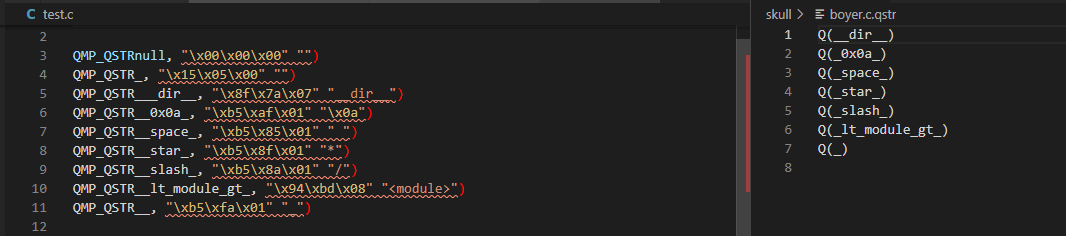
$ python py/makeqstrdefs.py split "qstr" test.c skull boyer.c
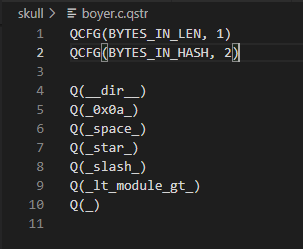
- 为了能供脚本py\makeqstrdata.py使用,需增加QCFG配置
def cat_together():

    import glob

    import hashlib

    # 构建MD5算法的hashlib对象

    hasher = hashlib.md5()

    all_lines = []

    outf = open(args.output_dir + "/out", "wb")

    # glob查找文件

    for fname in glob.glob(args.output_dir + "/*." + args.mode):

        with open(fname, "rb") as f:

            lines = f.readlines()

            all_lines += lines

    # 排序

    all_lines.sort()

    # 换行转换原来字符串

    all_lines = b"\n".join(all_lines)

    outf.write(all_lines)

    outf.close()

    hasher.update(all_lines)

    # hash值十六进制输出

    new_hash = hasher.hexdigest()

    # print(new_hash)

    old_hash = None

    try:

        with open(args.output_file + ".hash") as f:

            old_hash = f.read()

    except IOError:

        pass

    mode_full = "QSTR"

    if args.mode == _MODE_COMPRESS:

        mode_full = "Compressed data"

    if old_hash != new_hash:

        print(mode_full, "updated")

        try:

            # rename below might fail if file exists

            os.remove(args.output_file)

        except:

            pass

        os.rename(args.output_dir + "/out", args.output_file)

        with open(args.output_file + ".hash", "w") as f:

            f.write(new_hash)

    else:

        print(mode_full, "not updated")
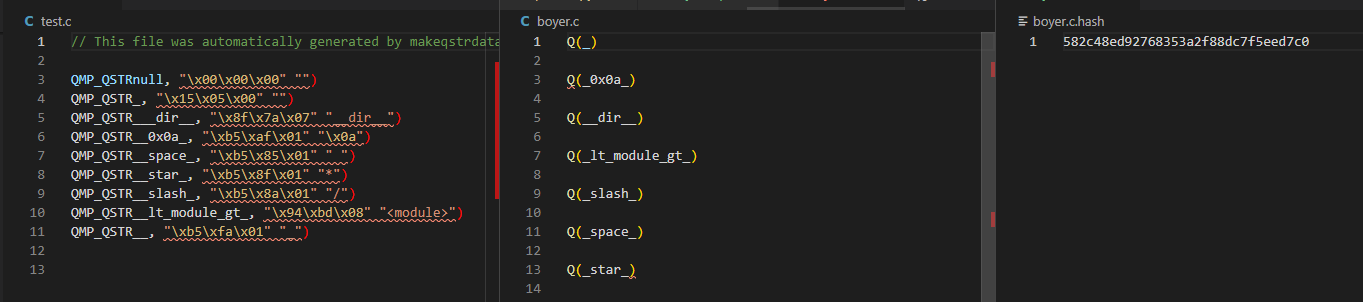
$ python py/makeqstrdefs.py cat "qstr" test.c skull boyer.c
【MicroPython】生成Q(string)符号表文件 - py\makeqstrdefs.py的更多相关文章
- (原创)Xilinx的ISE生成模块ngc网表文件
ISE中,右击“Synthesize”,选中“Process Properties”,将“Xilinx Specific Options:-iobuf”的对勾取消. 将取消模块的ioBuff,因为模块 ...
- 程序减肥,strip,eu-strip 及其符号表
程序减肥,strip,eu-strip 及其符号表 我们要给我们生成的可执行文件和DSO瘦身,因为这样可以节省更多的磁盘空间,所以我们移除了debug信息,移除了符号表信息,同时我们还希望万一出事了, ...
- GCC 符号表小结【转】
转自:https://blog.csdn.net/swedenfeng/article/details/53417085 版权声明:本文为博主原创文章,未经博主允许不得转载. https://blog ...
- IDA 与VC 加载符号表
将Windbg路径下的symsrv.yes 拷贝到ida 的安装目录,重新分析ntoskrnl.exe, 加载本地的符号表 添加环境变量 变量名:_NT_SYMBOL_PATH变量值:SRV*{$P ...
- ELF格式文件符号表全解析及readelf命令使用方法
http://blog.csdn.net/edonlii/article/details/8779075 1. 读取ELF文件头: $ readelf -h signELF Header: Magi ...
- mybatis根据表逆向自动化生成代码(自动生成实体类、mapper文件、mapper.xml文件)
.personSunflowerP { background: rgba(51, 153, 0, 0.66); border-bottom: 1px solid rgba(0, 102, 0, 1); ...
- [转载][FPGA]Quartus代码保护-生成网表文件
0. 简介 当项目过程中,不想给甲方源码时,该如何?我们可以用网表文件qxp或者vqm对资源进行保护. 下面讲解这两个文件的具体生成步骤: 1. 基本概念 QuartusII的qxp文件为Quartu ...
- c++的符号表的肤浅认识
符号表是编译期产生的一个hash列表,随着可执行文件在一起 示例程序 int a = 10; int b; void foo(){ static int c=100; } int main(){ in ...
- iOS 符号表恢复 & 逆向支付宝
推荐序 本文介绍了恢复符号表的技巧,并且利用该技巧实现了在 Xcode 中对目标程序下符号断点调试,该技巧可以显著地减少逆向分析时间.在文章的最后,作者以支付宝为例,展示出通过在 UIAlertVie ...
- 符号表 symbol table 符号 地址 互推
https://zh.wikipedia.org/wiki/符号表 https://en.wikipedia.org/wiki/Symbol_table 在计算机科学中,符号表是一种用于语言翻译器(例 ...
随机推荐
- Plant-Earth-wp
Earth 信息收集 开放了80,443 只能访问到443,试了试msf里面frado的远古rce都不成功.然后注意到有域名解析 添加到hosts里面再访问,当前页面有几串密文,经尝试在message ...
- ncurses 与 menu
ncurses 与 menu 一下位ncurses和菜单库menu的demo程序 #include <menu.h> #include <ncurses.h> #include ...
- 创新 = 颠覆?AI创新如何做大蛋糕
本文分享自华为云社区<创新 = 颠覆?AI创新如何做大蛋糕>,作者: 华为云PaaS服务小智 . 最近随着AI的风靡,各行各业都充斥着近乎疯狂的言论,"AI必将替代一切" ...
- 详解NLP和时序预测的相似性【附赠AAAI21最佳论文INFORMER的详细解析】
摘要:本文主要分析自然语言处理和时序预测的相似性,并介绍Informer的创新点. 前言 时序预测模型无外乎RNN(LSTM, GRU)以及现在非常火的Transformer.这些时序神经网络模型的主 ...
- 摆平各类目标检测识别AI应用,有它就够了!
摘要:在计算机视觉领域,CANN最新开源的通用目标检测与识别样例,通过其强大的可定制.可扩展性,为AI开发者们提供了良好编程选择. 本文分享自华为云社区<摆平各类目标检测识别AI应用,有它就够了 ...
- 火山引擎工具技术分享:用 AI 完成数据挖掘,零门槛完成 SQL 撰写
更多技术交流.求职机会,欢迎关注字节跳动数据平台微信公众号,并进入官方交流群 文 / DataWind 团队封声 在使用 BI 工具的时候,经常遇到的问题是:"不会 SQL 怎么生产加工 ...
- 使用 Kubeadm 部署 Kubernetes(K8S) 安装 -- 持久化存储(PV&PVC)
使用 Kubeadm 部署 Kubernetes(K8S) 安装 -- Ingress-Ngnix 使用 Kubeadm 部署 Kubernetes(K8S) 安装 -- 持久化存储(NFS网络存储) ...
- peewee update和save性能分析
背景 python项目中使用了peewee这款orm框架,在对数据库更新时有两种语法,分别是save和update方法.有同事说从peewee的日志来看,update比save更快,于是做了一个简单的 ...
- xv6book阅读 chapter1
xv6book主要研究了xv6如何实现它的类Unix接口,但是其思想和概念不仅仅适用于Unix.任何操作系统都必须将进程多路复用到底层硬件上,相互隔离进程,并提供受控制的进程间通信机制. 1 了解xv ...
- AI 黑科技,老照片修复,模糊变高清
大家好 最近闲逛,发现腾讯开源的老照片修复算法新出了V1.3的预训练模型,手痒试了一下. 我拿"自己"的旧照片试了一下,先看效果 GFPGAN FPGAN算法由腾讯PCG ARC实 ...