
NSPredicate 的使用
NSPredicate是什么?
NSPredicate 是预测的意思 但是我们常翻译成谓词
它可以干什么?
使用NSPredicate可以定义模糊查询条件 根据一定的条件 我们就可以从一个数组中快速找出 符合一定条件的元素对象
本次的示范我们沿用上次讲的 NSSortDescriptor 的使用 里面的代码 我们只需要稍微的修改一下 导航栏右边的按钮 为‘搜索年龄大于20的对象’ 然后再把点击左上角按钮的业务代码修改为如下:
- (IBAction)sortAge:(id)sender {

    NSPredicate *predicate = [NSPredicate predicateWithFormat:@"age>20"]; //创建NSPredicate对象 并定义查询条件

    self.datas =   [[self.datas filteredArrayUsingPredicate:predicate] mutableCopy]; //使用数组的filteredArrayUsingPredicate方法 获取符合我们指定条件的对象
   [self.tableView reloadData];

}
这个时候我们点击左上角的按钮 就可以查询出数组里面 年龄大于20的对象
除了 > 号之外 我们还可以用IN 查询两个数组的交集
我们新建一个程序 来测试IN 的用法 我们在ViewDidload方法里面 写入如下代码:
- (void)viewDidLoad {

    [super viewDidLoad];

    NSArray *array1 = [NSArray arrayWithObjects:@,@,@,@,@,@,@,@, nil];

    NSArray *array2 = [NSArray arrayWithObjects:@,@, nil];

    NSPredicate *predicate = [NSPredicate predicateWithFormat:@"SELF in%@",array2]; //SELF 代表本身 IN可以大写也可以小写
NSArray *temp = [array1 filteredArrayUsingPredicate:predicate]; //表示获取 array2 和 array1中的交集
NSLog(@"temp ====\n%@",temp); }
运行 打印结果为:
temp ====
(
4,
6
)
可以看到这两个数组的交集就是4和6 因为这两个数组中 都有4和6 这个元素
同时除了IN 之外 BETWEEN可以获取一定范围的值 示例代码如下:
- (void)viewDidLoad {

    [super viewDidLoad];
NSArray *array1 = [NSArray arrayWithObjects:@100,@20,@3,@4,@4,@6,@7,@1, nil];
    NSPredicate *predicate = [NSPredicate predicateWithFormat:@"SELF BETWEEN{1,20}"];

    NSArray *temp = [array1 filteredArrayUsingPredicate:predicate];

    NSLog(@"temp ====\n%@",temp);

}
上面的代码表示找出 值在1到20范围类的值包括首尾
打印结果如下:
temp ====
(
20,
3,
4,
4,
6,
7,
1
)
当然除了上面介绍的两个用法之外 还有其他的比较运算符>,<,==,>=,<=,!=
这里以等于号==为例:
- (void)viewDidLoad {

    [super viewDidLoad];

    NSArray *array1 = [NSArray arrayWithObjects:@,@,@,@,@,@,@,@, nil];

    NSPredicate *predicate = [NSPredicate predicateWithFormat:@"SELF ==6"];

    NSArray *temp = [array1 filteredArrayUsingPredicate:predicate];

    NSLog(@"temp ====\n%@",temp);

}
打印结果如下:
temp ====
(
6
)
同时还有以下与字符串操作相关的关键词 :
BEGINSWITH :以某个字符串开头
ENDSWITH :以某个字符串结尾
CONTAINS :是否包含某个字符串
同时这三个关键词后面还可以跟上一些格式符号 如:BEGINSWITH[cd] c表示不区分大小写 d表示不区分发音符号 cd就可以表示即不区分大小写 也不区分发音符号
- (void)viewDidLoad {

    [super viewDidLoad];

    NSArray *array1 = [NSArray arrayWithObjects:@"jack",@"anne",@"reserved",@"control" ,@"type",@"soure",@"version",nil];

    //查询出包含e这个字符的字符串

    NSPredicate *predicate = [NSPredicate predicateWithFormat:@"SELF CONTAINS[cd] 'E' "];

    NSArray *temp = [array1 filteredArrayUsingPredicate:predicate];

    NSLog(@"temp ====\n%@",temp);

}
打印结果如下:
temp ====
(
anne,
reserved,
type,
soure,
version
)
- (void)viewDidLoad {

    [super viewDidLoad];

    NSArray *array1 = [NSArray arrayWithObjects:@"jack",@"anne",@"reserved",@"control" ,@"type",@"soure",@"version",nil];

    //查询出以a这个字符开头的字符串

    NSPredicate *predicate = [NSPredicate predicateWithFormat:@"SELF BEGINSWITH[cd] 'a' "];

    NSArray *temp = [array1 filteredArrayUsingPredicate:predicate];

    NSLog(@"temp ====\n%@",temp);

}
打印结果如下:
temp ====
(
anne
)
- (void)viewDidLoad {

    [super viewDidLoad];

    NSArray *array1 = [NSArray arrayWithObjects:@"jack",@"anne",@"reserved",@"control" ,@"type",@"soure",@"version",nil];

    //查询出以e这个字符结尾的字符串

    NSPredicate *predicate = [NSPredicate predicateWithFormat:@"SELF ENDSWITH[cd] 'e' "];

    NSArray *temp = [array1 filteredArrayUsingPredicate:predicate];

    NSLog(@"temp ====\n%@",temp);

}
打印结果如下:
temp ====
(
anne,
type,
soure
)
还有一个你可能会用到的关键字 LIKE 他后面也可以写[cd]格式符号
- (void)viewDidLoad {

    [super viewDidLoad];

    NSArray *array1 = [NSArray arrayWithObjects:@"jack",@"anne",@"reserved",@"control" ,@"type",@"soure",@"version",nil];

    //查询出包含e这个字符的字符串

    NSPredicate *predicate = [NSPredicate predicateWithFormat:@"SELF like[cd] '*e*' "]; //*表示通配符

    NSArray *temp = [array1 filteredArrayUsingPredicate:predicate];

    NSLog(@"temp ====\n%@",temp);

}
打印结果如下:
temp ====
(
anne,
reserved,
type,
soure,
version
)
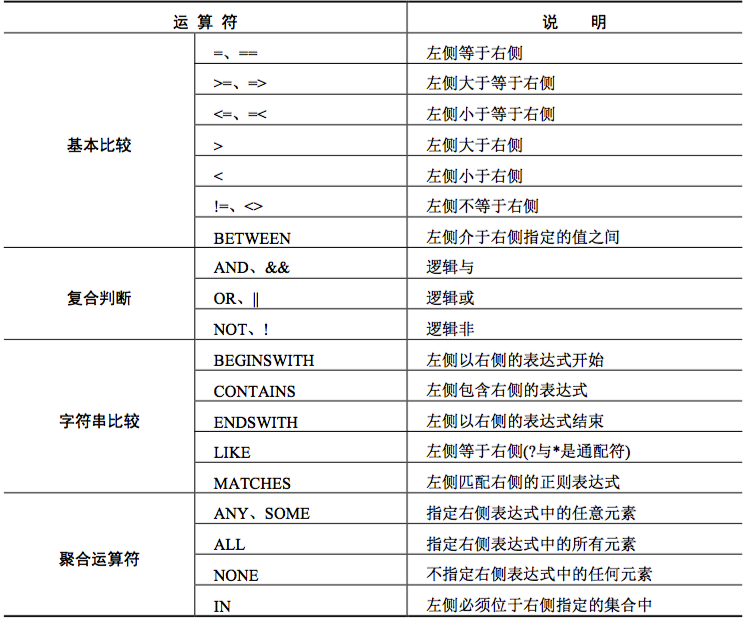
最后附上所有的相关的条件字符
NSPredicate 的使用的更多相关文章
- 谓词 (NSPredicate)使用详情
谓词 更加详细:http://blog.csdn.net/ztp800201/article/details/8116081 //判断是否满足条件 第一种 判断一个数组(array)中满足条件的 NS ...
- NSPredicate 过滤功能
NSPredicate *resultPredicate = [NSPredicate predicateWithFormat:@"self contains[cd] %@", i ...
- IOS开发之--NSPredicate
我把常用的NSPredicate使用场景整理了一下 官方参考: https://developer.apple.com/library/mac/#documentation/Cocoa/Refer ...
- NSPredicate
NSPredicate 1. 正则表达式使用单个字符串来描述.匹配一系列符合某个句法规则的字符串.通常被用来检索.替换那些符合某个模式的文本. 2. iOS中正则使用 有三种(NSPredicate, ...
- NSPredicate谓词
NSPredicate——谓词(is) 作用:判断条件表达式的求值返回真或假的过程 使用步骤: . 定义NSPredicate对象并指定条件 . 调用谓词的evaluateWithObject方法判断 ...
- 【原/转】iOS中非常强大的过滤器:NSPredicate
在APPLE的官方Demo:UICatalog中实现UISearchBar模糊搜索功能是这么做的: - (void)viewDidLoad { [super viewDidLoad]; self.al ...
- NSPredicate简单应用
1.筛选纯字符串数组的内容 NSArray *array = [[NSArray alloc]initWithObjects:@"beijing",@"shanghai& ...
- iOS开发之--NSPredicate
简述:Cocoa框架中的NSPredicate用于查询,原理和用法都类似于SQL中的where,作用相当于数据库的过滤取. 定义(最常用到的方法): NSPredicate *ca = [NSPred ...
- NSPredicate 根据谓语动词 进行 模糊查询
/** * 模糊查询 */ NSString *filterString = textField.text; NSPredicate *predicate = [NSPredicate predic ...
随机推荐
- eclipse配置javah命令
1.找到javah命令所在的目录 我的为 /usr/bin/javah 2.打开eclipse 如图点击第二项 3.配置 如图 ${project_loc}/src -classpat ...
- 使用LinqToExcel读取Excel
我们读取和写入Excel 经常使用NPOI工具,如果我们的需求只是需要读取Excel,可以考虑使用LinqToExcel这个组件.这个组件用起来简单,实用,操作方便,而且结合了Linq的查询特性,ex ...
- percona5.7 源码安装
200 ? "200px" : this.width)!important;} --> 介绍 主要为了测试percona的线程池的性能,这里就简单介绍一下percona5.7 ...
- RabbitMQ Exchange & Queue Design Trade-off
In previous post, I mentioned the discussion on StackOverflow regarding designing exchanges. Usually ...
- Atitit 索引技术--位图索引
Atitit 索引技术--位图索引 索引在数据结构上可以分为三种B树索引.位图索引和散列索引 存储原理 编辑 位图索引对数据表的列的每一个键值分别存储为一个位图,Oracle对于不同的版本,不同的操作 ...
- MongoDB 之C#实践
官方驱动:https://github.com/mongodb/mongo-csharp-driver/downloads.下载后,还提供了一个酷似msdn的帮助文档. samus驱动:https:/ ...
- hibernate用注解替代映射文件
1.首先把原来的映射文件删掉,给实体类添加注解: @Entity //声明当前类为hibernate映射到数据库中的实体类 @Table(name="news") //声明tabl ...
- CSS移动端多行显示多余省略号
/*css3 多行显示省略号,也可用于单行*/ .one-line { display: -webkit-box; overflow : hidden; text-overflow: ellipsis ...
- 【开源】OSharp3.0框架解说系列:新版本说明及新功能规划预览
OSharp是什么? OSharp是个快速开发框架,但不是一个大而全的包罗万象的框架,严格的说,OSharp中什么都没有实现.与其他大而全的框架最大的不同点,就是OSharp只做抽象封装,不做实现.依 ...
- Android音频开发之AudioRecord录音实现
前言: 其实在Android中录音可以用MediaRecord录音,操作比较简单.但是不能对音频进行处理.考虑到项目中做的是实时语音只能选择AudioRecord进行录音. 本文算是对AudioRec ...