
Springboot Actuator之九:actuator jmx endpoint
1、配置
endpoints.jmx.domain: myapp

endpoints.jmx.uniqueNames: true

endpoints.auditevents.enabled: true
2、结果:

自定义Bean,通过JMX暴露
package com.dxz.actuator;

import org.springframework.jmx.export.annotation.ManagedAttribute;

import org.springframework.jmx.export.annotation.ManagedOperation;

import org.springframework.jmx.export.annotation.ManagedResource;

import org.springframework.stereotype.Component;

@Component

@ManagedResource(objectName = "com.dxz.jmx:type=SimpleBean", description = "这里是描述")

public class SimpleBean {

    private long id;

    private String name;

    private int age;

    /**

     * 暴露属性

     */

    @ManagedAttribute(description = "这是属性id")

    public long getId() {

        return id;

    }

    public void setId(long id) {

        this.id = id;

    }

    /**

     * 暴露属性

     */

    @ManagedAttribute(description = "这是属性name")

    public String getName() {

        return name;

    }

    public void setName(String name) {

        this.name = name;

    }

    /**

     * 暴露属性

     */

    @ManagedAttribute(description = "这是属性age")

    public int getAge() {

        return age;

    }

    public void setAge(int age) {

        this.age = age;

    }

    /**

     * 暴露方法

     */

    @ManagedOperation(description = "这里是操作")

    public String display() {

        return this.toString();

    }

    @Override

    public String toString() {

        return "SimpleBean{" + "id=" + id + ", name='" + name + '\'' + ", age=" + age + '}';

    }

}
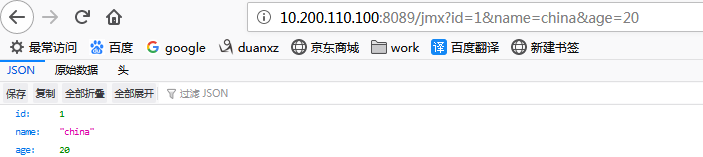
下面的controller为了测试,改变数据,
package com.dxz.actuator;

import org.springframework.beans.factory.annotation.Autowired;

import org.springframework.web.bind.annotation.GetMapping;

import org.springframework.web.bind.annotation.RequestParam;

import org.springframework.web.bind.annotation.RestController;

@RestController

public class JmxController {

    @Autowired

    private SimpleBean simpleBean;

    @GetMapping("/jmx")

    public SimpleBean simpleBean(@RequestParam(required = false) Long id, @RequestParam(required = false) String name,

            @RequestParam(required = false) Integer age) {

        if (id != null) {

            simpleBean.setId(id);

        }

        if (name != null) {

            simpleBean.setName(name);

        }

        if (age != null) {

            simpleBean.setAge(age);

        }

        return simpleBean;

    }

}
结果:

Springboot Actuator之九:actuator jmx endpoint的更多相关文章
- Springboot Actuator之八:actuator的执行原理
本文接着<Springboot Actuator之七:actuator 中原生endpoint源码解析1>,前面主要分析了原生endpoint的作用. 现在着重了解actuator的执行原 ...
- SpringBoot系列(九)单,多文件上传的正确姿势
SpringBoot系列(九)分分钟解决文件上传 往期推荐 SpringBoot系列(一)idea新建Springboot项目 SpringBoot系列(二)入门知识 springBoot系列(三)配 ...
- Springboot Actuator之七:actuator 中原生endpoint源码解析1
看actuator项目的包结构,如下: 本文中的介绍Endpoints. Endpoints(端点)介绍 Endpoints 是 Actuator 的核心部分,它用来监视应用程序及交互,spring- ...
- Springboot监控之一:SpringBoot四大神器之Actuator之3-springBoot的监控和管理--指标说明
Spring Boot包含很多其他的特性,它们可以帮你监控和管理发布到生产环境的应用.你可以选择使用HTTP端点,JMX或远程shell(SSH或Telnet)来管理和监控应用.审计(Auditing ...
- Spring Boot]SpringBoot四大神器之Actuator
论文转载自博客: https://blog.csdn.net/Dreamhai/article/details/81077903 https://bigjar.github.io/2018/08/19 ...
- SpringBoot四大神器之Actuator
介绍 Spring Boot有四大神器,分别是auto-configuration.starters.cli.actuator,本文主要讲actuator.actuator是spring boot提供 ...
- Springboot监控之一:SpringBoot四大神器之Actuator
介绍 Spring Boot有四大神器,分别是auto-configuration.starters.cli.actuator,本文主要讲actuator.actuator是spring boot提供 ...
- SpringBoot整合Swagger和Actuator
前言 本篇文章主要介绍的是SpringBoot整合Swagger(API文档生成框架)和SpringBoot整合Actuator(项目监控)使用教程. SpringBoot整合Swagger 说明:如 ...
- SpringBoot要点之使用Actuator监控
Actuator是Springboot提供的用来对应用系统进行自省和监控的功能模块,借助于Actuator开发者可以很方便地对应用系统某些监控指标进行查看.统计等. 在pom文件中加入spring-b ...
随机推荐
- nginx 反向代理时丢失端口的解决方案(转)
今天,配置nginx反向代理时遇到一个问题,当设置nginx监听80端口时转发请求没有问题.但一旦设置为监听其他端口,就一直跳转不正常:如,访问欢迎页面时应该是重定向到登录页面,在这个重定向的过程中端 ...
- kali2.0升级
1.登录kali2.0系统 2 2.修改软件源APT-sources.list vim /etc/apt/sources.list 3 可以删除该文件中的所有内容,也可以直接在文前添加新的APT源. ...
- 【转载】Gradle学习 第四章:安装Gradle
转载地址:http://ask.android-studio.org/?/article/16 4.1. Prerequisites 前提条件Gradle requires a Java JDK or ...
- 2 Linux磁盘管理
Linux磁盘管理:磁盘管理好坏直接关系到整个系统的性能问题常用三个命令:df.du.fdiskdf:列出文件系统的整体磁盘使用量 df 参数 目录或文件名 -a:理出所有文件系统,包括系统特有的 / ...
- 个人项目 python实现
一. github地址:https://github.com/zjh1234562/WC 二 . PSP表格 PSP2.1 Personal Software Process Stages 预估耗时 ...
- linux环境安装配置nginx
安装依赖 yum install gcc yum install pcre-devel yum install zlib zlib-devel yum install openssl openssl- ...
- Linux shell之重定向输入,输出
shell是一个命令解释器,它在操作系统的最外层,负责直接与用户对话,把用户的输入解释给操作系统,并处理各种各样的操作系统的输出结果,输出到屏幕返回给用户.这种对话方式可以是交互的方式(从键盘输入命令 ...
- Linux(Centos7.6)下安装Gitlab详细教程
Gitlab搭建操作步骤: 1.查看Linux系统版本确认gitlab需要使用的安装包类型 使用命令:cat /etc/redhat-release CentOS Linux release 7.6. ...
- Java精通并发-Condition方法实现分析与讲解
在上两次已经对Condition这个类的javadoc进行了完整的解读,接下来则对它里面的方法进行一下纵览,并进行官方的解读,如下: 下面一一来读一下各个方法的说明: await(): 上面这段说明已 ...
- 搭建自己的docker镜像
手动构建 1.关键字查找镜像 sudo docker search centos 2.下载基本镜像 sudo docker pull centos 3.启动容器 sudo docker run -d ...