
Android Design Support Library初探,NavigationView实践
前言
在前几天的IO大会上,Google带来了Android M,同时还有Android支持库的新一轮更新,其中更是增加一个全新的支持库Android Design Support Library,包含了数个重要的Material Design组件,用于将Material Design适配到Android 2.1(API 7)。
Android Design Support Library
可以通过官方博客,文档,和Demo示例来快速了解。Design Support Library现在包含NavigationView,TextInputLayout,FloatingActionButton,Snackbar,TabLayout,CoordinatorLayout。
要使用Design Support Library,请先更新SDK中的Android Support Repository到最新版,然后在工程中添加依赖
compile 'com.android.support:design:22.2.0'
下面让我们先来试试Navigation View。
NavigationView
在Material Design中,Navigation drawer导航抽屉,被设计用于应用导航,提供了一种通用的导航方式,体现了设计的一致性。
而NavigationView的典型用途就是配合之前v4包的DrawerLayout,作为其中的Drawer部分,即导航菜单的本体部分。NavigationView是一个导航菜单框架,使用menu资源填充数据,使我们可以更简单高效的实现导航菜单。它提供了不错的默认样式、选中项高亮、分组单选、分组子标题、以及可选的Header。
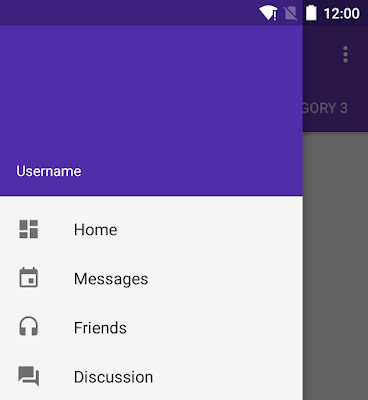
怎么用
典型的布局文件如下,外层是DrawerLayout,它的第一个child将作为content,第二个child作为Drawer
<android.support.v4.widget.DrawerLayout

    android:id="@+id/drawer_layout"

    android:layout_width="match_parent"

    android:layout_height="match_parent">

   <!-- Content -->

    <FrameLayout

        android:id="@+id/content_layout"

        android:layout_width="match_parent"

        android:layout_height="match_parent"/>

   <!-- Drawer -->

    <android.support.design.widget.NavigationView

        android:id="@+id/navigation"

        android:layout_width="240dp"

        android:layout_height="match_parent"

        android:layout_gravity="start"

        app:headerLayout="@layout/drawer_header"

        app:menu="@menu/drawer"/>

</android.support.v4.widget.DrawerLayout>注意其中NavigationView的两个自定义属性app:headerLayout接收一个layout,作为导航菜单顶部的Header,可选项。app:menu接收一个menu,作为导航菜单的菜单项,几乎是必选项,不然这个控件就失去意义了。但也可以在运行时动态改变menu属性。
用于NavigationView的典型menu文件,应该是一个可选中菜单项的集合。其中checked="true"的item将会高亮显示,这可以确保用户知道当前选中的菜单项是哪个。item的选中状态可以在代码中设置,稍后回调部分会讲。
<menu xmlns:android="http://schemas.android.com/apk/res/android">

    <group android:checkableBehavior="single">

        <item

            android:id="@+id/navigation_original"

            android:checked="true"

            android:icon="@drawable/ic_star_white_24dp"

            android:title="@string/navigation_original"/>

        <item

            android:id="@+id/navigation_library"

            android:icon="@drawable/ic_public_white_24dp"

            android:title="@string/navigation_library"/>

    </group>

</menu>还可以使用menu的嵌套,来显示分组子标题。关于menu资源的属性详解,可以参看官方文档
<item

    android:id="@+id/navigation_subheader"

    android:title="@string/navigation_subheader">

    <menu>

        <item

            android:id="@+id/navigation_sub_item_1"

            android:icon="@drawable/ic_android"

            android:title="@string/navigation_sub_item_1"/>

        <item

            android:id="@+id/navigation_sub_item_2"

            android:icon="@drawable/ic_android"

            android:title="@string/navigation_sub_item_2"/>

    </menu>

</item>最后,我们可以用setNavigationItemSelectedListener方法来设置当导航项被点击时的回调。OnNavigationItemSelectedListener会提供给我们被选中的MenuItem,这与Activity的onOptionsItemSelected非常类似。通过这个回调方法,我们可以处理点击事件,改变item的选中状态,更新页面内容,关闭导航菜单,以及任何我们需要的操作。我的示例代码如下
mNavigationView.setNavigationItemSelectedListener(new NavigationView.OnNavigationItemSelectedListener() {

    @Override

    public boolean onNavigationItemSelected(MenuItem menuItem) {

        if (sNavigationMap.containsKey(menuItem.getItemId())) {

            menuItem.setChecked(true); // 改变item选中状态

            setTitle(menuItem.getTitle()); // 改变页面标题,标明导航状态

            currentNavigationId = menuItem.getItemId();

            mDrawerLayout.closeDrawers(); // 关闭导航菜单

            return true;

        } else {

            return false;

        }

    }

});
示例工程
最后提供我自己平时自用的示例工程,项目地址在此,其中主页的导航菜单部分已经使用NavigationView重写,工程中还包含选中后的页面内容更新部分,可以作为参考(大概...)。项目中包含零零碎碎许多其他东西,无视即可。

另外,上图导航菜单中的图标全部来自Google的Material icons项目,提供了非常多的图片供我们选择,好顶赞,我们的设计师表示压力很大感觉快失业了。下载图标时注意,作为菜单项的icon为24dp,并选择light即白色版。
至于图中icon的高亮效果,应该是利用了Drawable Tinting。图中的图标有高亮绿色与普通灰色两种颜色,但是实际上对应图片只有一张白色版本。
Android Design Support Library初探,NavigationView实践的更多相关文章
- Android Design Support Library(二)用NavigationView实现抽屉菜单界面
NavigationView在MD设计中非常重要,之前Google也提出了使用DrawerLayout来实现导航抽屉.这次,在Android Design Support Library中,Googl ...
- 【转】【翻】Android Design Support Library 的 代码实验——几行代码,让你的 APP 变得花俏
转自:http://mrfufufu.github.io/android/2015/07/01/Codelab_Android_Design_Support_Library.html [翻]Andro ...
- Android Design Support Library 的 代码实验——几行代码,让你的 APP 变得花俏
原文:Codelab for Android Design Support Library used in I/O Rewind Bangkok session--Make your app fanc ...
- Android Design Support Library使用详解
Android Design Support Library使用详解 Google在2015的IO大会上,给我们带来了更加详细的Material Design设计规范,同时,也给我们带来了全新的And ...
- Codelab for Android Design Support Library used in I/O Rewind Bangkok session
At the moment I believe that there is no any Android Developer who doesn't know about Material Desig ...
- Material Design 开发利器:Android Design Support Library 介绍
转自:https://blog.leancloud.cn/3306/ Android 5.0 Lollipop 是迄今为止最重大的一次发布,很大程度上是因为 material design —— 这是 ...
- Android Design Support Library——Navigation View
前沿 Android 从5.0开始引入了Material design元素的设计,这种新的设计语言让整个安卓的用户体验焕然一新,google在Android Design Support Librar ...
- 如何使用android design support library
Android应用Design Support Library完全使用实例 - OPEN 开发经验库http://www.open-open.com/lib/view/open143338585611 ...
- Android Design Support Library 中控件的使用简单介绍(一)
Android Design Support Library 中控件的使用简单介绍(一) 介绍 在这个 Lib 中主要包含了 8 个新的 material design 组件!最低支持 Android ...
随机推荐
- ES6学习笔记(二十二)ArrayBuffer
ArrayBuffer ArrayBuffer对象.TypedArray视图和DataView视图是 JavaScript 操作二进制数据的一个接口.它们都是以数组的语法处理二进制数据,所以统称为二进 ...
- 洛谷 P1332 血色先锋队
P1332 血色先锋队 题目描述 巫妖王的天灾军团终于卷土重来,血色十字军组织了一支先锋军前往诺森德大陆对抗天灾军团,以及一切沾有亡灵气息的生物.孤立于联盟和部落的血色先锋军很快就遭到了天灾军团的重重 ...
- Qt之表单布局(QFormLayout)
简述 QFormLayout管理输入型控件和关联的标签组成的那些Form表单. QFormLayout是一个方便的布局类,其中的控件以两列的形式被布局在表单中.左列包括标签,右列包含输入控件,例如:Q ...
- asp.net C# 获取网页源代码的几种方式
1 方法 System.Net.WebClient aWebClient = new System.Net.WebClient(); aWebClient.Encoding = System.Text ...
- Mac OS X10.10_xcode6.1_ios8.1环境下,编译lame静态库libmp3lame.a,支持arm64 armv7s x86_64 i386 armv7指令集
近期升级了系统到Mac OS X 10.10 而且更新了XCode6.1和iOS 8.1 之前app用到的libmp3lame.a静态库.也要支持64位的模拟器(x86_64)和64位的真机(arm6 ...
- cocos2d_android 第一个游戏
依据上一篇文章.创建好cocos2d--android的开发环境 先上效果图 实现该效果的代码: package com.cn.firstgame; import org.cocos2d.layers ...
- OpenCASCADE点向平面投影
OpenCASCADE点向平面投影 OpenCASCADE的ProjLib类提供了解析曲线(直线.圆.椭圆.抛物线.双曲线)向解析曲面(平面.圆柱面.圆锥面.球面.圆环面)投影的功能,主要用来计算三维 ...
- HDU 5310 Souvenir
Souvenir Accepts: 901 Submissions: 2743 Time Limit: 2000/1000 MS (Java/Others) Memory Limit: 262 ...
- YTUOJ-计算该日在本年中是第几天(用户自己定义类型)
题目描写叙述 定义一个结构体变量(包含年.月.日).编写一个函数days,由主函数将年.月.日传递给函数days,计算出该日在本年中是第几天并将结果传回主函数输出. 输入 年月日 输出 当年第几天 例 ...
- Zepto源代码分析之二~三个API
因为时间关系:本次仅仅对这三个API($.camelCase.$.contains.$.each)方法进行分析 第一个方法变量转驼峰:$.camelCase('hello-world-welcome' ...