
Android Design Support Library——Navigation View
前沿
Android 从5.0开始引入了Material design元素的设计,这种新的设计语言让整个安卓的用户体验焕然一新,google在Android Design Support Library中封装了一些重要的material design控件,在这之前其实github上也已经出现了许多各种各样的material design 控件,只不过现在google把有些控件标准化了,注意这个Android Design Support Library和Android Support Library是有区别的,Android Support Library 只是支持了一些基本控件的封装,而Android Design Support Library主要是一些Material design特效的实现,Android Design Support Library包括以下八种控件:
Navigation View——抽屉导航
TextInputLayout——EditText悬浮标签
Floating Action Button——悬浮操作按钮
Snackbar——提示(类似Toast)
TabLayout——选项卡
CoordinatorLayout——滚动控制
CollapsingToolbarLayout——可折叠的Toolbar(Google+、photos中的效果)
AppBarLayout——容器AppBar
本文分章对以上控件主要做使用方式介绍,暂不分析源码。首先看Navigation View
Navigation View——抽屉导航
非常实用的一种抽屉导航效果,支持直接通过菜单资源文件直接生成导航标签,实现起来也非常简单,效果如下图所示:
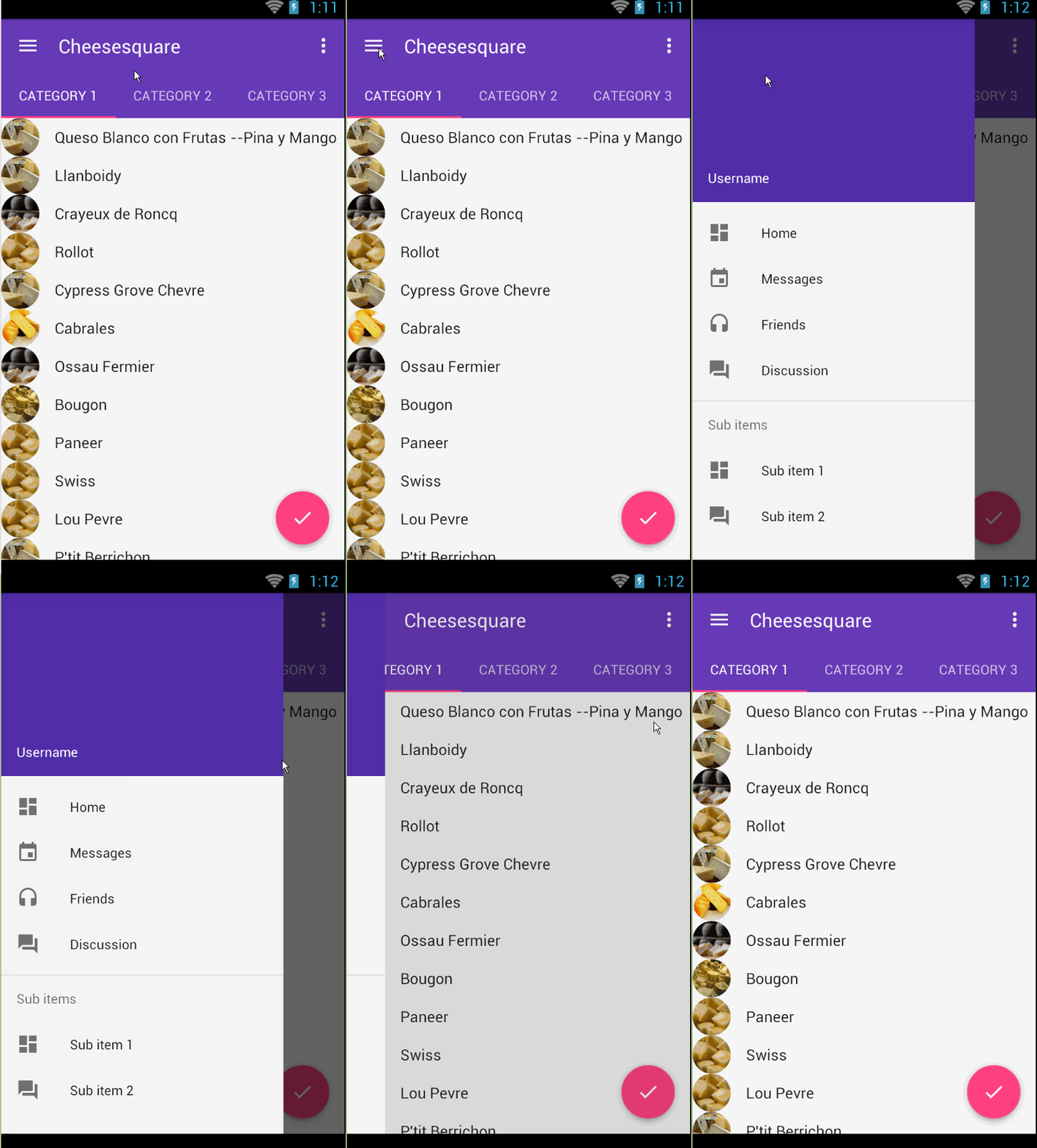
使用步骤:
(1)app的build.gradle中引入design包本文design包版本以23.1.1为例
dependencies {

    compile 'com.android.support:design:23.1.1'

}
(2)xml布局文件(activity_main.xml)和SlideMenu一样需要使用到DrawerLayout。
<android.support.v4.widget.DrawerLayout xmlns:android="http://schemas.android.com/apk/res/android"

    xmlns:app="http://schemas.android.com/apk/res-auto"

    android:id="@+id/drawer_layout"

    android:layout_width="match_parent"

    android:layout_height="match_parent"

    android:fitsSystemWindows="true">

    <include layout="@layout/include_list_viewpager" /><!-- 展示内容区域的布局-->

    <android.support.design.widget.NavigationView

        android:id="@+id/nav_view"

        android:layout_width="wrap_content"

        android:layout_height="match_parent"

        android:layout_gravity="start"

        android:fitsSystemWindows="true"

        app:headerLayout="@layout/nav_header"

        app:menu="@menu/drawer_view" />

</android.support.v4.widget.DrawerLayout>
两个重要的属性
app:headerLayout ——导航头布局
app:menu——导航菜单布局
layout_gravity——用来控制左滑和右滑的,start左滑,end右滑,其实这个是跟DrawerLayout有关的,具体可参考DrawerLayout的使用。
nav_header.xml
<LinearLayout xmlns:android="http://schemas.android.com/apk/res/android"

    android:layout_width="match_parent"

    android:layout_height="192dp"

    android:background="?attr/colorPrimaryDark"

    android:gravity="bottom"

    android:orientation="vertical"

    android:padding="16dp"

    android:theme="@style/ThemeOverlay.AppCompat.Dark">

    <TextView

        android:layout_width="match_parent"

        android:layout_height="wrap_content"

        android:text="Username"

        android:textAppearance="@style/TextAppearance.AppCompat.Body1" />

</LinearLayout>
drawer_view.xml(重点是看如何实现分组的)
<?xml version="1.0" encoding="utf-8"?>

<menu xmlns:android="http://schemas.android.com/apk/res/android">

    <group android:checkableBehavior="single"><!-- 实现单选-->

        <item

            android:id="@+id/nav_home"

            android:icon="@drawable/ic_dashboard"

            android:title="Home" />

        <item

            android:id="@+id/nav_messages"

            android:icon="@drawable/ic_event"

            android:title="Messages" />

        <item

            android:id="@+id/nav_friends"

            android:icon="@drawable/ic_headset"

            android:title="Friends" />

        <item

            android:id="@+id/nav_discussion"

            android:icon="@drawable/ic_forum"

            android:title="Discussion" />

    </group>

    <item android:title="Sub items">

        <menu>

            <item

                android:icon="@drawable/ic_dashboard"

                android:title="Sub item 1" />

            <item

                android:icon="@drawable/ic_forum"

                android:title="Sub item 2" />

        </menu>

    </item>

</menu>
(2)在代码中声明使用
NavigationView navigationView = (NavigationView) findViewById(R.id.nav_view);

        if (navigationView != null) {

            navigationView.setNavigationItemSelectedListener(

                new NavigationView.OnNavigationItemSelectedListener() {

                    @Override

                    public boolean onNavigationItemSelected(MenuItem menuItem) {

                        menuItem.setChecked(true);

                        mDrawerLayout.closeDrawers();

                        return true;

                    }

                });

        }
在onNavigationItemSelected()方法中就可以获取导航菜单中的每个Item进而实现相应的功能了。
扩展:如果你想让你的导航菜单在status bar 上也显示需要进行如下设置主要针对5.0及以上版本
../valuse-v21/styles.xml
<resources>

    <style name="Theme.DesignDemo" parent="Base.Theme.DesignDemo">

        <item name="android:windowDrawsSystemBarBackgrounds">true</item>

        <item name="android:statusBarColor">@android:color/transparent</item>

    </style>

</resources>
同时在DrawerLayout中加入如下属性
android:fitsSystemWindows="true"
如果你感觉Navigation View还不够强大,可以看看MaterialDrawer,连接如下:https://github.com/mikepenz/MaterialDrawer
Android Design Support Library——Navigation View的更多相关文章
- 【转】【翻】Android Design Support Library 的 代码实验——几行代码,让你的 APP 变得花俏
转自:http://mrfufufu.github.io/android/2015/07/01/Codelab_Android_Design_Support_Library.html [翻]Andro ...
- Android Design Support Library 的 代码实验——几行代码,让你的 APP 变得花俏
原文:Codelab for Android Design Support Library used in I/O Rewind Bangkok session--Make your app fanc ...
- Codelab for Android Design Support Library used in I/O Rewind Bangkok session
At the moment I believe that there is no any Android Developer who doesn't know about Material Desig ...
- Material Design 开发利器:Android Design Support Library 介绍
转自:https://blog.leancloud.cn/3306/ Android 5.0 Lollipop 是迄今为止最重大的一次发布,很大程度上是因为 material design —— 这是 ...
- Android Design Support Library 中控件的使用简单介绍(一)
Android Design Support Library 中控件的使用简单介绍(一) 介绍 在这个 Lib 中主要包含了 8 个新的 material design 组件!最低支持 Android ...
- Android Design Support Library初探,NavigationView实践
前言 在前几天的IO大会上,Google带来了Android M,同时还有Android支持库的新一轮更新,其中更是增加一个全新的支持库Android Design Support Library,包 ...
- Material Design with the Android Design Support Library
Material Design with the Android Design Support Library 原文http://www.sitepoint.com/material-design-a ...
- Android Design Support Library使用详解
Android Design Support Library使用详解 Google在2015的IO大会上,给我们带来了更加详细的Material Design设计规范,同时,也给我们带来了全新的And ...
- Android开发学习之路-Android Design Support Library使用(CoordinatorLayout的使用)
效果图: 上面的这个图有两个效果是,一个是顶部的图片,在上滑之后会隐藏起来并且显示出一个ToolBar(ToolBar类似于ActionBar,但是只有ToolBar是兼容Material Desig ...
随机推荐
- jquery页面隐藏和展开之间切换
html页面: <p id="myp4">默认情况下,这段话是隐藏的,点击按钮以后,这段话就展开,并且按钮上的值改变</p> <button id=& ...
- redis.conf之save配置项解读
配置示例: save 900 1 save 300 10 save 60 3600 配置解读: 1) “save 900 1”表示如果900秒内至少1个key发生变化(新增.修改和删除),则重写rdb ...
- C++编译器详解(一)
C/C++编译器-cl.exe的命令选项 和在IDE中编译相比,命令行模式编译速度更快,并可以避免被IDE产生的一些附加信息所干扰,本文将介绍微软C/C++编译器命令行模式设定和用法. 1.设置环境变 ...
- 恢复VS2010/VS2013项目为VS2008项目
https://blogs.msdn.microsoft.com/rextang/2009/07/06/convert-vs2010-projects-back-to-vs2008-ones/ 摘抄如 ...
- 7-12 How Long Does It Take
Given the relations of all the activities of a project, you are supposed to find the earliest comple ...
- SSM_CRUD新手练习(2)配置文件
配置之前现需要引入依赖的jar包: *Spring *SpringMvc *Mybatis *数据库连接池,驱动包 *其他(jstl,Servlet ,Junit..) 1.poxm.xml < ...
- Codeforces820A Mister B and Book Reading 2017-06-28 09:38 67人阅读 评论(0) 收藏
A. Mister B and Book Reading time limit per test 2 seconds memory limit per test 256 megabytes input ...
- codeforces 434D
题意:有n<=50个点,每个点有xi有[li, ri]种取值,-100 <= li <= ri <= 100,并且给定m<=100条边,每条边为u,v,d表示xu< ...
- AngularJS 过滤器 Filter
过滤器实质是数据转换或过滤,把ViewMode中的数据转化成View层用户友好的信息.可以看做一个函数,负责接收输入,转换成输出,每次参数变化时,它就被执行,输出被视图View使用. 一.基本定义及其 ...
- 如何获取帮助———— QQ群讨论摘要
QQ群对话整理(删除一些简单的回应),对一些重要的地方,我做了一些加粗 宝玉 2015/9/21 1:49:05 这次题目还有个问题就是如何读取Excel,我想对于很多同学来说是个困难 ...