
Android Design Support Library初探,NavigationView实践
前言
在前几天的IO大会上,Google带来了Android M,同时还有Android支持库的新一轮更新,其中更是增加一个全新的支持库Android Design Support Library,包含了数个重要的Material Design组件,用于将Material Design适配到Android 2.1(API 7)。
Android Design Support Library
可以通过官方博客,文档,和Demo示例来快速了解。Design Support Library现在包含NavigationView,TextInputLayout,FloatingActionButton,Snackbar,TabLayout,CoordinatorLayout。
要使用Design Support Library,请先更新SDK中的Android Support Repository到最新版,然后在工程中添加依赖
compile 'com.android.support:design:22.2.0'
下面让我们先来试试Navigation View。
NavigationView
在Material Design中,Navigation drawer导航抽屉,被设计用于应用导航,提供了一种通用的导航方式,体现了设计的一致性。
而NavigationView的典型用途就是配合之前v4包的DrawerLayout,作为其中的Drawer部分,即导航菜单的本体部分。NavigationView是一个导航菜单框架,使用menu资源填充数据,使我们可以更简单高效的实现导航菜单。它提供了不错的默认样式、选中项高亮、分组单选、分组子标题、以及可选的Header。
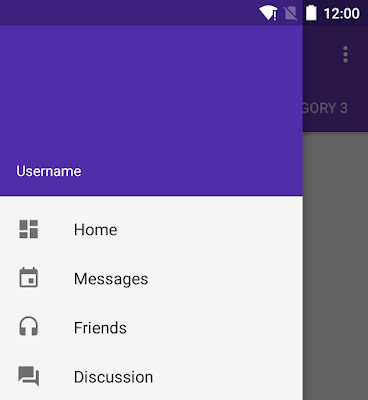
怎么用
典型的布局文件如下,外层是DrawerLayout,它的第一个child将作为content,第二个child作为Drawer
<android.support.v4.widget.DrawerLayout

    android:id="@+id/drawer_layout"

    android:layout_width="match_parent"

    android:layout_height="match_parent">

   <!-- Content -->

    <FrameLayout

        android:id="@+id/content_layout"

        android:layout_width="match_parent"

        android:layout_height="match_parent"/>

   <!-- Drawer -->

    <android.support.design.widget.NavigationView

        android:id="@+id/navigation"

        android:layout_width="240dp"

        android:layout_height="match_parent"

        android:layout_gravity="start"

        app:headerLayout="@layout/drawer_header"

        app:menu="@menu/drawer"/>

</android.support.v4.widget.DrawerLayout>注意其中NavigationView的两个自定义属性app:headerLayout接收一个layout,作为导航菜单顶部的Header,可选项。app:menu接收一个menu,作为导航菜单的菜单项,几乎是必选项,不然这个控件就失去意义了。但也可以在运行时动态改变menu属性。
用于NavigationView的典型menu文件,应该是一个可选中菜单项的集合。其中checked="true"的item将会高亮显示,这可以确保用户知道当前选中的菜单项是哪个。item的选中状态可以在代码中设置,稍后回调部分会讲。
<menu xmlns:android="http://schemas.android.com/apk/res/android">

    <group android:checkableBehavior="single">

        <item

            android:id="@+id/navigation_original"

            android:checked="true"

            android:icon="@drawable/ic_star_white_24dp"

            android:title="@string/navigation_original"/>

        <item

            android:id="@+id/navigation_library"

            android:icon="@drawable/ic_public_white_24dp"

            android:title="@string/navigation_library"/>

    </group>

</menu>还可以使用menu的嵌套,来显示分组子标题。关于menu资源的属性详解,可以参看官方文档
<item

    android:id="@+id/navigation_subheader"

    android:title="@string/navigation_subheader">

    <menu>

        <item

            android:id="@+id/navigation_sub_item_1"

            android:icon="@drawable/ic_android"

            android:title="@string/navigation_sub_item_1"/>

        <item

            android:id="@+id/navigation_sub_item_2"

            android:icon="@drawable/ic_android"

            android:title="@string/navigation_sub_item_2"/>

    </menu>

</item>最后,我们可以用setNavigationItemSelectedListener方法来设置当导航项被点击时的回调。OnNavigationItemSelectedListener会提供给我们被选中的MenuItem,这与Activity的onOptionsItemSelected非常类似。通过这个回调方法,我们可以处理点击事件,改变item的选中状态,更新页面内容,关闭导航菜单,以及任何我们需要的操作。我的示例代码如下
mNavigationView.setNavigationItemSelectedListener(new NavigationView.OnNavigationItemSelectedListener() {

    @Override

    public boolean onNavigationItemSelected(MenuItem menuItem) {

        if (sNavigationMap.containsKey(menuItem.getItemId())) {

            menuItem.setChecked(true); // 改变item选中状态

            setTitle(menuItem.getTitle()); // 改变页面标题,标明导航状态

            currentNavigationId = menuItem.getItemId();

            mDrawerLayout.closeDrawers(); // 关闭导航菜单

            return true;

        } else {

            return false;

        }

    }

});
示例工程
最后提供我自己平时自用的示例工程,项目地址在此,其中主页的导航菜单部分已经使用NavigationView重写,工程中还包含选中后的页面内容更新部分,可以作为参考(大概...)。项目中包含零零碎碎许多其他东西,无视即可。

另外,上图导航菜单中的图标全部来自Google的Material icons项目,提供了非常多的图片供我们选择,好顶赞,我们的设计师表示压力很大感觉快失业了。下载图标时注意,作为菜单项的icon为24dp,并选择light即白色版。
至于图中icon的高亮效果,应该是利用了Drawable Tinting。图中的图标有高亮绿色与普通灰色两种颜色,但是实际上对应图片只有一张白色版本。
Android Design Support Library初探,NavigationView实践的更多相关文章
- Android Design Support Library(二)用NavigationView实现抽屉菜单界面
NavigationView在MD设计中非常重要,之前Google也提出了使用DrawerLayout来实现导航抽屉.这次,在Android Design Support Library中,Googl ...
- 【转】【翻】Android Design Support Library 的 代码实验——几行代码,让你的 APP 变得花俏
转自:http://mrfufufu.github.io/android/2015/07/01/Codelab_Android_Design_Support_Library.html [翻]Andro ...
- Android Design Support Library 的 代码实验——几行代码,让你的 APP 变得花俏
原文:Codelab for Android Design Support Library used in I/O Rewind Bangkok session--Make your app fanc ...
- Android Design Support Library使用详解
Android Design Support Library使用详解 Google在2015的IO大会上,给我们带来了更加详细的Material Design设计规范,同时,也给我们带来了全新的And ...
- Codelab for Android Design Support Library used in I/O Rewind Bangkok session
At the moment I believe that there is no any Android Developer who doesn't know about Material Desig ...
- Material Design 开发利器:Android Design Support Library 介绍
转自:https://blog.leancloud.cn/3306/ Android 5.0 Lollipop 是迄今为止最重大的一次发布,很大程度上是因为 material design —— 这是 ...
- Android Design Support Library——Navigation View
前沿 Android 从5.0开始引入了Material design元素的设计,这种新的设计语言让整个安卓的用户体验焕然一新,google在Android Design Support Librar ...
- 如何使用android design support library
Android应用Design Support Library完全使用实例 - OPEN 开发经验库http://www.open-open.com/lib/view/open143338585611 ...
- Android Design Support Library 中控件的使用简单介绍(一)
Android Design Support Library 中控件的使用简单介绍(一) 介绍 在这个 Lib 中主要包含了 8 个新的 material design 组件!最低支持 Android ...
随机推荐
- Webpack的作用(一个基础的打包编译工具在做什么?)
结论: 转换ES6语法成ES5 处理模块加载依赖 生成一个可以在浏览器加载执行的 js 文件 第一个问题,转换语法,其实我们可以通过babel来做.核心步骤也就是: 通过babylon生成AST 通过 ...
- [vue插件]基于vue2.x的电商图片放大镜插件
最近在撸一个电商网站,有一个需求是要像淘宝商品详情页那样,鼠标放在主图上,显示图片放大镜效果,找了一下貌似没有什么合适的vue插件,于是自己撸了一个,分享一下.小白第一次分享,各位大神莫见笑. vue ...
- 紫书 习题 8-22 UVa 1622 (构造法)
这道题的构造法真的复杂--要推一堆公式--这道题写了几天了--还是没写出来-- 一开始简单的觉得先左右来回, 然后上下来回, 然后把剩下的执行完了好了, 然后就WA. 然后换了个思路, 觉得是贪心, ...
- Docker学习总结(4)——Docker镜像与容器命令
Docker是一个开源的引擎,可以轻松的为任何应用创建一个轻量级的.可移植的.自给自足的容器.开发者在笔记本上编译测试通过的容器可以批量地在生产环境中部署,包括VMs(虚拟机).bare metal. ...
- github git.exe位置
C:\Users\yourname\AppData\Local\GitHub\PortableGit_69703d1db91577f4c666e767a6ca5ec50a48d243\bin\git. ...
- Atitit.html解析器的选型 jsoup nsoup ,java c# .net 版本号
Atitit.html解析器的选型 jsoup nsoup ,java c# .net 版本号 1. 框架选型的要求 1 1.1. 文档多 1 1.2. 跨平台 1 2. html解析器特性: 1 2 ...
- Android新手入门2016(14)--FragmentTabHost实现选项卡和菜单
本文来自肥宝传说之路,引用必须注明出处! 这章憋了好久.本来想写选项卡的,学到TabHost,TabWidget的,把代码拿过来准备研究的时候,发现竟然在4.0.3版本号被废弃了. 百度一下,发如今后 ...
- dig linux下的使用
一般来说linux下查询域名解析有两种选择,nslookup或者dig,而在使用上我觉得dig更加方便顺手. 如果是在debian下的话,只要装上dnsutils这个包就可以使用dig命令了. 最基本 ...
- Bootstrap-FileInput组件的简单Demo
官网: https://github.com/kartik-v/bootstrap-fileinput/ http://plugins.krajee.com/file-input HTML页面: ...
- BAPC 2014 Preliminary(第一场)
D:Lift Problems On the ground floor (floor zero) of a large university building a number of students ...