
Winfrom控件使用
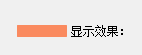
1.Lablelable添加图片,解决图片和字体重叠?
Text属性添加足够空格即可,显示效果如下所示:
2.根据窗体名称获取窗体并显示到指定panel?
Label item = sender as Label;
if (item == null) return;
Assembly assembly = Assembly.GetExecutingAssembly();
var path = "Namespace." + item.Name;
Form form = assembly.CreateInstance(path) as Form;
if (form == null) return;
this.panelContent.Controls.Clear();
form.TopLevel = false;
form.FormBorderStyle = FormBorderStyle.None;
form.Dock = DockStyle.Fill;
form.Parent = this.panelContent;
this.panelContent.Controls.Add(form);
form.Show();
注意:item.Name为获取到的窗体名称,如:LoginForm.
3.panel添加控件并为控件添加事件?
public class MenuItemNodes

    {

        public string Value { get; set; }

        public string Name { get; set; }

    }

private void InitNavigation(List<MenuItemNodes> items)

        {

            if (items == null) return;

            this.panleNavigation.Controls.Clear();

            foreach (MenuItemNodes item in items)

            {

                Add(new Label(), item, this.panleNavigation);

            }

        }

        private void Add(Label item, MenuItemNodes node, Panel panel)

        {

            item.Name = node.Name;

            item.Text = node.Value;

            item.Size = new Size(, );

            item.TextAlign = ContentAlignment.MiddleLeft;

            item.ForeColor = Color.White;

            item.Font = new Font("微软雅黑", 12f, FontStyle.Bold);

            //34, 95, 129

            item.BackColor = System.Drawing.Color.FromArgb(, , );

            item.BorderStyle = BorderStyle.FixedSingle;

            if (panel.Controls.Count == ) item.Location = new Point();

            else

            {

                int y = ;

                int x = ;

                if (panel.Controls.Count %  > )

                {

                    y = panel.Controls[panel.Controls.Count - ].Location.Y;

                    x = panel.Controls[panel.Controls.Count - ].Location.X + item.Width;

                }

                else

                {

                    y = panel.Controls[panel.Controls.Count - ].Location.Y + item.Height;

                    x = panel.Controls[panel.Controls.Count - ].Location.X;

                }

                item.Location = new Point(x, y);

            }

            item.MouseClick -= item_MouseClick;

            item.MouseClick += new MouseEventHandler(item_MouseClick);

            panel.Controls.Add(item);

        }

 void item_MouseClick(object sender, MouseEventArgs e)

{

}
Winfrom控件使用的更多相关文章
- WPF 精修篇 WPF嵌入Winfrom控件
原文:WPF 精修篇 WPF嵌入Winfrom控件 先增加DLL 支持 使用 WindowsFormsHost 来加载Forms的控件 引用命名空间 xmlns:forms="clr-na ...
- Winfrom控件 特效
链接:https://pan.baidu.com/s/1O9e7sxnYFYWD55Vh5fxFQg 提取码:5cey 复制这段内容后打开百度网盘手机App,操作更方便哦 Winfrom控件查询手册. ...
- C#winfrom控件命名规范
※用红字标记的部分表示有重复出现,括号内为替代表示方案 1.标准控件 序号 控件类型简写 控件类型 1 btn Button 2 chk CheckBox 3 ckl CheckedListBox ...
- winfrom控件——基本工具
窗体事件:属性—事件—load(双击添加) 窗体加载完之后的事件: 删除事件:先将属性事件里挂号的事件名删掉(行为里的load)再删后台代码里的事件. 控件:工具箱里(搜索—双击或点击拖动到窗体界面) ...
- 调整Winfrom控件WebBrowser的默认浏览器内核版本
一.问题解析: 今天在调试程序的时候,需要使用C#的客户端远程登录一个Web页面,用到了WebBrowser控件.但是却发现了一件很神奇的事情:当前浏览器使用的内核,可以通过访问下面这个网站获取:ht ...
- c# vs2010 winfrom控件检测网络环境
写下以作备用,代码附上. public partial class UserControl1 : UserControl, IObjectSafety { //检测网络状态 [DllImport(&q ...
- winfrom 控件的显示隐藏方法
使用Panel作为容器 Panel2.Visible = true; //显示 Panel1.Visible = false; //隐藏
- WinFrom控件双向绑定
using System; using System.Collections.Generic; using System.ComponentModel; using System.Data; usin ...
- winfrom控件圆角
刚好用到这个功能,看了好些例子.我就不明白,简单的一个事,一些文章里的代码写的那个长啊,还让人看么. 精简后,就其实一点,只要有paint事件的组件,都可画圆角,没有的外面套一个panel就行了. u ...
随机推荐
- 第四十一课 KMP子串查找算法
问题: 右移的位数和目标串没有多大的关系,和子串有关系. 已匹配的字符数现在已经有了,部分匹配值还没有. 前六位匹配成功就去查找PMT中的第六位. 现在的任务就是求得部分匹配表. 问题:怎么得到部分匹 ...
- Mysql安装和基本使用
MySQL的介绍安装.启动 windows上制作服务 MySQL破解密码 MySQL中统一字符编码 MySQL MySQL是一个关系型数据库管理系统,由瑞典MySQL AB 公司开发,目前属于 Ora ...
- Python之路,第四篇:Python入门与基础4
Python3 字符串 字符串是一个有序的字符序列 如何表示一个字符串: 在非注释中凡是用引号括起来的部分都是字符串: ‘ 单引号 ” 双引号 ‘’‘ 三单引号 “”“ ...
- 常用cursor光标说明
1.cursor语法: cursor : auto | crosshair | default | hand | move | help | wait | text | w-resize |s-res ...
- day03用户交互、基本数据类型、运算符
用户交互 在实际应用中,我们经常需要用户输入相应信息,根据用户输入信息进行反馈,此时我们需要input/output信息 python中提供了便捷的输入方法input()和print() 在pytho ...
- js 关于本地文件的处理
https://developer.mozilla.org/zh-CN/docs/Web/API/File/Using_files_from_web_applications
- webpack的一些详细配置
http://blog.csdn.net/c_kite/article/details/71279853
- 洛谷 P4779 :【模板】单源最短路径(标准版)(Dijkstra+堆优化+链式前向星)
题目背景 2018 年 7 月 19 日,某位同学在 NOI Day 1 T1 归程 一题里非常熟练地使用了一个广为人知的算法求最短路. 然后呢? 100→60: Ag→Cu: 最终,他因此没能与理想 ...
- 线程---同步(synchronized)
实现线程同步的一种方式介绍: 思路: 首先,需要被协调的类,先实现线程,并重写run方法 然后,在被协调的类中私有化控制器,控制器实例化,由构造器带入. 其次,由控制器对象具体负责调用. 举例:循环输 ...
- Redis怎么保持缓存与数据库一致性?
将不一致分为三种情况: 1. 数据库有数据,缓存没有数据: 2. 数据库有数据,缓存也有数据,数据不相等: 3. 数据库没有数据,缓存有数据. 在讨论这三种情况之前,先说明一下我使用缓存的策略,也是大 ...