
Spring MVC 使用介绍(二)—— DispatcherServlet
一、Hello World示例
1、引入依赖
<dependency>

       <groupId>javax.servlet</groupId>

       <artifactId>javax.servlet-api</artifactId>

       <version>4.0.1</version>

       <scope>provided</scope>

</dependency>

<dependency>

      <groupId>jstl</groupId>

      <artifactId>jstl</artifactId>

      <version>1.2</version>

</dependency>

<dependency>

    <groupId>org.springframework</groupId>

    <artifactId>spring-webmvc</artifactId>

    <version>4.2.5.RELEASE</version>

</dependency>
2、web.xml中定义servlet
<?xml version="1.0" encoding="UTF-8"?>

<web-app version="3.0"

    xmlns="http://java.sun.com/xml/ns/javaee"

    xmlns:xsi="http://www.w3.org/2001/XMLSchema-instance"

    xsi:schemaLocation="http://java.sun.com/xml/ns/javaee

        http://java.sun.com/xml/ns/javaee/web-app_3_0.xsd">

  <display-name>Archetype Created Web Application</display-name>

    <servlet>

        <servlet-name>test-servlet</servlet-name>

        <servlet-class>org.springframework.web.servlet.DispatcherServlet</servlet-class>

        <init-param>

            <param-name>contextConfigLocation</param-name>

            <param-value>/WEB-INF/test-servlet.xml</param-value>

        </init-param>

        <load-on-startup>1</load-on-startup>

    </servlet>

    <servlet-mapping>

        <servlet-name>test-servlet</servlet-name>

        <url-pattern>/</url-pattern>

    </servlet-mapping>

</web-app>
3、配置servlet
<?xml version="1.0" encoding="UTF-8"?>

<beans xmlns="http://www.springframework.org/schema/beans"

    xmlns:xsi="http://www.w3.org/2001/XMLSchema-instance"

    xsi:schemaLocation="http://www.springframework.org/schema/beans

           http://www.springframework.org/schema/beans/spring-beans-4.2.xsd">

    <!-- HandlerMapping -->

    <bean class="org.springframework.web.servlet.handler.BeanNameUrlHandlerMapping"/>

    <!-- HandlerAdapter -->

    <bean class="org.springframework.web.servlet.mvc.SimpleControllerHandlerAdapter"/>

    <!-- ViewResolver -->

    <bean class="org.springframework.web.servlet.view.InternalResourceViewResolver">

        <property name="viewClass" value="org.springframework.web.servlet.view.JstlView"/>

        <property name="prefix" value="/WEB-INF/jsp/"/>

        <property name="suffix" value=".jsp"/>

    </bean>

    <!-- 处理器 -->

    <bean name="/hello" class="cn.matt.controller.TestController"/>

</beans>
配置说明:
- BeanNameUrlHandlerMapping:表示将请求的URL映射为Bean名,如URL为 “上下文/hello”,则Spring配置文件必须有一个名字为“/hello”的Bean
- SimpleControllerHandlerAdapter:表示所有实现了org.springframework.web.servlet.mvc.Controller接口的Bean可以作为Spring Web MVC中的处理器
- InternalResourceViewResolver:用于支持Servlet、JSP视图解析
- viewClass:JstlView表示JSP模板页面需要使用JSTL标签库,classpath中必须包含jstl的相关jar包
- prefix、suffix:查找视图页面的前缀和后缀(前缀[逻辑视图名]后缀),比如传进来的逻辑视图名为hello,则该jsp视图页面应该存放在“WEB-INF/jsp/hello.jsp”
4、处理器
public class TestController implements Controller {

    public ModelAndView handleRequest(HttpServletRequest request, HttpServletResponse response) throws Exception {

           //1、收集参数、验证参数

           //2、绑定参数到命令对象

           //3、将命令对象传入业务对象进行业务处理

           //4、选择下一个页面

           ModelAndView mv = new ModelAndView();

           //添加模型数据 可以是任意的POJO对象

           mv.addObject("message", "Hello World!");

           //设置逻辑视图名,视图解析器会根据该名字解析到具体的视图页面

           mv.setViewName("hello");

           return mv;

    }

}
5、视图hello.jsp
<%@ page language="java" %>

<html>

<head>

<meta http-equiv="Content-Type" content="text/html; charset=ISO-8859-1">

<title>Insert title here</title>

</head>

<body>

    ${message}

</body>

</html>
使用tomcat启动,在浏览器输入 http://localhost:8080/myweb/hello 即可访问
二、DispatcherServlet详解
1、DispatcherServlet在web.xml中的配置
<servlet>

    <servlet-name>test-servlet</servlet-name>

    <servlet-class>org.springframework.web.servlet.DispatcherServlet</servlet-class>

    <init-param>

           <param-name>contextConfigLocation</param-name>

           <param-value>/WEB-INF/test-servlet.xml</param-value>

       </init-param>

    <load-on-startup>1</load-on-startup>

</servlet>

<servlet-mapping>

    <servlet-name>test-servlet</servlet-name>

    <url-pattern>/</url-pattern>

</servlet-mapping>
load-on-startup:表示启动容器时初始化该Servlet
url-pattern:表示哪些请求交给Spring Web MVC处理, “/” 是用来定义默认servlet映射的,详细可参考javaweb学习总结(五)——Servlet开发(一)
DispatcherServlet初始化配置:
- contextClass:实现WebApplicationContext接口的类, 默认使用XmlWebApplicationContext
- contextConfigLocation:指定上下文配置文件,可以被分成多个字符串(使用逗号作为分隔符) 来支持多个上下文,默认是“/WEB-INF/[servlet名字]-servlet.xml”。支持相对路径和类路径,如‘classpath:spring-mvc.xml’或‘/WEB-INF/test-servlet.xml’
- namespace:WebApplicationContext命名空间,默认值是[server-name]-servlet
2、通用上下文配置
<context-param>

     <param-name>contextConfigLocation</param-name>

     <param-value>classpath:spring-context.xml</param-value>

</context-param>

<listener>

    <listener-class>org.springframework.web.context.ContextLoaderListener</listener-class>

</listener>
通用上下文用于加载除Web层的其他Bean,如service、dao等,以便与其他Web框架集成
ContextLoaderListener初始化配置:
- contextConfigLocation:指定通用上下文配置文件,使用方式与DispatcherServlet相同,默认会去 /WEB-INFO/ 下加载applicationContext.xml
- contextClass:指定ApplicationContext的实现类,默认为XmlWebApplicationContext
3、DispatcherServlet上下文与通用上下文的关系
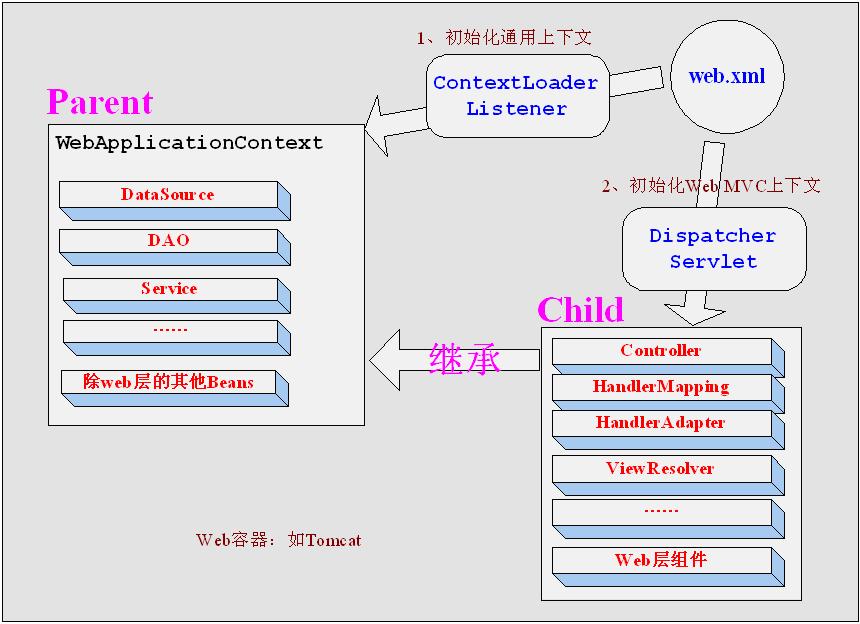
通用上下文:用于加载除Web层的其他Bean,如service、dao等,以便与其他Web框架集成;创建完毕后会将该上下文放在ServletContext:
servletContext.setAttribute(WebApplicationContext.ROOT_WEB_APPLICATION_CONTEXT_ATTRIBUTE, this.context);
DispatcherServlet上下文:用于加载只对Spring Web MVC有效的Bean,如Controller、HandlerMapping、HandlerAdapter等;创建时以通用上下文为父上下文,创建完毕后将该上下文放在ServletContext:
childContext.setParent(rootContext);
servletContext.setAttribute("org.springframework.web.servlet.FrameworkServlet.CONTEXT" + getServletName(), this.context);
4、spring mvc的典型配置
<!-- spring-context.xml中的配置 -->

<context:component-scan base-package="com.wind.pac" use-default-filters="true">

  <context:exclude-filter type="annotation" expression="org.springframework.stereotype.Controller" />

</context:component-scan>

<!-- spring-mvc.xml中的配置 -->

<context:component-scan base-package="com.wind.pac" use-default-filters="false">

    <context:include-filter type="annotation" expression="org.springframework.stereotype.Controller" />

    <context:include-filter type="annotation" expression="org.springframework.web.bind.annotation.RestController" />

</context:component-scan>
5、DispatcherServlet默认配置
DispatcherServlet的默认配置在DispatcherServlet.properties(和DispatcherServlet类在一个包下)中,是当Spring配置文件中没有指定配置时使用的默认策略
注:eclipse下,web项目的运行目录为:workspace\.metadata\.plugins\org.eclipse.wst.server.core\tmp0\wtpwebapps\
参考:
第二章 Spring MVC入门 —— 跟开涛学SpringMVC
第三章 DispatcherServlet详解 ——跟开涛学SpringMVC
Spring MVC 使用介绍(二)—— DispatcherServlet的更多相关文章
- Spring MVC源码(二) ----- DispatcherServlet 请求处理流程 面试必问
前端控制器 前端控制器,即所谓的Front Controller,体现的是设计模式中的前端控制器模式.前端控制器处理所有从用户过来的请求.所有用户的请求都要通过前端控制器.SpringMVC框架和其他 ...
- Spring MVC 使用介绍(十五)数据验证 (二)依赖注入与方法级别验证
一.概述 JSR-349 (Bean Validation 1.1)对数据验证进一步进行的规范,主要内容如下: 1.依赖注入验证 2.方法级别验证 二.依赖注入验证 spring提供BeanValid ...
- Spring MVC 使用介绍(十四)文件上传下载
一.概述 文件上传时,http请求头Content-Type须为multipart/form-data,有两种实现方式: 1.基于FormData对象,该方式简单灵活 2.基于<form> ...
- Spring MVC 使用介绍(十三)数据验证 (一)基本介绍
一.消息处理功能 Spring提供MessageSource接口用于提供消息处理功能: public interface MessageSource { String getMessage(Strin ...
- 2017.3.31 spring mvc教程(二)核心流程及配置详解
学习的博客:http://elf8848.iteye.com/blog/875830/ 我项目中所用的版本:4.2.0.博客的时间比较早,11年的,学习的是Spring3 MVC.不知道版本上有没有变 ...
- Maven 工程下 Spring MVC 站点配置 (二) Mybatis数据操作
详细的Spring MVC框架搭配在这个连接中: Maven 工程下 Spring MVC 站点配置 (一) Maven 工程下 Spring MVC 站点配置 (二) Mybatis数据操作 这篇主 ...
- Spring MVC 简单介绍
Spring MVC 是典型的mvc架构,适合web开发. controler 输入输出的控制器,也是对外view提供数据的接口,调用service层. model 数据,由bean组成(相应表),关 ...
- Spring MVC的核心控制器DispatcherServlet的作用
关于Spring MVC的核心控制器DispatcherServlet的作用,以下说法错误的是( )? 它负责接收HTTP请求 加载配置文件 实现业务操作 初始化上下应用对象ApplicationC ...
- Spring MVC 使用介绍(十二)控制器返回结果统一处理
一.概述 在为前端提供http接口时,通常返回的数据需要统一的json格式,如包含错误码和错误信息等字段. 该功能的实现有四种可能的方式: AOP 利用环绕通知,对包含@RequestMapping注 ...
随机推荐
- Codeforces Round #545 (Div. 1) Solution
人生第一场Div. 1 结果因为想D想太久不晓得Floyd判环法.C不会拆点.E想了个奇奇怪怪的set+堆+一堆乱七八糟的标记的贼难写的做法滚粗了qwq靠手速上分qwqqq A. Skyscraper ...
- mongodb .explain('executionStats') 查询性能分析(转)
mongodb性能分析方法:explain() 为了演示的效果,我们先来创建一个有200万个文档的记录.(我自己的电脑耗了15分钟左右插入完成.如果你想插更多的文档也没问题,只要有耐心等就可以了.) ...
- Java多线程编程核心技术(一)Java多线程技能
1.进程和线程 一个程序就是一个进程,而一个程序中的多个任务则被称为线程. 进程是表示资源分配的基本单位,线程是进程中执行运算的最小单位,亦是调度运行的基本单位. 举个例子: 打开你的计算机上的任务管 ...
- Java过滤掉字符串中的html标签、style标签、script标签
使用正则表达式 import java.util.regex.Matcher; import java.util.regex.Pattern; public class HTMLSpirit{ pub ...
- H5 CSS的格式
02-CSS的格式 标签名称{ 属性名称: 属性对应的值; ... } 2.注意点: 1.style标签必须写在head标签的开始标签和结束标签之间(也就是必须和title标签是兄弟关系) 2.sty ...
- C. Prefixes and Suffixes
链接 [https://codeforces.com/contest/1092/problem/C] 题意 给你某个字符串的长度n,再给你2*n-2个前缀或者后缀 让你判断那些是前缀那些是后缀 关键是 ...
- [2018福大至诚软工助教]UML设计小结
[2018福大至诚软工助教]UML设计小结 一.得分 总分(50分) 团队信息 (4分) 队名 (1分) 团队成员的学号与姓名(需要标注队长)(1分) 本次作业的博客链接(1分) 三者完全,4分 团队 ...
- [编程笔记]第一章 C语言概述
//C语言学习笔记 第一讲 C语言概述 第二讲 基本编程知识 第三讲 运算符和表达式 第四讲 流程控制 第五讲 函数 第六讲 数组 第七讲 指针 第八讲 变量的作用域和存储方式 第九讲 拓展类型 第十 ...
- switch变种玩法
标准版本: switch(表达式) { case 值1: 语句体1; break; case 值2: 语句体2; break; ... default: 语句体n+; break; } switch: ...
- 【转帖】理解 Linux 的虚拟内存
理解 Linux 的虚拟内存 https://www.cnblogs.com/zhenbianshu/p/10300769.html 段页式内存 文章了里面讲了 页表 没讲段表 记得最开始的时候 学习 ...