
[iOS]改变UIAlertController的标题、内容的字体和颜色
https://www.jianshu.com/p/51949eec2e9c
在开发中,弹出框是必不可少的,通常情况下,我们只要弹出系统自带的弹出框就可以。but,在某些情况下,万恶的UI会要求你修改显示文字的大小、颜色,虽然系统自带有一种红色字体的UIAlertAction,但是这种Action并不能放在Cancel位置,所以,更多时候,需要我们自己修改文字字体和颜色。
我采用的方法是KVC:
正常情况下,我们配置出来的UIAlertController是这样的:

或者是这样:

代码如下:
UIAlertController *alertController = [UIAlertController alertControllerWithTitle:@"提示" message:@"提示内容" preferredStyle:UIAlertControllerStyleAlert];
// UIAlertController *alertController = [UIAlertController alertControllerWithTitle:@"提示" message:@"提示内容" preferredStyle:UIAlertControllerStyleActionSheet];
UIAlertAction *defaultAction = [UIAlertAction actionWithTitle:@"Default" style:UIAlertActionStyleDefault handler:nil];
UIAlertAction *destructiveAction = [UIAlertAction actionWithTitle:@"Destructive" style:UIAlertActionStyleDestructive handler:nil];
UIAlertAction *cancelAction = [UIAlertAction actionWithTitle:@"Cancel" style:UIAlertActionStyleCancel handler:nil];
[alertController addAction:defaultAction];
[alertController addAction:destructiveAction];
[alertController addAction:cancelAction];
[self presentViewController:alertController animated:YES completion:nil];
代码里展示了系统提供的三种UIAlertAction,现在我们要对文字的字体和颜色进行设置:
- 1.标题和提示内容的文字设置
代码如下:
//修改title
NSMutableAttributedString *alertControllerStr = [[NSMutableAttributedString alloc] initWithString:@"提示"];
[alertControllerStr addAttribute:NSForegroundColorAttributeName value:[UIColor redColor] range:NSMakeRange(0, 2)];
[alertControllerStr addAttribute:NSFontAttributeName value:[UIFont systemFontOfSize:17] range:NSMakeRange(0, 2)];
[alertController setValue:alertControllerStr forKey:@"attributedTitle"];
//修改message
NSMutableAttributedString *alertControllerMessageStr = [[NSMutableAttributedString alloc] initWithString:@"提示内容"];
[alertControllerMessageStr addAttribute:NSForegroundColorAttributeName value:[UIColor greenColor] range:NSMakeRange(0, 4)];
[alertControllerMessageStr addAttribute:NSFontAttributeName value:[UIFont systemFontOfSize:20] range:NSMakeRange(0, 4)];
[alertController setValue:alertControllerMessageStr forKey:@"attributedMessage"];
效果如下:

- 2.设置按钮文字,就拿取消按钮距离:
代码如下:
//修改按钮
if (cancelAction valueForKey:@"titleTextColor") {
[cancelAction setValue:[UIColor redColor] forKey:@"titleTextColor"];
}
效果如下:

至于里面的key值怎么得到的,过两天会写一篇文章来讲述。
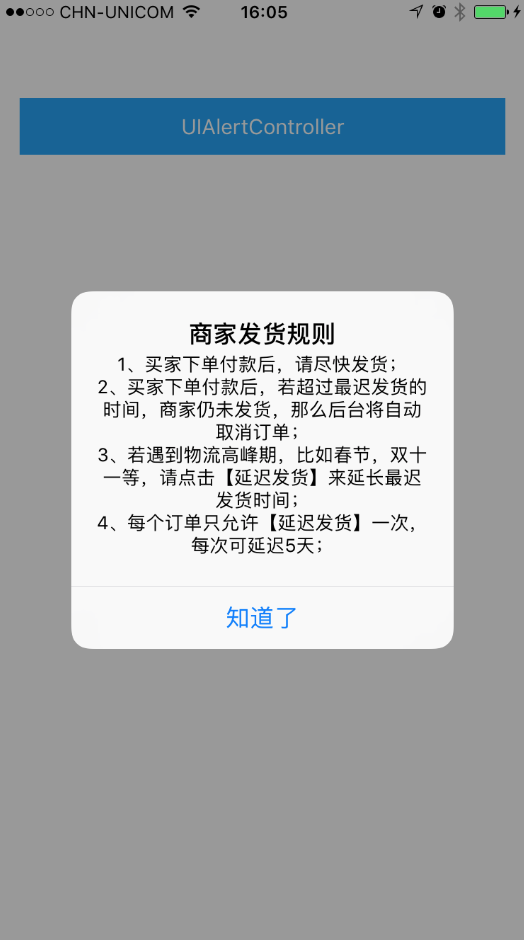
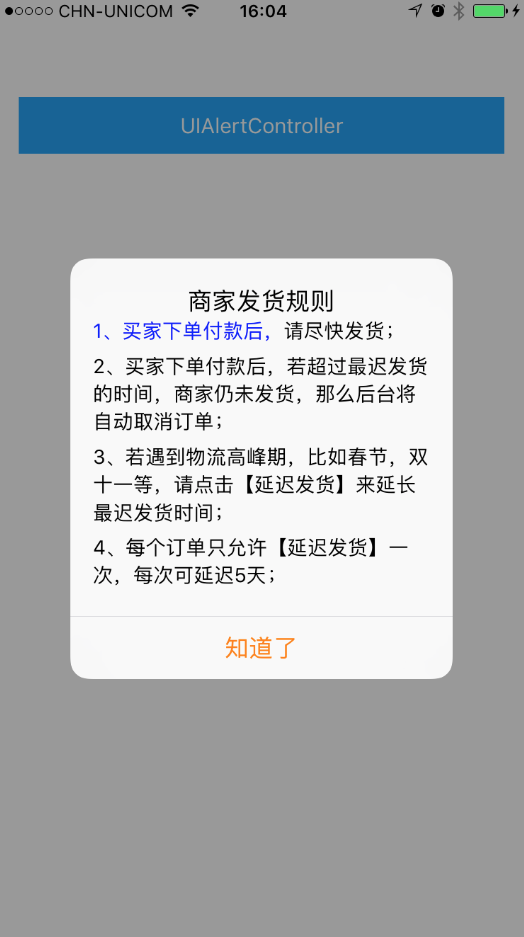
经常需要设置message左对齐、段间距这些属性
- (IBAction)tapAlertControllerButton:(id)sender {
NSString *titleString = @"商家发货规则";
NSString *messageString = @"1、买家下单付款后,请尽快发货;\n2、买家下单付款后,若超过最迟发货的时间,商家仍未发货,那么后台将自动取消订单;\n3、若遇到物流高峰期,比如春节,双十一等,请点击【延迟发货】来延长最迟发货时间;\n4、每个订单只允许【延迟发货】一次,每次可延迟5天;";
NSString *alertTitle = @"知道了";
UIAlertController *_alertController = [UIAlertController alertControllerWithTitle:titleString message:messageString preferredStyle:UIAlertControllerStyleAlert];
[_alertController addAction:[UIAlertAction actionWithTitle:alertTitle style:UIAlertActionStyleDefault handler:^(UIAlertAction * _Nonnull action) {
}]];
/* 修改title */
NSMutableAttributedString *attTitleString = [[NSMutableAttributedString alloc] initWithString:titleString];
[_alertController setValue:attTitleString forKey:@"attributedTitle"];
/* 修改message */
NSMutableAttributedString *attMsgString = [[NSMutableAttributedString alloc] initWithString:messageString];
// 设置字体
[attMsgString addAttribute:NSFontAttributeName value:[UIFont systemFontOfSize:14] range:NSMakeRange(0, attMsgString.length)];
// 设置颜色
[attMsgString addAttribute:NSForegroundColorAttributeName value:[UIColor blueColor] range:NSMakeRange(0, 10)];
NSMutableParagraphStyle *paragraph = [[NSMutableParagraphStyle alloc] init];
// 设置行间距
[paragraph setLineSpacing:3];
// 设置段间距
[paragraph setParagraphSpacingBefore:5];
// 设置对齐方式
[paragraph setAlignment:NSTextAlignmentLeft];
// 设置书写方向
[paragraph setBaseWritingDirection:NSWritingDirectionLeftToRight];
[attMsgString addAttribute:NSParagraphStyleAttributeName value:paragraph range:NSMakeRange(0, attMsgString.length)];
[_alertController setValue:attMsgString forKey:@"attributedMessage"];
/* 修改按钮的颜色 */
NSArray *actionArr = [_alertController actions];
[actionArr.firstObject setTitle:alertTitle];
[actionArr.firstObject setValue:[UIColor orangeColor] forKey:@"titleTextColor"];
[self presentViewController:_alertController animated:YES completion:nil];
}
示意图:
系统默认样式:
改变属性样式:
---------------------
作者:枫志应明
来源:CSDN
原文:https://blog.csdn.net/wsyx768/article/details/60874420
版权声明:本文为博主原创文章,转载请附上博文链接!
[iOS]改变UIAlertController的标题、内容的字体和颜色的更多相关文章
- iOS导航栏背景,标题和返回按钮文字颜色
在iOS7下,默认导航栏背景,颜色是这样的,接下来我们就进行自定义,如果你仅仅是更改一下背景和颜色,代码会很简单,不需要很复杂的自定义View来替代leftBarItem 更改导航栏的背景和文字Col ...
- Android(java)学习笔记96:如何改变spinner系统自带的字体和颜色
1.首先我们要知道spinner系统自带字体和颜色本质: 原生的Spring 控件是无法更改字体和颜色的... 从下面的代码可以看出...红色的标注显示使用的是Android默认的布局.. Spinn ...
- Android(java)学习笔记35:如何改变Spinner系统自带的字体和颜色
1. 首先我们要知道Spinner系统自带字体和颜色本质: 原生的Spring 控件是无法更改字体和颜色的... 从下面的代码可以看出...红色的标注显示使用的是Android默认的布局.. Spin ...
- iOS开发笔记-一种任意字体、颜色混排UILabel的实现
最近开发新App,射妓狮给的图上出现一种不同大小字体混排的Label,就像下面这种: 想了想,最简单的方法是使用多个UILabel排列显示,但是这样不仅麻烦而且效果也不好,索性自定义UILabel来尽 ...
- IOS 修改UIAlertController的按钮标题的字体颜色,字号,内容
IOS 修改UIAlertController的按钮标题的字体颜色,字号,内容 UIAlertController *alertVC = [UIAlertController alertControl ...
- iOS改变UIAlertView、UIActionSheet、UIAlertController系统字体颜色
废话不多说,直接上代码,效果是最好的说服力 1.改变UIAlertView字体颜色 [UIView appearance].tintColor = [UIColor greenColor]; 个人还是 ...
- IOS 改变导航栏返回按钮的标题
IOS 改变导航栏返回按钮的标题 下午又找到了一个新的方法 这个方法不错 暂时没有发现异常的地方. 新写的App中需要使用UINavigationController对各个页面进行导航,但由于第一 ...
- iOS 最新UIAlertController
iOS 8的新特性之一就是让接口更有适应性.更灵活,因此许多视图控制器的实现方式发生了巨大的变化.全新的UIPresentationController 在实现视图控制器间的过渡动画效果和自适应设备尺 ...
- iOS学习——UIAlertController详解
在开发中,弹出提示框是必不可少的.这两天项目中统一对已经被iOS API废弃的UIAlertView和UIActionSheet进行替换,我们知道,UIAlertView和UIActionSheet都 ...
随机推荐
- Mycat实现Mysql主从读写分离
一.概述 关于Mycat的原理网上有很多,这里不再详述,对于我来说Mycat的功能主要有如下几种: 1.Mysql主从的读写分离 2.Mysql大表分片 3.其他数据库例如Oracle,MSSQL,D ...
- Oracle 锁机制探究
以前虽然在网上看到很多关于Oracle锁机制的描述,但总感觉哪里有缺陷不适合自己,因此花了点时间参考官网以及Tom Tyke的<Oracle 9i/10g/11g编程艺术>一书整理了一下O ...
- [Hive_3] Hive 建表指定分隔符
0. 说明 Hive 建表示例及指定分隔符 1. Hive 建表 Demo 在 Hive 中输入以下命令创建表 user2 create table users2 (id int, name stri ...
- Ubuntu16.04下iTop4412环境搭建+Android4.0.3编译
系统:Ubuntu16.04.02(优麒麟) 安装库文件和JDK 使用cd 命令,进入解压出来的“Android_JDK” -->“jdk6”文件夹,运行脚本文件 “install-sun-ja ...
- C语言 设一个函数process,调用它时,实现不同功能。
//凯鲁嘎吉 - 博客园 http://www.cnblogs.com/kailugaji/ 输入a, b,第一次调用process找最大值,第二次调用process找最小值,第三次调用求和. 方法1 ...
- Beta冲刺博客汇总(麻瓜制造者)
Beta冲刺博客 Beta冲刺(1/5)(麻瓜制造者) Beta冲刺(2/5)(麻瓜制造者) Beta冲刺(3/5)(麻瓜制造者) Beta冲刺(4/5)(麻瓜制造者) Beta冲刺(5/5)(麻瓜制 ...
- Servlet中的request与response
了解这方面的知识可以查看以下博客 https://www.cnblogs.com/zhangyinhua/p/7629221.html https://www.cnblogs.com/zhaojian ...
- 《Java大学教程》—第24章 Java的背景
本章主要介绍的是Java的背景知识,通过了解历史知道Java与其他语言的区别,以便更好选择在什么场景下使用Java. 24.2 语言的尺寸Java语言短小.紧凑,以C++为基础,放弃了一些特定的 ...
- 用于文本分类的多层注意力模型(Hierachical Attention Nerworks)
论文来源:Hierarchical Attention Networks for Document Classification 1.概述 文本分类时NLP应用中最基本的任务,从之前的机器学习到现在基 ...
- Java时间api