
iOS开发笔记-一种任意字体、颜色混排UILabel的实现
最近开发新App,射妓狮给的图上出现一种不同大小字体混排的Label,就像下面这种:
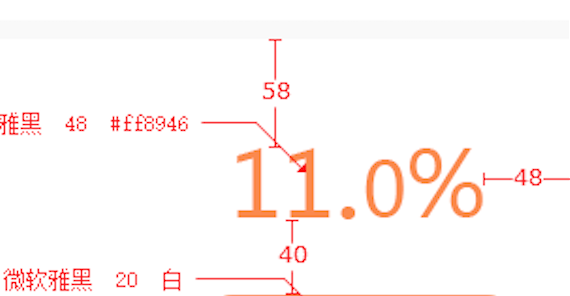
想了想,最简单的方法是使用多个UILabel排列显示,但是这样不仅麻烦而且效果也不好,索性自定义UILabel来尽可能的满足使用灵活性。
实现方法
与正常自定义控件的方法类似,主要利用了CoreGraphics来动态绘制字体,但这里字体的参数都用NSArray存储,以尽最大可能不受具体内容约束,实现灵活性。
代码如下:
#import <UIKit/UIKit.h>

@interface UnevenHeightLabel : UIView

@property (nonatomic) NSArray *strings;

@property (nonatomic) NSArray *fonts;

@property (nonatomic) NSArray *originY;

@property (nonatomic) NSArray *fontColors;

-(instancetype) initWithUnevenHeightStrings:(NSArray *)strings stringFonts:(NSArray *)fonts originY:(NSArray *)originY  stringColors:(NSArray *) colors;

@end
#import "UnevenHeightLabel.h"

#import "UIColor+HexColor.h"

@implementation UnevenHeightLabel

// Only override drawRect: if you perform custom drawing.

// An empty implementation adversely affects performance during animation.

- (void)drawRect:(CGRect)rect {

    // Drawing code

    CGContextRef ctx = UIGraphicsGetCurrentContext();

    CGContextSetLineWidth(ctx, 1.0f);

    CGRect startRect;

    CGSize requiredSize;

    float sumWidth=;

    if(_strings!=nil&& _strings.count>){

        for (int i=; i<_strings.count; i++) {

            CGSize maxSize=rect.size;

            requiredSize=[_strings[i] boundingRectWithSize:maxSize options:NSStringDrawingUsesFontLeading attributes:@{NSFontAttributeName:_fonts[i]} context:nil].size;

            if(i==){

                startRect=CGRectMake(, , maxSize.width, maxSize.height);

            }

            else{

                startRect=CGRectMake(sumWidth, [_originY[i] floatValue], requiredSize.width, requiredSize.height);

            }

            [_strings[i] drawInRect:startRect

                     withAttributes:@{NSFontAttributeName:_fonts[i],

                                      NSForegroundColorAttributeName:_fontColors[i]}];

            sumWidth=sumWidth+requiredSize.width;

        }

    }

}

-(instancetype)initWithUnevenHeightStrings:(NSArray *)strings stringFonts:(NSArray *)fonts originY:(NSArray *)originY stringColors:(NSArray *)colors {

    self=[super init];

    self.strings=strings;

    self.fonts=fonts;

    self.originY=originY;

    self.fontColors=colors;

    //[self setNeedsDisplay];

    return self;

}

@end
Demo:
使用方法很简单,直接在需要使用的地方调用,如下:
 UnevenHeightLabel  *label=[[UnevenHeightLabel alloc] initWithUnevenHeightStrings:@[@"11.",@"",@"%"]  stringFonts:@[[UIFont systemFontOfSize:],[UIFont systemFontOfSize:],[UIFont systemFontOfSize:]] originY:@[@,@,@] stringColors:@[[UIColor redColor],[UIColor blueColor],[UIColor greenColor]]];

    label.frame=CGRectMake(, , , );

    label.backgroundColor=[UIColor clearColor];

    [self.view addSubview:label];

    UnevenHeightLabel *mylabel=[[UnevenHeightLabel alloc] initWithUnevenHeightStrings:@[@"A",@"a",@"B",@"b",@"C",@"c"]

                                                                          stringFonts:@[[UIFont systemFontOfSize:],

                                                                                        [UIFont systemFontOfSize:],

                                                                                        [UIFont systemFontOfSize:],

                                                                                        [UIFont systemFontOfSize:],

                                                                                        [UIFont systemFontOfSize:],

                                                                                        [UIFont systemFontOfSize:]]

                                                                              originY:@[@,@,@,@,@,@]

                                                                         stringColors:@[

                                                                                        [UIColor redColor],

                                                                                        [UIColor orangeColor],

                                                                                        [UIColor greenColor],

                                                                                        [UIColor blueColor],

                                                                                        [UIColor cyanColor],

                                                                                        [UIColor purpleColor]]];

    [mylabel setFrame:CGRectMake(SCREEN_WIDTH/-, SCREEN_HEIGHT/-, , )];

    [mylabel setBackgroundColor:[UIColor clearColor]];

    [self.view addSubview:mylabel];
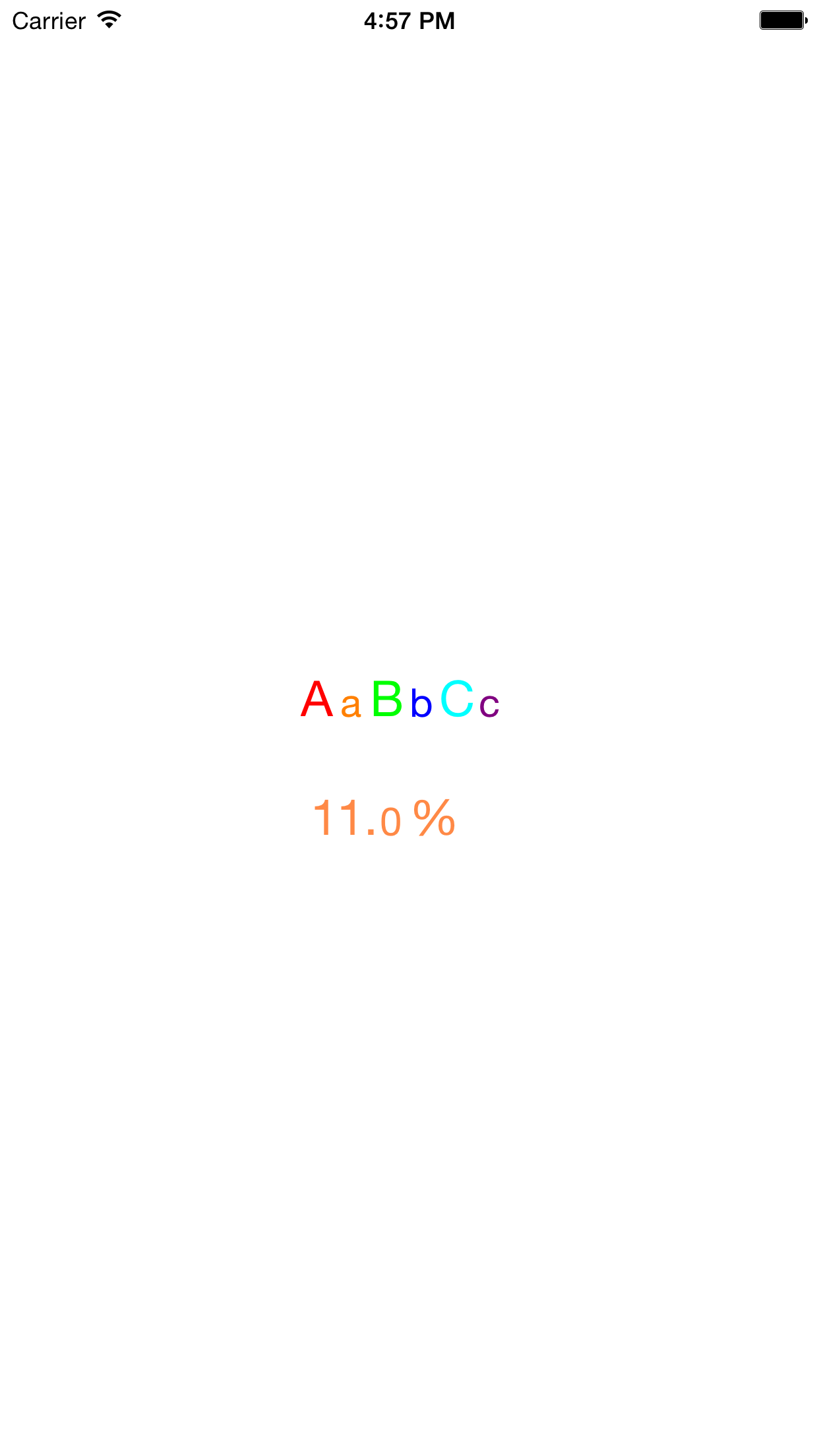
效果如下:
iOS开发笔记-一种任意字体、颜色混排UILabel的实现的更多相关文章
- 【iOS学习笔记】改变状态栏字体颜色
Step1. info.plist中设置UIViewControllerBasedStatusBarAppearance为NO Step2. AppDelegate.m中添加 - (BOOL)appl ...
- iOS开发 - 第05篇 - 项目 - 12 - 图文混排
1.首页微博文字处理 对于之前微博项目中首页:微博文字中的用户名.话题.链接等文字须要高亮显示.表情字符串须要显示相应表情. 思路: 1>之前微博中的文字使用NSString,要达到不同文字的高 ...
- iOS开发笔记--使用blend改变图片颜色
最近对Core Animation和Core Graphics的内容东西比较感兴趣,自己之前也在这块相对薄弱,趁此机会也想补习一下这块的内容,所以之后几篇可能都会是对CA和CG学习的记录的文章. 在应 ...
- iOS开发笔记-两种单例模式的写法
iOS开发笔记-两种单例模式的写法 单例模式是开发中最常用的写法之一,iOS的单例模式有两种官方写法,如下: 不使用GCD #import "ServiceManager.h" ...
- 李洪强iOS开发之-修改状态栏的字体的颜色
李洪强iOS开发之-修改状态栏的字体的颜色 修改的效果: -(void)viewDidAppear:(BOOL)animated { [super viewDidAppear:animated]; [ ...
- iOS开发笔记7:Text、UI交互细节、两个动画效果等
Text主要总结UILabel.UITextField.UITextView.UIMenuController以及UIWebView/WKWebView相关的一些问题. UI细节主要总结界面交互开发中 ...
- iOS开发UITableViewCell的选中时的颜色设置(转)
iOS开发UITableViewCell的选中时的颜色设置 1.系统默认的颜色设置 //无色 cell.selectionStyle = UITableViewCellSelectionStyle ...
- iOS开发UI篇—iOS开发中三种简单的动画设置
iOS开发UI篇—iOS开发中三种简单的动画设置 [在ios开发中,动画是廉价的] 一.首尾式动画 代码示例: // beginAnimations表示此后的代码要“参与到”动画中 [UIView b ...
- IOS开发-几种截屏方法
IOS开发-几种截屏方法 1. UIGraphicsBeginImageContextWithOptions(pageView.page.bounds.size, YES, zoomSc ...
随机推荐
- FP数据库配置文件
- 289. Game of Life数组生存游戏
[抄题]: According to the Wikipedia's article: "The Game of Life, also known simply as Life, is a ...
- Java 深拷贝,浅拷贝
一直听说这两个词,确实不知道代表啥意思?也不知道究竟要用来做什么?什么时候用到他们. 下面是从一篇博文种得到的解释: 浅复制(浅克隆) :被复制对象的所有变量都含有与原来的对象相同的值,而所有的对其他 ...
- Django中操作Redis
一 创建redis连接池 redis_pool.py pool = redis.ConnectionPool(host='10.211.55.4', port=6379) 二 引入连接池 import ...
- 根据需要查找需要的第三方pyhton库
1.可以在https://awesome-python.com/这个网站上按照分类去寻找,上面收录了比较全面的第三方库.比如我们想要找爬虫方面的库时,查看Web Crawling这个分类,就能看到相应 ...
- Python开发——数据类型【列表】
列表的定义 中括号[]内以逗号分隔开,按照索引,存放各种数据类型,每个位置代表一个元素 list_t = ['张三','Lucy',123] print(list_t) # ['张三', 'Lucy' ...
- win10系统配置jdk环境不能用%JAVA_HOME% 代替目录
发现以前配好的java环境变量和tomcat环境变量全都清空了,在重新配置的时候总是出现问题,即在cmd命令窗口下,输入java,显示正常,输入java -version 也是显示正常,唯独输入jav ...
- python小结 1
1.变量 记录状态 类型:数字,字符串,元组,列表,字典 可变不可变(内存地址不变的情况下,值能不能改变): 不可变:字符串,数字,元组 可变:列表,字典 访问顺序: 直接访问:数字 有序:字符串,列 ...
- CodeForces - 589D
题目链接:http://codeforces.com/problemset/problem/589/D 思路:将每个人的信息转化为自变量为时间因变量为位置的一元方程.再一个个判断是否相遇. 若两人同向 ...
- Python Day 2
阅读目录: 内容回顾 编程语言介绍 python语言介绍 安装官方cpython解释器 --版本共存 运行python代码 --交互式:实时交互 --脚本式:运行py文件的三步骤 变量 ...