
Zero to Build: Create new Xamarin apps in minutes with AppMap
Creating a new Xamarin.Forms app can be an intimidating task, especially if you add in content pages one by one using the Visual Studio templates. You most likely already have a design in your head, or maybe drawn out on a whiteboard.
Wouldn’t it be nice to be able to turn a drawing into an app design? That’s exactly how AppMap works with the Ultimate UI Controls for Xamarin. Using AppMap, you can drag and drop your content page design and navigation into a functioning app in minutes. Let’s get started!
First, let’s create a new Visual Studio project. In File -> New -> Project, expand Infragistics and then select Xamarin.Forms. Select the AppMap Project (Xamarin.Forms) and name your project.

That will bring up the Infragistics Project Wizard. This is where you can select which platforms that you would like to target with your new app. For now, we’ll only select Android. By default, the DI Container is set to Unity. Unless you plan on using a different container type, you can leave that set. You’ll also want to make sure that Use AppMap is enabled, so that we can drag and drop our pages. Click Create Project to get started.

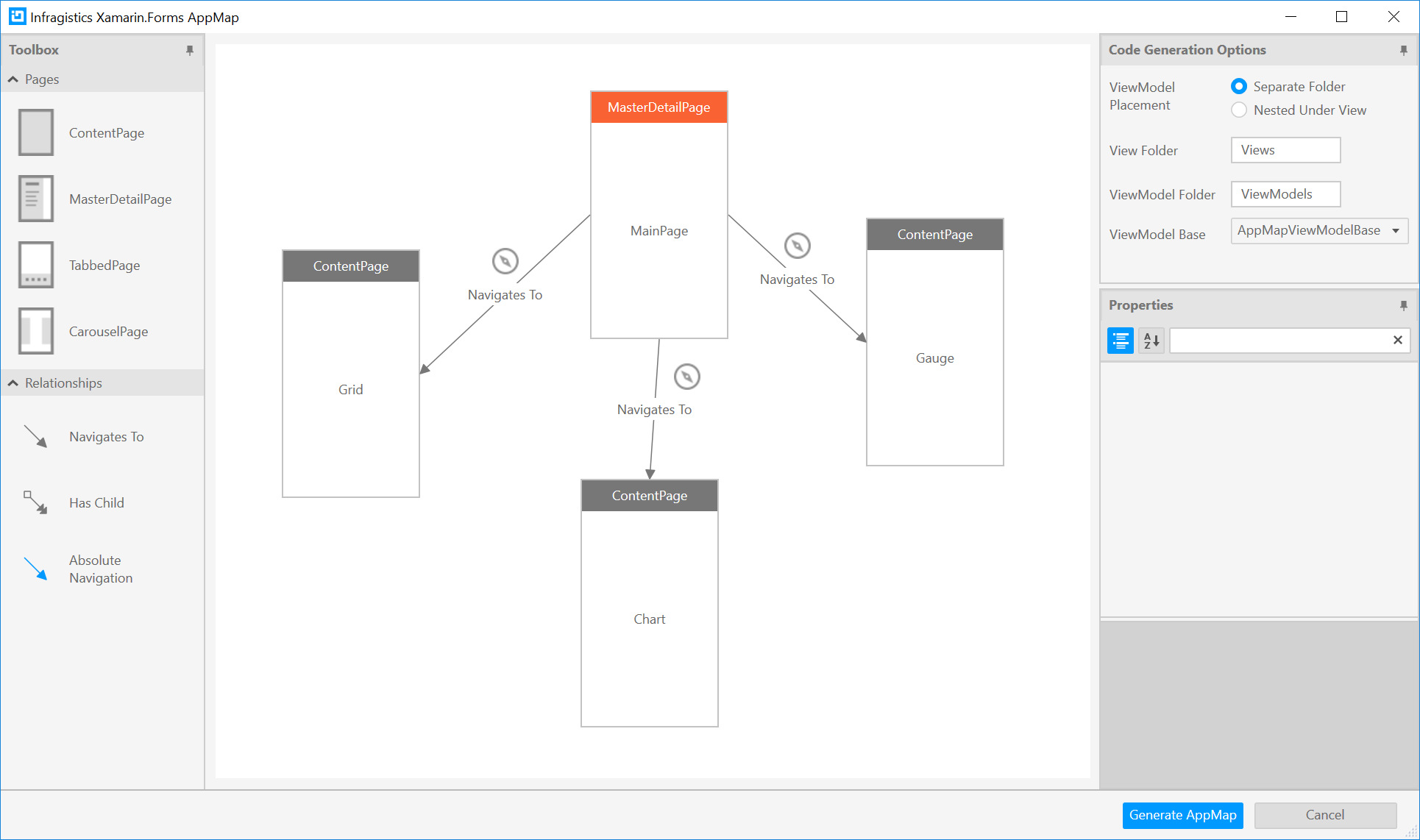
Now we’re presented with a blank canvas. You can think of this as a Visio or PowerPoint where you drag and drop what you the various page and navigation types onto the canvas. The Code Generation Options give you the ability to customize where the pages are generated. We’ll leave these set to default and visit them in more detail in a later post.

Let’s drag and drop a MasterDetailPage onto the canvas. Notice that some content pages automatically get created, with navigation links to each page. Since this is the first page, it also gets named MainPage automatically, and is marked as the main page within the app. Let’s rename the content pages to GridPage, ChartPage, and GaugePage, and then click Generate AppMap.
You’ll see in Solution Explorer that that Views and ViewModels are created for you.

From here, we can build and run our app to see the pages and test out our navigation.

Its that simple! Now we have a working app with our content pages, and a hamburger menu that provides navigation between them. Download a trial today to get started using AppMap with the UI Controls for Xamarin. We also have videos and lessons for using AppMap and other UI Controls for Xamarin to help you write fast and run fast.
This blog is the first in a series highlighting the Infragisitics Productivity Pack with the UI Controls for Xamarin. In the next post of this series, we'll build onto our solution.
Zero to Build: Create new Xamarin apps in minutes with AppMap的更多相关文章
- Add Languages to Your Xamarin Apps with Multilingual App Toolkit
With Xamarin, you can extend your cross-platform apps with support for native speakers, reaching mar ...
- rails 中 create, new, build, save 的用法以及误区汇总
自己很初级,初级的不能再初级,所以初次接触rails的时候,对于里面的create,new,build等方法不是很了解,用的很混乱,导致经常出现不必要的bug,很苦恼,决定,总结一下,结合网上已有资源 ...
- rails 中 create, new, build, save 的用法以及误区汇总 (转)
自己很初级,初级的不能再初级,所以初次接触rails的时候,对于里面的create,new,build等方法不是很了解,用的很混乱,导致经常出现不必要的bug,很苦恼,决定,总结一下,结合网上已有资源 ...
- Developing Universal Windows Apps 开发UWA应用 问答
开始是一些欢迎,就不翻译 Question: Is the code already there? Answer: There is some code on that codeplex site, ...
- Add AI feature to Xamarin.Forms app
Now, AI is one of important technologies.Almost all platforms have API sets of AI. Following list is ...
- Xamarin.Forms 开发资源集合(复制)
复制:https://www.cnblogs.com/mschen/p/10199997.html 收集整理了下 Xamarin.Forms 的学习参考资料,分享给大家,稍后会不断补充: UI样式 S ...
- Xamarin.Forms 开发资源集合
收集整理了下 Xamarin.Forms 的学习参考资料,分享给大家,稍后会不断补充: UI样式 Snppts: Xamarin Forms UI Snippets. Prebuilt Templat ...
- [百度网盘]Xamarin for Visual Studio 3.7.165 Preview 最新版-介绍
Xamarin 3.7.165 Preview 下载地址:http://download.xamarin.com/XamarinforVisualStudio/Windows/Xamarin.Visu ...
- Isomorphic JavaScript: The Future of Web Apps
Isomorphic JavaScript: The Future of Web Apps At Airbnb, we’ve learned a lot over the past few years ...
随机推荐
- C语言中指针变量的加减运算
1.指针变量中存放的是地址值,也就是一个数字地址,例如某指针变量中的值是0x20000000,表示表示此指针变量存放的是内存中位于0x20000000地方的内存地址.指针变量可以加减,但是只能与整型数 ...
- Ext中 grid 设置行样式
//设置样式 JS var SetRowClass = function(record, rowIndex, rowParams, store) { if (record.data.status ...
- iOS开发简记(5):设备唯一标识与全局变量
这里记录两个iOS开发中经常用到的知识点,一个是唯一标识,一个是全局变量. (1)唯一标识 唯一标识一台设备(比如iPhone.iPad等)是一个基本的实现与业务上的需求,因为这个唯一标识在许多场景都 ...
- 失物找寻APP软件需求规格说明书——第三次团队作业
⭐对于软件需求规格说明书的理解 在没写这份软件需求规格说明书的时候我们组成员都不是很理解它的必要性,当然,写完之后才知道它的作用. 软件需求说明书的存在是为了使用户和软件开发者双方对该软件的初始规定有 ...
- python 链接 redis 失败 由于目标计算机积极拒绝,无法连接
whereis redis-cli ps -ef |grep redis 1.启动redis redis-server & 2.查看redis 进程 ps -ef |grep redis 3. ...
- 小L的项链切割 (回文串)
题目描述 小T送给了小L了一串项链.为了方便,我们把项链上形态不同钻石用不同的字母表示.这样小L的项链就变成了一个字符串.小L忽然想把这串项链优美地切割一下,她想把它切割成尽量少的回文项链,啊也就是回 ...
- ibeacon和蓝牙有什么区别_它们的区别在哪里
iBeacon概述 iBeacon是苹果公司2013年9月发布的移动设备用OS(iOS7)上配备的新功能.其工作方式是,配备有低功耗蓝牙(BLE)通信功能的设备使用BLE技术向周围发送自己特有的ID, ...
- python_超级基础
初识计算机 CPU 计算机的大脑.中央处理单元,主要负责数据运算及计算,是运算计算中心. 存储器 内存 临时存储数据,供CPU运算使用. 优点: 读取速度快. 缺点: 容量小,成本高,断电即消失. 硬 ...
- Pycharm中怎么给字典中的多个键-值对同时加上单引号
今天看了个爬虫视频,崔庆才讲师的免费视频, 里面一个批量给header加引号2s完成,这波操作让我眼前一亮. 最终还是发现了骚操作的背后手速是真的快. pycharm中按ctrl+r 勾选右上角的Re ...
- 把composer的源切换为 国际的源
把composer的源切换为 国际的源:composer config -g repo.packagist composer https://packagist.org