
Zero to Build: Create new Xamarin apps in minutes with AppMap
Creating a new Xamarin.Forms app can be an intimidating task, especially if you add in content pages one by one using the Visual Studio templates. You most likely already have a design in your head, or maybe drawn out on a whiteboard.
Wouldn’t it be nice to be able to turn a drawing into an app design? That’s exactly how AppMap works with the Ultimate UI Controls for Xamarin. Using AppMap, you can drag and drop your content page design and navigation into a functioning app in minutes. Let’s get started!
First, let’s create a new Visual Studio project. In File -> New -> Project, expand Infragistics and then select Xamarin.Forms. Select the AppMap Project (Xamarin.Forms) and name your project.

That will bring up the Infragistics Project Wizard. This is where you can select which platforms that you would like to target with your new app. For now, we’ll only select Android. By default, the DI Container is set to Unity. Unless you plan on using a different container type, you can leave that set. You’ll also want to make sure that Use AppMap is enabled, so that we can drag and drop our pages. Click Create Project to get started.

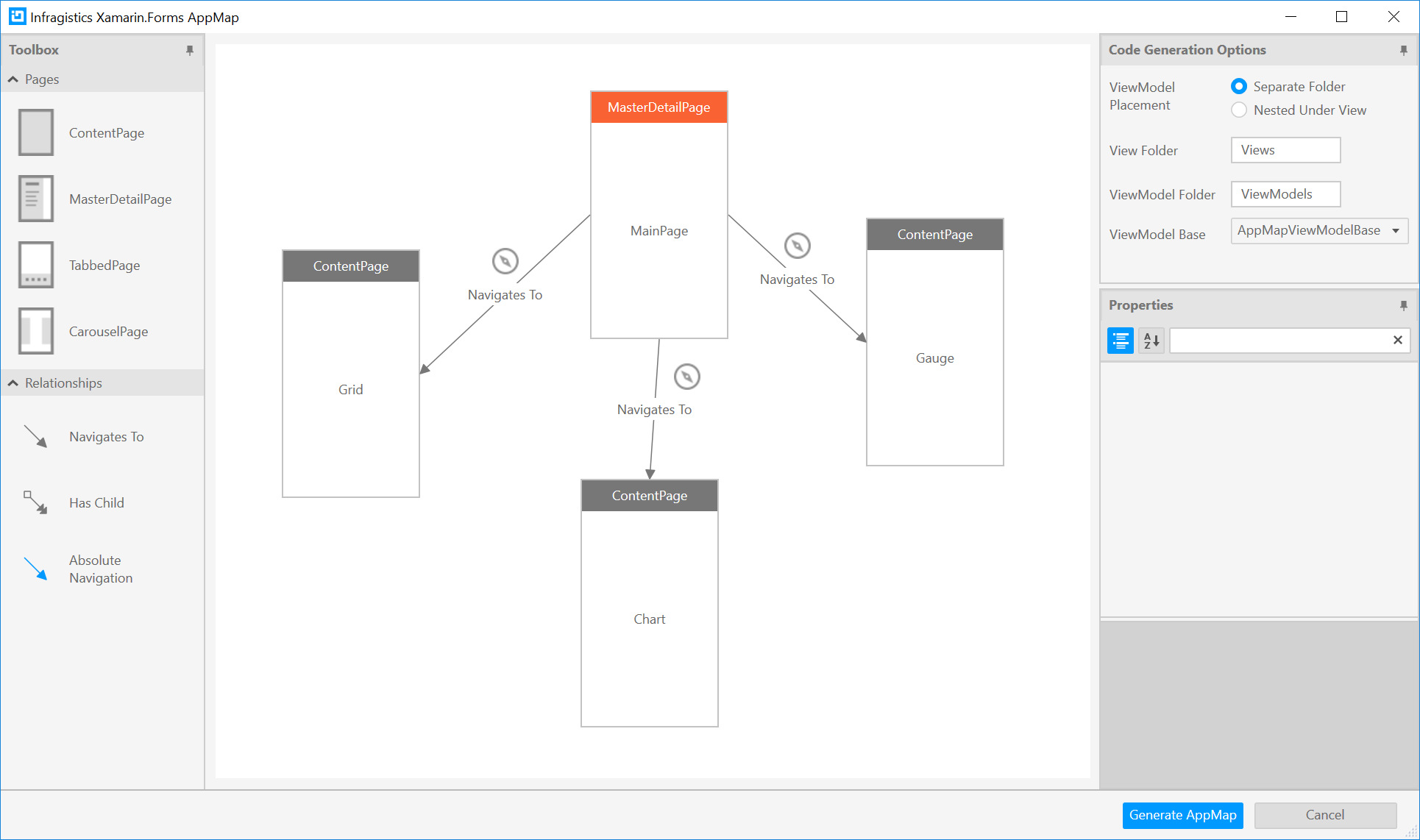
Now we’re presented with a blank canvas. You can think of this as a Visio or PowerPoint where you drag and drop what you the various page and navigation types onto the canvas. The Code Generation Options give you the ability to customize where the pages are generated. We’ll leave these set to default and visit them in more detail in a later post.

Let’s drag and drop a MasterDetailPage onto the canvas. Notice that some content pages automatically get created, with navigation links to each page. Since this is the first page, it also gets named MainPage automatically, and is marked as the main page within the app. Let’s rename the content pages to GridPage, ChartPage, and GaugePage, and then click Generate AppMap.
You’ll see in Solution Explorer that that Views and ViewModels are created for you.

From here, we can build and run our app to see the pages and test out our navigation.

Its that simple! Now we have a working app with our content pages, and a hamburger menu that provides navigation between them. Download a trial today to get started using AppMap with the UI Controls for Xamarin. We also have videos and lessons for using AppMap and other UI Controls for Xamarin to help you write fast and run fast.
This blog is the first in a series highlighting the Infragisitics Productivity Pack with the UI Controls for Xamarin. In the next post of this series, we'll build onto our solution.
Zero to Build: Create new Xamarin apps in minutes with AppMap的更多相关文章
- Add Languages to Your Xamarin Apps with Multilingual App Toolkit
With Xamarin, you can extend your cross-platform apps with support for native speakers, reaching mar ...
- rails 中 create, new, build, save 的用法以及误区汇总
自己很初级,初级的不能再初级,所以初次接触rails的时候,对于里面的create,new,build等方法不是很了解,用的很混乱,导致经常出现不必要的bug,很苦恼,决定,总结一下,结合网上已有资源 ...
- rails 中 create, new, build, save 的用法以及误区汇总 (转)
自己很初级,初级的不能再初级,所以初次接触rails的时候,对于里面的create,new,build等方法不是很了解,用的很混乱,导致经常出现不必要的bug,很苦恼,决定,总结一下,结合网上已有资源 ...
- Developing Universal Windows Apps 开发UWA应用 问答
开始是一些欢迎,就不翻译 Question: Is the code already there? Answer: There is some code on that codeplex site, ...
- Add AI feature to Xamarin.Forms app
Now, AI is one of important technologies.Almost all platforms have API sets of AI. Following list is ...
- Xamarin.Forms 开发资源集合(复制)
复制:https://www.cnblogs.com/mschen/p/10199997.html 收集整理了下 Xamarin.Forms 的学习参考资料,分享给大家,稍后会不断补充: UI样式 S ...
- Xamarin.Forms 开发资源集合
收集整理了下 Xamarin.Forms 的学习参考资料,分享给大家,稍后会不断补充: UI样式 Snppts: Xamarin Forms UI Snippets. Prebuilt Templat ...
- [百度网盘]Xamarin for Visual Studio 3.7.165 Preview 最新版-介绍
Xamarin 3.7.165 Preview 下载地址:http://download.xamarin.com/XamarinforVisualStudio/Windows/Xamarin.Visu ...
- Isomorphic JavaScript: The Future of Web Apps
Isomorphic JavaScript: The Future of Web Apps At Airbnb, we’ve learned a lot over the past few years ...
随机推荐
- Egg入门学习(一)
一:什么是Egg? 它能做什么?Egg.js是nodejs的一个框架,它是基于koa框架的基础之上的上层框架,它继承了koa的,它可以帮助开发人员提高开发效率和维护成本.Egg约定了一些规则,在开发中 ...
- python推导式创建序列
推导式创建序列 推导式是一个或多个迭代器快速创建序列的一种方式.可以将循环和条件判断结合,简化代码.几个推导式注意符号的使用,比如小括号,方括号,大括号等等. 列表推导式 列表推导式生成列表对象,语法 ...
- buildroot使用介绍
buildroot是Linux平台上一个构建嵌入式Linux系统的框架.整个Buildroot是由Makefile脚本和Kconfig配置文件构成的.你可以和编译Linux内核一样,通过buildro ...
- glance系列一:glance基础
一 什么是glance glance即image service,是为虚拟机的创建提供镜像的服务 二 为何要有glance 我们基于openstack是构建基本的Iaas平台对外提供虚拟机,而虚拟机在 ...
- 【转】MySQL中的共享锁与排他锁
在MySQL中的行级锁,表级锁,页级锁中介绍过,行级锁是Mysql中锁定粒度最细的一种锁,行级锁能大大减少数据库操作的冲突.行级锁分为共享锁和排他锁两种,本文将详细介绍共享锁及排他锁的概念.使用方式及 ...
- Java函数式编程和lambda表达式
为什么要使用函数式编程 函数式编程更多时候是一种编程的思维方式,是种方法论.函数式与命令式编程的区别主要在于:函数式编程是告诉代码你要做什么,而命令式编程则是告诉代码要怎么做.说白了,函数式编程是基于 ...
- Mysql MHA高可用集群架构
** 记得之前发过一篇文章,名字叫<浅析MySQL高可用架构>,之后一直有很多小伙伴在公众号后台或其它渠道问我,何时有相关的深入配置管理文章出来,因此,民工哥,也将对前面的各类架构逐一进行 ...
- 【LeetCode-数组篇】 1 Two Sum
1 前言 之所以开始刷 LeetCode 上的算法题,一是快面临秋招,第二点是因为提升自己的编程能力,坚持两个月,希望博友们监督. 这个系列打算用 C# 和 Java 编程,为什么用两门语言,因为经历 ...
- Mysql数据库中索引的概念总结
1.索引的目的是什么 1.快速访问数据表中的特定信息,提高检索速度 2.创建唯一性索引,保证数据库表中每一行数据的唯一性. 3.加速表和表之间的连接 4.使用分组和排序子句进行数据检索时,可以显著减少 ...
- 虚拟机Ubuntu图形界面进入命令行快捷键
ctrl+alt+f2 https://jingyan.baidu.com/article/03b2f78c69e5c25ea337ae40.html https://www.zabbix.com/d ...