
SpringBoot系列——mail
前言
邮件是许多项目里都需要用到的功能,之前一直都是用JavaMail来发,现在Spring框架为使用JavaMailSender接口发送电子邮件提供了一个简单的抽象,Spring Boot为它提供了自动配置以及启动模块。springboot参考手册介绍:https://docs.spring.io/spring-boot/docs/2.1.0.RELEASE/reference/htmlsingle/#boot-features-email
作为发送方,首先需要开启POP3/SMTP服务,登录邮箱后前往设置进行开启,开启后取得授权码。
POP3 :
POP3是Post Office Protocol 3的简称,即邮局协议的第3个版本,规定怎样将个人计算机连接到Internet的邮件服务器和下载电子邮件的电子协议。是因特网电子邮件的第一个离线协议标准,POP3允许用户从服务器上把邮件存储到本地主机(即自己的计算机)上,同时删除保存在邮件服务器上的邮件,而POP3服务器则是遵循POP3协议的接收邮件服务器,用来接收电子邮件的。
SMTP:
SMTP 的全称是“Simple Mail Transfer Protocol”,即简单邮件传输协议。是一组用于从源地址到目的地址传输邮件的规范,通过来控制邮件的中转方式。SMTP 协议属于 TCP/IP 协议簇,帮助每台计算机在发送或中转信件时找到下一个目的地。SMTP 服务器就是遵循 SMTP 协议的发送邮件服务器。
代码编写
maven引包,其中,邮件模板需要用到thymeleaf
        <!-- springboot mail -->

        <dependency>

            <groupId>org.springframework.boot</groupId>

            <artifactId>spring-boot-starter-mail</artifactId>

        </dependency>

        <!-- thymeleaf模板 -->

        <dependency>

            <groupId>org.springframework.boot</groupId>

            <artifactId>spring-boot-starter-thymeleaf</artifactId>

        </dependency>

        <!-- springboot web(MVC)-->

        <dependency>

            <groupId>org.springframework.boot</groupId>

            <artifactId>spring-boot-starter-web</artifactId>

        </dependency>

        <!-- springboot -->

        <dependency>

            <groupId>org.springframework.boot</groupId>

            <artifactId>spring-boot-starter-test</artifactId>

            <scope>test</scope>

        </dependency>
appliaction.propertise配置文件
#设置服务端口

server.port=

# Email (MailProperties)

spring.mail.default-encoding=UTF-

spring.mail.host=smtp.qq.com

spring.mail.username=huanzi.qch@qq.com #发送方邮件名
spring.mail.password= #授权码
spring.mail.properties.mail.smtp.auth=true
spring.mail.properties.mail.smtp.starttls.enable=true
spring.mail.properties.mail.smtp.starttls.required=true
SpringBootMailServiceImpl.java
@Service

class SpringBootMailServiceImpl implements SpringBootMailService {

    @Autowired

    private JavaMailSender mailSender;

    /**

     * 发送方

     */

    @Value("${spring.mail.username}")

    private String from;

    /**

     * 发送简单邮件

     *

     * @param to      接收方

     * @param subject 邮件主题

     * @param text    邮件内容

     */

    @Override

    public void sendSimpleMail(String to, String subject, String text) {

        SimpleMailMessage message = new SimpleMailMessage();

        message.setFrom(from);

        message.setTo(to);

        message.setSubject(subject);

        message.setText(text);

        mailSender.send(message);

    }

    /**

     * 发送HTML格式的邮件

     *

     * @param to      接收方

     * @param subject 邮件主题

     * @param content HTML格式的邮件内容

     * @throws MessagingException

     */

    @Override

    public void sendHtmlMail(String to, String subject, String content) throws MessagingException {

        MimeMessage message = mailSender.createMimeMessage();

        //true表示需要创建一个multipart message

        MimeMessageHelper helper = new MimeMessageHelper(message, true);

        helper.setFrom(from);

        helper.setTo(to);

        helper.setSubject(subject);

        helper.setText(content, true);

        mailSender.send(message);

    }

    /**

     * 发送HTML格式的邮件,并可以添加附件

     * @param to      接收方

     * @param subject 邮件主题

     * @param content HTML格式的邮件内容

     * @param files   附件

     * @throws MessagingException

     */

    @Override

    public void sendAttachmentsMail(String to, String subject, String content, List<File> files) throws MessagingException {

        MimeMessage message = mailSender.createMimeMessage();

        MimeMessageHelper helper = new MimeMessageHelper(message, true);

        helper.setFrom(from);

        helper.setTo(to);

        helper.setSubject(subject);

        helper.setText(content, true);

        //添加附件

        for(File file : files){

            helper.addAttachment(file.getName(), new FileSystemResource(file));

        }

        mailSender.send(message);

    }

}
测试controller
    @Autowired

    private SpringBootMailService springBootMailService;

    @Autowired

    private TemplateEngine templateEngine;

    @GetMapping("/index")

    public String index() throws MessagingException {

        //简单邮件

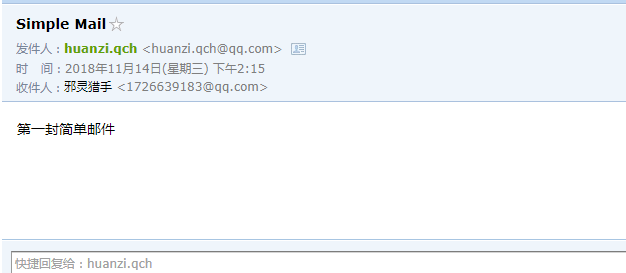
        springBootMailService.sendSimpleMail("1726639183@qq.com","Simple Mail","第一封简单邮件");

        //HTML格式邮件

        Context context = new Context();

        context.setVariable("username","我的小号");

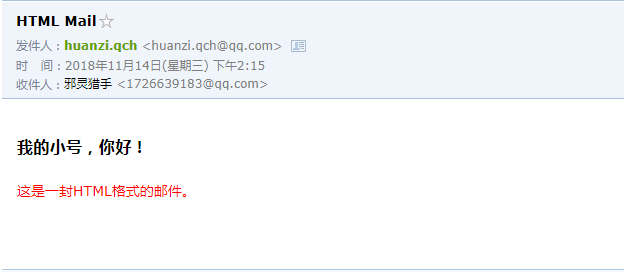
        springBootMailService.sendHtmlMail("1726639183@qq.com","HTML Mail",templateEngine.process("mail/mail",context));

        //HTML格式邮件,带附件

        Context context2 = new Context();

        context2.setVariable("username","我的小号(带附件)");

        ArrayList<File> files = new ArrayList<>();

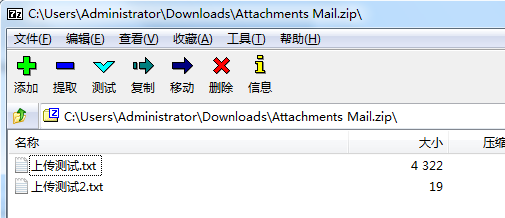
        files.add(new File("C:\\Users\\Administrator\\Desktop\\上传测试.txt"));

        files.add(new File("C:\\Users\\Administrator\\Desktop\\上传测试2.txt"));

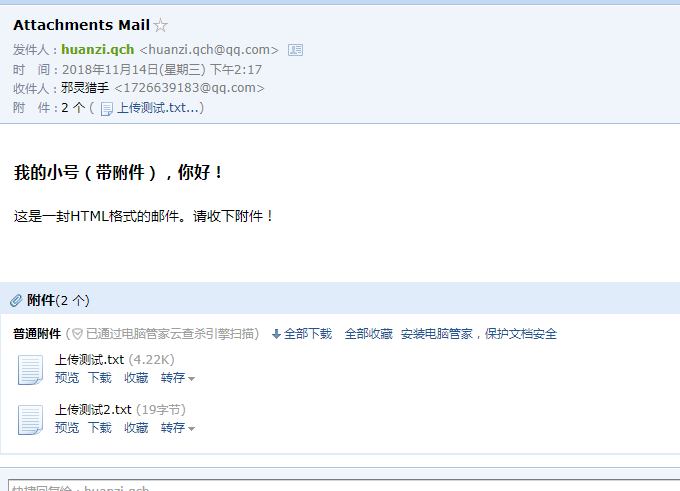
        springBootMailService.sendAttachmentsMail("1726639183@qq.com","Attachments Mail",templateEngine.process("mail/attachment",context2),files);

        return "hello springboot!";

    }
两个html模板,路径:myspringboot\src\main\resources\templates\mail\
mail.html
<!DOCTYPE html>

<html xmlns:th="http://www.thymeleaf.org">

<head>

    <meta charset="UTF-8">

    <title>Mail Templates</title>

</head>

<body>

    <h3><span th:text="${username}"></span>,你好!</h3>

    <p style="color: red;">这是一封HTML格式的邮件。</p>

</body>

</html>
attachment.html
<!DOCTYPE html>

<html xmlns:th="http://www.thymeleaf.org">

<head>

    <meta charset="UTF-8">

    <title>Mail Templates Accessory</title>

</head>

<body>

    <h3><span th:text="${username}"></span>,你好!</h3>

    <p>这是一封HTML格式的邮件。请收下附件!</p>

</body>

</html>
效果
Simple Mail
HTML Mail
Attachments Mail
后记
本文章部分参考:https://www.cnblogs.com/yangtianle/p/8811732.html
代码开源
代码已经开源、托管到我的GitHub、码云:
GitHub:https://github.com/huanzi-qch/springBoot
码云:https://gitee.com/huanzi-qch/springBoot
SpringBoot系列——mail的更多相关文章
- SpringBoot系列(十四)集成邮件发送服务及邮件发送的几种方式
往期推荐 SpringBoot系列(一)idea新建Springboot项目 SpringBoot系列(二)入门知识 springBoot系列(三)配置文件详解 SpringBoot系列(四)web静 ...
- springBoot系列教程07:异常捕获
发生异常是很正常的事,异常种类也是千奇百怪,发生异常并不可怕,只要正确的处理,并正确的返回错误信息并无大碍,如果不进行捕获或者处理,分分钟服务器宕机是很正常的事 所以处理异常时,最基本的要求就是发生异 ...
- SpringBoot系列——利用系统环境变量与配置文件的分支选择实现“智能部署”
前言 通过之前的博客:SpringBoot系列——jar包与war包的部署,我们已经知道了如果实现项目的简单部署,但项目部署的时候最烦的是什么?修改成发布环境对应的配置!数据库连接地址.Eureka注 ...
- Springboot 系列(十二)使用 Mybatis 集成 pagehelper 分页插件和 mapper 插件
前言 在 Springboot 系列文章第十一篇里(使用 Mybatis(自动生成插件) 访问数据库),实验了 Springboot 结合 Mybatis 以及 Mybatis-generator 生 ...
- Springboot 系列(九)使用 Spring JDBC 和 Druid 数据源监控
前言 作为一名 Java 开发者,相信对 JDBC(Java Data Base Connectivity)是不会陌生的,JDBC作为 Java 基础内容,它提供了一种基准,据此可以构建更高级的工具和 ...
- SpringBoot系列——Spring-Data-JPA(究极进化版) 自动生成单表基础增、删、改、查接口
前言 我们在之前的实现了springboot与data-jpa的增.删.改.查简单使用(请戳:SpringBoot系列——Spring-Data-JPA),并实现了升级版(请戳:SpringBoot系 ...
- SpringBoot系列——Spring-Data-JPA
前言 jpa是ORM映射框架,更多详情,请戳:apring-data-jpa官网:http://spring.io/projects/spring-data-jpa,以及一篇优秀的博客:https:/ ...
- SpringBoot系列——Spring-Data-JPA(升级版)
前言 在上篇博客中:SpringBoot系列——Spring-Data-JPA:https://www.cnblogs.com/huanzi-qch/p/9970545.html,我们实现了单表的基础 ...
- SpringBoot系列: SpringBoot Web项目中使用Shiro
注意点有:1. 不要启用 spring-boot-devtools, 如果启用 devtools 后, 不管是热启动还是手工重启, devtools总是试图重新恢复之前的session数据, 很有可能 ...
随机推荐
- Mac下git配置
1.下载git 2.配置key macdeMacBook-Pro:~ mac$ cd ~/.ssh macdeMacBook-Pro:.ssh mac$ ssh-keygen -t rsa -C &q ...
- 第4周小组作业:WordCount优化
Github项目地址:https://github.com/chaseMengdi/wcPro stage1:代码编写+单元测试 PSP表格 PSP2.1 PSP阶段 预估耗时(分钟) 实际耗时(分 ...
- 安装vue-cli脚手架构建工具
vue安装 1.vue安装: $ cnpm install vue 2.安装vue-cli脚手架构建工具: # 全局安装 vue-cli $ cnpm install --global vue-cli ...
- You just run!
第一篇博客,无关技术,有关身体. 写一篇跑步干货 装备篇 用过的鞋: 光脚,拖鞋,人字拖,回力板鞋,皮鞋,特步,鸿星尔克,李宁超轻13,ASICS gt2000,阿迪低端. 1,非常推荐攒钱买一双a ...
- Activity的task任务栈
转自http://blog.csdn.net/liuhe688/article/details/6761337 古人學問無遺力,少壯工夫老始成.紙上得來終覺淺,絕知此事要躬行.南宋.陸遊<冬夜讀 ...
- openvpn搭建和使用
一.openvpn原理 openvpn通过使用公开密钥(非对称密钥,加密解密使用不同的key,一个称为Publice key,另外一个是Private key)对数据进行加密的.这种方式称为TLS加密 ...
- UDF函数 解码url
背景 URL 的编码 是ASCII十六进制格式.数仓接受到前端上报的URL,要对URL字段解码. 如要将 https"Fmybook.do%3Frequest_type%3D%26type% ...
- MySQL--自增列学习
##=====================================================================================## 在数据库表设计中会纠 ...
- 【高速接口-RapidIO】1、RapidIO协议概述
一.RapidIO背景介绍 RapidIO是由Motorola和Mercury等公司率先倡导的一种高性能. 低引脚数. 基于数据包交换的互连体系结构,是为满足和未来高性能嵌入式系统需求而设计的一种开放 ...
- HashMap是如何实现快速存取的
一.存储实现:put(key,vlaue) 首先我们先看源码: // 将“key-value”添加到HashMap中 public V put(K key, V value) { // 若 ...