
GITHUB(github)初级使用
Github顾名思义是一个Git版本库的托管服务,是目前全球最大的软件仓库,拥有上百万的开发者用户,也是软件开发和寻找资源的最佳途径,Github不仅可以托管各种Git版本仓库,还拥有了更美观的Web界面,您的代码文件可以被任何人克隆,使得开发者为开源项贡献代码变得更加容易,当然也可以付费购买私有库,这样高性价比的私有库真的是帮助到了很多团队和企业
github使用
1、注册用户
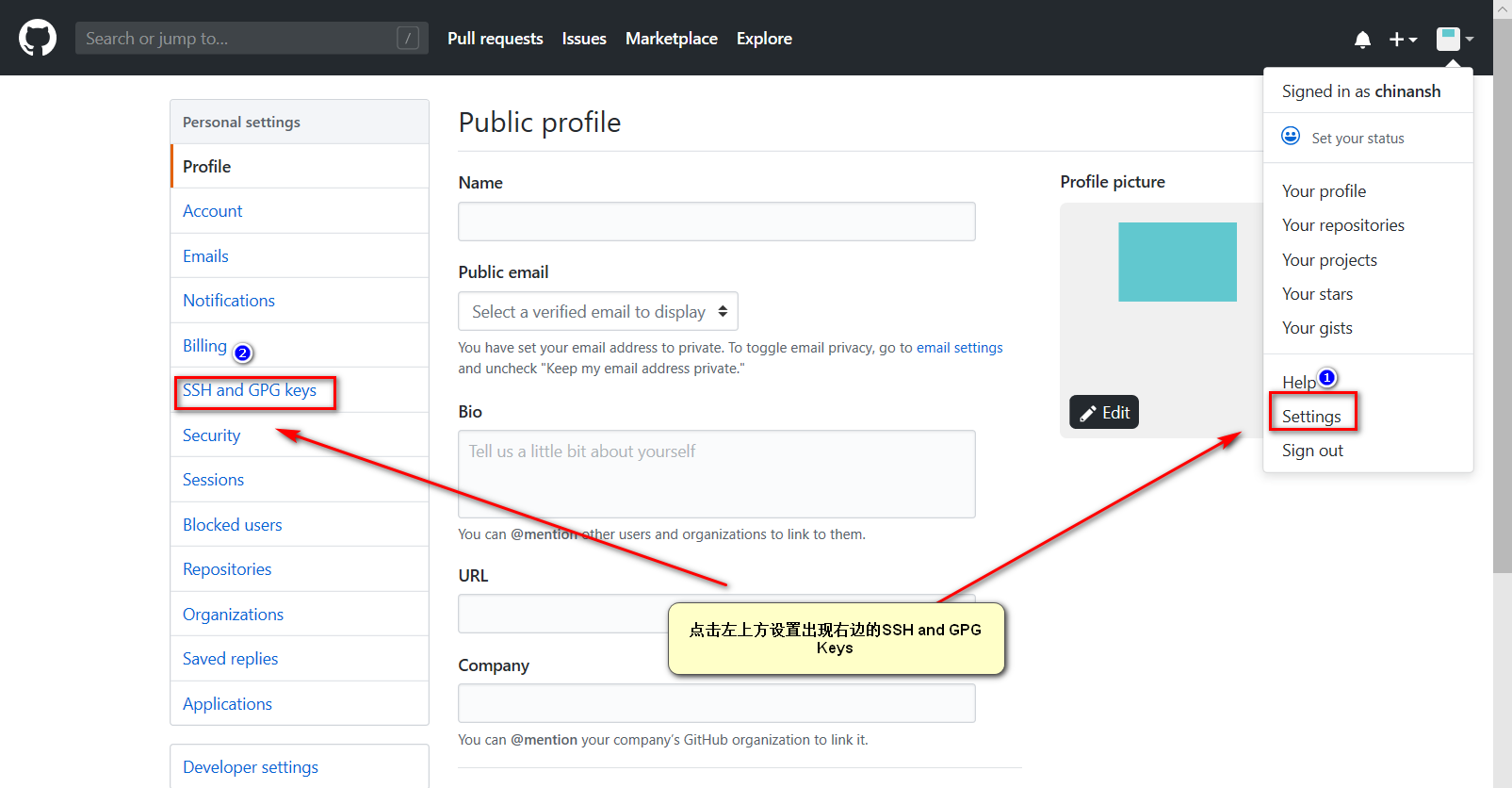
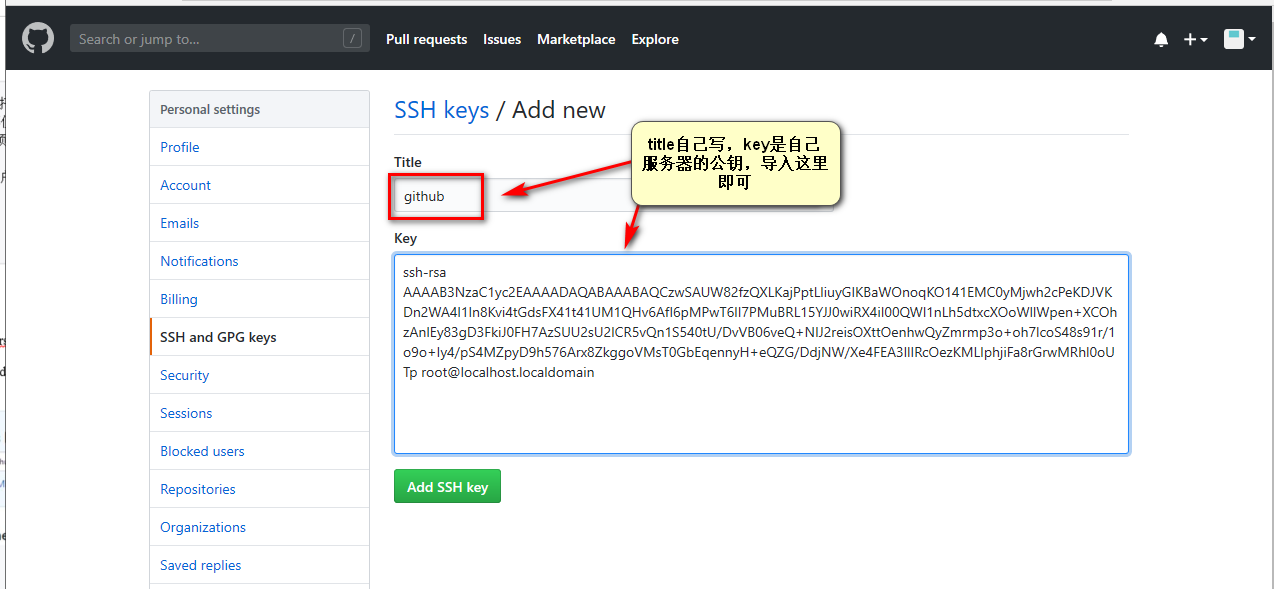
2、配置ssh‐key
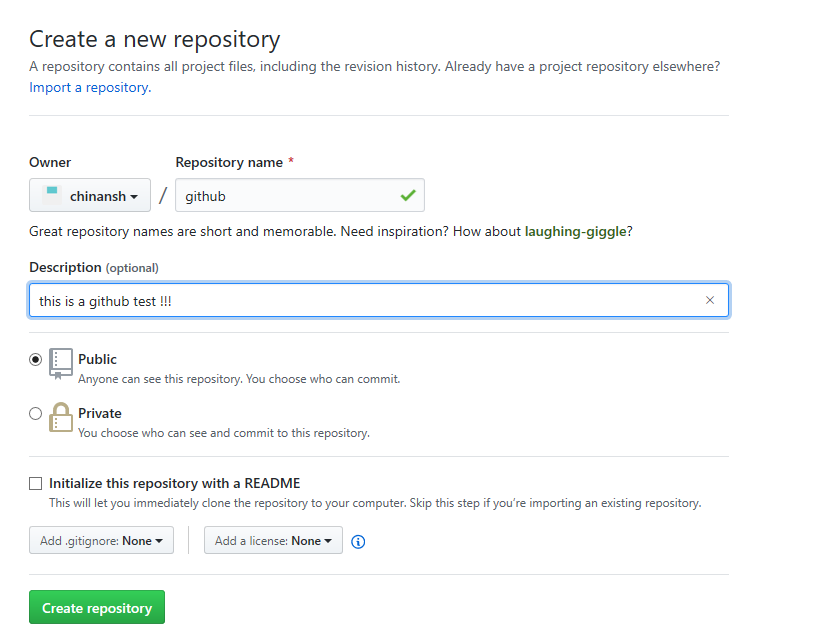
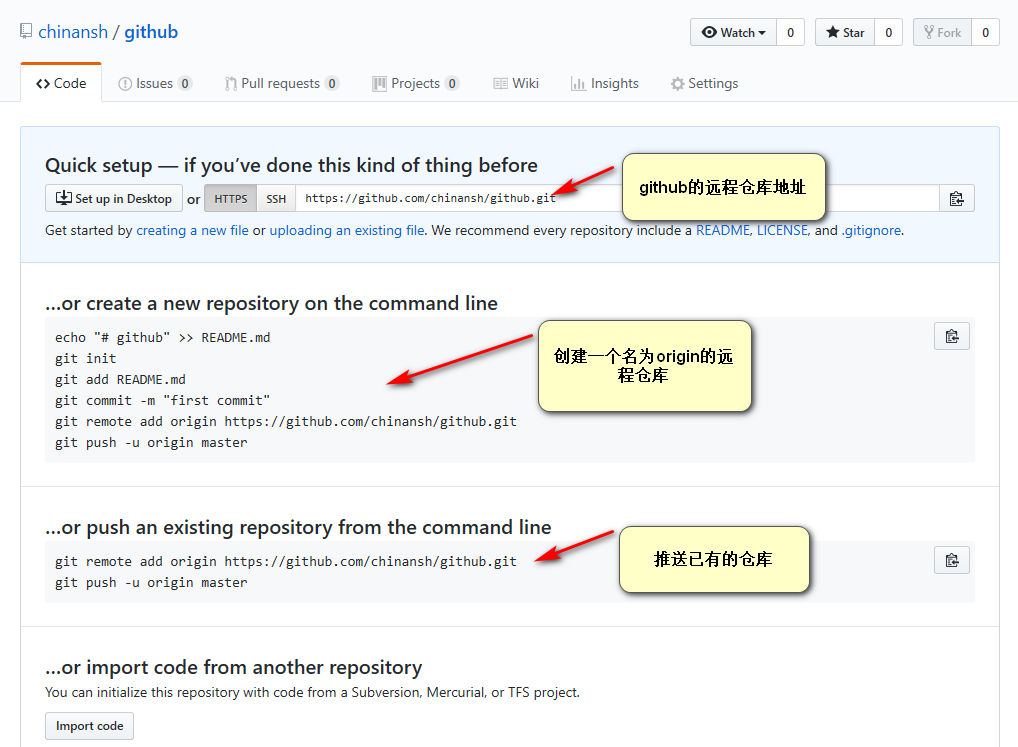
3、创建项目
4、克隆项目到本地
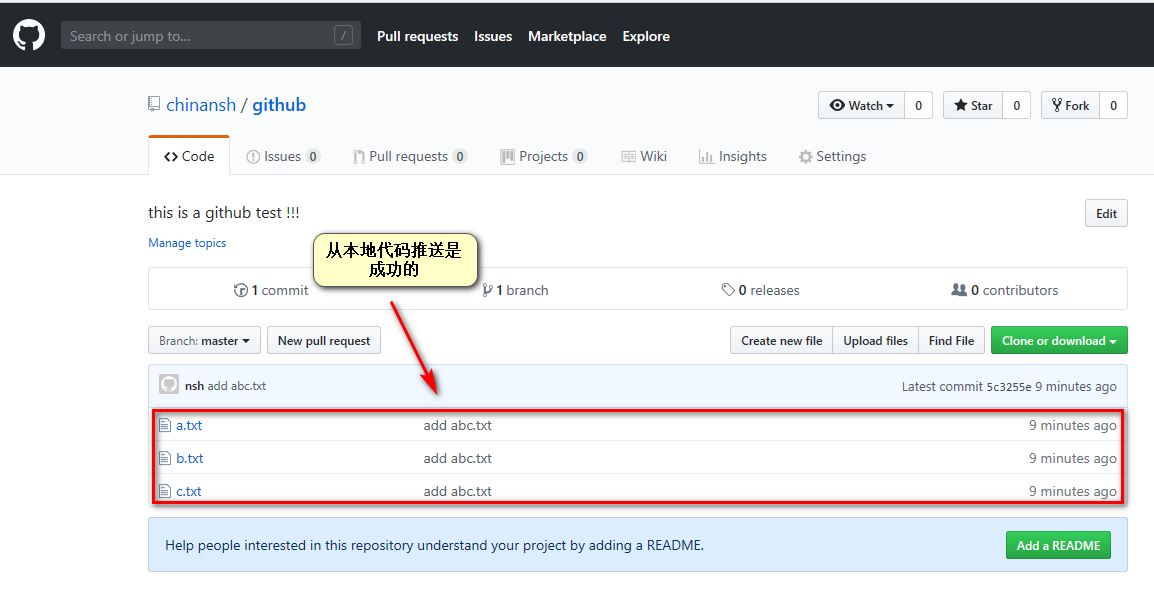
5、推送新代码到github
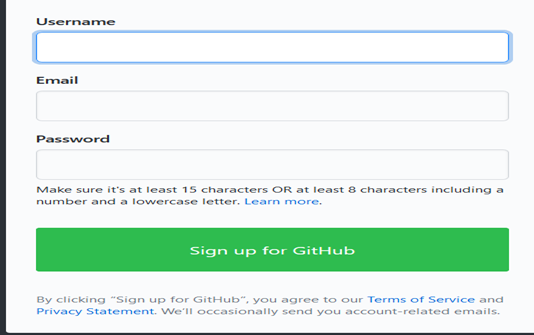
注册:
进入github官网:https://github.com/

[root@localhost git_data]# git remote
origin
[root@localhost git_data]# touch a.txt
[root@localhost git_data]# touch b.txt
[root@localhost git_data]# touch c.txt
[root@localhost git_data]# git add .
[root@localhost git_data]# git commit -m "add abc.txt"
[master (root-commit) 5c3255e] add abc.txt
 3 files changed, 0 insertions(+), 0 deletions(-)
 create mode 100644 a.txt
 create mode 100644 b.txt
 create mode 100644 c.txt
[root@localhost git_data]# git status
# On branch master
nothing to commit, working directory clean
[root@localhost git_data]# git remote remove origin
[root@localhost git_data]# git remote
[root@localhost git_data]# git remote add origin git@github.com:chinansh/github.git
[root@localhost git_data]# git remote
origin
[root@localhost git_data]# git push -u origin master
The authenticity of host 'github.com (13.229.188.59)' can't be established.
RSA key fingerprint is SHA256:nThbg6kXUpJWGl7E1IGOCspRomTxdCARLviKw6E5SY8.
RSA key fingerprint is MD5:16:27:ac:a5:76:28:2d:36:63:1b:56:4d:eb:df:a6:48.
Are you sure you want to continue connecting (yes/no)? yes
Warning: Permanently added 'github.com,13.229.188.59' (RSA) to the list of known hosts.
Counting objects: 3, done.
Compressing objects: 100% (2/2), done.
Writing objects: 100% (3/3), 207 bytes | 0 bytes/s, done.
Total 3 (delta 0), reused 0 (delta 0)
To git@github.com:chinansh/github.git
 * [new branch]      master -> master
Branch master set up to track remote branch master from origin.
[root@localhost git_data]# git status
# On branch master
nothing to commit, working directory clean
[root@localhost git_data]# ll
total 0
-rw-r--r--. 1 root root 0 Apr 17 21:44 a.txt
-rw-r--r--. 1 root root 0 Apr 17 21:44 b.txt
-rw-r--r--. 1 root root 0 Apr 17 21:45 c.txt
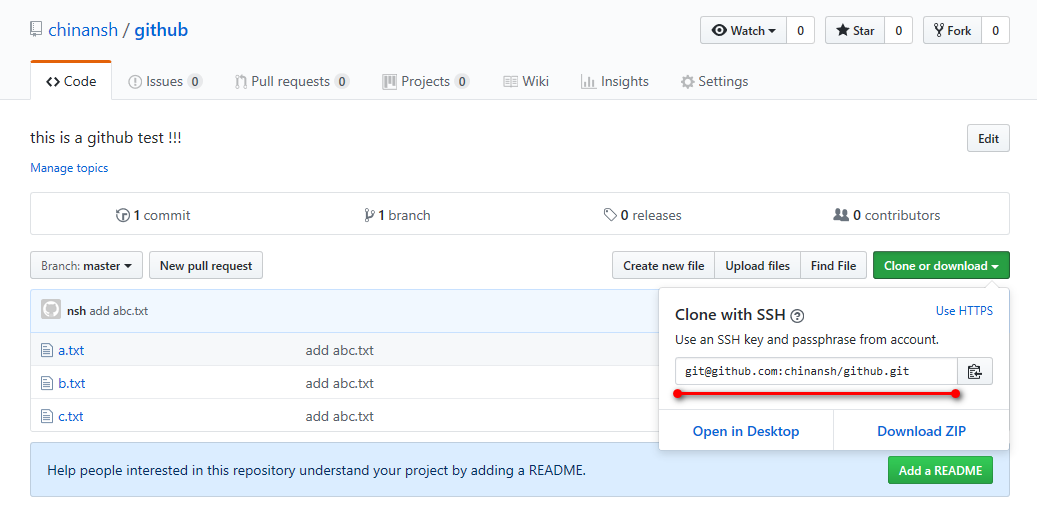
[root@localhost data]# git clone git@github.com:chinansh/github.git
Cloning into 'github'...
Warning: Permanently added the RSA host key for IP address '52.74.223.119' to the list of known hosts.
remote: Enumerating objects: 3, done.
remote: Counting objects: 100% (3/3), done.
remote: Compressing objects: 100% (2/2), done.
remote: Total 3 (delta 0), reused 3 (delta 0), pack-reused 0
Receiving objects: 100% (3/3), done.
[root@localhost data]# ll
total 0
drwxr-xr-x. 3 root root 57 Apr 17 21:58 github
[root@localhost data]# cd github/
[root@localhost github]# ll
total 0
-rw-r--r--. 1 root root 0 Apr 17 21:58 a.txt
-rw-r--r--. 1 root root 0 Apr 17 21:58 b.txt
-rw-r--r--. 1 root root 0 Apr 17 21:58 c.txt
[root@git git_test]# touch d

[root@git git_test]# git add .
[root@git git_test]# git commit ‐m "add	d"
[root@git git_test]# git push	‐u origin master
[root@git git_data]# cd /root/git_data/	# 拉取远程仓库最新代码、然后进行上传
[root@git git_data]# git pull
GITHUB(github)初级使用的更多相关文章
- GitHub & GitHub Package Registry
GitHub & GitHub Package Registry npm https://github.blog/2019-05-10-introducing-github-package-r ...
- git以及github的初级入门(一)
本身学习git的操作是没什么兴趣的,毕竟原本是win平台学的java开发,git下那么多复制的命令行操作确实比较让人头疼,直到昨天我打开计算机的时候,我放置项目的E盘,以及F盘,G盘盘符都不见了!!我 ...
- GitHub的初级使用
最近准备学习一个GitHub的使用 一.账号创建 1.百度找到GitHub官方网站(https://github.com/ ) 2.点击Sign up注册GitHub账号 下图为注册页面 第一步:填写 ...
- [GitHub] GitHub Repositories
https://github.com/karqical2016/karqical2016.github.io.git https://github.com/karqical2016/java.git ...
- [GitHub] GitHub使用教程for Eclipse
1.下载egit插件 打开Eclipse,git需要eclipse授权,通过网页是无法下载egit的安装包的.在菜单栏依次打开eclipse→help→install new software→add ...
- Github/github 初始化教程
注: 由于将项目迁移到gitee,克隆gitee 的时候出现了问题.不得已,重新配置 ref : https://blog.csdn.net/jingtingfengguo/article/detai ...
- [GitHub]GitHub for Windows离线安装的方法
这几天一直在尝试安装GitHub for windows ,安装程序是从https://windows.github.com/ 下载到的OneClick 部署程序,版本号为2.11.0.5.可能是因为 ...
- [Github] Github使用教程
前言 Github是一个面向开源及私有软件项目的托管平台.它可以免费使用,并且速度快速,拥有超多的用户.是目前管理软件开发和发现已有代码的首选平台.下面将向Github新手介绍相关操作. 正文 注册 ...
- GitHub & GitHub Desktop能帮我们做什么
GitHub: 1.代码版本管理 GitHub Desktop:
随机推荐
- 每天写两个的java常见面试题—final 和static 的用法
第一次写随笔,可能写的比较乱,更多的是作为自己记忆一些知识的方式.所有记录的东西都是自己的一些理解,很多语言可能还是从其他大牛的博客里面搬过来的. 一.static的作用: static的的作用从三个 ...
- LaTeX入门
原写于我的洛谷博客,由于洛谷的\(\mathtt{markdown}\)编辑器和博客园的\(\mathtt{markdown}\)编辑器有点差别,所以实在懒得进行微调,就直接挂一个到洛谷博客的链接好了 ...
- 生产与学术之Pytorch模型导出为安卓Apk尝试记录
生产与学术 写于 2019-01-08 的旧文, 当时是针对一个比赛的探索. 觉得可能对其他人有用, 就放出来分享一下 生产与学术, 真实的对立... 这是我这两天对pytorch深度学习->a ...
- propertychange事件导致的IE浏览器堆栈溢出
前段事件做项目,在IE下测试时,发现会报堆栈溢出的错误,其他浏览器正常,于是开始了苦逼的IE查错路程... 由于是在操作了某个输入框之后才出现的错误,所以把重点放到了input的相关事件,最终发现是这 ...
- ABP 设置默认为中文
把资源文件 的zh-cn去掉就可以,改成默认文件
- [C#.Net]Window服务调用外部程序
最近遇到要做回传服务内增加开关,可以自定义运行一些脚本已方便收集PC状态,发现Bat始终无法运行,上网找了半天才发现和Session0有关,也就是程序有不同级别的访问权限,Vista以上版本为了安全因 ...
- kettle连接oracle报错oracle.i18n.text.converter.CharacterConverter.OGS.getInstance(I)Loracle/i18n/text/converter/CharacterConverter
问题背景1:需要将一张excel中的数据导入到数据库中,并且还有关联转换和去重的处理问题,且此excel表不是固定的,需要写一个脚本 当新的excel拿来的时候,可以直接导入即可.所以我想用kettl ...
- 第四次Scrum编码冲刺!!!!
一.总体任务: 本次冲刺是完成对图书馆管理系统的最后三个功能的实现------管理员对用户授权.用户注销和用户查询 二.个人任务及完成情况: 本人本次的任务是实现对管理员对用户授权部分的界面与部 ...
- etcd 增减节点
一.查看集群节点 etcdctl --endpoint=https://10.2.0.6:2379 --ca-file=/etc/etcd/ca.pem --cert-file=/etc/etcd/c ...
- JSOI2018 简要题解
潜入行动 复杂度分析题. 定义状态fi,j,0/1,0/1f_{i,j,0/1,0/1}fi,j,0/1,0/1表示以iii为根子树放jjj个机器iii这个放不放,iii这个是否已放来进行dpdpd ...