
GITHUB(github)初级使用
Github顾名思义是一个Git版本库的托管服务,是目前全球最大的软件仓库,拥有上百万的开发者用户,也是软件开发和寻找资源的最佳途径,Github不仅可以托管各种Git版本仓库,还拥有了更美观的Web界面,您的代码文件可以被任何人克隆,使得开发者为开源项贡献代码变得更加容易,当然也可以付费购买私有库,这样高性价比的私有库真的是帮助到了很多团队和企业
github使用
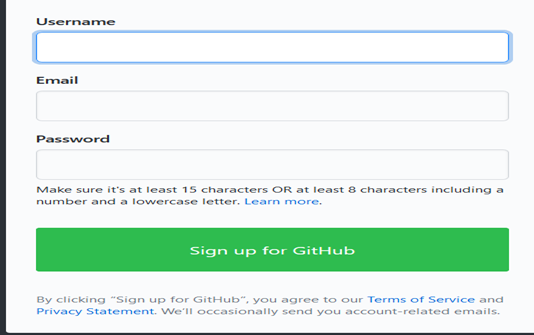
1、注册用户
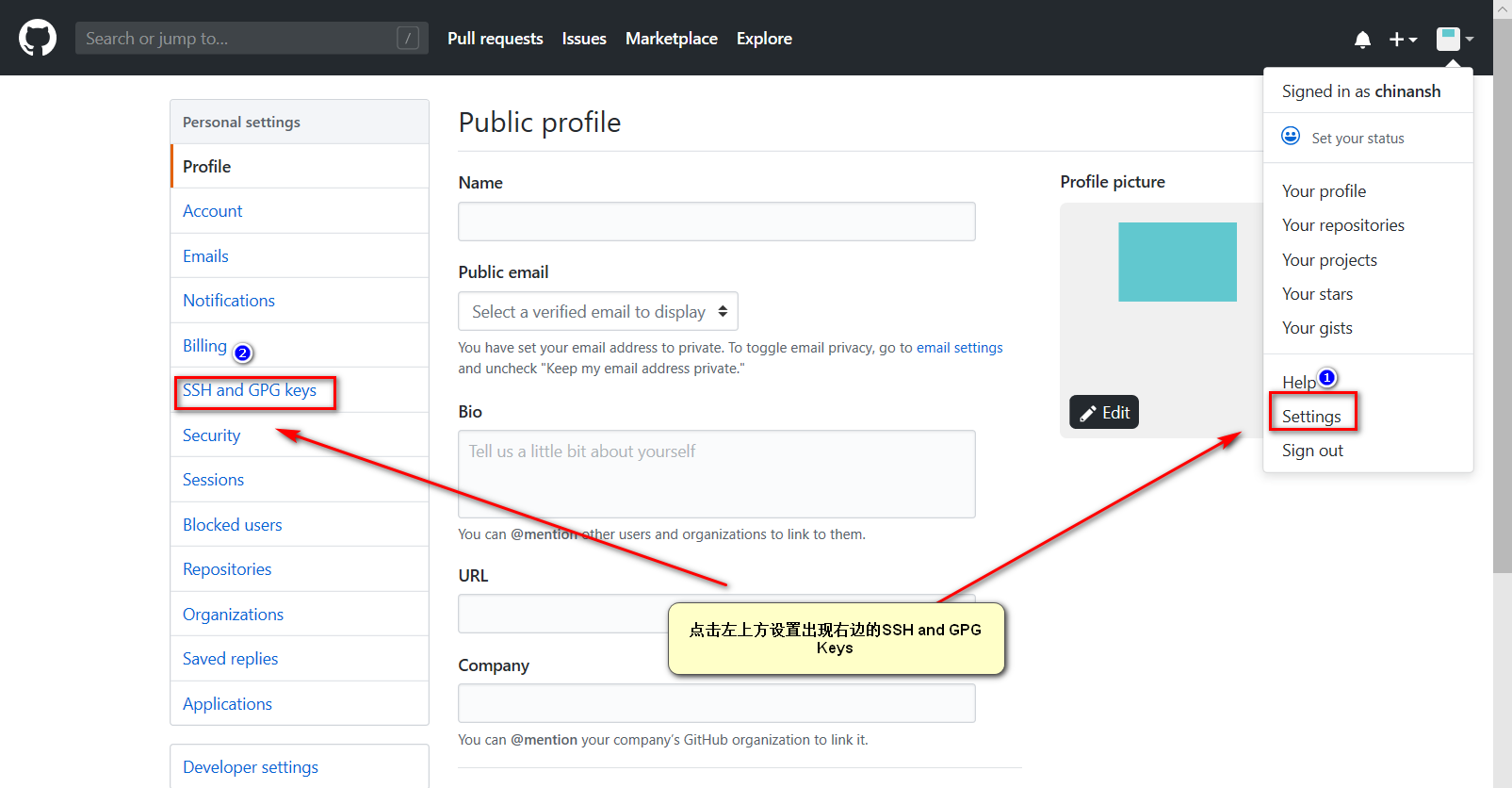
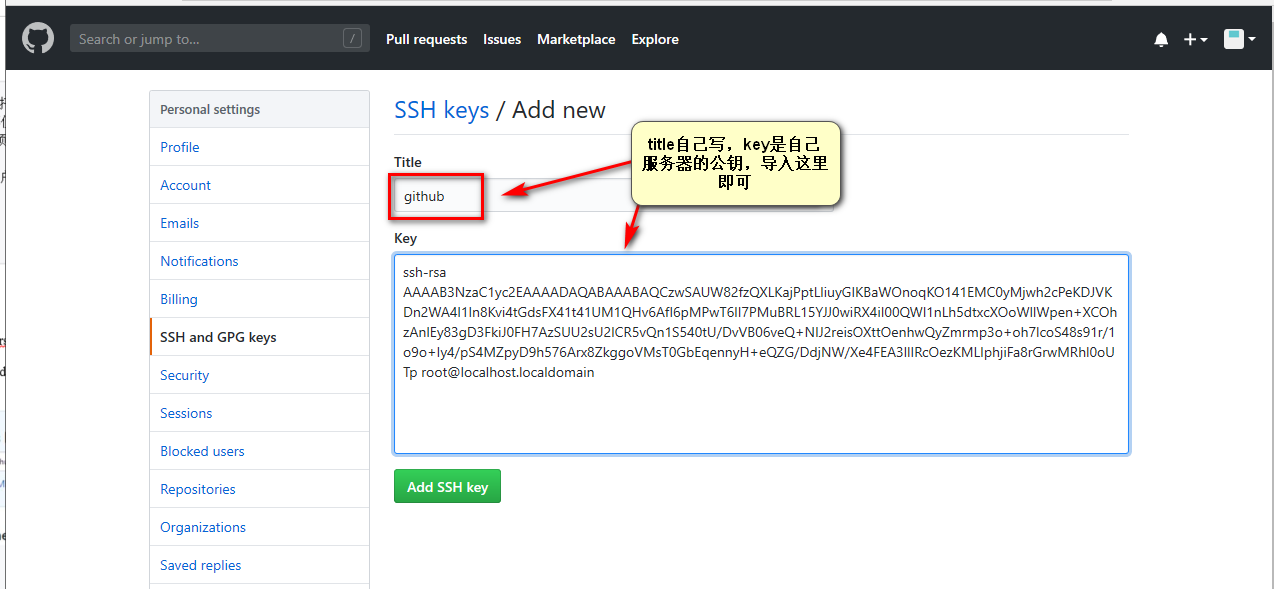
2、配置ssh‐key
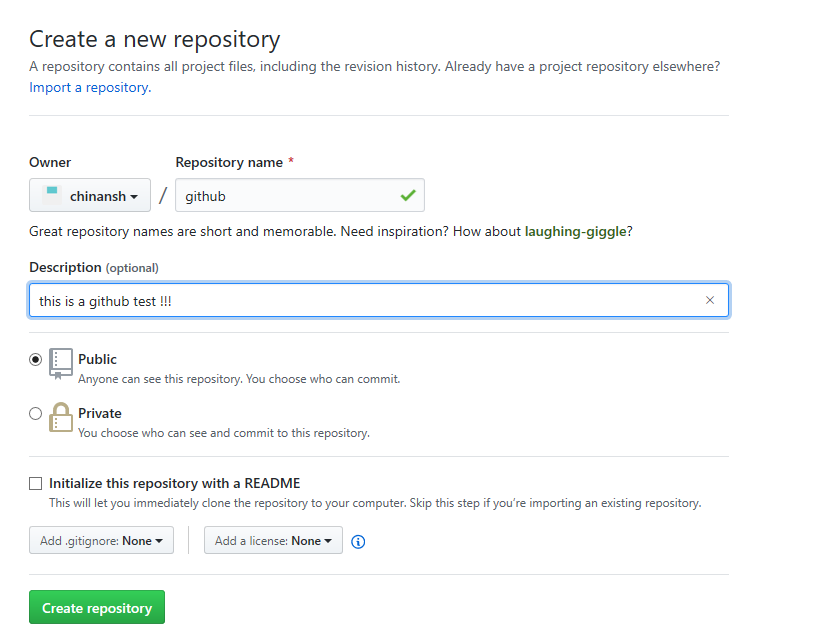
3、创建项目
4、克隆项目到本地
5、推送新代码到github
注册:
进入github官网:https://github.com/

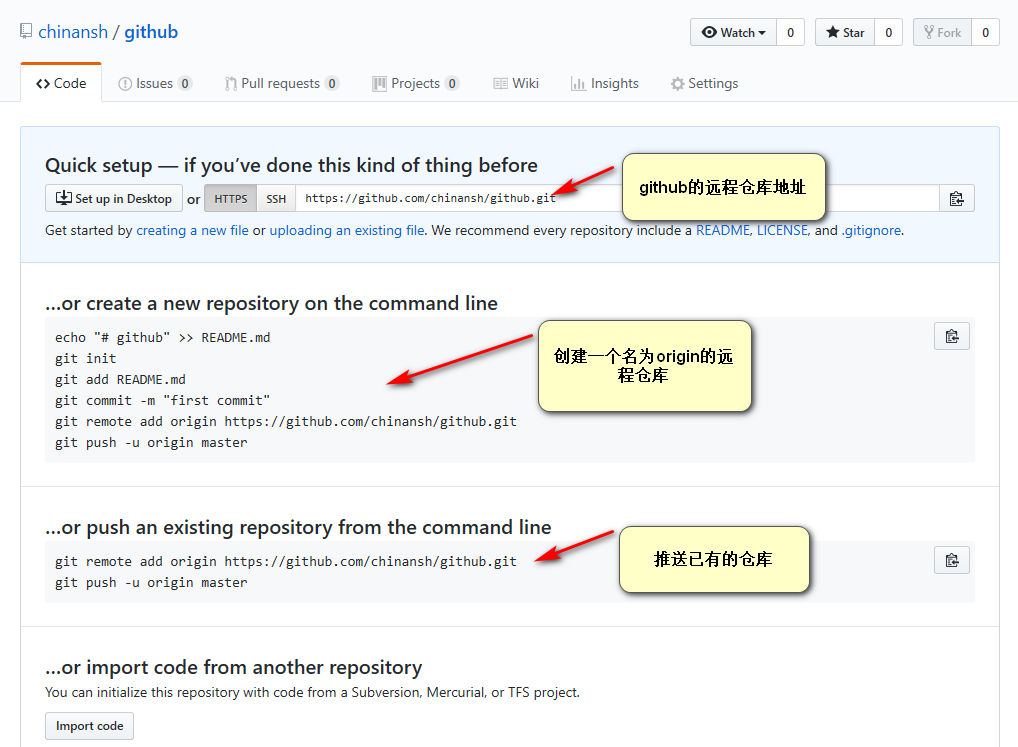
[root@localhost git_data]# git remote
origin
[root@localhost git_data]# touch a.txt
[root@localhost git_data]# touch b.txt
[root@localhost git_data]# touch c.txt
[root@localhost git_data]# git add .
[root@localhost git_data]# git commit -m "add abc.txt"
[master (root-commit) 5c3255e] add abc.txt
 3 files changed, 0 insertions(+), 0 deletions(-)
 create mode 100644 a.txt
 create mode 100644 b.txt
 create mode 100644 c.txt
[root@localhost git_data]# git status
# On branch master
nothing to commit, working directory clean
[root@localhost git_data]# git remote remove origin
[root@localhost git_data]# git remote
[root@localhost git_data]# git remote add origin git@github.com:chinansh/github.git
[root@localhost git_data]# git remote
origin
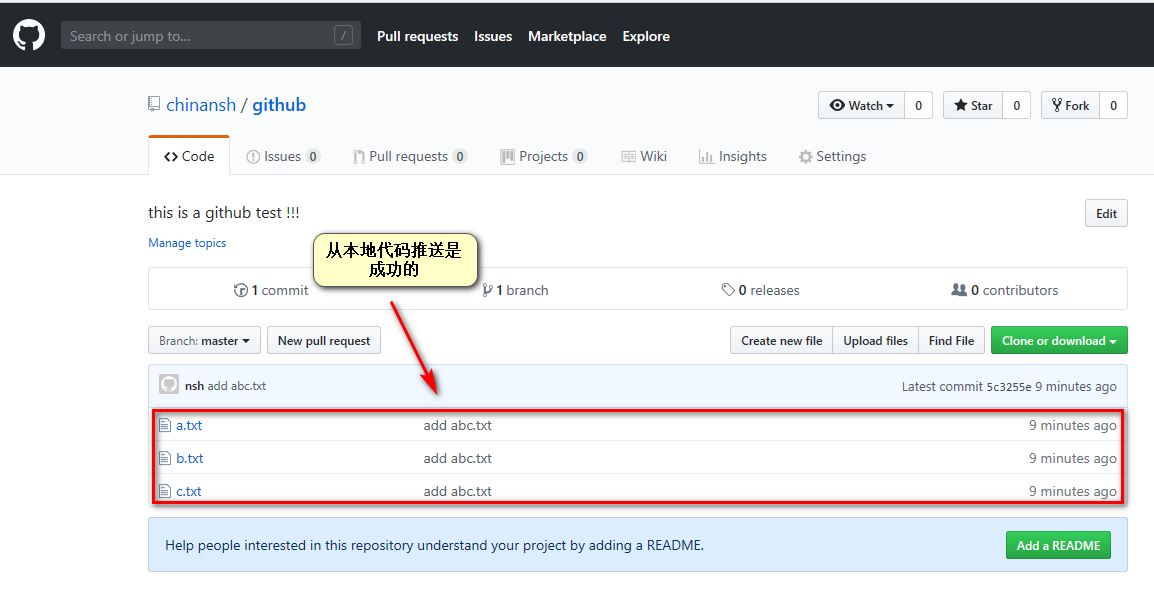
[root@localhost git_data]# git push -u origin master
The authenticity of host 'github.com (13.229.188.59)' can't be established.
RSA key fingerprint is SHA256:nThbg6kXUpJWGl7E1IGOCspRomTxdCARLviKw6E5SY8.
RSA key fingerprint is MD5:16:27:ac:a5:76:28:2d:36:63:1b:56:4d:eb:df:a6:48.
Are you sure you want to continue connecting (yes/no)? yes
Warning: Permanently added 'github.com,13.229.188.59' (RSA) to the list of known hosts.
Counting objects: 3, done.
Compressing objects: 100% (2/2), done.
Writing objects: 100% (3/3), 207 bytes | 0 bytes/s, done.
Total 3 (delta 0), reused 0 (delta 0)
To git@github.com:chinansh/github.git
 * [new branch]      master -> master
Branch master set up to track remote branch master from origin.
[root@localhost git_data]# git status
# On branch master
nothing to commit, working directory clean
[root@localhost git_data]# ll
total 0
-rw-r--r--. 1 root root 0 Apr 17 21:44 a.txt
-rw-r--r--. 1 root root 0 Apr 17 21:44 b.txt
-rw-r--r--. 1 root root 0 Apr 17 21:45 c.txt
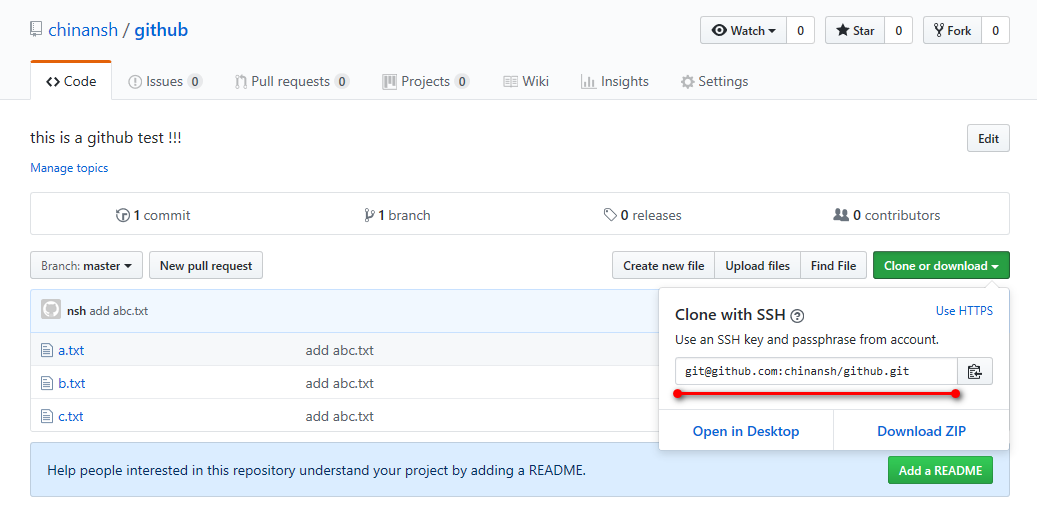
[root@localhost data]# git clone git@github.com:chinansh/github.git
Cloning into 'github'...
Warning: Permanently added the RSA host key for IP address '52.74.223.119' to the list of known hosts.
remote: Enumerating objects: 3, done.
remote: Counting objects: 100% (3/3), done.
remote: Compressing objects: 100% (2/2), done.
remote: Total 3 (delta 0), reused 3 (delta 0), pack-reused 0
Receiving objects: 100% (3/3), done.
[root@localhost data]# ll
total 0
drwxr-xr-x. 3 root root 57 Apr 17 21:58 github
[root@localhost data]# cd github/
[root@localhost github]# ll
total 0
-rw-r--r--. 1 root root 0 Apr 17 21:58 a.txt
-rw-r--r--. 1 root root 0 Apr 17 21:58 b.txt
-rw-r--r--. 1 root root 0 Apr 17 21:58 c.txt
[root@git git_test]# touch d

[root@git git_test]# git add .
[root@git git_test]# git commit ‐m "add	d"
[root@git git_test]# git push	‐u origin master
[root@git git_data]# cd /root/git_data/	# 拉取远程仓库最新代码、然后进行上传
[root@git git_data]# git pull
GITHUB(github)初级使用的更多相关文章
- GitHub & GitHub Package Registry
GitHub & GitHub Package Registry npm https://github.blog/2019-05-10-introducing-github-package-r ...
- git以及github的初级入门(一)
本身学习git的操作是没什么兴趣的,毕竟原本是win平台学的java开发,git下那么多复制的命令行操作确实比较让人头疼,直到昨天我打开计算机的时候,我放置项目的E盘,以及F盘,G盘盘符都不见了!!我 ...
- GitHub的初级使用
最近准备学习一个GitHub的使用 一.账号创建 1.百度找到GitHub官方网站(https://github.com/ ) 2.点击Sign up注册GitHub账号 下图为注册页面 第一步:填写 ...
- [GitHub] GitHub Repositories
https://github.com/karqical2016/karqical2016.github.io.git https://github.com/karqical2016/java.git ...
- [GitHub] GitHub使用教程for Eclipse
1.下载egit插件 打开Eclipse,git需要eclipse授权,通过网页是无法下载egit的安装包的.在菜单栏依次打开eclipse→help→install new software→add ...
- Github/github 初始化教程
注: 由于将项目迁移到gitee,克隆gitee 的时候出现了问题.不得已,重新配置 ref : https://blog.csdn.net/jingtingfengguo/article/detai ...
- [GitHub]GitHub for Windows离线安装的方法
这几天一直在尝试安装GitHub for windows ,安装程序是从https://windows.github.com/ 下载到的OneClick 部署程序,版本号为2.11.0.5.可能是因为 ...
- [Github] Github使用教程
前言 Github是一个面向开源及私有软件项目的托管平台.它可以免费使用,并且速度快速,拥有超多的用户.是目前管理软件开发和发现已有代码的首选平台.下面将向Github新手介绍相关操作. 正文 注册 ...
- GitHub & GitHub Desktop能帮我们做什么
GitHub: 1.代码版本管理 GitHub Desktop:
随机推荐
- 现代编译原理——第六章:中间树 IR Tree 含源码
转自: http://www.cnblogs.com/BlackWalnut/p/4559717.html 这一章,就虎书而言,理论知识点是及其少的,就介绍了为什么要有一个中间表示树.看下面这张图就能 ...
- 摹客iDoc的PS插件全新改版!—— 智能检测不对应的设计稿
一.简洁美观——iDoc的PS插件全新界面 iDoc对PS插件的界面进行了全新设计,无论是登录.上传.还是设置界面,都变得更精致.简洁美观,功能分布也非常明确,是一款轻巧且实用的小插件. 二.同步上传 ...
- mysql8.0 1251错误
ALTER USER 'root'@'localhost' IDENTIFIED BY 'password' PASSWORD EXPIRE NEVER; ALTER USER '; FLUSH PR ...
- Java和C++的数组比较
Java:数组的定义:如下两种方式都可以:int array[];int[] array; 注意:数组在定义后,不能直接使用.必须在初始化后才能使用.初始化有两种方式:1.静态初始化:int arra ...
- IntelliJ IDEA2017 + tomcat 即改即生效 实现热部署
https://www.cnblogs.com/1024zy/p/6344000.html
- A能ping通B,BpingA请求超时
除了防火墙等,杀毒软件都已经关了: A是外网,B是内网,A有两个ip地址,请ping A 的内网地址.
- SAS 函数
SAS 函数 SAS函数是编程语言的一个组件,可接受参数.执行计算或进行其他操作并返回值.返回值是字符型或数值型的结果,可用于赋值语句或 表达式中.SAS包含很多函数,也可以自定义函数.在BASE S ...
- 每日一练ACM
2019.04.15 第1000题:A+B Problem Problem DescriptionCalculate A + B. InputEach line will contain two in ...
- go基本使用方法
一,变量 var:声明变: var 变量名 数据类型 :同时还需要指定数据的类型 var 变量名 = 值 : 声明变量,根据变量值判断变量类型 := :省略var,直接可以(变量名:= 值), ...
- 转发:已知rsa的模数和指数 生成pem公钥文件
1.安装cryptographysudo pip3 install cryptography 2.代码 #coding:utf8# pupulate-pub-key-v3.py#from crypto ...