
Android项目实战(三十一):异步下载apk文件并安装(非静默安装)
前言:
实现异步下载apk文件 并 安装。(进度条对话框显示下载进度的展现方式)
涉及技术点:
1、ProgressDialog 进度条对话框 用于显示下载进度
2、AsyncTask 异步任务的使用 耗时操作不能再主线程中进行 安卓开发_浅谈AsyncTask
3、File 文件相关操作 将文件的字节数据生成文件
4、自动打开安装应用操作 下载网络apk数据并生成文件之后需要我们去执行这个apk的安装操作(非静默安装)
实现前提:
1、我们下载的apk的url地址
2、文件权限,网络权限
   <uses-permission android:name="android.permission.WRITE_EXTERNAL_STORAGE" />     //文件操作权限

    <uses-permission android:name="android.permission.INTERNET" />                  //网络权限
----------------------------------------------------------------------------------------------------------------------------------------
实现:
1、创建ProgressDialog对象,初始化操作,开启下载的异步任务
   private void showDownloadProgressDialog(Context context) {

        ProgressDialog progressDialog = new ProgressDialog(context);

        progressDialog.setTitle("提示");

        progressDialog.setMessage("正在下载...");

        progressDialog.setIndeterminate(false);

        progressDialog.setMax();

        progressDialog.setCancelable(false);                    //设置不可点击界面之外的区域让对话框小时

        progressDialog.setProgressStyle(ProgressDialog.STYLE_HORIZONTAL);         //进度条类型

        progressDialog.show();

        String downloadUrl = "http://ac-edNxPKqQ.clouddn.com/800exxxxxxx68ebcefda.apk"; //这里写你的apk url地址

        new DownloadAPK(progressDialog).execute(downloadUrl);

    }
2、下载apk的异步任务
首先看一下整个异步任务的结构
private class DownloadAPK extends AsyncTask<String, Integer, String> {

        ProgressDialog progressDialog;

        File file;

        public DownloadAPK(ProgressDialog progressDialog) {

            this.progressDialog = progressDialog;

        }

        @Override

        protected String doInBackground(String... params) {
       //根据url获取网络数据生成apk文件

            return null;

        }

        @Override

        protected void onProgressUpdate(Integer... progress) {

            super.onProgressUpdate(progress);

          // 这里 改变ProgressDialog的进度值
    }

        @Override

        protected void onPostExecute(String s) {

            super.onPostExecute(s);
       //到这里说明下载完成,判断文件是否存在,如果存在,执行安装apk的操作

        }

    }
(1)、 局部变量
ProgressDialog 用于显示下载进度
File 根据网络数据生成的apk文件
     ProgressDialog progressDialog;

        File file;
(2)、构造方法,将外部的ProgressDialog对象传到异步任务里
      public DownloadAPK(ProgressDialog progressDialog) {

            this.progressDialog = progressDialog;

        }
(3)、进度更新方法,将下载进度现在在对话框中
     @Override

        protected void onProgressUpdate(Integer... progress) {

            super.onProgressUpdate(progress);

            progressDialog.setProgress(progress[]);

        }
(4)、下载网络数据生成apk文件的操作
     @Override

        protected String doInBackground(String... params) {

            URL url;

            HttpURLConnection conn;

            BufferedInputStream bis = null;

            FileOutputStream fos = null;

            try {

                url = new URL(params[]);

                conn = (HttpURLConnection) url.openConnection();

                conn.setRequestMethod("GET");

                conn.setConnectTimeout();

                int fileLength = conn.getContentLength();

                bis = new BufferedInputStream(conn.getInputStream());

                String fileName = Environment.getExternalStorageDirectory().getPath() + "/magkare/action.apk";

                file = new File(fileName);

                if (!file.exists()) {

                    if (!file.getParentFile().exists()) {

                        file.getParentFile().mkdirs();

                    }

                    file.createNewFile();

                }

                fos = new FileOutputStream(file);

                byte data[] = new byte[ * ];

                long total = ;

                int count;

                while ((count = bis.read(data)) != -) {

                    total += count;

                    publishProgress((int) (total *  / fileLength));

                    fos.write(data, , count);

                    fos.flush();

                }

                fos.flush();

            } catch (IOException e) {

                e.printStackTrace();

            } finally {

                try {

                    if (fos != null) {

                        fos.close();

                    }

                } catch (IOException e) {

                    e.printStackTrace();

                }

                try {

                    if (bis != null) {

                        bis.close();

                    }

                } catch (IOException e) {

                    e.printStackTrace();

                }

            }

            return null;

        }
(5)、文件下载完成后
判断文件是否存在,存在的话要打开安装apk的操作,并关闭进度对话框
不存在的话说明文件下载失败,进行相关提示即可
    @Override

        protected void onPostExecute(String s) {

            super.onPostExecute(s);

            openFile(file);                 //打开安装apk文件操作

            progressDialog.dismiss();      //关闭对话框

        }
(6)、打开apk文件安装apk的操作
     private void openFile(File file) {

            if (file!=null){

                Intent intent = new Intent(Intent.ACTION_VIEW);

                intent.setDataAndType(Uri.fromFile(file), "application/vnd.android.package-archive");

                TaskListActivity.this.startActivity(intent);

            }

        }
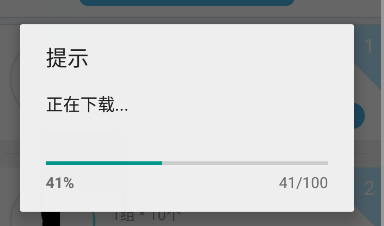
效果图:
完整代码:
private void showDownloadProgressDialog(Context context) {

        ProgressDialog progressDialog = new ProgressDialog(context);

        progressDialog.setTitle("提示");

        progressDialog.setMessage("正在下载...");

        progressDialog.setIndeterminate(false);

        progressDialog.setMax();

        progressDialog.setCancelable(false);

        progressDialog.setProgressStyle(ProgressDialog.STYLE_HORIZONTAL);

        progressDialog.show();

        String downloadUrl = "http://ac-edNxPKqQ.clouddn.com/80xxxxxxxebcefda.apk";

        new DownloadAPK(progressDialog).execute(downloadUrl);

    }

    /**

     * 下载APK的异步任务

     */

    private class DownloadAPK extends AsyncTask<String, Integer, String> {

        ProgressDialog progressDialog;

        File file;

        public DownloadAPK(ProgressDialog progressDialog) {

            this.progressDialog = progressDialog;

        }

        @Override

        protected String doInBackground(String... params) {

            URL url;

            HttpURLConnection conn;

            BufferedInputStream bis = null;

            FileOutputStream fos = null;

            try {

                url = new URL(params[]);

                conn = (HttpURLConnection) url.openConnection();

                conn.setRequestMethod("GET");

                conn.setConnectTimeout();

                int fileLength = conn.getContentLength();

                bis = new BufferedInputStream(conn.getInputStream());

                String fileName = Environment.getExternalStorageDirectory().getPath() + "/magkare/action.apk";

                file = new File(fileName);

                if (!file.exists()) {

                    if (!file.getParentFile().exists()) {

                        file.getParentFile().mkdirs();

                    }

                    file.createNewFile();

                }

                fos = new FileOutputStream(file);

                byte data[] = new byte[ * ];

                long total = ;

                int count;

                while ((count = bis.read(data)) != -) {

                    total += count;

                    publishProgress((int) (total *  / fileLength));

                    fos.write(data, , count);

                    fos.flush();

                }

                fos.flush();

            } catch (IOException e) {

                e.printStackTrace();

            } finally {

                try {

                    if (fos != null) {

                        fos.close();

                    }

                } catch (IOException e) {

                    e.printStackTrace();

                }

                try {

                    if (bis != null) {

                        bis.close();

                    }

                } catch (IOException e) {

                    e.printStackTrace();

                }

            }

            return null;

        }

        @Override

        protected void onProgressUpdate(Integer... progress) {

            super.onProgressUpdate(progress);

            progressDialog.setProgress(progress[]);

        }

        @Override

        protected void onPostExecute(String s) {

            super.onPostExecute(s);

            openFile(file);

            progressDialog.dismiss();

        }

        private void openFile(File file) {

            if (file!=null){

                Intent intent = new Intent(Intent.ACTION_VIEW);

                intent.setDataAndType(Uri.fromFile(file), "application/vnd.android.package-archive");

                TaskListActivity.this.startActivity(intent);

            }

        }

    }
异步下载apk文件并安装
------------------------------------------------------------------------------------------------------------------------------------------
注意:
如果是一次性全部获取到网络文件的字节数据,当文件过大的时候会出现OOM的问题。
此方法 实现边下载获取网络文件的字节数据边生成文件的操作。 不用担心OOM 的问题。 其他文件下载操作都可以参考此方法。
学习自 : http://www.cnblogs.com/laujiangtao/ 同学
Android项目实战(三十一):异步下载apk文件并安装(非静默安装)的更多相关文章
- Android项目实战(十一):moveTaskToBack(boolean ) 方法的使用
当你开发的程序被按后退键退出的时候, 你肯定不想让他就这么被finish()吧,那么就想把程序退置到后台就可. (类似于PC端,你关闭一个浏览器和你最小化一个浏览器的区别) 参看方法:public b ...
- 下载apk文件浏览器会直接打开并显示乱码的问题
今天同事反映他的apk文件在自己的老项目中下载有问题:下载apk文件浏览器会直接打开并显示乱码,在别的项目中就没有问题. 后分析response的content-type发现,老项目的类型是text/ ...
- Android项目实战(三十二):圆角对话框Dialog
前言: 项目中多处用到对话框,用系统对话框太难看,就自己写一个自定义对话框. 对话框包括:1.圆角 2.app图标 , 提示文本,关闭对话框的"确定"按钮 难点:1.对话框边框圆角 ...
- (转载)Android项目实战(三十二):圆角对话框Dialog
Android项目实战(三十二):圆角对话框Dialog 前言: 项目中多处用到对话框,用系统对话框太难看,就自己写一个自定义对话框. 对话框包括:1.圆角 2.app图标 , 提示文本,关闭对话 ...
- (转载)Android项目实战(二十八):使用Zxing实现二维码及优化实例
Android项目实战(二十八):使用Zxing实现二维码及优化实例 作者:听着music睡 字体:[增加 减小] 类型:转载 时间:2016-11-21我要评论 这篇文章主要介绍了Android项目 ...
- Android项目实战(一): SpannableString与SpannableStringBuilder
原文:Android项目实战(一): SpannableString与SpannableStringBuilder 前言: 曾经在一些APP中的一些类似“帮助”“关于”的界面看过一行文字显示不同的颜色 ...
- Android项目实战(二十五):Android studio 混淆+打包+验证是否成功
前言: 单挑Android项目,最近即时通讯用到环信,集成sdk的时候 官方有一句 在 ProGuard 文件中加入以下 keep. -keep class com.hyphenate.** {*;} ...
- Android项目实战(二十九):酒店预定日期选择
先看需求效果图: 几个需求点: 1.显示当月以及下个月的日历 (可自行拓展更多月份) 2.首次点击选择"开始日期",再次点击选择"结束日期" (1).如果&qu ...
- Android项目实战(四十九):Andoird 7.0+相机适配
解决方案类似: Android项目实战(四十):Andoird 7.0+ 安装APK适配 解决方法: 一.在AndroidManifest.xml 文件中添加 四大组件之一的 <provider ...
随机推荐
- Lambda表达式例子
转 Lambda表达式例子 1.Java8 新特性介绍 写java的同学对java8肯定知道 那么java8到底有哪些特性呢,总结如下: Lambda表达式 函数式接口 Stream Optional ...
- 【转】Linux 上的最佳 C/C++ IDE
IDE介绍收藏篇: 个人linux下开发经验不多,一般也都使用shell远程连接使用命令行模式开发.如果自己在自己机器上开发还是有IDE要方便很多,看到这篇帖子就果断的转过来先收藏下,之前自己使用过E ...
- 总结分享十大iOS开发者最喜爱的库 分类: ios相关 app相关 2015-04-03 16:43 320人阅读 评论(0) 收藏
该10大iOS开发者最喜爱的库由"iOS辅导团队"成员Marcelo Fabri组织投票选举而得,参与者包括开发者团队,iOS辅导团队以及行业嘉宾.每个团队都要根据以下规则选出五个 ...
- leetcode day8
[83] Remove Duplicates from Sorted List Given a sorted linked list, delete all duplicates such that ...
- JS 响应式编程
<!DOCTYPE html> <html> <head> <meta charset="utf-8" /> <script ...
- 把C#对象变成数组技术---索引器(indexer)
public class IndexerDemo { IList list = new List(); public IndexerDemo() { list.Add("); list.Ad ...
- 最简化模型2——css3分阶段动画效果(经过实测)之转动的div
@keyframes mymove{ 0%{top: 0;left: 0;transform:rotate(50deg);} 10%{top: 100px;left: 50px;trans ...
- apache的工作模式 和 最大连接数设置
经过测试 效果明显 (1)首选查看apache的工作模式 windows下的查看apache的工作模式命令:httpd -l 如果列出mod_win32.c,则表示是 win32.c 工作方式. 列出 ...
- flex blazeds地址
flex blazeds地址 BlazeDS地址:http://sourceforge.net/adobe/blazeds/wiki/Home/最新BlazeDS版本是2011年编译的4.0.1.21 ...
- HTML5 新元素、HTML5 Canvas
HTML5 新元素 自1999年以后HTML 4.01 已经改变了很多,今天,在HTML 4.01中的几个已经被废弃,这些元素在HTML5中已经被删除或重新定义. 为了更好地处理今天的互联网应用,HT ...