
Spring使用Jackson处理json数据
1.搭建SpringMVC+Spring环境
2.配置web.xml、SpringMVC-config.xml
<?xml version="1.0" encoding="UTF-8"?>

<web-app xmlns:xsi="http://www.w3.org/2001/XMLSchema-instance"

    xmlns="http://xmlns.jcp.org/xml/ns/javaee"

    xsi:schemaLocation="http://xmlns.jcp.org/xml/ns/javaee

    http://xmlns.jcp.org/xml/ns/javaee/web-app_3_1.xsd"

    id="WebApp_ID" version="3.1">

    <!-- 定义Spring MVC的前端控制器 -->

  <servlet>

    <servlet-name>springmvc</servlet-name>

    <servlet-class>

        org.springframework.web.servlet.DispatcherServlet

    </servlet-class>

    <init-param>

      <param-name>contextConfigLocation</param-name>

      <param-value>/WEB-INF/springmvc-config.xml</param-value>

    </init-param>

    <load-on-startup>1</load-on-startup>

  </servlet>

  <!-- 让Spring MVC的前端控制器拦截所有请求 -->

  <servlet-mapping>

    <servlet-name>springmvc</servlet-name>

    <url-pattern>/</url-pattern>

  </servlet-mapping>

  <!-- 编码过滤器 -->

  <filter>

        <filter-name>characterEncodingFilter</filter-name>

        <filter-class>org.springframework.web.filter.CharacterEncodingFilter</filter-class>

        <init-param>

            <param-name>encoding</param-name>

            <param-value>UTF-8</param-value>

        </init-param>

 </filter>

    <filter-mapping>

        <filter-name>characterEncodingFilter</filter-name>

        <url-pattern>/*</url-pattern>

    </filter-mapping>

</web-app>
<?xml version="1.0" encoding="UTF-8"?>

<beans xmlns="http://www.springframework.org/schema/beans"

    xmlns:xsi="http://www.w3.org/2001/XMLSchema-instance"

    xmlns:mvc="http://www.springframework.org/schema/mvc"

    xmlns:context="http://www.springframework.org/schema/context"

    xsi:schemaLocation="

        http://www.springframework.org/schema/beans

        http://www.springframework.org/schema/beans/spring-beans-4.2.xsd

        http://www.springframework.org/schema/mvc

        http://www.springframework.org/schema/mvc/spring-mvc-4.2.xsd

        http://www.springframework.org/schema/context

        http://www.springframework.org/schema/context/spring-context-4.2.xsd">

    <!-- spring可以自动去扫描base-pack下面的包或者子包下面的java文件,

        如果扫描到有Spring的相关注解的类,则把这些类注册为Spring的bean -->

    <context:component-scan base-package="Controller"/>

    <!-- 设置配置方案  -->

    <mvc:annotation-driven/>

    <!-- 使用默认的Servlet来响应静态文件 -->

    <mvc:default-servlet-handler/>

    <!-- 视图解析器  -->

     <bean id="viewResolver"

          class="org.springframework.web.servlet.view.InternalResourceViewResolver">

        <!-- 前缀 -->

        <property name="prefix">

            <value>/WEB-INF/content/</value>

        </property>

        <!-- 后缀 -->

        <property name="suffix">

            <value>.jsp</value>

        </property>

    </bean>

</beans>
3.controller层
@Controller

@RequestMapping("/json")

public class BookController {

    private static final Log logger = LogFactory.getLog(BookController.class);

    // @RequestBody根据json数据,转换成对应的Object

    @RequestMapping(value="/testRequestBody")

    public void setJson(@RequestBody Book book,

            HttpServletResponse response) throws Exception{

        // ObjectMapper类是Jackson库的主要类。它提供一些功能将Java对象转换成对应的JSON格式的数据

        ObjectMapper mapper = new ObjectMapper();

        // 将book对象转换成json输出

        logger.info(mapper.writeValueAsString(book) );

        book.setAuthor("jackson");

        response.setContentType("text/html;charset=UTF-8");

        // 将book对象转换成json写出到客户端

        response.getWriter().println(mapper.writeValueAsString(book));

    }

}
4.实体类
public class Book implements Serializable {

    private Integer id;

    private String name;

    private String author;

    public Integer getId() {

        return id;

    }

    public void setId(Integer id) {

        this.id = id;

    }

    public String getName() {

        return name;

    }

    public void setName(String name) {

        this.name = name;

    }

    public String getAuthor() {

        return author;

    }

    public void setAuthor(String author) {

        this.author = author;

    }

    @Override

    public String toString() {

        return "Book [id=" + id + ", name=" + name + ", author=" + author + "]";

    }

}
5.表现层
<%@ page language="java" contentType="text/html; charset=UTF-8"

    pageEncoding="UTF-8"%>

<!DOCTYPE html>

<html>

<head>

<meta http-equiv="Content-Type" content="text/html; charset=UTF-8">

<title>测试接收JSON格式的数据</title>

<script type="text/javascript" src="js/jquery-1.11.0.min.js"></script>

<script type="text/javascript" src="js/json2.js"></script>

<script type="text/javascript">

$(document).ready(function(){

    testRequestBody();

});

function testRequestBody(){

    $.ajax(//"${pageContext.request.contextPath}/json/testRequestBody",// 发送请求的URL字符串。

            {

            url:"${pageContext.request.contextPath}/json/testRequestBody",

            dataType : "jsonp", // 预期服务器返回的数据类型。

               type : "post", //  请求方式 POST或GET

           contentType:"application/json", //  发送信息至服务器时的内容编码类型

           // 发送到服务器的数据。

           data:JSON.stringify({"id" : 1, "name" : "Spring MVC企业应用实战"}),

           async:  true , // 默认设置下,所有请求均为异步请求。如果设置为false,则发送同步请求

           // 请求成功后的回调函数。

           success :function(data){

              // console.log(data);

           //    data=eval('('+data+')');

              $("#id").html(data.id);

              $("#name").html(data.name);

              $("#author").html(data.author);

           },

           // 请求出错时调用的函数

           error:function(XMLHttpRequest, textStatus, errorThrown){

               alert(XMLHttpRequest.status);

               alert(XMLHttpRequest.readyState);

               alert(textStatus);

           }

    });

}

</script>

</head>

<body>

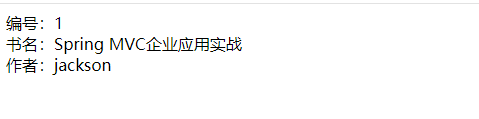
编号:<span id="id"></span><br>

书名:<span id="name"></span><br>

作者:<span id="author"></span><br>

</body>

</html>
运行结果:
Spring使用Jackson处理json数据的更多相关文章
- Spring使用fastjson处理json数据
1.搭建SpringMVC+spring环境 2.配置web.xml以及springmvc-config.xml,web.xml同Spring使用jackson处理json数据一样,Springmvc ...
- Java操作JSON数据(4,end)--Jackson操作JSON数据
Jackson是SpringBoot默认使用的JSON处理库,它可以轻松的将Java对象转换成JSON对象,同样也可以将JSON转换成Java对象.本文介绍下Jackson的基本使用方法,包括序列化和 ...
- Spring boot之返回json数据
1.步骤: 1. 编写实体类Demo 2. 编写getDemo()方法 3. 测试 2.项目构建 编写实体类Demo package com.kfit; /** * 这是一个测试实体类. */ pub ...
- Jackson 解析json数据之忽略解析字段注解@JsonIgnoreProperties
转自:http://blog.csdn.net/ngl272/article/details/70217104 以前解析json用的惯的就是Google的gson了,用惯了基本就用它了,一直也没发现什 ...
- [转]Jackson 解析json数据之忽略解析字段注解@JsonIgnoreProperties
以前解析json用的惯的就是Google的gson了,用惯了基本就用它了,一直也没发现什么大问题,因为都是解析简单的json数据.但是最近学习springboot,要解析一个比较复杂的json数据.就 ...
- Spring mvc,jQuery和JSON数据交互
一.实验环境的搭建 1.Spring mvc jar. 导入spring mvc运行所需jar包.导入如下(有多余) 2.json的支持jar 3.加入jQuery. 选用jquery-3.0.0.m ...
- 1.4(Spring MVC学习笔记)JSON数据交互与RESTful支持
一.JSON数据交互 1.1JSON简介 JSON(JavaScript Object Notation)是一种数据交换格式. 1.2JSON对象结构 {}代表一个对象,{}中写入数据信息,通常为ke ...
- 使用jackson解析JSON数据
本文介绍使用jackson来对json数据进行解析操作 首先,需要去官网下载jackson,本文使用的是(jackson-all-1.9.11.jar) 主要通过ObjectMapper对json进行 ...
- Spring MVC如何进行JSON数据的传输与接受
本篇文章写给刚接触SpingMVC的同道中人,虽然笔者本身水平也不高,但聊胜于无吧,希望可以给某些人带来帮助 笔者同时再次说明,运行本例时,需注意一些配置文件和网页脚本的路径,因为笔者的文件路径与读者 ...
随机推荐
- leetcode 152. Maximum Product Subarry
这道题求的是乘积的最大值的,那么依照之前的和的最大值类似的做法的,乘积的最大值可能是在最大值*当前值和最小值*当前值和当前值三者之间取得的最大值的,那么使用两个变量来保存每一步的最大最小值的. cla ...
- 定时重启tomcat
写个简单的定时重启,弄了一上午,主要是crontab里面奇怪 #!/bin/bash p=`ps -ef |grep tomcat |head -n 1|awk -F" " '{p ...
- 18.1 volatile的作用
volatile的作用是作为指令关键字,确保本条指令不会因编译器的优化而省略,且要求每次直接读值. 1.编译器的优化 在本次线程内,当读取一个变量时,为提高存取速度,编译器优化时有时会先把变量读取到一 ...
- TreeSet的两种排序方式,含Comparable、Comparator
1.排序的引入 由于TreeSet可以实现对元素按照某种规则进行排序,例如下面的例子 public class TreeSetDemo { public static void main(String ...
- 关于java做题时需要注意的事项
1.要熟悉eclipse的使用 2.用java提交时只能有一个public class 且类名只能为Main 3.提交时不能提交包名 4.提交时要将引入的包一起提交 5.虽然java提供了很多的函数, ...
- django 获取用户提交的数据 文件 表单
templates: <div> <form action="/detail" method="post" enctype="mul ...
- Python 模块collections
1.深入理解python中的tuple的功能 基本特性 # 可迭代 name_tuple = ('0bug', '1bug', '2bug') for name in name_tuple: prin ...
- ubuntu命令行打开网页
在Ubuntu下,当需要打开其他格式文件时,比如pdf.jpg.mp3等格式文件,通常做法是进入到文件所在的目录,双击打开,很影响效率.事实上,可以通过命令xdg-open打开这些格式文件,甚至是网页 ...
- PCL数据类型和ROS数据类型的转换
参考网址 http://wiki.ros.org/pcl/Overview ,重点参看第2和第3节. 1. Data types 介绍了三种点云数据类型:sensor_msgs::PointCloud ...
- MySQL内存使用查看方式
使用版本:MySQL 5.7 官方文档 在performance_schema有如下表记录内存使用情况 mysql> show tables like '%memory%summary%'; + ...