
demo1:会下蛋的机器人
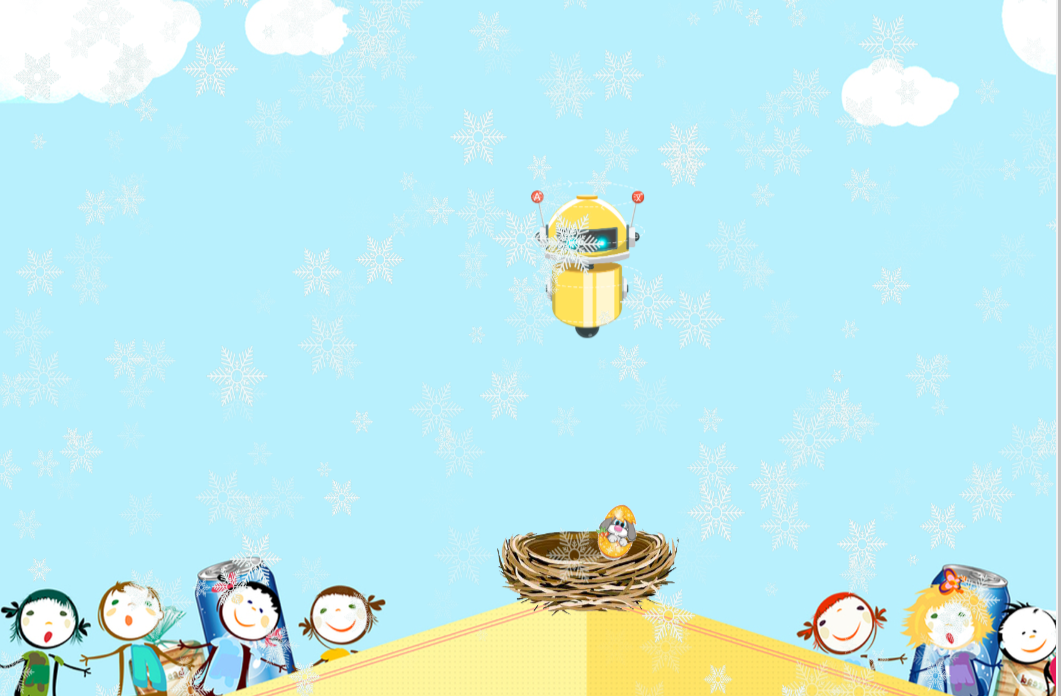
<!DOCTYPE html>

<html lang="en">

<head>

    <meta charset="UTF-8">

    <title>spriteJs</title>

    <style>

        body {

            background: black;

        }

        div {

            width: 1000px;

            height: 600px;

            /*border: 1px solid red;*/

            border-radius: 10px;

            margin: 30px auto;

            overflow: hidden;

            background: black;

        }

    </style>

</head>

<body>

<div id="container"></div>

</body>

<script src="https://unpkg.com/spritejs/dist/spritejs.min.js"></script>

<script>

    // localStorage.setItem('language', 'zh-CN');

    let container = document.getElementById('container'),

        width = container.offsetWidth * 2,

        height = container.offsetHeight;

    const {Scene, Sprite} = spritejs;

    const scene = new Scene('#container', {

        // viewport: ['auto', 'auto'],

        resolution: ['flex', 'flex'],

    });

    (async function () {

        await scene.preload({

                id: 'bg',

                src: './img/bgImage.png'

            }, {

                id: 'robot',

                src: './img/robot.png'

            }, {

                id: 'rabbit',

                src: './img/rabbit.png'

            }, {

                id: 'egg1',

                src: './img/dragon-egg1.png'

            }, {

                id: 'egg2',

                src: './img/dragon-egg2.png'

            }, {

                id: 'snow',

                src: './img/snowflake.png'

            }

        )

    })();

    const layer = scene.layer();

    const robot = new Sprite('./img/robot.png');

    const rabbit = new Sprite('rabbit');

    const egg1 = new Sprite('egg1');

    const egg2 = new Sprite('egg2');

    const bg = new Sprite('bg');

    bg.attr({

        anchor: [0, 0],

        x: 0,

        y: 0,

        // size: [1000, 600]

    });

    robot.attr({

        anchor: [0.5, 0],

        x: width,

        y: 0,

        // scale: 0.5

        size: [182, 252]

    });

    let robotHeight = robot.offsetSize[1];

    async function init() {

        let rabbitP = await initEgg(rabbit);

        let egg1P = await initEgg(egg1);

        let egg2P = await initEgg(egg2);

        layer.append(bg);

        layer.append(robot);

        layer.append(rabbitP);

        layer.append(egg1P);

        layer.append(egg2P);

        animateRobot();

        // 创建300片雪花,循环,稍微节省点性能

        for (let i = 0; i < 300; i++) {

            setTimeout(async () => {

                let snow = new Sprite('snow');

                let snowP = await initSnow(snow);

                layer.append(snowP.sprite);

                animateSnow(snowP);

            }, 100 * i);

        }

    }

    // 入口

    init();

    // 初始化蛋蛋

    async function initEgg(egg) {

        await egg.attr({

            anchor: [0.5, 0.5],

            x: width / 2,

            y: (height / 2) + robotHeight,

            opacity: 0

        });

        return egg;

    }

    // 初始化雪花

    async function animateSnow(snow) {

        snow.sprite.animate([

            {

                x: snow.attribute.x,

                y: 0

            },

            {

                x: snow.attribute.x,

                y: height * 2

            }

        ], {

            duration: 5000,

            iterations: Infinity,

            direction: 'default',

        })

    }

    // 雪花的动画

    async function initSnow(snowSpite) {

        var sss = random(20, 100);

        let snow = {

            width: sss,

            height: sss,

            x: random(0, width),

            y: 0,

            opacity: random(0, 1)

        };

        await snowSpite.attr({

            anchor: [0.5, 0.5],

            x: snow.x,

            y: snow.y,

            size: [snow.width, snow.height],

            opacity: snow.opacity

        });

        let obj = {

            attribute: snow,

            sprite: snowSpite

        };

        return obj;

    }

    // 会飞的机器人

    async function animateRobot() {

        await robot.animate([

            {x: width, y: 0},

            {x: width / 2, y: height / 2},

            {x: width / 2, y: height / 2 + 60},

        ], {

            duration: 3500,

            iterations: 1,

            direction: 'default',

        }).finished;

        animateEgg(rabbit, 45);

        await robot.animate([

            {x: width / 2, y: height / 2 + 60},

            {x: width / 2, y: height / 2},

            {x: width / 2, y: height / 2 + 60},

        ], {

            duration: 1500,

            iterations: 1,

            direction: 'default',

        }).finished;

        animateEgg(egg1, -45);

        await robot.animate([

            {x: width / 2, y: height / 2 + 60},

            {x: width / 2, y: height / 2},

            {x: width / 2, y: height / 2 + 60},

        ], {

            duration: 1500,

            iterations: 1,

            direction: 'default',

        }).finished;

        animateEgg(egg2, 0);

        await robot.animate([

            {x: width / 2, y: height / 2 + 60},

            {x: width / 2, y: height / 2},

            {x: 0, y: 0}

        ], {

            duration: 2000,

            iterations: 1,

            direction: 'default',

        }).finished;

        animateRobot();

    }

    // 蛋的动画

    async function animateEgg(egg, deg) {

        egg.animate([

            {

                x: width / 2,

                y: (height / 2) + robotHeight + 60,

                opacity: 1

            },

            {

                x: width / 2 + deg,

                y: (height / 2) + robotHeight + 360,

                opacity: 1

            },

            {

                rotate: deg

            }

        ], {

            duration: 2000,

            iterations: 1,

            direction: 'default',

            // fill: 'forwards'

        });

    }

    // 随机

    function random(min, max) {

        return Math.random() * (max - min) + min;

    }

</script>

</html>
demo1:会下蛋的机器人的更多相关文章
- Delphi 实现 图灵机器人API(IDHTTP POST )
此功能所需的 Key及接口文档,都可以在图灵机器人的官网下载, 小伙伴们需要申请自己的图灵机器人账号. 申请方法请自行百度“图灵机器人” . 登录账号后,在左侧的[机器人接入],获取需要的信息,记得 ...
- 【翻译】用AIML实现的Python人工智能聊天机器人
前言 用python的AIML包很容易就能写一个人工智能聊天机器人. AIML是Artificial Intelligence Markup Language的简写, 但它只是一个简单的XML. 下面 ...
- 3.C#面向对象基础聊天机器人
基于控制台的简单版的聊天机器人,词库可以自己添加. 聊天机器人1.0版本 源码如下: using System; using System.Collections.Generic; using Sys ...
- Python 简易聊天机器人
聊天机器人 | |-----MySql | |---module--"逻辑运算层" | | | |---ciku--"与词库交互" | | | |---dict ...
- java 聊天猜拳机器人
2016-12-06本随笔记录第一次制作经过,感谢各位大神指导. 工具:eclipse;JAVA JDK; 语言:java 时间:2016.11.23 作者:潇洒鸿图 地址:http://www.cn ...
- 用VB实现SmartQQ机器人
这里为了便于介绍程序设计的流程,更多以代码形式给出,具体可用火狐浏览器的firebug插件来抓包分析,或者用谷歌浏览器的开发者工具进行抓包.抓包地址是:http://w.qq.com 第一步,是二维码 ...
- PHP 检测机器人,屏蔽内页
PHP 检测机器人,屏蔽内页 <?php // SpiderHelper::rewrite301(); // SpiderHelper::showRobotTxt(); class Spider ...
- vijos1250 最勇敢的机器人
背景 Wind设计了很多机器人.但是它们都认为自己是最强的,于是,一场比赛开始了~ 描述 机器人们都想知道谁是最勇敢的,于是它们比赛搬运一些物品. 它们到了一个仓库,里面有n个物品,每个物品都有一个价 ...
- 【chrome插件】web版微信接入图灵机器人API实现自动回复
小贱鸡自动回复API已经不可以用了,现在改良接入图灵机器人API 360chrome浏览器团队翻译了部分谷歌插件开发文档 地址:http://open.chrome.360.cn/extension_ ...
随机推荐
- TeamViewer 版本v13.2.26558 修改ID
TeamViewer 使用频繁后会被判定为商业用途,不可用.此软件的账号和设备mac地址绑定. 修改TeamViewer ID后可以重新开始使用.下述方法可以成功修改TeamViewer ID. Wi ...
- crt sqlplus 中文乱码解决方案:
1.确定数据库字符集 SQL> select userenv('language') from dual; USERENV('LANGUAGE') ----------------------- ...
- 基于VS Code快速搭建Java项目
有时候随手想写一点Java测试代码,以控制台程序为主,还会用到一些其它框架,并基于Maven构建. 1.Java Extension Pack一定要安装. 2.VS Code打开一个指定目录,创建相应 ...
- webpack使用小记
前言 webpack是目前前端开发必不可少的一款模块加载器兼构建工具,它能极其方便的处理各种资源的打包和使用, 让前端开发获得与后端开发几乎一致的体验. webpack特点 webpack 是以 co ...
- gitlab+jenkins+tomcat CI/CD 部署
整个项目的框架为: gitlab的安装与使用(Centos7) gitlab的安装 新建yum源 vim /etc/yum.repos.d/gitlab-ce.repo [gitlab-ce] nam ...
- prometheus + grafana安装部署(centos6.8)
官方网址:https://prometheus.io/ GitHub网址:https://github.com/prometheus/prometheus 软件下载地址:https://prometh ...
- Linux上配置http上网代理
有些局域网环境上网需要使用代理上网,图形界面的很好解决就设置一下浏览器的代理就好了,但是Linux纯命令行的界面就需要手动配置了. 如果要全局用户使用应用于所有的Shell,就需要修改 /etc/pr ...
- eclipse测试链接sql server2008 数据库
注:在测试连接数据库之前必须保证SQL Server 2008是采用SQL Server身份验证方式而不是windows身份验证方式.如果在安装时选用了后者,则需要重新进行配置. 首先 使用命令行测试 ...
- 剑指offer——python【第28题】数组 中出现次数超过一半的数字
题目描述 数组中有一个数字出现的次数超过数组长度的一半,请找出这个数字.例如输入一个长度为9的数组{1,2,3,2,2,2,5,4,2}.由于数字2在数组中出现了5次,超过数组长度的一半,因此输出2. ...
- js设计模式(三)---代理模式
代理模式: 代理模式是为一个对象提供一个代理用品或占位符,以便控制对他的访问. 实现: 在 Web开发中,图片预加载是一种常用的技术,如果直接给某个 img 标签节点设置 src 属性,由于图片过大或 ...