
windos下安装django
一:pip install Django
#

# script to register Python 2.0 or later for use with win32all

# and other extensions that require Python registry settings

#

# written by Joakim Loew for Secret Labs AB / PythonWare

#

# source:

# http://www.pythonware.com/products/works/articles/regpy20.htm

#

# modified by Valentine Gogichashvili as described in http://www.mail-archive.com/distutils-sig@python.org/msg10512.html

import sys

from _winreg import *

# tweak as necessary

version = sys.version[:3]

installpath = sys.prefix

regpath = "SOFTWARE\\Python\\Pythoncore\\%s\\" % (version)

installkey = "InstallPath"

pythonkey = "PythonPath"

pythonpath = "%s;%s\\Lib\\;%s\\DLLs\\" % (

    installpath, installpath, installpath

)

def RegisterPy():

    try:

        reg = OpenKey(HKEY_CURRENT_USER, regpath)

    except EnvironmentError as e:

        try:

            reg = CreateKey(HKEY_CURRENT_USER, regpath)

            SetValue(reg, installkey, REG_SZ, installpath)

            SetValue(reg, pythonkey, REG_SZ, pythonpath)

            CloseKey(reg)

        except:

            print "*** Unable to register!"

            return

        print "--- Python", version, "is now registered!"

        return

    if (QueryValue(reg, installkey) == installpath and

        QueryValue(reg, pythonkey) == pythonpath):

        CloseKey(reg)

        print "=== Python", version, "is already registered!"

        return

    CloseKey(reg)

    print "*** Unable to register!"

    print "*** You probably have another Python installation!"

if __name__ == "__main__":

    RegisterPy()


if sys.getdefaultencoding() != 'gbk':

    reload(sys)

    sys.setdefaultencoding('gbk')

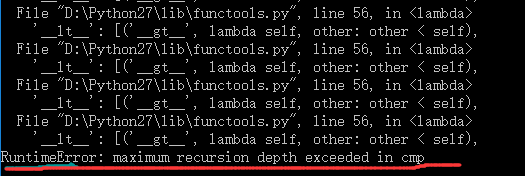
convert = {

        '__lt__': [('__gt__', lambda self, other: not (self < other or self == other)),

                   ('__le__', lambda self, other: self < other or self == other),

                   ('__ge__', lambda self, other: not self < other)],

        '__le__': [('__ge__', lambda self, other: not self <= other or self == other),

                   ('__lt__', lambda self, other: self <= other and not self == other),

                   ('__gt__', lambda self, other: not self <= other)],

        '__gt__': [('__lt__', lambda self, other: not (self > other or self == other)),

                   ('__ge__', lambda self, other: self > other or self == other),

                   ('__le__', lambda self, other: not self > other)],

        '__ge__ ': [('__le__', lambda self, other: (not self >= other) or self == other),

                   ('__gt__', lambda self, other: self >= other and not self == other),

                   ('__lt__', lambda self, other: not self >= other)]

    }
windos下安装django的更多相关文章
- 在centos下安装django
这里有一个不错的Django的学习资料.先收藏一下,以备后用.谢谢 http://www.ziqiangxuetang.com/django/django-install.html 在centos下安 ...
- Windows下安装Django【转】
Windows下安装Django及WEB服务启动 如果使用的是 Linux 或 Mac OS X ,系统可能已经预装了 Python .在命令提示符下 (或 OS X 的终端中) 输入python ...
- Linux下安装Django
Django是基于Python开发的免费的开源网站框架,也是python web开发中重量级的web框架,可以用于快速搭建高性能并且优雅的网站! 下面以Fedora为例安装Django,最新Fedor ...
- Windows下安装Django及WEB服务启动
如果使用的是 Linux 或 Mac OS X ,系统可能已经预装了 Python .在命令提示符下 (或 OS X 的终端中) 输入python ,如果出现python编辑环境,说明 ...
- win10下安装Django
Django的核心(1.4+)可以运行在从2.5到2.7之间的任何Python版本. 我的电脑是操作系统是window10 ,内存是4G. 1.下载django 官网地址:https://www.dj ...
- 在windows下安装Django
2013-07-24 21:23:30| 1.安装Python 我安装的是Python(x,y)-2.7.5.0,安装目录在C盘.安装成功后如下图所示. 2.安装Django 从https://w ...
- python3下安装Django
1.下载python3 https://www.Python.org/ 我下载的是Python3.5.1 选的 Windows x86-64 executable installer 2. 打开cmd ...
- Ubuntu下安装Django
正式开始Django学习历程.要用Django第一步就是要配置好环境啊. 我的配置: OS: Ubuntu 12.10 Server: Apache 2. ...
- Linux环境下安装Django和Python
1 下载前准备操作:安装相关的依赖库(工具包) yum install gcc patch libffi-devel python-devel zlib-devel bzip2-devel ...
随机推荐
- python检测服务器端口
import socket sk = socket.socket(socket.AF_INET, socket.SOCK_STREAM) sk.settimeout(10) try: sk.conne ...
- constructor __proto__ prototype
js里面constructor __proto__ prototype这三个属性比较难理解,在重点研究这三个属性后,在这里做一个笔记, constructor:构造器,每个对象都有这个属性,他指向构 ...
- 加快Gradle的构建过程
Gradle配置文件中加入守护进程 org.gradle.daemon=true 这个守护进程是在第一次编译时才开启进程进行编译,之后的编译将不再开启进程重新编译,这样以减小编译的速度
- Dubbox:来自当当网的SOA服务框架
Dubbox:来自当当网的SOA服务框架 http://www.open-open.com/lib/view/open1417426480618.html
- yii2 adminlte后台搭建
加载第三方扩展, composer require dmstr/yii2-adminlte-asset "2.*" composer require mdmsoft/yii2-ad ...
- Redux和react-redux的学习总结
写在最前面:这段时间一直在看前端方面的东西,之前只是了解HTML,CSS,JS,jQuery,由于公司交代了前端的任务,所以后面又看了Bootstrap,React,Redux,react-redux ...
- 活动代码页437--修改windows的系统编码
1.首先查看系统编码 win+R打开运行,输入cmd回车,打开命令提示符窗口,输入chcp回车,会查询当前系统的活动代码页,它指明了当前系统使用的编码: 或者,打开cmd后,点击cmd窗口左上角图标, ...
- 977. Squares of a Sorted Array有序数组的平方
网址:https://leetcode.com/problems/squares-of-a-sorted-array/ 双指针法 把左端的元素和右端的元素比较后挑出绝对值大的,将其平方放入ans中,并 ...
- struct放入list中按照某字段排序
//管线字段信息 public struct FieldInfo { public int iID; //编号 public string sFieldName; //字段名 public strin ...
- Quartz的基本使用之入门(2.3.0版本)
一.Quartz可以用来做什么 Quartz是一个强大任务调度框架,我工作时候会在这些情况下使用到quartz框架,当然还有很多的应用场景,在这里只列举2个实际用到的 餐厅系统会在每周四晚上的22点自 ...