
Spring Cloud Circuit Breaker 使用示例
Spring Cloud Circuit Breaker 使用示例
作者: Grey
原文地址:
博客园:Spring Cloud Circuit Breaker 使用示例
CSDN:Spring Cloud Circuit Breaker 使用示例
说明
Spring Cloud Circuit breaker提供了一个跨越不同断路器实现的抽象。它提供了一个一致的API,可以在你的应用程序中使用,允许你的开发者选择最适合你的应用程序需求的断路器实现。
它还支持的实现有如下几种
完整代码
spring-cloud-circuit-breaker-usage
环境
JDK 1.8+
Maven 3.5+
Spring Boot 版本:2.7.5
Spring Cloud 版本:2021.0.5
项目结构和说明
- spring-cloud-circuit-breaker-usage:父项目名称
- server : 服务端端模块
- src/
- pom.xml
- client : 客户端模块
- src/
- pom.xml
- pom.xml:父项目 pom 配置
- server : 服务端端模块
代码说明
服务端需要引入如下依赖
        <dependency>

            <groupId>org.springframework.boot</groupId>

            <artifactId>spring-boot-starter-webflux</artifactId>

        </dependency>
然后暴露一个简单服务
import org.springframework.web.bind.annotation.RequestMapping;

import org.springframework.web.bind.annotation.RestController;

import reactor.core.publisher.Mono;

@RestController

public class BookController {

    @RequestMapping(value = "/recommended")

    public Mono<String> readingList() {

        return Mono.just("book1,book2,book3");

    }

}
暴露端口
server.port=8090
客户端的配置也很简单,核心在ReactiveCircuitBreaker的初始化,客户端的依赖如下
        <dependency>

            <groupId>org.springframework.cloud</groupId>

            <artifactId>spring-cloud-starter-circuitbreaker-reactor-resilience4j</artifactId>

        </dependency>

        <dependency>

            <groupId>org.springframework.boot</groupId>

            <artifactId>spring-boot-starter-webflux</artifactId>

        </dependency>
import org.slf4j.Logger;

import org.slf4j.LoggerFactory;

import org.springframework.cloud.client.circuitbreaker.ReactiveCircuitBreaker;

import org.springframework.cloud.client.circuitbreaker.ReactiveCircuitBreakerFactory;

import org.springframework.stereotype.Service;

import org.springframework.web.reactive.function.client.WebClient;

import reactor.core.publisher.Mono;

@Service

public class BookService {

    private static final Logger LOG = LoggerFactory.getLogger(BookService.class);

    private final WebClient webClient;

    private final ReactiveCircuitBreaker readingListCircuitBreaker;

    public BookService(ReactiveCircuitBreakerFactory circuitBreakerFactory) {

        this.webClient = WebClient.builder().baseUrl("http://localhost:8090").build();

        this.readingListCircuitBreaker = circuitBreakerFactory.create("recommended");

    }

    public Mono<String> readingList() {

        return readingListCircuitBreaker.run(webClient.get().uri("/recommended").retrieve().bodyToMono(String.class), throwable -> {

            LOG.warn("Error making request to book service", throwable);

            return Mono.just("local store book");

        });

    }

}
如果需要配置一些熔断条件,则做如下设置即可
CircuitBreakerConfig circuitBreakerConfig = CircuitBreakerConfig.custom()

  .failureRateThreshold(50)

  .waitDurationInOpenState(Duration.ofMillis(1000))

  .slidingWindowSize(2)

  .build();

TimeLimiterConfig timeLimiterConfig = TimeLimiterConfig.custom()

  .timeoutDuration(Duration.ofSeconds(4))

  .build();

this.readingListCircuitBreaker = circuitBreakerFactory.configureDefault(

                id -> new Resilience4JConfigBuilder(id)

                .timeLimiterConfig(timeLimiterConfig)

                .circuitBreakerConfig(circuitBreakerConfig)
客户端暴露一个接口用于测试
@RestController

public class ReadingController {

    private final BookService bookService;

    public ReadingController(BookService bookService) {

        this.bookService = bookService;

    }

    @RequestMapping("/to-read")

    public Mono<String> toRead() {

        return bookService.readingList();

    }

}
客户端设置端口
server.port=8080
接下来,启动服务端,然后启动客户端,用 Postman 或者其他相关工具访问: http://localhost:8080/to-read
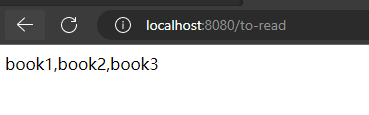
然后把服务端停止,模拟服务中断,再次访问: http://localhost:8080/to-read
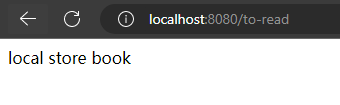
显示了降级后的内容。
参考文档
spring-cloud-circuitbreaker-demo
Spring Cloud Circuit Breaker Guide
Quick Guide to Spring Cloud Circuit Breaker
Spring Cloud Circuit Breaker 使用示例的更多相关文章
- Spring Cloud App(Service) Pom示例
都配对了才能找到jar包(无法访问外网时是如何配的?) parent dependencyManageMent repositories plugInRepositories <groupId& ...
- Spring Cloud Hystrix理解与实践(一):搭建简单监控集群
前言 在分布式架构中,所谓的断路器模式是指当某个服务发生故障之后,通过断路器的故障监控,向调用方返回一个错误响应,这样就不会使得线程因调用故障服务被长时间占用不释放,避免故障的继续蔓延.Spring ...
- 微服务组件--限流框架Spring Cloud Hystrix分析
Hystrix的介绍 [1]Hystrix是springCloud的组件之一,Hystrix 可以让我们在分布式系统中对服务间的调用进行控制加入一些调用延迟或者依赖故障的容错机制. [2]Hystri ...
- Spring Cloud是怎么运行的?
导读 在之前的文章中给大家介绍了Spring Boot的基本运行原理(链接),收到了很多读者朋友们关于目前比较流行的微服务框架Spring Cloud的问题反馈.因此,在这篇文章中小码哥打算和大家一起 ...
- Spring Cloud 学习--Hystrix应用
上一篇介绍了Hystrix基本功能和单独使用的方式,今天继续学习如何将Hystrix融入SpringCloud组件中去. 在Ribbon上使用熔断器 在 pom.xml 文件中引入 hystrix 的 ...
- Spring Cloud Gateway的断路器(CircuitBreaker)功能
欢迎访问我的GitHub https://github.com/zq2599/blog_demos 内容:所有原创文章分类汇总及配套源码,涉及Java.Docker.Kubernetes.DevOPS ...
- spring cloud 学习(1) - 基本的SOA示例
有过dubbo/dubbox使用经验的朋友,看到下面这张图,一定很熟悉,就是SOA架构的最基本套路. 与dubbo对比,上图的3大要素中,spring cloud是借助以下组件来实现的: 1.注册中心 ...
- 《Spring Cloud构建微服务架构》系列博文示例
SpringCloud-Learning 源码下载地址:http://download.csdn.net/detail/k21325/9650968 本项目内容为Spring Cloud教 ...
- Spring Cloud 入门教程(二): 配置管理
使用Config Server,您可以在所有环境中管理应用程序的外部属性.客户端和服务器上的概念映射与Spring Environment和PropertySource抽象相同,因此它们与Spring ...
- Spring Cloud(Dalston.SR5)--Feign 声明式REST客户端
Spring Cloud 对 Feign 进行了封装,集成了 Ribbon 并结合 Eureka 可以实现客户端的负载均衡,Spring Cloud 实现的 Feign 客户端类名为 LoadBala ...
随机推荐
- 游标长时间open导致表无法vacuum问题
一.问题描述 用户在实际中可能会碰到类似以下 dead rows 无法 vacuum的问题,一个可能的原因是由于游标未结束的原因. test=# vacuum(verbose) t1; INFO: v ...
- Job And Schedule (V8R6C4)
KingbaseES 数据库提供了 kdb_schedule 扩展,使得用户能通过类似oracle job 的方式进行job调用.kdb_schedule 提供了三个Schema :dbms_job ...
- KFS邮件自动告警-数据比对-数据修复配置方法
一.告警机制 用户可以通过配置告警机制,在比对完成和节点报错时接收到邮件告警. 告警机制共包含3个方面: 1. 告警配置 2. 用户订阅 3. 告警历史 KFS邮箱分两个部分,一个是接收告警信息的邮箱 ...
- 自定义View5 -塔防小游戏:第二篇防御塔随意放置
第一篇:一个防御塔+多个野怪(简易版) 第二篇:防御塔随意放置 自定义View,处理事件分发,up,move,down. 第三篇:防御塔随意放置+多组野怪 第四篇:多波野怪 第五篇:杀死野怪获得金币 ...
- Docker 完整版教程
Docker 安装 一.安装前必读 在安装 Docker 之前,先说一下配置,我这里是Centos7 Linux 内核:官方建议 3.10 以上,3.8以上貌似也可. 注意:本文的命令使用的是 roo ...
- 利用c++编写bp神经网络实现手写数字识别详解
利用c++编写bp神经网络实现手写数字识别 写在前面 从大一入学开始,本菜菜就一直想学习一下神经网络算法,但由于时间和资源所限,一直未展开比较透彻的学习.大二下人工智能课的修习,给了我一个学习的契机. ...
- 微服务低代码Serverless平台(星链)的应用实践
导读 星链是京东科技消金基础研发部研发的一款研发效能提升的工具平台,面向后端服务研发需求,尤其是集成性.场景化.定制化等难度不太高.但比较繁琐的需求,如服务前端的后端(BFF).服务流程编排.异步消息 ...
- Django 创建 APP和目录结构介绍
一.通过pip安装Django 以windows 系统中使用pip命令安装为例 win+r,调出cmd,运行命令:pip install django自动安装PyPi 提供的最新版本.指定版本,可使用 ...
- mysql ERROR 1396 (HY000): Operation CREATE USER failed 解决办法
原因:MySQL账户表中已经存在这个要创建的用户 操作分析: 当创建新用户时会提示这个新用户创建失败,但是当解决创建失败的问题后再次重新创建这个新用户,则会报这个错误 # 创建新用户,提示root用户 ...
- 谈谈对K8S CNI、CRI和CSI插件的理解