
转:Remote debugging with Visual Studio 2010
Original URL http://www.codeproject.com/Articles/146838/Remote-debugging-with-Visual-Studio-2010
you may also need to set up window firewall for this. see URL https://msdn.microsoft.com/en-us/library/ee126350(v=vs.100).aspx
I've recently needed to remotely debug a .NET desktop application with Visual Studio 2010. After having read the MSDN documentation on this subject, I still missed some information. I hope that this post will fill some of these gaps and will help you configure and run the remote debugging tools.
Let’s first start with a definition of parts involved in the debugging process:
- host – is a machine on which Visual Studio is installed and on which you control the debugging process
- remote computer – is a machine on which the debuggee is run
Since the debugging process is wholly controlled from the host, there must be a listener on the remote computer that executes commands sent from Visual Studio. This listener is called Remote Debugging Monitor (msvsmon.exe). There are two possible ways to install it – you can either download and run the setup package from Microsoft or copy all the necessary files from C:\Program Files (x86)\Microsoft Visual Studio 10.0\Common7\IDE\Remote Debugger (path on my 64-bit Win7). A caveat here: If your host is x86 machine, then you have no choice but x86 package for your remote computer – there is no way you can debug a 64-bit process in a 32-bit debugger. Though you can debug 32-bit process in a 64-bit debugger.
Next step (the most boring and error prone in my opinion) is a network setup. Ideally Visual Studio and Remote Debugging Monitor should take care of the Windows Firewall settings after you run them with the elevated privileges, but life is life and you might need to get your hands dirty. Fortunately the manual configuration process is pretty well explained on MSDN sites for WinXP, Vista and Win7. The next important thing is security. You can either perform debugging in “NoAuthentication” mode (which is of course less secure) or in Windows Authentication mode. Unfortunately Windows Authentication mode requires the same account to be setup on the host and the remote computer – both usernames and passwords must be the same. If it’s a problem for you, then you are left with the “NoAuthentication” mode in which you take a risk of allowing all people to access your debugging monitor.
Having finished the configuration part, we may finally start the debugging process. Begin with starting msvsmon.exe (Remote Debugging Monitor) on the remote computer – it will communicate with Visual Studio running on the host. Let’s assume that our application is named RemoteControl.exe and is written in C#. First, we need to deploy it on the remote computer, for example into the C:\Users\concept\Desktop\RemoteControl folder (remember to copy also all the pdb files and the assemblies required by the main application). We can now either start the application under the debugger or attach the debugger to the already running process. Let’s start with the first scenario. If you have access to the application solution folder and to all the project files, then you can start the remote debugging by modifying the start project properties page:

If you don’t have access to the application solution, then you need to use the application EXE file. From File menu choose Open->Project/Solution… and find the EXE file for your application. Select the newly opened project and choose properties. Fill the page with following values:
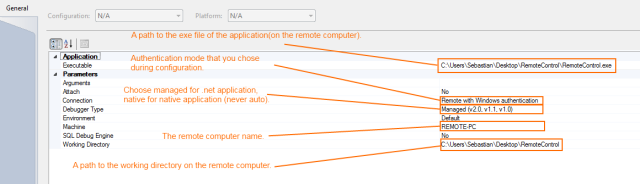
Attaching to the already started process is fairly simple: From the Debug menu, choose Attach to process…. If you are debugging in the Windows Authentication mode, set the Transport box to Default. In Qualifier field, type name of your Remote Debugging Monitor session. Usually it is your user name + @ + the remote computer name, for example Sebastian@REMOTE-PC (the session name is also displayed in the listbox after you start the msvsmon.exe).
Finally, a few words about the debugging process. Unfortunately the debugging symbol configuration differs depending on the chosen debugging engine (native, managed, mixed). When using managed debugging engine symbols must be accessible on the remote computer (so you need to deploy your application with all pdb files and set_NT_SYMBOL_PATH variable on the remote computer for .NET Framework debugging symbols). When using native debugging engine symbols are loaded from the host machine (so you must include the directory with all pdb files for your application into the Visual Studio symbols search path – Tools->Options->Debugging->Symbols). Interestingly, source files are always loaded from the host machine (in case that you don’t use any kind of source server). To summarize: remember to always choose the managed engine for your .NET applications that don’t have any interop parts. The native engine requires much more information (like symbols for all native libraries) and provides you with capabilities that are usually not necessary in debugging pure .NET application.
I haven’t touched the subject of the web applications remote debugging and running Remote Debugging Monitor as a service. Leave a comment if you wish such a post to appear in the future. 
转:Remote debugging with Visual Studio 2010的更多相关文章
- Visual Studio 2010初学者的调试指南:Mastering Debugging in Visual Studio 2010 - A Beginner's Guide
Introduction In the software development life cycle, testing and defect fixing take more time than a ...
- Win7 32bit + Matlab2013b +Visual Studio 2010联合编程配置
要建立独立运行的C应用程序,系统中需要安装Matlab.Matlab编译器.C/C++编译器以及Matlab C/C++数学库函数和图形库函数. Matlab编译器使用mbuild命令可以直接将C/C ...
- VS:101 Visual Studio 2010 Tips
101 Visual Studio 2010 Tips Tip #1 How to not accidentally copy a blank line TO – Text Editor ...
- Creating SharePoint 2010 Event Receivers in Visual Studio 2010
转:http://msdn.microsoft.com/en-us/library/gg252010(v=office.14).aspx Summary: Learn how to create a ...
- 恼人的Visual Studio 2010崩溃重启问题
上周时Visual Studio 2010突然出现崩溃现象.在源文件修改只要一编译,马上就崩溃,而且还不弹出任何异常窗口,严重影响软件开发工作. google了无数解决方案 试了下面这些方法: 1)h ...
- How To Compile Qt with Visual Studio 2010
This post is a step-by-step guide on how to compile Qt 4.x.x with MSVC 2010. Although we use Qt 4.7. ...
- Visual Studio 2010 将网站直接发布到远程站点
原文:Visual Studio 2010 将网站直接发布到远程站点 这次说下如何将web应用程序直接发布到IIS服务器站点!!! 问题的由来 本人每天要发布更新的程序,所以每次更新的时候要做的工作: ...
- ASP.NET 4 and Visual Studio 2010
https://msdn.microsoft.com/en-us/library/ee532866.aspx The topics in this section provide informatio ...
- [入门级] 基于 visual studio 2010 mvc4 的图书管理系统开发初步 (二)
[入门级] 基于 visual studio 2010 mvc4 的图书管理系统开发初步 (二) Date 周六 10 一月 2015 By 钟谢伟 Category website develop ...
随机推荐
- 【转】Javabyte[]数组和十六进制String之间的转换Util------包含案例和代码
原文网址:http://blog.csdn.net/caijunjun1006/article/details/11740223 Java中byte用二进制表示占用8位,而我们知道16进制的每个字符需 ...
- Java---类反射(1)---类反射入门和基础
什么是类反射 ☆什么是反射 JAVA反射机制是在运行状态中,对于任意一个类,都能够知道这个类的所有属性和方法:对于任意一个对象,都能够调用它的任意一个方法和属性:这种动态获取的信息以及动态调用对象的方 ...
- bzoj 2324 [ZJOI2011]营救皮卡丘(floyd,费用流)
2324: [ZJOI2011]营救皮卡丘 Time Limit: 10 Sec Memory Limit: 256 MBSubmit: 1777 Solved: 712[Submit][Stat ...
- 《A First Course in Probability》-chaper5-连续型随机变量-基本概念
在利用基本的概率论模型解决实际问题的时候,我们很容易发现一些随机变量的连续分布的,例如火车进站的时间.台灯的寿命等一些和时间相关的随机变量,此时我们发现我们难以求出某个点的概率了,因为随机变量是连续的 ...
- Java中的字符串流的读取和写入(创建文件并判断重复账户)
各位我又来了!!哎!好心酸!我还没注册到三天!!没法登上博客的首页!!心累!! import java.io.BufferedOutputStream; import java.io.Buffered ...
- Java模块化概念解惑与现状总结
在过去几年,Java模块化一直是一个活跃的话题.从JSR 277(现已废止)到JSR 291,模块化看起来是Java进化过程中的必经一环.即便是基于JVM的未来语言,比如Scala,也考虑了模块化的问 ...
- Java基础知识强化之IO流笔记11:递归之递归概述和注意事项
1. 递归: 方法定义中调用方法本身的现象. e.g: public void show(int n ) { if(n <= 0) { System.exit(0); } System.out. ...
- vsftp配置主动模式和被动模式
配置文件:/etc/vsftpd/vsftpd.conf 主动模式配置方法: 主动式连接使用的数据通道 connect_from_port_20=YES 支持数据流的被动式连接模式 pasv_enab ...
- .NET 拼音检索
微软提供了一个Visual Studio International Pack 组件,可以转换简繁体,或者将汉字转换为拼音以及其他语言的支持. https://www.microsoft.com/zh ...
- AS Gradle构建工具与Android plugin插件【大全】
Android plugin version 与 gradle version 的关系 Gradle是一种构建工具,它通过编写一个名为build.gradle的脚本文件对项目进行设置,再根据这个脚本对 ...