
MySQL【第一篇】安装
一、简介
MySQL 是最流行的关系型数据库管理系统,由瑞典MySQL AB公司开发,目前属于Oracle公司。
MySQL所使用的SQL语言是用于访问数据库的最常用标准化语言。
MySQL由于其体积小、速度快、总体拥有成本低,尤其是开放源码这一特点,一般中小型网站的开发都选择MySQL作为网站数据库。
二、准备
1、所需软件
mysql-5.6.34.tar.gz
下载地址:http://mirrors.sohu.com/mysql/MySQL-5.6/mysql-5.6.34.tar.gz
2、所需环境
1)卸载自带 mysql
# yum -y remove mysql*
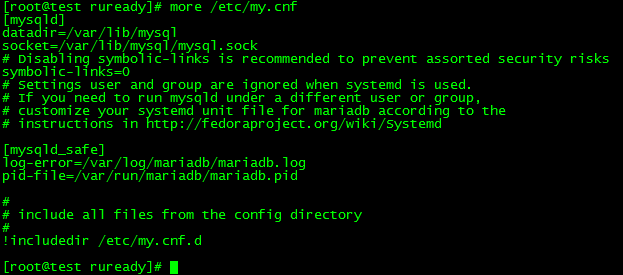
2)将原配置文件删除或改名
# mv /etc/my.cnf /etc/my.cnf.old
三、安装
1、配置yum源
1)将系统 rhel-server-7.3-x86_64-dvd.iso 文件拷贝到 /soft 目录下
# cp rhel-server-7.3-x86_64-dvd.iso /soft/
2)建立挂载所需的目录
# mkdir -p /media/cdrom
3)挂载
# mount -o loop /soft/rhel-server-7.3-x86_64-dvd.iso /media/cdrom
4)进入 /etc/yum.repo.d 目录,对yum 源进行设置
# cd /etc/yum.repo.d
# vi server.repo

5)查看是否安装成功,显示有4751 个软件包,源配置成功
# yum repolist

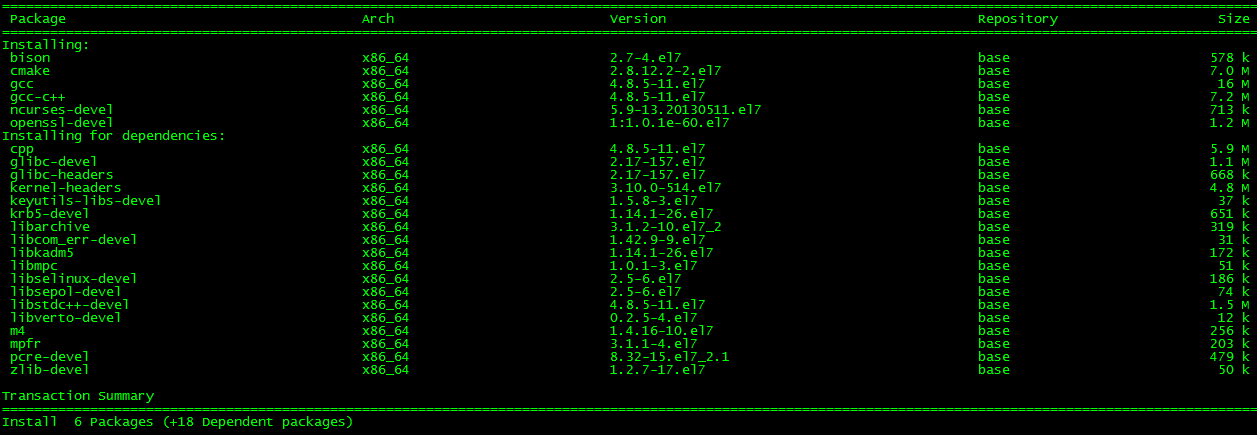
2、安装依赖
# yum -y install ncurses ncurses-devel openssl-devel bison gcc gcc-c++ make cmake
3、创建用户和组
# groupadd -r mysql
# useradd -g mysql -r -d /mydata/data mysql
4、解压安装包
# tar zxvf mysql-5.6.34.tar.gz
5、编译
# cd mysql-5.6.34
# cmake . -DCMAKE_INSTALL_PREFIX=/usr/local/mysql -DMYSQL_DATADIR=/mydata/data -DSYSCONFDIR=/etc -DWITH_INNOBASE_STORAGE_ENGINE=1 -DWITH_ARCHIVE_STORAGE_ENGINE=1 -DWITH_BLACKHOLE_STORAGE_ENGINE=1 -DWITH_READLINE=1 -DWITH_SSL=system -DWITH_ZLIB=system -DWITH_LIBWRAP=0 -DMYSQL_UNIX_ADDR=/tmp/mysql.sock -DDEFAULT_CHARSET=utf8 -DDEFAULT_COLLATION=utf8_general_ci
其他参考
# cmake -DCMAKE_INSTALL_PREFIX=/usr/local/webserver/mysql/ -DMYSQL_UNIX_ADDR=/tmp/mysql.sock -DDEFAULT_CHARSET=utf8 -DDEFAULT_COLLATION=utf8_general_ci -DWITH_EXTRA_CHARSETS=all -DWITH_MYISAM_STORAGE_ENGINE=1 -DWITH_INNOBASE_STORAGE_ENGINE=1 -DWITH_MEMORY_STORAGE_ENGINE=1 -DWITH_READLINE=1 -DWITH_INNODB_MEMCACHED=1 -DWITH_DEBUG=OFF -DWITH_ZLIB=bundled -DENABLED_LOCAL_INFILE=1 -DENABLED_PROFILING=ON -DMYSQL_MAINTAINER_MODE=OFF -DMYSQL_DATADIR=/usr/local/webserver/mysql/data -DMYSQL_TCP_PORT=3306
6、安装
# make
# make install
7、查看是否安装成功
查看mysql版本
# /usr/local/mysql/bin/mysql --version

四、配置
1、更改 /usr/local/mysql 目录所属
# cd /usr/local
# chown -R mysql:mysql mysql
2、安装perl
# yum -y install perl*
3、初始化数据库
# mkdir -p /mydata/data
# cd /usr/local/mysql
# ./scripts/mysql_install_db --user=mysql --basedir=/usr/local/mysql --datadir=/mydata/data
Installing MySQL system tables...2016-12-12 13:24:13 0 [Warning] TIMESTAMP with implicit DEFAULT value is deprecated. Please use --explicit_defaults_for_timestamp server option (see documentation for more details).
2016-12-12 13:24:13 0 [Note] Ignoring --secure-file-priv value as server is running with --bootstrap.
2016-12-12 13:24:13 0 [Note] /usr/local/mysql/bin/mysqld (mysqld 5.6.34) starting as process 4076 ...
2016-12-12 13:24:13 4076 [Note] InnoDB: Using atomics to ref count buffer pool pages
2016-12-12 13:24:13 4076 [Note] InnoDB: The InnoDB memory heap is disabled
2016-12-12 13:24:13 4076 [Note] InnoDB: Mutexes and rw_locks use GCC atomic builtins
2016-12-12 13:24:13 4076 [Note] InnoDB: Memory barrier is not used
2016-12-12 13:24:13 4076 [Note] InnoDB: Compressed tables use zlib 1.2.7
2016-12-12 13:24:13 4076 [Note] InnoDB: Using CPU crc32 instructions
2016-12-12 13:24:13 4076 [Note] InnoDB: Initializing buffer pool, size = 128.0M
2016-12-12 13:24:13 4076 [Note] InnoDB: Completed initialization of buffer pool
2016-12-12 13:24:13 4076 [Note] InnoDB: The first specified data file ./ibdata1 did not exist: a new database to be created!
2016-12-12 13:24:13 4076 [Note] InnoDB: Setting file ./ibdata1 size to 12 MB
2016-12-12 13:24:13 4076 [Note] InnoDB: Database physically writes the file full: wait...
2016-12-12 13:24:13 4076 [Note] InnoDB: Setting log file ./ib_logfile101 size to 48 MB
2016-12-12 13:24:14 4076 [Note] InnoDB: Setting log file ./ib_logfile1 size to 48 MB
2016-12-12 13:24:16 4076 [Note] InnoDB: Renaming log file ./ib_logfile101 to ./ib_logfile0
2016-12-12 13:24:16 4076 [Warning] InnoDB: New log files created, LSN=45781
2016-12-12 13:24:16 4076 [Note] InnoDB: Doublewrite buffer not found: creating new
2016-12-12 13:24:16 4076 [Note] InnoDB: Doublewrite buffer created
2016-12-12 13:24:16 4076 [Note] InnoDB: 128 rollback segment(s) are active.
2016-12-12 13:24:16 4076 [Warning] InnoDB: Creating foreign key constraint system tables.
2016-12-12 13:24:16 4076 [Note] InnoDB: Foreign key constraint system tables created
2016-12-12 13:24:16 4076 [Note] InnoDB: Creating tablespace and datafile system tables.
2016-12-12 13:24:16 4076 [Note] InnoDB: Tablespace and datafile system tables created.
2016-12-12 13:24:16 4076 [Note] InnoDB: Waiting for purge to start
2016-12-12 13:24:16 4076 [Note] InnoDB: 5.6.34 started; log sequence number 0
2016-12-12 13:24:16 4076 [Note] RSA private key file not found: /mydata/data//private_key.pem. Some authentication plugins will not work.
2016-12-12 13:24:16 4076 [Note] RSA public key file not found: /mydata/data//public_key.pem. Some authentication plugins will not work.
2016-12-12 13:24:19 4076 [Note] Binlog end
2016-12-12 13:24:19 4076 [Note] InnoDB: FTS optimize thread exiting.
2016-12-12 13:24:19 4076 [Note] InnoDB: Starting shutdown...
2016-12-12 13:24:19 4076 [Note] InnoDB: Shutdown completed; log sequence number 1625977
OK
Filling help tables...2016-12-12 13:24:20 0 [Warning] TIMESTAMP with implicit DEFAULT value is deprecated. Please use --explicit_defaults_for_timestamp server option (see documentation for more details).
2016-12-12 13:24:20 0 [Note] Ignoring --secure-file-priv value as server is running with --bootstrap.
2016-12-12 13:24:20 0 [Note] /usr/local/mysql/bin/mysqld (mysqld 5.6.34) starting as process 4098 ...
2016-12-12 13:24:20 4098 [Note] InnoDB: Using atomics to ref count buffer pool pages
2016-12-12 13:24:20 4098 [Note] InnoDB: The InnoDB memory heap is disabled
2016-12-12 13:24:20 4098 [Note] InnoDB: Mutexes and rw_locks use GCC atomic builtins
2016-12-12 13:24:20 4098 [Note] InnoDB: Memory barrier is not used
2016-12-12 13:24:20 4098 [Note] InnoDB: Compressed tables use zlib 1.2.7
2016-12-12 13:24:20 4098 [Note] InnoDB: Using CPU crc32 instructions
2016-12-12 13:24:20 4098 [Note] InnoDB: Initializing buffer pool, size = 128.0M
2016-12-12 13:24:20 4098 [Note] InnoDB: Completed initialization of buffer pool
2016-12-12 13:24:20 4098 [Note] InnoDB: Highest supported file format is Barracuda.
2016-12-12 13:24:20 4098 [Note] InnoDB: 128 rollback segment(s) are active.
2016-12-12 13:24:20 4098 [Note] InnoDB: Waiting for purge to start
2016-12-12 13:24:20 4098 [Note] InnoDB: 5.6.34 started; log sequence number 1625977
2016-12-12 13:24:20 4098 [Note] RSA private key file not found: /mydata/data//private_key.pem. Some authentication plugins will not work.
2016-12-12 13:24:20 4098 [Note] RSA public key file not found: /mydata/data//public_key.pem. Some authentication plugins will not work.
2016-12-12 13:24:20 4098 [Note] Binlog end
2016-12-12 13:24:20 4098 [Note] InnoDB: FTS optimize thread exiting.
2016-12-12 13:24:20 4098 [Note] InnoDB: Starting shutdown...
2016-12-12 13:24:21 4098 [Note] InnoDB: Shutdown completed; log sequence number 1625987
OK
To start mysqld at boot time you have to copy
support-files/mysql.server to the right place for your system
PLEASE REMEMBER TO SET A PASSWORD FOR THE MySQL root USER !
To do so, start the server, then issue the following commands:
/usr/local/mysql/bin/mysqladmin -u root password 'new-password'
/usr/local/mysql/bin/mysqladmin -u root -h test password 'new-password'
Alternatively you can run:
/usr/local/mysql/bin/mysql_secure_installation
which will also give you the option of removing the test
databases and anonymous user created by default. This is
strongly recommended for production servers.
See the manual for more instructions.
You can start the MySQL daemon with:
cd . ; /usr/local/mysql/bin/mysqld_safe &
You can test the MySQL daemon with mysql-test-run.pl
cd mysql-test ; perl mysql-test-run.pl
Please report any problems at http://bugs.mysql.com/
The latest information about MySQL is available on the web at
http://www.mysql.com
Support MySQL by buying support/licenses at http://shop.mysql.com
New default config file was created as /usr/local/mysql/my.cnf and
will be used by default by the server when you start it.
You may edit this file to change server settings
WARNING: Default config file /etc/my.cnf exists on the system
This file will be read by default by the MySQL server
If you do not want to use this, either remove it, or use the
--defaults-file argument to mysqld_safe when starting the server
-------------------------------------------------------------------------------------------------------------------------
可能出现的错误:
bash: ./scripts/mysql_install_db: /usr/bin/perl: bad interpreter: No such file or directory

安装 perl 后问题解决
-------------------------------------------------------------------------------------------------------------------------
4、配置文件
# cp support-files/my-default.cnf /etc/my.cnf
5、添加到服务
# cp support-files/mysql.server /etc/rc.d/init.d/mysqld
# chkconfig --add mysqld
# chkconfig mysqld on
6、添加到环境变量
# echo "export PATH=$PATH:/usr/local/mysql/bin" >> /etc/profile
添加到 /etc/profile 后,为什么没有生效呢?
别忘了执行下一步:
# source /etc/profile

7、启动
# service mysqld start

8、测试
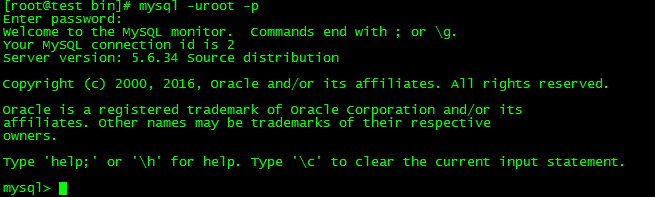
# mysql -uroot -p
初始没有密码,直接回车
登录成功
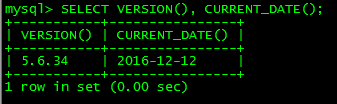
测试
9、设置密码
方式一:
# mysqladmin -uroot password 要设置的密码(加不加引号都可以)

或者
# mysqladmin -u用户名 -p旧密码 password 新密码(加不加引号都可以)

方式二:
mysql> SET PASSWORD FOR '用户名'@'主机' = PASSWORD('密码');
方式三:
mysql> update mysql.user set authentication_string=PASSWORD('要设置的密码') where user='root';
mysql> flush privileges; # 刷新数据库权限

10、创建用户
1)创建用户
mysql> create user '用户名'@'%' identified by '密码';
2)创建用户并授权
mysql> grant all privileges on *.* to 用户名@'%' identified by '密码' with grant option;
mysql> flush privileges;# 刷新数据库权限
五、常用命令
- 启动:service mysqld start
- 停止:service mysqld stop
- 重启:service mysqld restart
- 重载配置:service mysqld reload
MySQL【第一篇】安装的更多相关文章
- 【OpenCV入门指南】第一篇 安装OpenCV
http://blog.csdn.net/morewindows/article/details/8225783/ win10下vs2015配置Opencv3.1.0过程详解(转) http://ww ...
- 详解MySQL第一篇—MySQL简要介绍及DDL语句
背景:近几年,开源数据库逐渐流行起来.由于具有免费使用.配置简单.稳定性好.性能优良等优点,开源数据库在中低端应用上占据了很大的市场份额,而 MySQL 正是开源数据库中的杰出代表.MySQL 数据库 ...
- MySQL 第一篇
一.MySQL介绍 MySQL是一个关系型数据库管理系统,由瑞典MySQL AB公司开发,目前属于Oracle公司.MySQL是一种关联数据库管理系统,关联数据库将数据保存在不同的表中,而不是将所有数 ...
- OpenResty 安装及使用(第一篇安装)
OpenResty搭建 1.openResty介绍 OpenResty (也称为 ngx_openresty)是一个全功能的 Web 应用服务器.它打包了标准的 Nginx 核心,很多的常用的第三方模 ...
- mycat操作MySQL第一篇:全局表
1.安装mycat,点击bin下面startup_nowrap.bat启动 2.客户端连接mycat:server.xml里面的 <!--连接mycat用户名和密码.数据库--> < ...
- MySQL 第一篇:初识数据库
一 数据库管理软件的由来 基于我们之前所学,数据要想永久保存,都是保存于文件中,毫无疑问,一个文件仅仅只能存在于某一台机器上. 如果我们暂且忽略直接基于文件来存取数据的效率问题,并且假设程序所有的组件 ...
- Oracle学习第一篇—安装和简单语句
一 安装 10G ----不适合Win7 Visual Machine-++++Visual Hard Disk 先安装介质(VM)---便于删除 11G-----适合Win7 1 把win64_1 ...
- MySQL基础篇——安装、管理
MySQL 安装 所有平台的 MySQL 下载地址为https://dev.mysql.com/downloads/mysql/ .挑选你需要的 MySQL Community Server 版本及对 ...
- 第一篇 -- 安装和配置PyQt5
我的电脑环境是:Win10 + Python3.6.4 + JetBrains PyCharm 2017.3.2 x64 之前用tkinter写界面,现在学习如何用PyQt5写界面. 安装PyQt5: ...
- Node 之 Express 学习笔记 第一篇 安装
最近由于工作不忙,正好闲暇时间学学基于 node 的 web开发框架. 现在关于web开发框架除了Express 还有新出的 KOA以及其它一些. 但是想想还是先从 Express 入手吧.因为比较成 ...
随机推荐
- Introducing RecyclerView(二)
文/poberWong(简书作者)原文链接:http://www.jianshu.com/p/7fdfea845937著作权归作者所有,转载请联系作者获得授权,并标注“简书作者”. 正文: Recyc ...
- OpenCV学习笔记:矩阵的掩码操作
矩阵的掩码操作很简单.其思想是:根据掩码矩阵(也称作核)重新计算图像中每个像素的值.掩码矩阵中的值表示近邻像素值(包括该像素自身的值)对新像素值有多大影响.从数学观点看,我们用自己设置的权值,对像素邻 ...
- 【HDOJ】3480 Division
斜率dp+滚动数组. /* 3480 */ #include <iostream> #include <sstream> #include <string> #in ...
- simplified build configuration
http://blogs.msdn.com/b/saraford/archive/2005/08/16/452411.aspx Did you know… That you can hide the ...
- 如何kill掉TaobaoProtect.exe
C:\Users\Administrator\AppData\Roaming\TaobaoProtect TaobaoProtect.exe https://technet.microsoft.com ...
- bzoj3611
会构建虚树之后就是noip提高组的题目了稍微难一点的是求代价和,只要注意按一个方向避免重复计算贡献即可 ; type node=record po,next:longint; end; ..] of ...
- VM Depot 分布式计算框架主题应用精选
发布于 2014-12-24 作者 陈 忠岳 在前几期为各位介绍了大数据应用主题以及开发运营主题的各类镜像后,这次我们精选了 VM Depot 站点中分布式计算相关主题的虚拟机镜像和大家一起分享 ...
- Microsoft StreamInsight install
Microsoft StreamInsight 是一个开发平台.安装之后,可通过一组 .NET 命名空间来得到 SDK.有关 StreamInsight 应用程序开发的其他信息,请参阅上面列出的资源. ...
- The Task: Events, Asynchronous Calls, Async and Await
The Task: Events, Asynchronous Calls, Async and Await Almost any software application today will lik ...
- python模拟登录人人网
参考: http://www.cnblogs.com/txw1958/archive/2012/03/12/2392067.html http://www.cnblogs.com/chenyg32/a ...