
CALayer 的 position和anchorPoint属性
在iOS 中,UIButton、UIImage等UIView 之所以能够显示在屏幕上,是因为其内部有一个图层(CALayer)。通过UIView的layer 属性可以访问这个图层:
@property(nonatomic,readonly,retain) CALayer *layer;
当UIView需要显示到屏幕上时,会调用 drawRect: 方法进行绘图,并且会将所有内容绘制在自己的图层上,绘图完毕后,系统会将图层拷贝的屏幕上,于是就完成了UIView的显示。
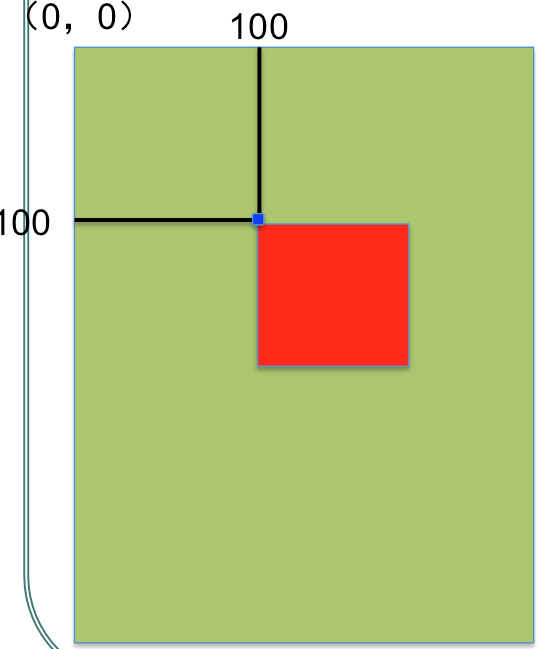
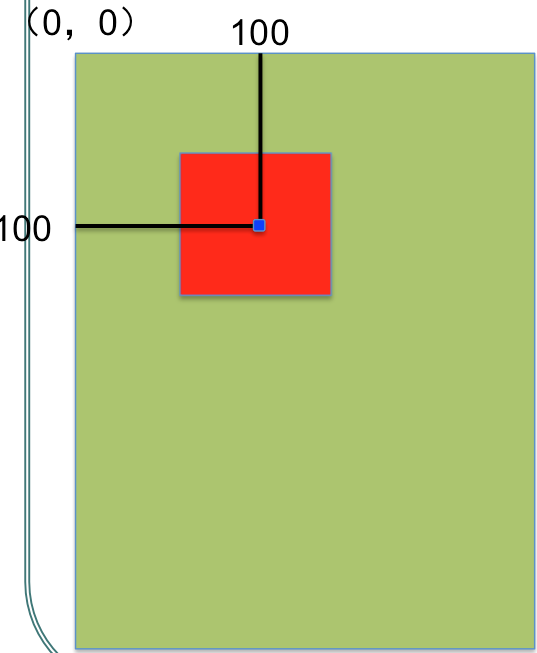
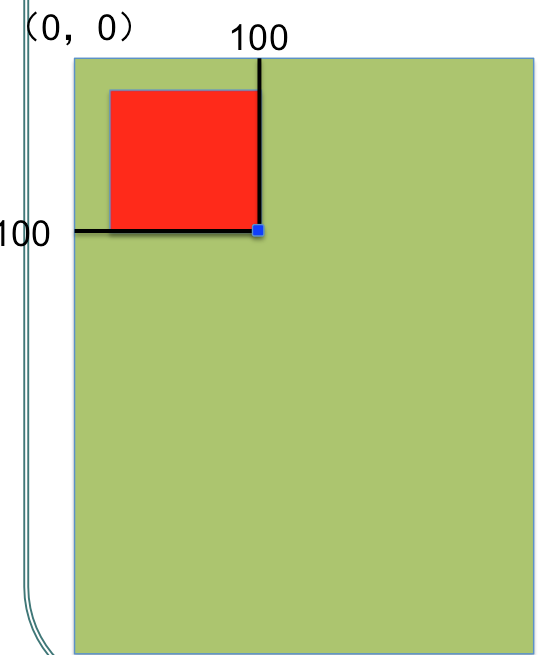
UIView中有两个容易混淆的属性, postion 和 anchorPoint(锚点)。postion用来设置CALayer 在父层中的位置,anchorPoint决定着CALayer上的哪个点会在postion点上。举个例子来说,红色图层要加在绿色图层上。
(1)positon为(100,100),anchorPoint为(0,0),效果图如下
(2)positon为(100,100),anchorPoint为(0.5,0.5),效果图如下
(3)positon为(100,100),anchorPoint为(1,1),效果图如下
(4)positon为(100,100),anchorPoint为(1,0.5),效果图如下
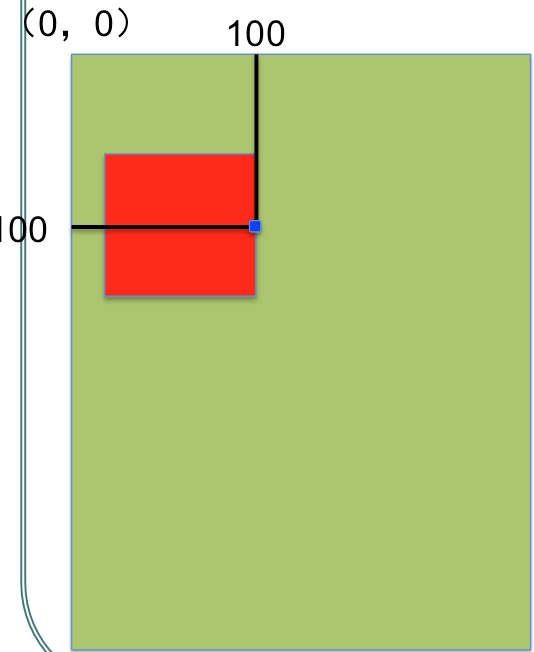
即:anchorPoint决定着CALayer上的哪个点会在postion点上。
CALayer 的 position和anchorPoint属性的更多相关文章
- ios开发图层layer与核心动画二:CATransform3D,CAlayear和UIView区别,layer的position和anchorpoint
一:CATransform3D #import "ViewController.h" @interface ViewController () @property (weak, n ...
- position和anchorPoint笔记
position和anchorPoint是CAlayer的两个属性. 我们以前修改一个控件的位置都是能过Frame的方式进行修改. 现在利用CALayer的position和ancho ...
- CALayer 易混淆的两个属性 - position和anchorPoint
1.简单介绍 CALayer有2个非常重要的属性:position和anchorPoint @property CGPoint position; ...
- CALayer属性:position和anchorPoint
一.position和anchorPoint 1.简单介绍 CALayer有2个非常重要的属性:position和anchorPoint @property CGPoint position; 用来设 ...
- CALayer的position,anchorPoint属性 与UIView的frame 属性
彻底理解CALayer的position,anchorPoint属性 与UIView的frame 属性 一.position,anchorPoint两者都是CALayer的属性,都是CGPoint点 ...
- 彻底理解position与anchorPoint
引言 相信初接触到CALayer的人都会遇到以下几个问题: 为什么修改anchorPoint会移动layer的位置?CALayer的position点是哪一点呢?anchorPoint与positio ...
- position与anchorPoint
相信初接触到CALayer的人都会遇到以下几个问题: 为什么修改anchorPoint会移动layer的位置?CALayer的position点是哪一点呢?anchorPoint与position有什 ...
- 彻底理解position与anchorPoint - Wonderffee's Blog(转)
引言 相信初接触到CALayer的人都会遇到以下几个问题: 为什么修改anchorPoint会移动layer的位置?CALayer的position点是哪一点呢?anchorPoint与positio ...
- iOS-CALayer中position与anchorPoint详解
iOS-CALayer中position与anchorPoint详解 属性介绍 CALayer通过四个属性来确定大小和位置, 分别为:frame.bounds.position.anchorPoint ...
随机推荐
- 自适应单本小说网站源码,基于bootstrap+dedecms。
具体效果:http://www.ishengxu.cc/ 基于bootstrap+dedecms,PC端与手机端自适应,广告位也都设计好了,很简单.
- Oracle数据库安装完成之后的启动操作
由于是菜鸟,在 完成Oracle数据库的安装之后,不知道该怎么启动.在经过一番折腾之后明白了其中的一些道理,总结如下: 其实Oracle数据库和Mysql数据库的启动都是相同的原理. Mysql数据库 ...
- BZOJ 3997 [TJOI 2015 组合数学] 解题报告
这个题我脑洞了一个结论: 首先,我们定义满足以下条件的路径为“从右上到左下的路径”: 对于路径上任何不相同的两个点 $(x_1, y_1)$,$(x_2, y_2)$,都有: $x_1\neq x_2 ...
- PHP漏洞全解(七)-Session劫持
本文主要介绍针对PHP网站Session劫持.session劫持是一种比较复杂的攻击方法.大部分互联网上的电脑多存在被攻击的危险.这是一种劫持tcp协议的方法,所以几乎所有的局域网,都存在被劫持可能. ...
- CF192div2-C - Purification
题意: 从给定的图中找出某些点,这些点能够消除同一行和同一列的“怪物”.求使得最少的点的位置. 关键:要想消除整张的图的妖怪,必须选中n个点(对于n行n列来说)!!!!!!!!!!! 做法:对于每一行 ...
- UVA 10896 Sending Email
这个题目真是伤透脑筋了,一直RE,连着改了好几个版本,又是spfa,又是单调队列dijkstra+单调队列,总是不过,后来发现M开小了,双向边应该开m的两倍,悲剧啊!!!以后不管怎样,数组一定要尽量开 ...
- spring+mybatis的优缺点
mybatis的优缺点: 优点: 1. 易于上手和掌握. 2. sql写在xml里,便于统一管理和优化. 3. 解除sql与程序代码的耦合. 4. 提供映射标签,支持对象与数据库的orm字段关系映射 ...
- QAbstractItemView为截断的项显示ToolTip(在eventFilter函数里覆盖QEvent::ToolTip事件)
在Qt中想要为QAbstractItemView中长度不够而使得内容被截断的项显示ToolTip,Qt官网有一篇文章介绍使用事件过滤器来显示太长的项,但是没有涵盖图标的情况.显示列头项太长的情况等等, ...
- Android 使用MediaStore.Images和 Cursor查询本地图片和图片缩略图
先看一个实例: String[] projection = { MediaStore.Images.Thumbnails._ID ,MediaStore.Images.Thumbnails.DATA} ...
- hdu4705Y
链接 这题可以算树形DP吧 树上的递推 对于树上的某个节点 反着算比较好做 就是算有多少有simple路径的 固定某个节点u 另两个节点 有两种取法 1.从不同子树里各选一个 2.从所有子树里选一个 ...