
day10 nfs服务,nginx负载均衡,定时任务
==================nginx 负载均衡====================
实现nginx负载均衡的效果,并运用nfs服务共享目录,使所有nginx服务拥有共同的http目录
nginx安装:http://www.cnblogs.com/alwaysInMe/p/6924859.html
nfs安装:NFS 是Network File System的缩写,即网络文件系统。一种使用于分散式文件系统的协定。
===> 环境配置及软件安装
注:本次安装用的是centos7系统光盘自带的rpm文件进行安装,已提前将光盘镜像路径加载到了repo文件中。
[root@localhost ~]# iptables -F                           # 清除防火墙配置

[root@localhost ~]# systemctl stop firewalld              # 关闭防火墙

[root@localhost ~]# setenforce 0                          # 关闭策略组,临时
[root@localhost ~]# vim /etc/sysconfig/selinux            # 文件中关闭策略组

[root@localhost ~]# systemctl status firewalld            # 查看防火墙状态
[root@bogon ~]# yum -y install rpcbind nfs-utils         # 安装rpcbind、nfs-utils。其中nfs依赖于rpcbind

软件包 rpcbind-0.2.-.el7.x86_64 已安装并且是最新版本      # 这里提示已经安装,不需要处理

软件包 :nfs-utils-1.3.-0.21.el7.x86_64 已安装并且是最新版本

无须任何处理
====> 文件配置
[root@bogon ~]# mkdir /share                            # 创建共享目录

[root@bogon ~]# vim /etc/exports                        # 设定nfs配置文件,如下:
/share *(rw,sync,fsid=0) #<输出目录> [客户端1 选项(访问权限,用户映射,其他)]
====> 启动服务
[root@bogon ~]# systemctl start nfs                  # 启动服务-这里演示的事二进制的

[root@bogon ~]# systemctl status nfs                 # 查看文件启动情况

● nfs-server.service - NFS server and services

   Loaded: loaded (/usr/lib/systemd/system/nfs-server.service; disabled; vendor preset: disabled)

   Active: active (exited) since Thu -- :: PDT; 1min 6s ago

  Process:  ExecStart=/usr/sbin/rpc.nfsd $RPCNFSDARGS (code=exited, status=/SUCCESS)

  Process:  ExecStartPre=/usr/sbin/exportfs -r (code=exited, status=/SUCCESS)

 Main PID:  (code=exited, status=/SUCCESS)

   CGroup: /system.slice/nfs-server.service

Jun  :: bogon systemd[]: Starting NFS server and services...

Jun  :: bogon systemd[]: Started NFS server and services.
[root@bogon ~]# exportfs                   # 查看nfs服务所开放的文件夹及开放给谁

/share            <world>
====> 测试功能
注:测试需要用另外一台linux系统进行挂载链接,所有测试的机器中需要安装nfs,但不需要启动,安装方法见前面。
[root@bogon ~]# mount 192.168.128.181:/share /opt/        # 将共享的文件挂载在/opt 上,如果没有这个目录,可以先使用mkdir命另创建这个文件夹

[root@bogon ~]# df                                        # 查看是否挂载成功

文件系统                  1K-块    已用     可用 已用% 挂载点

/dev/sda3                   % /

devtmpfs                               % /dev

tmpfs                                 % /dev/shm

tmpfs                               % /run

tmpfs                                  % /sys/fs/cgroup

/dev/sda1                        % /boot

tmpfs                                 % /run/user/

/dev/sr0                           % /media

192.168.128.181:/share      % /opt
我这里一共用了四台电脑,重复以上操作,分别进行连接
下面进行nginx负载均衡文件的配置
注:我这里是先配置web服务器(工作的),测试没问题后再配置代理服务器(分配任务的)
[root@bogon ~]# vim /usr/local/nginx/conf/nginx.conf # 修改nginx配置文件,由于我用的是源码安装,所以我自定义了路径 /usr/local/nginx
 #user  nobody;

 worker_processes  1;

 #error_log  logs/error.log;

 #error_log  logs/error.log  notice;

 #error_log  logs/error.log  info;

 #pid        logs/nginx.pid;

 events {

     worker_connections  1024;

 }

 http {

     include       mime.types;

     default_type  application/octet-stream;

     log_format  main  '$remote_addr - $remote_user [$time_local] "$request" '

                       '$status $body_bytes_sent "$http_referer" '

                       '"$http_user_agent" "$http_x_forwarded_for"';

 #  日志功能

     access_log  logs/access.log  main;

     sendfile        on;

     tcp_nopush     on;

     #keepalive_timeout  0;

     keepalive_timeout  65;

     #gzip  on;

     server {

         listen       8084;                      # 修改软件使用端口为 8084

         server_name  localhost;

         #charset koi8-r;

         #access_log  logs/host.access.log  main;

         location / {

             root   /opt;                                          #  修改默认的 html 文件路径

             index  index.html index.htm;

         }

         #error_page  404              /404.html;

         # redirect server error pages to the static page /50x.html

         #

         error_page   500 502 503 504  /50x.html;

         location = /50x.html {

             root   html;

         }

         # proxy the PHP scripts to Apache listening on 127.0.0.1:80

         #

         #location ~ \.php$ {

         #    proxy_pass   http://127.0.0.1;

         #}

         # pass the PHP scripts to FastCGI server listening on 127.0.0.1:9000

         #

         #location ~ \.php$ {

         #    root           html;

         #    fastcgi_pass   127.0.0.1:9000;

         #    fastcgi_index  index.php;

         #    fastcgi_param  SCRIPT_FILENAME  /scripts$fastcgi_script_name;

         #    include        fastcgi_params;

         #}

         # deny access to .htaccess files, if Apache's document root

         # concurs with nginx's one

         #

         #location ~ /\.ht {

         #    deny  all;

         #}

     }

     # another virtual host using mix of IP-, name-, and port-based configuration

     #

     #server {

     #    listen       8000;

     #    listen       somename:8080;

     #    server_name  somename  alias  another.alias;

     #    location / {

     #        root   html;

     #        index  index.html index.htm;

     #    }

     #}

     # HTTPS server

     #

     #server {

     #    listen       443 ssl;

     #    server_name  localhost;

     #    ssl_certificate      cert.pem;

     #    ssl_certificate_key  cert.key;

     #    ssl_session_cache    shared:SSL:1m;

     #    ssl_session_timeout  5m;

     #    ssl_ciphers  HIGH:!aNULL:!MD5;

     #    ssl_prefer_server_ciphers  on;

     #    location / {

     #        root   html;

     #        index  index.html index.htm;

     #    }

     #}

 }
配置文件
[root@bogon ~]# /usr/local/nginx/sbin/nginx -c /usr/local/nginx/conf/nginx.conf

# 启动服务
成功!!!!!

其它三个重复以上配置,注意修改html存放的默认位置,上面的端口我改成了8084,这个地方改不改都行,只要记住了是多少就好了
下面修改代理服务器:同时在代理服务器上配置一个web服务器,原理是通过不同的配置文件打开相同的软件,实现端口不同从而同时工作
[root@bogon ~]# cd /usr/local/nginx/conf/                  # 进入nginx的目录

[root@bogon conf]# ll

总用量

-rw-r--r--.  root root  May  : fastcgi.conf

-rw-r--r--.  root root  May  : fastcgi.conf.default

-rw-r--r--.  root root  May  : fastcgi_params

-rw-r--r--.  root root  May  : fastcgi_params.default

-rw-r--r--.  root root  May  : koi-utf

-rw-r--r--.  root root  May  : koi-win

-rw-r--r--.  root root  May  : mime.types

-rw-r--r--.  root root  May  : mime.types.default

-rw-r--r--.  root root  May  : nginx.conf

-rw-r--r--.  root root  May  : nginx.conf.default

-rw-r--r--.  root root   May  : scgi_params

-rw-r--r--.  root root   May  : scgi_params.default

-rw-r--r--.  root root   May  : uwsgi_params

-rw-r--r--.  root root   May  : uwsgi_params.default

-rw-r--r--.  root root  May  : win-utf

[root@bogon conf]# cp nginx.conf web1.conf    # 复制一份nginx的配置文件,用作web端
[root@bogon conf]# vim web1.conf # 修改web1的配置文件,如下,修改了端口以及默认html文件位置
 #user  nobody;

 worker_processes  ;

 error_log  logs/error.log;

 error_log  logs/error.log  notice;

 error_log  logs/error.log  info;

 #pid        logs/nginx.pid;

 events {

     worker_connections  ;

 }

 http {

     include       mime.types;

     default_type  application/octet-stream;

     log_format  main  '$remote_addr - $remote_user [$time_local] "$request" '

                       '$status $body_bytes_sent "$http_referer" '

                       '"$http_user_agent" "$http_x_forwarded_for"';

     access_log  logs/access.log  main;

     sendfile        on;

     #tcp_nopush     on;

     #keepalive_timeout  ;

     keepalive_timeout  ;

     #gzip  on;

     server {

         listen       ;                   # 修改端口为8081,防止与代理服务冲突

         server_name  localhost;

         #charset koi8-r;

         #access_log  logs/host.access.log  main;

         location / {

             root   /share;                      # 修改html文件默认存放位置为 /share 保证一致性

             index  index.html index.htm;

         }

         #error_page                /.html;

         # redirect server error pages to the static page /50x.html

         #

         error_page        /50x.html;

         location = /50x.html {

             root   html;

         }

         # proxy the PHP scripts to Apache listening on 127.0.0.1:

         #

         #location ~ \.php$ {

         #    proxy_pass   http://127.0.0.1;

         #}

         # pass the PHP scripts to FastCGI server listening on 127.0.0.1:

         #

         #location ~ \.php$ {

         #    root           html;

         #    fastcgi_pass   127.0.0.1:;

         #    fastcgi_index  index.php;

         #    fastcgi_param  SCRIPT_FILENAME  /scripts$fastcgi_script_name;

         #    include        fastcgi_params;

         #}

         # deny access to .htaccess files, if Apache's document root

         # concurs with nginx's one

         #

         #location ~ /\.ht {

         #    deny  all;

         #}

     }

     # another virtual host using mix of IP-, name-, and port-based configuration

     #

     #server {

     #    listen       ;

     #    listen       somename:;

     #    server_name  somename  alias  another.alias;

     #    location / {

     #        root   html;

     #        index  index.html index.htm;

     #    }

     #}

     # HTTPS server

     #

     #server {

     #    listen        ssl;

     #    server_name  localhost;

     #    ssl_certificate      cert.pem;

     #    ssl_certificate_key  cert.key;

     #    ssl_session_cache    shared:SSL:1m;

     #    ssl_session_timeout  5m;

     #    ssl_ciphers  HIGH:!aNULL:!MD5;

     #    ssl_prefer_server_ciphers  on;

     #    location / {

     #        root   html;

     #        index  index.html index.htm;

     #    }

     #}

 }
web1配置文件修改
[root@bogon conf]# /usr/local/nginx/sbin/nginx -c /usr/local/nginx/conf/web1.conf

# 启动刚才的web服务,从 /usr/local/nginx/conf/web1.conf  读取配置文件
修改代理服务器配置
[root@bogon conf]# vim /usr/local/nginx/conf/nginx.conf # 配置内容如下
 #user  nobody;

 worker_processes  ;

 #error_log  logs/error.log;

 #error_log  logs/error.log  notice;

 #error_log  logs/error.log  info;

 #pid        logs/nginx.pid;

 events {

     worker_connections  ;

 }

 http {

     include       mime.types;

     default_type  application/octet-stream;

     upstream myapp1 {

         server 192.168.:;

         server 192.168.:;

         server 192.168.:;

         server 192.168.:;

  }

     #log_format  main  '$remote_addr - $remote_user [$time_local] "$request" '

     #                  '$status $body_bytes_sent "$http_referer" '

     #                  '"$http_user_agent" "$http_x_forwarded_for"';

     #access_log  logs/access.log  main;

     sendfile        on;

     #tcp_nopush     on;

     #keepalive_timeout  ;

     keepalive_timeout  ;

     #gzip  on;

     server {

         listen       ;

         location / {

             proxy_pass http://myapp1;

         }

         #charset koi8-r;

         #access_log  logs/host.access.log  main;

         #error_page                /.html;

         # redirect server error pages to the static page /50x.html

         #

         error_page        /50x.html;

         location = /50x.html {

             root   html;

         }

         # proxy the PHP scripts to Apache listening on 127.0.0.1:

         #

         #location ~ \.php$ {

         #    proxy_pass   http://127.0.0.1;

         #}

         # pass the PHP scripts to FastCGI server listening on 127.0.0.1:

         #

         #location ~ \.php$ {

         #    root           html;

         #    fastcgi_pass   127.0.0.1:;

         #    fastcgi_index  index.php;

         #    fastcgi_param  SCRIPT_FILENAME  /scripts$fastcgi_script_name;

         #    include        fastcgi_params;

         #}

         # deny access to .htaccess files, if Apache's document root

         # concurs with nginx's one

         #

         #location ~ /\.ht {

         #    deny  all;

         #}

     }

     # another virtual host using mix of IP-, name-, and port-based configuration

     #

     #server {

     #    listen       ;

     #    listen       somename:;

     #    server_name  somename  alias  another.alias;

     #    location / {

     #        root   html;

     #        index  index.html index.htm;

     #    }

     #}

     # HTTPS server

     #

     #server {

     #    listen        ssl;

     #    server_name  localhost;

     #    ssl_certificate      cert.pem;

     #    ssl_certificate_key  cert.key;

     #    ssl_session_cache    shared:SSL:1m;

     #    ssl_session_timeout  5m;

     #    ssl_ciphers  HIGH:!aNULL:!MD5;

     #    ssl_prefer_server_ciphers  on;

     #    location / {

     #        root   html;

     #        index  index.html index.htm;

     #    }

     #}

 }
代理服务器的配置
修改的位置
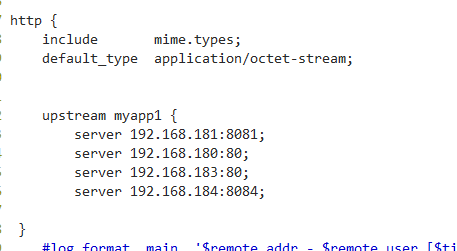
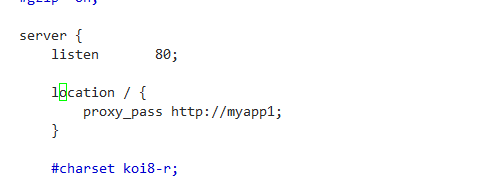
配置详情:http://nginx.org/en/docs/http/load_balancing.html
注:配置文件经常会报错,它会告诉你第几行出现问题,这个时候我们可以用vim进去,使用命令 :set number 设置显示行号
[root@bogon conf]# /usr/local/nginx/sbin/nginx -c /usr/local/nginx/conf/nginx.conf

#  用nginx.conf的配置,运行nginx
===================定时任务================
什么是计划任务:
后台运行,到了预定的时间就会自动执行的任务,前提是:事先手动将计划任务设定好。这就用到了crond服务
crond服务相关的软件包
[root@MiWiFi-R3-srv ~]# rpm -qa |grep cron

cronie-anacron-1.4.-.el7.x86_64

crontabs-1.11-.20121102git.el7.noarch

cronie-1.4.-.el7.x86_64
这些包在最小化安装系统时就已经安装了,并且会开机自启动crond服务,并为我们提供好编写计划任务的crontab命令。
计划任务分为两类:系统级和用户级
首先需要知道的是,无论是系统级还是用户级的cron计划都是文本文件,系 统的计划文件存放在/etc/crontab路径下。用户的计划文件放在/var/spool/cron/用户名,不管是哪一种,都可以满足我们定制计划任务的需求。
root用户可以直接对文件进行修改来编写计划任务也可以使用 crontab -e命令,而普通用户只能使用后者。除此之外,系统crontab文件中任务的定义也有所不同,在前五个部分之后插入了一个“用户”部分。
[root@MiWiFi-R3-srv ~]# cat /etc/crontab #查看全局计划任务

SHELL=/bin/bash

PATH=/sbin:/bin:/usr/sbin:/usr/bin

MAILTO=root
# For details see man 4 crontabs
# Example of job definition:
# .---------------- minute (0 - 59)
# | .------------- hour (0 - 23)
# | | .---------- day of month (1 - 31)
# | | | .------- month (1 - 12) OR jan,feb,mar,apr ...
# | | | | .---- day of week (0 - 6) (Sunday=0 or 7) OR sun,mon,tue,wed,thu,fri,sat
# | | | | |
# * * * * * user-name command to be executed
* * * * * root run-parts /test #run-parts命令,可以执行一个目录下所有的可执行文件,目录下文件必须有执行权限
You have new mail in /var/spool/mail/root
[root@MiWiFi-R3-srv ~]# crontab -u tom -l #通过命令查看用户tom的计划任务
*/1 * * * * echo 123213123213
[root@MiWiFi-R3-srv ~]# cat /var/spool/cron/tom #从文件中查看用户tom的计划任务
*/1 * * * * echo 123213123213
crontab命令编写计划任务
语 法:crontab [-u <用户名称>][配置文件] 或 crontab [-u <用户名称>][-elr]
crontab任务配置基本格式:
* * * * * command
分钟(0-59) 小时(0-23) 日期(1-31) 月份(1-12) 星期(0-6,0代表星期天) 命令
第1列表示分钟1~59 每分钟用*或者 */1表示
第2列表示小时1~23(0表示0点)
第3列表示日期1~31
第4列表示月份1~12
第5列标识号星期0~6(0表示星期天)
第6列要运行的命令
参 数:
-e 编辑该用户的计时器设置。
-l 列出该用户的计时器设置。
-r 删除该用户的计时器设置。
-u<用户名称> 指定要设定计时器的用户名称。
注意:
1 查看计划任务的执行:tail -f /var/log/cron
2 写计划任务时,命令必须加上绝对路径,否则会出现这种情况:从日志中看,确实触发了计划任务的执行,但是命令却没有执行成功,比如* * * * * reboot就会出现这种情况,需要将reboot写成/usr/sbin/reboot
以上来自:http://www.cnblogs.com/linhaifeng/articles/6045600.html
================举例子===============
编写日志切割脚本,结合计划任务,每天凌晨两点,自动备份并切割nginx的访问日志
[root@bogon nginx]# cd /usr/local/nginx/logs/          # 打开软件日志位置

[root@bogon logs]# ll            # 这里我以 access.log 这个文件为例

总用量

-rw-r--r--   root root     Jun   : access.log

-rw-r--r--.  root root  Jun   : error.log

-rw-r--r--   root root     Jun   : nginx.pid

drwxr-xr-x   root root    Jun   : usr
设想的方法是:用txt文件存放bash命令,最后用cron来定时执行 bash *.txt
[root@bogon logs]# mkdir /timed_task                   # 创建一个存放定时备份的目录

[root@bogon logs]# touch nginx_logs_bak.txt            # 创建nginx日志备份文件

[root@bogon logs]# vim /timed_task/nginx_logs_bak.txt     # 编辑文件,内容如下
tar -czf /usr/local/nginx/logs/$(date "+%Y-%m-%d_%T").access.log.tar.gz /usr/local/nginx/logs/access.log   # 这个是简单的tar压缩命令

echo '' > /usr/local/nginx/logs/access.log            # 这一条的主要内容是用来清空access.log
[root@bogon logs]# ll /usr/local/nginx/logs/     # 先查看目录情况,查看下执行前效果

总用量

-rw-r--r--   root root     Jun   : access.log

-rw-r--r--.  root root  Jun   : error.log

-rw-r--r--   root root     Jun   : nginx.pid

drwxr-xr-x   root root    Jun   : usr
执行后查看结果
[root@bogon logs]# bash nginx_logs_bak.txt

[root@bogon ~]# ll /usr/local/nginx/logs/

总用量

-rw-r--r--  1 root root  138 Jun  1 06:42 2017-06-01_06:42:33.access.log.tar.gz

-rw-r--r--   root root     Jun   : access.log

-rw-r--r--.  root root  Jun   : error.log

-rw-r--r--   root root     Jun   : nginx_logs_bak.txt

-rw-r--r--   root root     Jun   : nginx.pid

drwxr-xr-x   root root    Jun   : usr

# 证明脚本没有问题,我们现在把它放在cron命令里面  /etc/crontab
配置cron文件
[root@bogon logs]# vim /etc/crontab # 配置如下
0 2 * * * root /usr/bin/bash /timed_task/nginx_logs_bak.txt
第一个0表示每个小时的零分中,第二个2表示每天的两点 用 root 的身份,执行 后面的命令
本人菜鸟,如有错误,还请多多指出!!!!
day10 nfs服务,nginx负载均衡,定时任务的更多相关文章
- Web Server 分布式服务: Nginx负载均衡
Nginx是一款轻量级的Web 服务器/反向代理服务器及电子邮件(IMAP/POP3)代理服务器.由俄罗斯的程序设计师Igor Sysoev所开发,供俄国大型的入口网站及搜索引擎Rambler使用.其 ...
- Nginx服务器之负载均衡策略(6种)
一.关于Nginx的负载均衡 在服务器集群中,Nginx起到一个代理服务器的角色(即反向代理),为了避免单独一个服务器压力过大,将来自用户的请求转发给不同的服务器.详情请查看我的另一篇博客. 二.Ng ...
- nginx负载均衡配合keepalived服务案例实战
本实验用4台 centos6 虚拟机,2台做负载均衡,2台做web服务器,都先装上nginx lb01:192.168.0.235 --主负载均衡器 lb02:192.168.0.236 --备负 ...
- Tomcat服务部署与Nginx负载均衡配置
一.中间键产品介绍 目前来说IBM的WebSphere,Oracle的Weblogic占据了市场上java语言Web站点的部分份额,该两种软件都是商业化的软件,由于性能优越,可靠性高等优点应用于大型互 ...
- centos7+nginx负载均衡Tomcat服务
接着上一篇:www.cnblogs.com/lkun/p/8252815.html 我们在上一篇在一台centos7服务器上部署了两个nginx,接下来我们使用一个nginx实现tomcat的负载均衡 ...
- 搭建服务与负载均衡的客户端-Spring Cloud学习第二天(非原创)
文章大纲 一.Eureka中的核心概念二.Spring RestTemplate详解三.代码实战服务与负载均衡的客户端四.项目源码与参考资料下载五.参考文章 一.Eureka中的核心概念 1. 服务提 ...
- 企业级Nginx负载均衡与keepalived高可用实战(一)Nginx篇
1.集群简介 1.1.什么是集群 简单地说,集群就是指一组(若干个)相互独立的计算机,利用高速通信网络组成的一个较大的计算机服务系统,每个集群节点(即集群中的每台计算机)都是运行各自服务的独立服务器. ...
- Nginx负载均衡配置说明
WEB服务做负载均衡的方法有很多种,但使用Nginx做负载均衡部署毫无疑问是非常高效也是非常流行的一种. 本人大多数做.NET开发,但部署负载却一直用Nginx,对其他的负载方式研究不多,只测试过一次 ...
- Net分布式系统之二:CentOS系统搭建Nginx负载均衡
一.关于CentOS系统介绍 CentOS(Community Enterprise Operating System,中文意思是:社区企业操作系统)是Linux发行版之一,它是来自于Red Hat ...
随机推荐
- CSS兼容问题资料汇集
CSS兼容问题一直困扰着CSSer,面对各浏览器,往往感觉束手无策,愁眉不展.CSS Hack是在标准CSS没办法兼容各浏览器显示效果时才会用上的补救方法,在各浏览器厂商解析CSS没有达成一致前,我们 ...
- PDO如何完成事务操作
起因 无意间翻看极客学院的APP,准备找一些教程看看.看到一篇PDO 安全处理与事务处理,一想对MySQL的事务处理仅仅停留在概念上(知道执行多条语句,其中一个失败了,就会回滚操作).但是把概念变成代 ...
- 前端 JavaScript BOM & DOM
内容目录: 1. BOM 2. DOM BOM(Browser Object Model)是指浏览器对象模型,它使 JavaScript 有能力与浏览器进行"对话". DOM (D ...
- linux下alsa架构音频驱动播放wav格式文件
#include<stdio.h> #include<stdlib.h> #include <string.h> #include <alsa/asoundl ...
- Linux 进程间通信 信号(signal)
1. 概念: 1)信号是在软件层次上对中断机制的一种模拟,是一种异步通信方式 2)信号可以直接进行用户空间进程和内核进程之间的交互,内核进程也可以利用它来通知用户空间进程发生了哪些系统事件. 3)如果 ...
- vim 中 ctags的应用
为了方便查询代码段中代码的最终的定义 在linux的vim便以其中可以使用ctags 使用步骤: 1. 安装 ctags : sudo apt-get install ctags 2. 生 ...
- curl直接作为http的客户端?也是醉了
- Linux service,挂载,定时任务等常用服务
一.防火墙 防火墙根据配置文件/etc/sysconfig/iptables 来控制本机的“出.入”网络访问行为 其对行为的配置策略有四个策 1. 基础必备技能 查看防火墙状态 s ...
- cut sort uniq wc 一 文本处理工具
cut cut是一个选取命令,就是将一段数据经过分析,取出我们想要的. 一般来说,选取信息通常是针对"行"来进行分析的,并不是整篇信息分析的. -c : 以字符为单位进行分割. c ...
- Ruby 安装 – Windows
Ruby 安装 – Windows 下面列出了在 Windows 机器上安装 Ruby 的步骤. 注意:在安装时,您可能有不同的可用版本. - Window 系统下,我们可以使用 RubyInstal ...