
Android学习09
SharedPreferences
SharedPreferences,是一种轻量级的数据存储方式,采用Key/value的方式
进行映射,Sp通常用于记录一些参数配置、行为标记等!
1、获得mSharedPreferences的实例
mSharedPreferences = getSharedPreferences("data",MODE_PRIVATE);
2、通过Eidt更新数据,获取一个Edit对象,所有对数据的操作都需要经过Edit
mEditor = mSharedPreferences.edit();
layout:
<?xml version="1.0" encoding="utf-8"?>

<LinearLayout xmlns:android="http://schemas.android.com/apk/res/android"

    android:layout_width="match_parent"

    android:layout_height="match_parent"

    android:orientation="vertical"

    android:padding="15dp">

    <EditText

        android:id="@+id/et_name"

        android:layout_width="match_parent"

        android:layout_height="wrap_content"

        android:hint="输入内容"/>

    <Button

        android:id="@+id/btn_save"

        android:layout_width="match_parent"

        android:layout_height="wrap_content"

        android:layout_marginTop="20dp"

        android:text="保存"

        android:textSize="20sp"/>

    <Button

        android:id="@+id/btn_show"

        android:layout_width="match_parent"

        android:layout_height="wrap_content"

        android:layout_marginTop="10dp"

        android:text="显示"

        android:textSize="20sp"/>

    <TextView

        android:id="@+id/tv_content"

        android:layout_width="match_parent"

        android:layout_height="wrap_content"

        android:layout_marginTop="10dp"/>

</LinearLayout>
Activity:
package com.example.helloworld.datastorage;

import androidx.appcompat.app.AppCompatActivity;

import android.content.SharedPreferences;

import android.os.Bundle;

import android.view.View;

import android.widget.Button;

import android.widget.EditText;

import android.widget.TextView;

import com.example.helloworld.R;

public class SharedPreferencesActivity extends AppCompatActivity {

    private EditText mEtName;

    private Button mBtnSave,mBtnShow;

    private TextView mTvContent;

    private SharedPreferences mSharedPreferences;

    private SharedPreferences.Editor mEditor;

    @Override

    protected void onCreate(Bundle savedInstanceState) {

        super.onCreate(savedInstanceState);

        setContentView(R.layout.activity_shared_preferences2);

        mEtName = findViewById(R.id.et_name);

        mBtnSave = findViewById(R.id.btn_save);

        mBtnShow = findViewById(R.id.btn_show);

        mTvContent = findViewById(R.id.tv_content);

        //获得mSharedPreferences的实例

        mSharedPreferences = getSharedPreferences("data",MODE_PRIVATE);

        //获取一个Edit对象,所有对数据的操作都需要经过Edit

        mEditor = mSharedPreferences.edit();

        mBtnSave.setOnClickListener(new View.OnClickListener() {

            @Override

            public void onClick(View v) {

                //把EditText里的文本通过SharedPreferences保存起来

                mEditor.putString("name",mEtName.getText().toString());//获取EditText里的文本内容

                mEditor.commit();//提交,commmit才回生效

            }

        });

        mBtnShow.setOnClickListener(new View.OnClickListener() {

            @Override

            public void onClick(View v) {

                //获取文件中的值

                mTvContent.setText(mSharedPreferences.getString("name",""));

            }

        });

    }

}
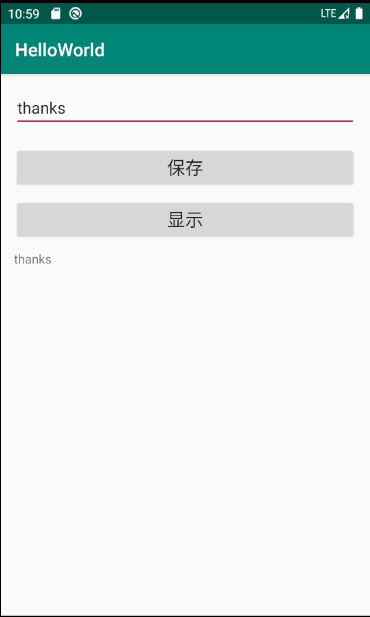
把EditText里的文本通过SharedPreferences保存起来,获取之后在EditText中显示
Android学习09的更多相关文章
- Android学习——windows下搭建Cygwin环境
在上一篇博文<Android学习——windows下搭建NDK_r9环境>中,我们详细的讲解了在windows下进行Android NDK开发环境的配置,我们也讲到了在NDk r7以后,我 ...
- android学习系列:jercy——AI3 的博客
[android学习之十七]——特色功能2:桌面组件(快捷方式,实时文件夹) 二.桌面组件 1.快捷方式 Android手机上得快捷方式的意思可以以我们实际PC机器上程序的快捷方式来理解.而andro ...
- Android学习链接大放送
虽然贴链接这种事情..真是一种很偷懒的做法... 但是我一个小菜鸟,果断还是要以多向别人学习为主... 好资源要和大家分享对不对! 况且..放博客里..比收藏夹的利用几率要大一点! 原作者应该也很喜欢 ...
- Android学习系列(17)--App列表之圆角ListView(续)
http://www.cnblogs.com/qianxudetianxia/archive/2011/09/19/2068760.html 本来这篇文章想并到上篇Android学习系列(16)- ...
- Android学习路线总结,绝对干货
title: Android学习路线总结,绝对干货 tags: Android学习路线,Android学习资料,怎么学习android grammar_cjkRuby: true --- 一.前言 不 ...
- Android 学习资源
下面这些资源对Android开发来说是很有帮助的! 最常用的: Android开发官方网站:http://developer.android.com/index.html 这个网站应该是Android ...
- Android学习资料收集
1.Android 学习之路 http://stormzhang.com/android/2014/07/07/learn-android-from-rookie/
- Android学习——第一个NDK程序
在前面的学习中,我们已经讲解了关于NDK编程的环境搭建流程,简单的使用我们也通过官网本身自带的例子进行说明了.可是相信大家一定还存在这么的一个疑惑:“如果我要自己利用NDK编写一个Android应用, ...
- Android学习——windows下搭建NDK_r9环境
1. NDK(Native Development Kit) 1.1 NDK简介 Android NDK是一套允许开发人员使用本地代码(如C/C++)进行Android APP功能开发的工具,通过这个 ...
随机推荐
- ADO.NET中sqlserver和mysql的变量名
因为ADO.NET标配是访问SQL SERVER数据库,那么如果需要访问MySQL数据库,那么ADO.NET五个对象也必须转换. 访问 SQL SERVER 的ADO.NET对象 1.SqlConne ...
- Linux package installation: deb and rpm
一般来说著名的 Linux 系统基本上分两大类: RedHat 系列:Redhat.Centos.Fedora 等 Debian 系列:Debian.Ubuntu 等 Dpkg (Debian系): ...
- Allegro 反射仿真--IBIS模型转化
一.IBIS模型的获取 a) 直接找芯片供应商 b) 从网上下载 i.到Google网站直接搜索某个型号的IBIS模型: ii. 到器件厂商的官方网站下载: iii.从专门提供IBIS模型的网站搜索下 ...
- cookie 与 session区别
cookie 与 session 是网页开发中常用的信息存储方式.Cookie是在客户端开辟的一块可存储用户信息的地方:Session是在服务器内存中开辟的一块存储用户信息的地方.JavaScript ...
- Mybatis学习笔记——输入参数parameterType、Mybatis调用存储过程
输入参数:parameterType(两种取值符号) 1.类型为简单类型 区别: (1) #{可以为任意值} ${vaue}--->标识符只能是value (2) ...
- Hackintosh Issues 10.13.x
Issuses 1: 出现禁行: (-v:) allcating 0x800 pages at 0x2000000 alloc type 2 Load kernal from stream Load ...
- C++内存管理(new operator/operator new/operator delete/placement new)
new operator 我们平时使用的new是new操作符(new operator),就像sizeof一样是语言内置的,不能改变它的含义,功能也是一样的 比如: string *ps = new ...
- 在Linux系统下安装jdk并配置环境变量
本文主要介绍的是如何是Linux环境下安装JDK的,因为Linux环境下,很多时候也离不开Java的,下面笔者就和大家一起分享如何jdk1.8的过程吧. 1.安装环境 操作系统:CentOS 07 6 ...
- goahead web 服务器
https://blog.csdn.net/xieyihua1994/article/details/74002413
- Ztree使用教程
这两天项目需要写一个树形帮助,学习了我们项目组的老师的Ztree的树的写法,实现了这个帮助,下面来总结一下Ztree的用法. (也是参考的一篇csdn上的博客了) zTree 是一个依靠 jQuery ...