
使用poi读写excel、向excel追加数据等,包括.xls和.xlsx文档
1、使用maven引入jar包
        <dependency>

            <groupId>org.apache.poi</groupId>

            <artifactId>poi</artifactId>

            <version>3.16</version>

        </dependency>

        <dependency>

            <groupId>org.apache.poi</groupId>

            <artifactId>poi-ooxml</artifactId>

            <version>3.14</version>

        </dependency>
实际引入的jar包为:
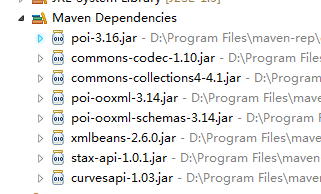
如果不使用maven方法引入jar包只需导入以下jar包

2、 向excel追加数据示例:
    public static void dealExcel(String in, String out) throws Exception {

        if (!in.equals(out)) {

           copyFile(in, out);

        }

        FileInputStream input = new FileInputStream(new File(out));

        Workbook wb = WorkbookFactory.create(input);

        System.out.println(wb.getClass());

        FileOutputStream output = new FileOutputStream(new File(out));

        Sheet sheet = wb.getSheetAt(0);

        int columnCount = -1;

        int rowCount = 0;

        for (Row row : sheet) {

            if (columnCount == -1) {

                columnCount = row.getLastCellNum();

            }

            if (row.getLastCellNum() == columnCount) {

                //增加列

                Cell last = row.createCell(columnCount);

                if (rowCount == 0) {

                    last.setCellValue("Test");

                } else {

                    last.setCellValue(rowCount);

                }

                rowCount++;

            }

        }

        ////添加行

        //Row row = sheet.createRow(sheet.getLastRowNum());

        //Cell cell = row.createCell(0);

        //cell.setCellValue("Test");

        output.flush();

        wb.write(output);

        wb.close();

        output.close();

    }
    public static void copyFile(String in, String out) throws Exception {

        InputStream inputStream = new FileInputStream(new File(in));

        File copy = new File(out);

        if (copy.exists()) {

            copy.delete();

        }

        copy.createNewFile();

        OutputStream outputStream = new FileOutputStream(copy);

        byte[] buffer = new byte[1024 * 4];

        while ((inputStream.read(buffer)) != -1) {

            outputStream.write(buffer);

        }

        inputStream.close();

        outputStream.close();

    }
3、获取excel数据
    public static String getCellData(Cell cell) {

        Object value = null;

        CellType cellType = cell.getCellTypeEnum();

        if (cellType == CellType.STRING) {

            value = cell.getStringCellValue();

        } else if (cellType == CellType.BOOLEAN) {

            value = cell.getBooleanCellValue();

        } else if (cellType == CellType.NUMERIC) {

            value = cell.getNumericCellValue();

        } else if (cellType == CellType.FORMULA) {

            value = cell.getCellFormula();

        } else if (cellType == CellType.BLANK || cellType == CellType.ERROR) {

            value = "error";

        } else {

            value = "";

        }

        return String.valueOf(value);

    }
使用poi读写excel、向excel追加数据等,包括.xls和.xlsx文档的更多相关文章
- 使用poi或jxl,通过java读写xls、xlsx文档
package nicetime.com.baseutil; import jxl.Sheet;import jxl.Workbook;import jxl.read.biff.BiffExcepti ...
- POI加dom4j将数据库的数据按一定格式生成word文档
一:需求:将从数据库查处来的数据,生成word文档,并有固定的格式.(dom4j的jar包+poi的jar包) 二:解决:(1)先建立固定格式的word文档(2007版本以上),另存成为xml文件,作 ...
- NPOI(2.1.3)向excel中插入图片,xls文档图片插入成功,xlsx文档图片插入失败
众所周知,NPOI对xls和xlsx两个版本的excel文档的操作并没有一个统一的支持, 程序若想兼容这两个版本的操作,必须根据excel版本分别去调用HSSF和XSSF这两套操作库, 之前一直不明白 ...
- JAVA导入(读取)Excel中的数据(支持xls与xlsx文件)
一.导入jar包 poi-3.7.jarpoi-scratchpad-3.7.jarpoi-examples-3.7.jarpoi-ooxml-3.7.jarpoi-ooxml-schemas-3.7 ...
- C# DataGridView 导出 Excel(根据Excel版本显示选择不同后缀格式xls或xlsx)
/// <summary> /// DataGridView导出至Excel,解决问题:打开Excel文件格式与扩展名指定格式不一致 /// </summary> /// &l ...
- $用python处理Excel文档(2)——用xlsxwriter模块写xls/xlsx文档
Refer:<python自动化运维:技术与最佳实践> 更多用法参考xlsxwriter官方文档:http://xlsxwriter.readthedocs.io/ 本文主要总结一下如何使 ...
- $ 用python处理Excel文档(1)——用xlrd模块读取xls/xlsx文档
本文主要介绍xlrd模块读取Excel文档的基本用法,并以一个GDP数据的文档为例来进行操作. 1. 准备工作: 1. 安装xlrd:pip install xlrd 2. 准备数据集:从网上找到的1 ...
- Java读取Excel文件(包括xls和xlsx)的样例程序
样例程序如下所示,其中: parseXls()函数依赖于jxl,只能读取xls格式文件: parseExcel()函数依赖于apache poi,能够读取xls和xlsx两种格式的文件. jxl的依赖 ...
- Swift - 文件目录路径获取及数据储存(Home目录,文档目录,缓存目录)
iOS应用程序只能在自己的目录下进行文件的操作,不可以访问其他的存储空间,此区域被称为沙盒. 应用沙盒结构分析 1.应用程序包:包含了所有的资源文件和可执行文件 2.Documents:保存应用运 ...
随机推荐
- Mysql——ERROR 1045 (28000): Access denied for user 'root'@'localhost'
1.修改my.ini,最后一行添加 skip-grant-tables ,保存关闭.(win10默认安装路径:C:\ProgramData\MySQL\MySQL Server 5.7) 2.重启 ...
- 使用jQuery的 autocomplete 实现输入框 自动提示补全
参考网址: https://www.cnblogs.com/jinzhiming/p/6768402.html 插件下载地址: 链接:https://pan.baidu.com/s/1SpP3hixZ ...
- vlc 网页插件的 使用与控制 API
下面开始使用教程: html文档结构: <object class="vlc" type='application/x-vlc-plugin' events='True' w ...
- Facebook 发布深度学习工具包 PyTorch Hub,让论文复现变得更容易
近日,PyTorch 社区发布了一个深度学习工具包 PyTorchHub, 帮助机器学习工作者更快实现重要论文的复现工作.PyTorchHub 由一个预训练模型仓库组成,专门用于提高研究工作的复现性以 ...
- 用JavaScript判断网站是在手机端还是在PC端打开的方法
我们可以在网站的首页加上一段JavaScript代码对用户的浏览器进行判断,从而显示不同的网址,代码如下: <script type="text/javascript"> ...
- 十分钟学会 Fiddler
一.Fiddler介绍 Fiddler是一个http抓包改包工具,fiddle英文中有"欺骗.伪造"之意,与wireshark相比它更轻量级,上手简单,因为只能抓http和http ...
- [转][ASP.NET Core 3框架揭秘] 跨平台开发体验: Windows [中篇]
我们在<上篇>利用dotnet new命令创建了一个简单的控制台程序,接下来我们将它改造成一个ASP.NET Core应用.一个ASP.NET Core应用构建在ASP.NET Core框 ...
- centos linux ip地址无法连接数据库,ssh登录服务器时必须使用22端口
问题一:连接数据库时直接使用ip地址无法连接,必须使用ssh方式才能连接? 问题二:ssh登录服务器时必须使用22端口,在/etc/ssh/sshd_config中添加了10086端口,防火墙中已开启 ...
- P1026 翻硬币
题目描述 小明正在玩一个"翻硬币"的游戏.桌上放着排成一排的若干硬币.我们用 * 表示正面,用 o 表示反面(是小写字母,不是零). 比如,可能情形是:**oo***oooo 如果 ...
- 2019-6-5-WPF-隐藏系统窗口菜单
title author date CreateTime categories WPF 隐藏系统窗口菜单 lindexi 2019-06-05 17:26:44 +0800 2019-06-05 17 ...