
Linux获取进程执行时间
1、前言
测试一个程序的执行时间,时间包括用户CPU时间、系统CPU时间、时钟时间。之前获取之前时间都是在程序的main函数用time函数实现,这个只能粗略的计算程序的执行时间,不能准确的获取其他时间。在看《APUE》时,书中有关程序时间测试程序,非常正规,提供这三个时间。如是,上网搜了一下,进行总结一下。
2、获取方法
有两种方法可以获取,第一种是用time命令,time 进程。第二种是通过在程序中进行记录,首先利用sysconf函数获取时钟滴答数,再用times获取tms结构。
查看times函数,man 2 tms,得到tms结构定义和times函数声明如下:
struct tms {

       clock_t tms_utime;  /* user time */

       clock_t tms_stime;  /* system time */

       clock_t tms_cutime; /* user time of children */

       clock_t tms_cstime; /* system time of children */

  };
 #include <sys/times.h>

 clock_t times(struct tms *buf);
注意:此处计算的时间是时钟滴答数,需要除以系统时钟滴答数,得出实际的秒数。
3、测试例子:
测试程序如下:
   #include <stdio.h>

   #include <stdlib.h>

   #include <sys/times.h>

   #include <unistd.h>

   #define BUFFER_SIZE  4 * 1024

   int main()

   {

      int sc_clk_tck;

      sc_clk_tck = sysconf(_SC_CLK_TCK);

      struct tms begin_tms, end_tms;

      clock_t begin, end;

      system("date");

      begin = times(&begin_tms);

      sleep();

      end = times(&end_tms);

      printf("real time: %lf\n", (end - begin) / (double)sc_clk_tck);

      printf("user time: %lf\n",

              (end_tms.tms_utime - begin_tms.tms_utime) / (double)sc_clk_tck);

      printf("sys time: %lf\n",

              (end_tms.tms_stime - begin_tms.tms_stime) / (double)sc_clk_tck);

      printf("child user time: %lf\n",

              (end_tms.tms_cutime - begin_tms.tms_cutime) / (double)sc_clk_tck);

      printf("child sys time: %lf\n",

              (end_tms.tms_cstime - begin_tms.tms_cstime) / (double)sc_clk_tck);

      return ;

  }
测试结果如下所示:
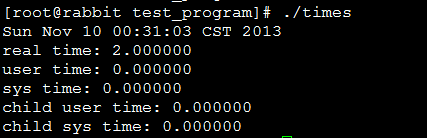
采用time命令,测试结果如下所示:

4、参考网址
http://www.01happy.com/linux-process-time/
http://www.01happy.com/c-get-process-time/
Linux获取进程执行时间的更多相关文章
- linux --> 获取进程执行时间
获取进程执行时间 一.时间概念 在linux下进行编程时,可能会涉及度量进程的执行时间.linux下进程的时间值分三种: 时钟时间(real time):指进程从开始执行到结束,实际执行的时间. 用户 ...
- Unix/Linux获取进程的详细信息
Linux的进程的信息都记录在/proc/<pid>/下面,其实常用的ps.top命令也是从这里读取信息的.常用的信息有: cmd(命令).cmdline(完整的命令行参数).envrio ...
- Linux获取进程中变量
列出所有进程 #include <linux/kernel.h> #include <linux/module.h> #include <linux/init.h> ...
- Windows与Linux获取进程集合的方法
Windows: List<String> tasklist=new ArrayList<String>(); try { Process process = Runtime. ...
- Linux常用获取进程占用资源情况手段
测试环境:Ubuntu14.04 1. 获取进程ID号 ps -aux | grep your_process_name 例如: xxx@xxx:~$ ps -e |grep Midlet|awk ...
- linux: 获取监听指定端口的进程PID
在 linux 下经常需要杀死(重启)监听某端口的进程, 因此就写了一个小脚本, 通过 ss 命令获取监听制定端口的进程 PID, 然后通过 kill 命令结束掉进程: #!/bin/sh # set ...
- linux中使用top获取进程的资源占用信息
在linux中使用top获取进程的资源占用信息: Cpu(s): 1.0%us, 0.0%sy, 0.0%ni, 98.3%id, 0.7%wa, 0.0%hi, 0.0%si, 0.0 ...
- linux命令(26):Bash Shell 获取进程 PID
转载地址:http://weyo.me/pages/techs/linux-get-pid/ 根据pid,kill该进程:http://www.cnblogs.com/lovychen/p/54113 ...
- linux shell 获取进程pid
1.通过可执行程序的程序名称 a.运行程序 b.获取进程id号 c.pidof相关知识:http://www.cnblogs.com/yunsicai/p/3675938.html 2.有些程序需要在 ...
随机推荐
- CentOS安装openvpn报错:error: route utility is required but missing
centos7特有,直接安装net-tools即可. 参考: https://forums.openvpn.net/viewtopic.php?t=21432
- 使用filezilla server搭建FTP服务器
参考文献 http://www.pc6.com/infoview/Article_51961_all.html 背景 需要在内网环境下搭建一个FTP服务器,查阅相关资料发现使用filezilla se ...
- 搭建《深入Linux内核架构》的Linux环境
作者 彭东林 pengdonglin137@163.com 软件 Host: Ubuntu14.04 64 Qemu 2.8.0 Linux 2.6.24 busybox 1.24.2 gcc 4.4 ...
- 移植Python3到TQ2440(二)
接着前一篇博文. 在上一篇博文中我们用NFS挂载根文件系统的方式启动了系统,接下来我们把移植了Python3的根文件系统固化到NandFlash中,但是由于linux-4.9目前不支持Yaffs2文件 ...
- AngularJS使用ngMessages进行表单验证
名称为"ngMessages"的module,通过npm install angular-messages进行安装.在没有使用ngMessages之前,我们可能这样写验证: < ...
- 【ELK】【ElasticSearch】3.es入门基本操作
docker安装elasticSearch步骤 ================================================================== 本篇参考: htt ...
- 错误:update 忘了加 where
职业生涯应该都犯过的错误,幸好是在开发库,生产环境的库真是要严格的进行权限管理和脚本执行流程规范.
- 黑马day17 ajax&实现username自己主动刷新
1. regist.jsp文件 <%@ page language="java" pageEncoding="utf-8"%> <!DOCTY ...
- hdu 2049 不easy系列之(4)——考新郎
不easy系列之(4)--考新郎 Time Limit: 2000/1000 MS (Java/Others) Memory Limit: 65536/32768 K (Java/Others) ...
- 2016 移动应用质量大数据报告--转自腾讯Bugly
2016年,在“互联网+”战略的推动下,移动互联网与越来越多传统行业的结合更加紧密,用户使用移动互联网的工作场景.生活场景.消费场景都在悄然发生着改变, 移动互联网产品在智能硬件.医疗.汽车.旅游.教 ...