
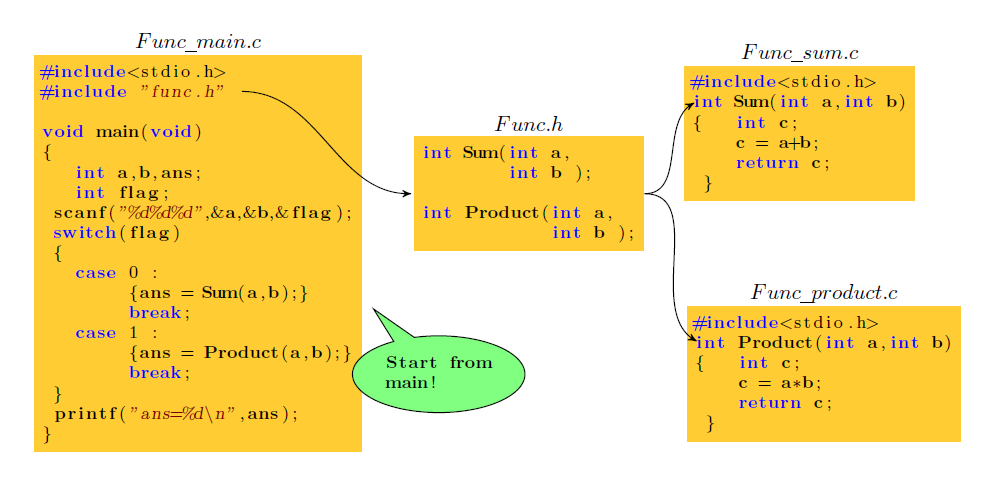
Latex中画出函数文件的调用关系拓扑图
流程图,思维导图,拓扑图通常能把我们遇到的一些复杂的关系结构用图形的方式展现出来。在Latex中要想画这样的拓扑图,有一个很好用的绘图工具包 pgf/tikz 。
1.pgf/tikz的安装:pgf/tikz 绘图工具用到的宏是 \usepackage{tikz} 。如果你的Latex并不带有这个宏包,那就需要参考[1]中进行安装。也可以直接下载使用带有这个宏包的新版本 CTeX_2.9.2.164_Full。
2.pgf/tikz的使用:参考[2]pgf/tikz使用说明,这里详细介绍了pgf/tikz的各种用法。
利用Latex绘制函数关系的图
\documentclass{report}

\usepackage{pgf}

\usepackage{tikz}

\usepackage{listings}

\usepackage{xcolor}

\usepackage{graphicx}

\usetikzlibrary{shapes.callouts}

\usetikzlibrary{arrows,decorations.pathmorphing, backgrounds, positioning, fit, petri, automata}

\definecolor{yellow1}{rgb}{1,0.8,0.2}

\lstset{

    basicstyle=\footnotesize,

    framexleftmargin=1.5mm,

    keywordstyle=\color{blue}\bfseries,

    identifierstyle=\bf,

    commentstyle=\it\color[RGB]{96,96,96},

    stringstyle=\rmfamily\slshape\color[RGB]{128,0,0},

    showstringspaces=false

}

\begin{document}

\begin{tikzpicture}

[remember picture, note/.style={ellipse callout, fill=#1},

->,>=stealth',shorten >=1pt,auto,node distance=2.8cm,semithick]

\tikzstyle{every state}=[rectangle,fill=yellow1,draw=none,text=black]

%创建对象:\node(对象属性)   (对象名称)  at (对象坐标) {对象内容};

\node[state]         (fun_main) at (-32, 16)        {

\begin{lstlisting}[language={C}]

#include<stdio.h>

#include "func.h"

void main(void)

{

   int a,b,ans;

   int flag;

 scanf("%d%d%d",&a,&b,&flag);

 switch(flag)

 {

   case 0 :

        {ans = Sum(a,b);}

        break;

   case 1 :

        {ans = Product(a,b);}

        break;

 }

 printf("ans=%d\n",ans);

}

\end{lstlisting}

};

\node[state,fill=none]         (filename_main) at ([yshift=0.2cm]fun_main.north)        {$Func\underline{\hspace{0.5em}}main.c$};

\node[state]         (fun0) at (-26.5, 17)        {

\begin{lstlisting}[language={C}]

int Sum(int a,

        int b );

int Product(int a,

            int b );

\end{lstlisting}

};

\node[state,fill=none]         (file0) at ([yshift=0.2cm]fun0.north)        {$Func.h$};

\node[state]         (fun1) at (-22, 18)        {

\begin{lstlisting}[language={C}]

#include<stdio.h>

int Sum(int a,int b)

{   int c;

    c = a+b;

    return c;

 }

\end{lstlisting}

};

\node[state,fill=none]         (file1) at ([yshift=0.2cm]fun1.north)        {$Func\underline{\hspace{0.5em}}sum.c$};

\node[state]         (fun2) at (-21.6, 14)        {

\begin{lstlisting}[language={C}]

#include<stdio.h>

int Product(int a,int b)

{   int c;

    c = a*b;

    return c;

 }

\end{lstlisting}

};

\node[state,fill=none]         (file2) at ([yshift=0.2cm]fun2.north)        {$Func\underline{\hspace{0.5em}}product.c$};

%\node[标注填充颜色,相对标注对象坐标,边框] (标注对象名称) at (标注对象的坐标) {内容};

\node[note=green!50, callout relative pointer={(-0.5,0.5)}, draw] (note_name)at (-28,14) {

\begin{lstlisting}[language={C}]

Start from

main!

\end{lstlisting}

};

%箭头:([横平移,纵平移]箭头端点相对对象1的位置) (out:箭头出射角度,int:箭头入射角度) ([横平移,纵平移]箭头端点相对对象2的位置);

\draw[->] ([xshift=-2.0cm,yshift=-0.6cm]fun_main.north east) to[out=0,in=180]  ([xshift=0cm,yshift=0cm]fun0.west);

\draw[->] (fun0.east) to[out=0,in=210]  ([xshift=0.2cm,yshift=-0.6cm]fun1.north west);

\draw[->] (fun0.east) to[out=0,in=150]  ([xshift=0.2cm,yshift=-0.6cm]fun2.north west);

\end{tikzpicture}

\end{document}
排版出来的效果如下
参考:
[1] http://blog.csdn.net/mathsoperator/article/details/6747170
[2] http://mirror.lzu.edu.cn/CTAN/graphics/pgf/base/doc/pgfmanual.pdf
[3] Latex论坛,http://tex.stackexchange.com/
Latex中画出函数文件的调用关系拓扑图的更多相关文章
- Latex中cls和sty文件有何区别?
Latex中cls和sty文件有何区别? 资源 本文对 LaTeX 中 .cls 和 .sty 文件进行介绍,主要参考了 What are .cls and .sty files?How are th ...
- python—networkx:在一张图中画出多个子图
通过plt.subplot能够在一张图中画出多个子图 #coding: utf-8 #!/usr/bin/env python """ Draw a graph with ...
- Linux 编程中的API函数和系统调用的关系【转】
转自:http://blog.chinaunix.net/uid-25968088-id-3426027.html 原文地址:Linux 编程中的API函数和系统调用的关系 作者:up哥小号 API: ...
- haploview画出所有SNP的LD关系图
有时候我们想画出所有SNP的LD关系图,则需要在命令行添加“-skipcheck”命令行,如下所示: java -jar Haploview.jar -skipcheck -n -pedfile 80 ...
- shell从函数文件里调用函数
碰到一个shell中函数调用的小问题,记录一下. shell中函数有三种调用方式,一种是在文件前面定义函数,然后在以下直接调用:一种是通过加载shell,在shell中直接调用:第三种是将函数写入文件 ...
- wpf 在不同DPI下如何在DrawingVisual中画出清晰的图形
环境Win10 VS2017 .Net Framework4.7.1 本文仅讨论在DrawingVisual中进行的画图. WPF单位,系统DPI,显示器DPI三者的定义及关系 WPF单位:一 ...
- 如何在canvas中画出一个太极图
先放一个效果图: 代码如下 <!DOCTYPE html> <html> <head> <meta charset="utf-8" /&g ...
- android中画弧函数canvas.drawArc()之理解
在学习android中图形图像处理技术这部分内容时,对绘制圆弧函数canvas.drawArc()的用法.参数含义及画图原理很是不理解,在网上搜索了一些,加上自己的理解,在此做个小总结,作为学习过程中 ...
- Mysql获取字符串中的数字函数方法和调用
)) ) BEGIN ; ) default ''; set v_length=CHAR_LENGTH(Varstring); DO )) )) ) THEN )); END IF; ; END WH ...
随机推荐
- 在移动端中的flex布局
flex布局介绍: flex布局很灵活, 这种布局我们也可以称之为弹性布局, 弹性布局的主要优势就是元素的宽或者高会自动补全; flex布局实例: 比如有两个div,一个div的宽度为100px, ...
- iOS事件传递->处理->响应
前言: 按照时间顺序,事件的生命周期是这样的: 事件的产生和传递(事件如何从父控件传递到子控件并寻找到最合适的view.寻找最合适的view的底层实现.拦截事件的处理)->找到最合适的view后 ...
- ubuntu10.04编译安装LAMP
ubuntu10.04编译安装LAMP以及简单wordpress的使用 : http://linuxme.blog.51cto.com/1850814/971631 一.源码安装LAMP 网上有一堆关 ...
- Windows常用快捷方式
总结了其他常用的快捷方式: Ctrl+C 复制 . Ctrl+V粘贴. Ctrl+X剪切. Delete删除. Alt+Tab 应用程序切换 Ctrl+Alt+Delete Ctrl+shift+E ...
- JAVA源码分析-HashMap源码分析(二)
本文继续分析HashMap的源码.本文的重点是resize()方法和HashMap中其他的一些方法,希望各位提出宝贵的意见. 话不多说,咱们上源码. final Node<K,V>[] r ...
- Web Service简要概念,学习记录!
Web Service平台需要一套协议来实现分布式应用程序的创建.任何平台都有它的数据表示方法和类型系统.要实现互操作性,Web Service平台必须提供一套标准的类型系统,用于沟通不同平台.编程语 ...
- webapi-创建项目
- Forward+
http://aras-p.info/blog/2012/03/02/2012-theory-for-forward-rendering/ http://www.slideshare.net/taka ...
- 如何修改geditor的配置文件 -好像geditor没有文本格式的配置文件? 要使用dconf-editor来配置- geditor自己配置编码格式
好像geditor没有文本格式的配置文件? 好像是通过一个程序, 叫 dconf-editor 来配置geditor的? 以前是通过gconf-editor来配置的, 但是gconf-editor的配 ...
- JAVA WEB WITH IDEA
本文主要介绍使用IDEA开发环境,创建JAVA WEB 工程,并介绍war包的制作过程. 1 创建MAVEN工程