
SharePoint2010 对象模型 关联列表
有关列表的创建其实网上已经有很多文章了,其中练习 :利用Visual Studio 2010创建列表这篇文章个人感觉还不错,这里我强调的是对象模型来创建。在这之前我插入一点其他的东东,导入电子表格和数据表视图中的自定义列表。
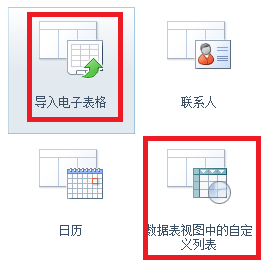
创建“导入电子表格列表”
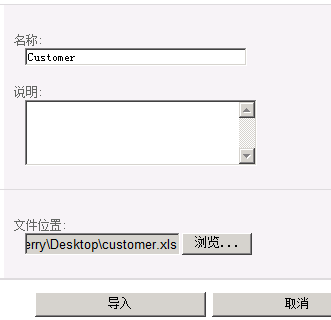
单击“导入”
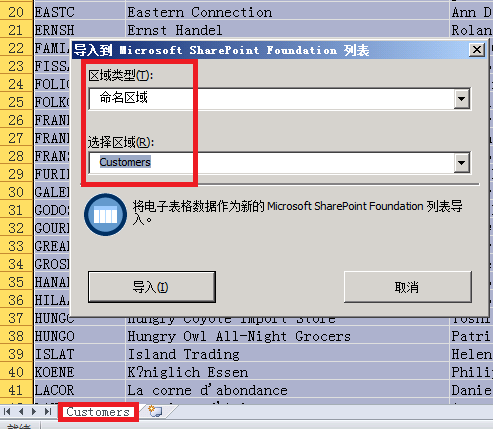
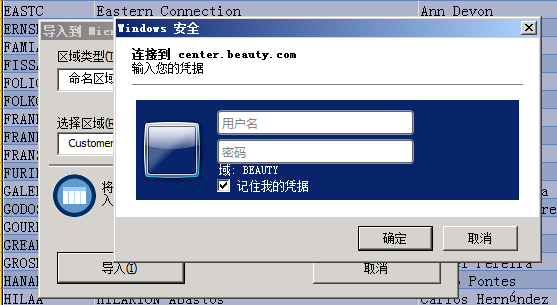
单击“导入”
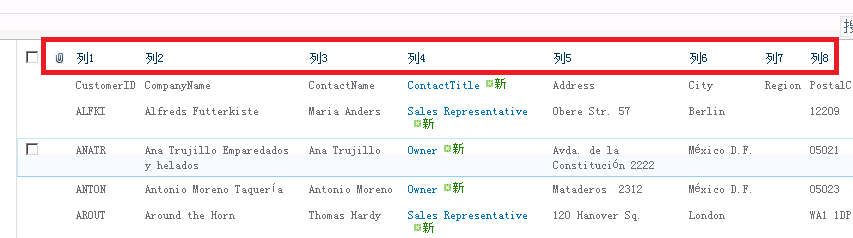
这些列名称不好用 我们需要修改为我们自己的列名称
修改前
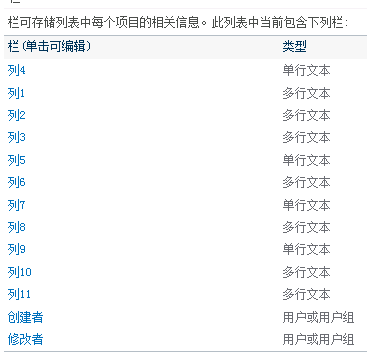
修改后:
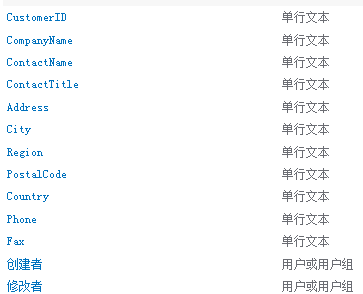
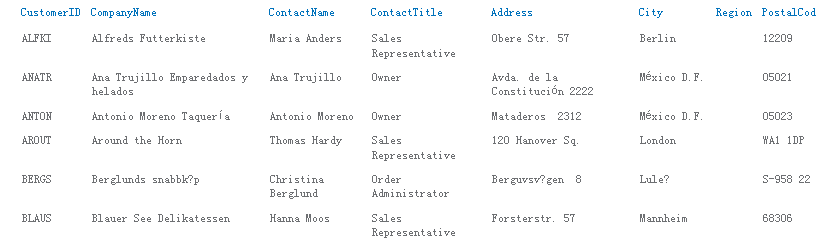
我们启用 视图的直接编辑属性

现在看看数据的编辑
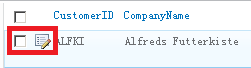

这个编辑是不是很简单啊。
数据表视图中的自定义列表 这个没什么好说的,主要是数据浏览很好用,如果你和我一样用的是office64的话,会用“未安装与 Microsoft SharePoint Foundation 兼容的数据表组件”错误

需要安装“AccessDatabaseEngine.exe”来解决。
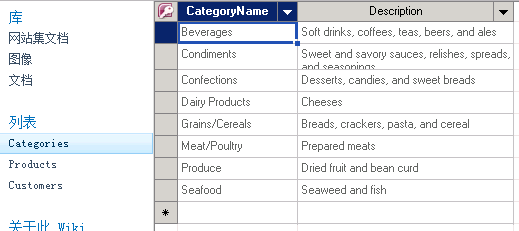
这个页面是不是很好 编辑数据啊。
SharePoint中还有一个外部列表,这里有比较详细的介绍:
http://www.cnblogs.com/chenxizhang/archive/2010/05/01/1725531.html
http://www.cnblogs.com/chenxizhang/archive/2010/05/01/1725576.html
http://www.cnblogs.com/chenxizhang/archive/2010/05/01/1725711.html
现在切换到我们的正题 “关联列表” ,相信大家对Northwind数据库比较熟悉,这里我们用Categories和Products表来演示关联关系。
首先 列表的创建代码 很简单 如下:
Guid id = web.Lists.Add("Categories", string.Empty, SPListTemplateType.GenericList);
SPList list = web.Lists[id];
列表 列的创建也很简单 如下:
string fieldname = list.Fields.Add("Description", SPFieldType.Text, true);
SPField field = list.Fields.GetFieldByInternalName("Description");
大家都应该知道sharepoint自定义列表由很多预定义好的列,典型的就是 ID(编号) 和Title(标题),这里Categories和Products都有自增长字段,用这个ID
来做是在好不过了。
field = list.Fields["ID"];
field.Title = "CategoryID";
field.StaticName = "CategoryID";
field.Update();
还有在我们列表默认有一个 “所有项目”的视图,该视图有一个附件列,这里我们需要移除它。
SPView view = list.Views.OfType<SPView>().FirstOrDefault(x => x.DefaultView);
SPViewFieldCollection viewFields = view.ViewFields;
//附件
SPField field = list.Fields.GetFieldByInternalName("Attachments");
viewFields.Delete(field);
创建Categories列表如下:
  public static void CreateCategories()

        {

            SPSecurity.RunWithElevatedPrivileges(() =>

          {

              using (SPSite site = new SPSite(siteUrl))

              {

                  using (SPWeb web = site.RootWeb)

                  {

                      bool originalupdate = web.AllowUnsafeUpdates;

                      web.AllowUnsafeUpdates = true;

                      Guid id = web.Lists.Add("Categories", string.Empty, SPListTemplateType.GenericList);

                      SPList list = web.Lists[id];

                      SPView view = list.Views.OfType<SPView>().FirstOrDefault(x => x.DefaultView);

                      SPViewFieldCollection viewFields = view.ViewFields;

                      //附件

                      SPField field = list.Fields.GetFieldByInternalName("Attachments");

                      viewFields.Delete(field);

                      field = list.Fields["ID"];

                      field.Title = "CategoryID";

                      field.StaticName = "CategoryID";

                      field.Update();

                      // viewFields.Add(field);

                      field = list.Fields.GetFieldByInternalName("Title");

                      field.Title = "CategoryName";

                      field.StaticName = "CategoryName";

                      field.EnforceUniqueValues = true;

                      field.Indexed = true;

                      field.Update();

                      string fieldname = list.Fields.Add("Description", SPFieldType.Text, true);

                      field = list.Fields.GetFieldByInternalName("Description");

                      viewFields.Add(field);

                      list.OnQuickLaunch = true;

                      view.Update();

                      list.Update();

                      //web.Update();

                      web.AllowUnsafeUpdates = originalupdate;

                  }

              }

          });

        }
创建关联列我们需要用到SPFieldLookup对象,它需要指定关联那个列表那个列,具体实现如下:
SPList categorList = web.Lists.TryGetList("Categories");
string fieldname = list.Fields.AddLookup("CategoryID", categorList.ID, true);
SPFieldLookup categoryID = list.Fields.GetFieldByInternalName(fieldname) as SPFieldLookup;
categoryID.Required = true;
categoryID.Indexed = true;
categoryID.LookupField = "ID";// categorList.Fields["CategoryID"].InternalName;
categoryID.RelationshipDeleteBehavior = SPRelationshipDeleteBehavior.Cascade;
categoryID.Update();
viewFields.Add(categoryID);
这里指定关联到Categories列表的CategoryID列(内部名称是ID),关联行为 是级联删除。 我们还可以添加依赖的列,依赖列需要指定那个关联列和查找列
fieldname = list.Fields.AddDependentLookup("CategoryName", categoryID.Id);
SPFieldLookup categoryName = (SPFieldLookup)list.Fields.GetFieldByInternalName("CategoryName");
categoryName.LookupField = "Title";// categorList.Fields["标题"].InternalName;
viewFields.Add(categoryName);
categoryName.Update();
Products列表创建代码 如下:
 public static void CreateProducts()

        {

            SPSecurity.RunWithElevatedPrivileges(() =>

            {

                using (SPSite site = new SPSite(siteUrl))

                {

                    using (SPWeb web = site.RootWeb)

                    {

                        bool originalupdate = web.AllowUnsafeUpdates;

                        web.AllowUnsafeUpdates = true;

                        Guid id = web.Lists.Add("Products", string.Empty, SPListTemplateType.GenericList);

                        SPList list = web.Lists[id];

                        SPView view = list.Views.OfType<SPView>().FirstOrDefault(x => x.DefaultView);

                        SPViewFieldCollection viewFields = view.ViewFields;

                        //Remove Attachments

                        SPField field = list.Fields.GetFieldByInternalName("Attachments");

                        viewFields.Delete(field);

                        field = list.Fields.GetFieldByInternalName("ID");

                        field.Title = "ProductID";

                        field.StaticName = "ProductID";

                        field.Update();

                        // viewFields.Add(field);

                        field = list.Fields.GetFieldByInternalName("Title");

                        field.Title = "ProductName";

                        field.StaticName = "ProductName";

                        field.EnforceUniqueValues = true;

                        field.Indexed = true;

                        field.Update();

                        SPList categorList = web.Lists.TryGetList("Categories");

                        string fieldname = list.Fields.AddLookup("CategoryID", categorList.ID, true);

                        SPFieldLookup categoryID = list.Fields.GetFieldByInternalName(fieldname) as SPFieldLookup;

                        categoryID.Required = true;

                        categoryID.Indexed = true;

                        categoryID.LookupField = "ID";// categorList.Fields["CategoryID"].InternalName;

                        categoryID.RelationshipDeleteBehavior = SPRelationshipDeleteBehavior.Cascade;

                        categoryID.Update();

                        viewFields.Add(categoryID);

                        fieldname = list.Fields.AddDependentLookup("CategoryName", categoryID.Id);

                        SPFieldLookup categoryName = (SPFieldLookup)list.Fields.GetFieldByInternalName("CategoryName");

                        categoryName.LookupField = "Title";// categorList.Fields["标题"].InternalName;

                        viewFields.Add(categoryName);

                        categoryName.Update();

                        fieldname = list.Fields.Add("UnitPrice", SPFieldType.Number, true);

                        SPFieldNumber numberfield = list.Fields[fieldname] as SPFieldNumber;

                        numberfield.DisplayFormat = SPNumberFormatTypes.TwoDecimals;

                        viewFields.Add(numberfield);

                        field.Update();

                        list.OnQuickLaunch = true;

                        view.Update();

                        list.Update();

                        //web.Update();

                        web.AllowUnsafeUpdates = originalupdate;

                    }

                }

            });

        }
现在列表已经创建好了,我们需要相应的代码来做删除操作,这里Categories原本可以直接删除,可是Products关联它的,所以必须先删除Products列表才能删除Categories,而Products列表中有关联列,默认是不能直接删除该列表,所以在删除列表前必须先删除相应的关联列,并且在删除关联列前也必须先删除依赖列,具体实现如下:
 public static void DeleteList(string listname)

        {

            SPSecurity.RunWithElevatedPrivileges(() =>

            {

                using (SPSite site = new SPSite(siteUrl))

                {

                    using (SPWeb web = site.RootWeb)

                    {

                        SPList list = web.Lists.TryGetList(listname);

                        if (list == null) return;

                        SPFieldLookup[] lookupFields = list.Fields.OfType<SPFieldLookup>().Where(c => c.IsRelationship).ToArray();

                        if (lookupFields != null && lookupFields.Count()>)

                        {

                            foreach (SPFieldLookup field in lookupFields)

                            {

                                SPFieldLookup[] depentFields = list.Fields.OfType<SPFieldLookup>().Where(c => c.IsDependentLookup && c.PrimaryFieldId == field.Id.ToString()).ToArray();

                                foreach (SPFieldLookup item in depentFields)

                                {

                                    item.Delete();

                                }

                                field.Delete();

                            }

                        }

                        list.Delete();

                        web.Update();

                    }

                }

            });

        }
现在需要向这2个列表导入数据,这个就没什么特别
SPListItem item = list.Items.Add();
item["CategoryName"] = row["CategoryName"].ToString();
item["Description"] = row["Description"].ToString();
item.SystemUpdate();
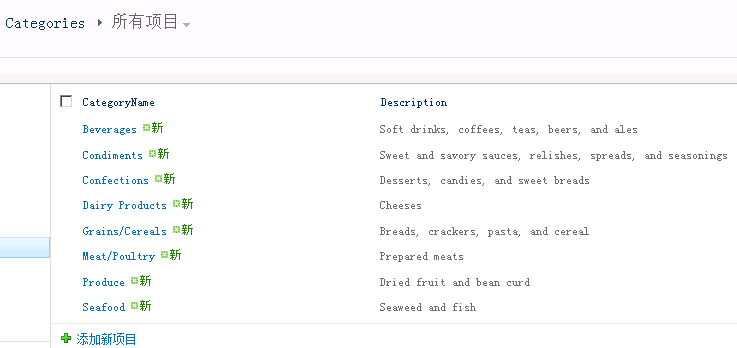
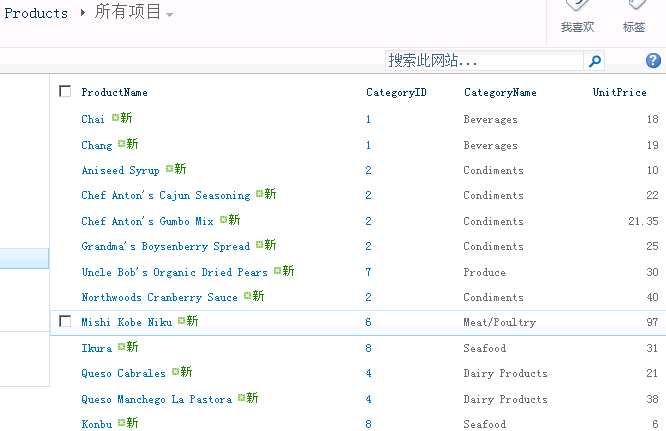
导入数据后 列表如图:
现在该说查询的事情,关联查询需要用到SPQuery的Joins和ProjectedFields属性,这2个属性这里不是很好设置,我做这个demo在这个花费了4个小时都没搞定,最后用ling来实现,把相应的caml拷贝出来才实现该功能。
/*
* 不过Joins 和ProjectedFields 对于字段有很多限制,join的表不支持多行文本,不支持用户或用户组
SPQuery查询列表查不出结果,提示“一个或多个域类型未正确安装。请转到列表设置页删除这些域”。
原因: 查询的时候,字段名称需要输入字段的内部(InternalName)名称,而不是显示名称(DisplayName)。
*/
SPList list = web.Lists.TryGetList("Products");
SPQuery query = new SPQuery();
query.Query = @"<Where>
<And>
<BeginsWith>
<FieldRef Name='ContentTypeId' />
<Value Type='ContentTypeId'>0x0100</Value>
</BeginsWith>
<Gt>
<FieldRef Name='UnitPrice' />
<Value Type='Number'>30</Value>
</Gt>
</And>
</Where>";
query.Joins = @"<Join Type='LEFT' ListAlias='CategoryID'>
<Eq>
<FieldRef Name='CategoryID' RefType='ID'/>
<FieldRef List='CategoryID' Name='ID' />
</Eq>
</Join>";
query.ProjectedFields = @"<Field Name='CategoryTitle' Type='Lookup' List='CategoryID' ShowField='Title' />
<Field Name='CategoryDescription' Type='Lookup' List='CategoryID' ShowField='Description' />";
query.ViewFields = @" <FieldRef Name='ID' />
<FieldRef Name='Title' />
<FieldRef Name='UnitPrice' />
<FieldRef Name='CategoryTitle' />
<FieldRef Name='CategoryDescription' />";
query.RowLimit = 10;
SPListItemCollection items = list.GetItems(query);
在joins里面<FieldRef List='CategoryID' Name='ID' />这句我不知道我们非要写成CategoryID(Products里面的关联列名),而不是Categories(关联的列表名称),网上也没有找到相应的说明。如果大家有人知道原因还请赐教一下。个人建议用Linq to SharePoint来实现关联查询(用它来生成这里的caml也可以啊)。
完整的代码如下:
public partial class Programs
{
static string siteUrl = "http://center.beauty.com/sites/wiki/"; public static void DeleteList(string listname)
{ SPSecurity.RunWithElevatedPrivileges(() =>
{
using (SPSite site = new SPSite(siteUrl))
{ using (SPWeb web = site.RootWeb)
{
SPList list = web.Lists.TryGetList(listname);
if (list == null) return;
SPFieldLookup[] lookupFields = list.Fields.OfType<SPFieldLookup>().Where(c => c.IsRelationship).ToArray();
if (lookupFields != null && lookupFields.Count()>)
{
foreach (SPFieldLookup field in lookupFields)
{
SPFieldLookup[] depentFields = list.Fields.OfType<SPFieldLookup>().Where(c => c.IsDependentLookup && c.PrimaryFieldId == field.Id.ToString()).ToArray();
foreach (SPFieldLookup item in depentFields)
{
item.Delete();
}
field.Delete();
}
}
list.Delete();
web.Update();
}
}
});
}
public static void CreateCategories()
{
SPSecurity.RunWithElevatedPrivileges(() =>
{
using (SPSite site = new SPSite(siteUrl))
{ using (SPWeb web = site.RootWeb)
{
bool originalupdate = web.AllowUnsafeUpdates;
web.AllowUnsafeUpdates = true;
Guid id = web.Lists.Add("Categories", string.Empty, SPListTemplateType.GenericList);
SPList list = web.Lists[id];
SPView view = list.Views.OfType<SPView>().FirstOrDefault(x => x.DefaultView);
SPViewFieldCollection viewFields = view.ViewFields;
//附件
SPField field = list.Fields.GetFieldByInternalName("Attachments");
viewFields.Delete(field); field = list.Fields["ID"];
field.Title = "CategoryID";
field.StaticName = "CategoryID";
field.Update();
// viewFields.Add(field); field = list.Fields.GetFieldByInternalName("Title");
field.Title = "CategoryName";
field.StaticName = "CategoryName";
field.EnforceUniqueValues = true;
field.Indexed = true;
field.Update(); string fieldname = list.Fields.Add("Description", SPFieldType.Text, true);
field = list.Fields.GetFieldByInternalName("Description");
viewFields.Add(field); list.OnQuickLaunch = true;
view.Update();
list.Update();
//web.Update();
web.AllowUnsafeUpdates = originalupdate;
}
}
});
}
public static void CreateProducts()
{ SPSecurity.RunWithElevatedPrivileges(() =>
{
using (SPSite site = new SPSite(siteUrl))
{ using (SPWeb web = site.RootWeb)
{
bool originalupdate = web.AllowUnsafeUpdates;
web.AllowUnsafeUpdates = true;
Guid id = web.Lists.Add("Products", string.Empty, SPListTemplateType.GenericList);
SPList list = web.Lists[id];
SPView view = list.Views.OfType<SPView>().FirstOrDefault(x => x.DefaultView);
SPViewFieldCollection viewFields = view.ViewFields;
//Remove Attachments
SPField field = list.Fields.GetFieldByInternalName("Attachments");
viewFields.Delete(field); field = list.Fields.GetFieldByInternalName("ID");
field.Title = "ProductID";
field.StaticName = "ProductID";
field.Update();
// viewFields.Add(field); field = list.Fields.GetFieldByInternalName("Title");
field.Title = "ProductName";
field.StaticName = "ProductName";
field.EnforceUniqueValues = true;
field.Indexed = true;
field.Update(); SPList categorList = web.Lists.TryGetList("Categories");
string fieldname = list.Fields.AddLookup("CategoryID", categorList.ID, true);
SPFieldLookup categoryID = list.Fields.GetFieldByInternalName(fieldname) as SPFieldLookup;
categoryID.Required = true;
categoryID.Indexed = true;
categoryID.LookupField = "ID";// categorList.Fields["CategoryID"].InternalName;
categoryID.RelationshipDeleteBehavior = SPRelationshipDeleteBehavior.Cascade;
categoryID.Update();
viewFields.Add(categoryID); fieldname = list.Fields.AddDependentLookup("CategoryName", categoryID.Id);
SPFieldLookup categoryName = (SPFieldLookup)list.Fields.GetFieldByInternalName("CategoryName");
categoryName.LookupField = "Title";// categorList.Fields["标题"].InternalName;
viewFields.Add(categoryName);
categoryName.Update(); fieldname = list.Fields.Add("UnitPrice", SPFieldType.Number, true);
SPFieldNumber numberfield = list.Fields[fieldname] as SPFieldNumber;
numberfield.DisplayFormat = SPNumberFormatTypes.TwoDecimals;
viewFields.Add(numberfield);
field.Update(); list.OnQuickLaunch = true;
view.Update();
list.Update();
//web.Update();
web.AllowUnsafeUpdates = originalupdate;
}
}
}); } public static void ImportData()
{
string constr = "Data Source=192.168.1.21;Initial Catalog=Northwind;Integrated Security=SSPI;";
string sql = "SELECT CategoryName, Description FROM Categories";
DataTable dt = new DataTable();
using (SqlConnection con = new SqlConnection(constr))
{
SqlDataAdapter ap = new SqlDataAdapter(sql, con);
ap.Fill(dt);
}
SPList list;
using (SPSite site = new SPSite(siteUrl))
{
using (SPWeb web = site.RootWeb)
{
list = web.Lists.TryGetList("Categories");
foreach (DataRow row in dt.Rows)
{
SPListItem item = list.Items.Add();
item["CategoryName"] = row["CategoryName"].ToString();
item["Description"] = row["Description"].ToString();
item.SystemUpdate();
} }
} //add Products
sql = "SELECT ProductName, CategoryID, UnitPrice FROM Products";
dt = new DataTable();
using (SqlConnection con = new SqlConnection(constr))
{
SqlDataAdapter ap = new SqlDataAdapter(sql, con);
ap.Fill(dt);
}
using (SPSite site = new SPSite(siteUrl))
{
using (SPWeb web = site.RootWeb)
{
list = web.Lists.TryGetList("Products");
foreach (DataRow row in dt.Rows)
{
SPListItem item = list.Items.Add();
item["ProductName"] = row["ProductName"].ToString();
item["CategoryID"] = int.Parse(row["CategoryID"].ToString());
item["UnitPrice"] = double.Parse(row["UnitPrice"].ToString());
item.SystemUpdate();
} }
}
}
public static void GetListItems()
{ SPSecurity.RunWithElevatedPrivileges(() =>
{
using (SPSite site = new SPSite(siteUrl))
{ using (SPWeb web = site.RootWeb)
{
try
{
//var context = new NwindDataContext(siteUrl); //var qry = from p in context.Products
// where p.标题 == "demo"
// select new { ProductID = p.Id, Title = p.标题, UnitPrice = p.UnitPrice, CategoryName = p.CategoryID.标题, Description = p.CategoryID.Description };
//context.Log = Console.Out;
//var result = qry.ToList(); /*
* 不过Joins 和ProjectedFields 对于字段有很多限制,join的表不支持多行文本,不支持用户或用户组
SPQuery查询列表查不出结果,提示“一个或多个域类型未正确安装。请转到列表设置页删除这些域”。
原因: 查询的时候,字段名称需要输入字段的内部(InternalName)名称,而不是显示名称(DisplayName)。
*/
SPList list = web.Lists.TryGetList("Products");
SPQuery query = new SPQuery();
query.Query = @"<Where>
<And>
<BeginsWith>
<FieldRef Name='ContentTypeId' />
<Value Type='ContentTypeId'>0x0100</Value>
</BeginsWith>
<Gt>
<FieldRef Name='UnitPrice' />
<Value Type='Number'>30</Value>
</Gt>
</And>
</Where>"; query.Joins = @"<Join Type='LEFT' ListAlias='CategoryID'>
<Eq>
<FieldRef Name='CategoryID' RefType='ID'/>
<FieldRef List='CategoryID' Name='ID' />
</Eq>
</Join>";
query.ProjectedFields = @"<Field Name='CategoryTitle' Type='Lookup' List='CategoryID' ShowField='Title' />
<Field Name='CategoryDescription' Type='Lookup' List='CategoryID' ShowField='Description' />";
query.ViewFields = @" <FieldRef Name='ID' />
<FieldRef Name='Title' />
<FieldRef Name='UnitPrice' />
<FieldRef Name='CategoryTitle' />
<FieldRef Name='CategoryDescription' />";
query.RowLimit = ;
SPListItemCollection items = list.GetItems(query);
foreach (SPListItem item in items)
{
string productID = item["ProductID"].ToString();
string productionname = item["ProductName"].ToString();
string unitePrice = item["UnitPrice"].ToString();
string categoryName = new SPFieldLookupValue(item["CategoryTitle"].ToString()).LookupValue;
string categoryDescription = new SPFieldLookupValue(item["CategoryDescription"].ToString()).LookupValue;
Console.WriteLine(string.Format("ProductID={0},ProductName={1},CategoryName={2},UnitPrice={3}",
productID, productionname, categoryName, unitePrice));
} }
catch (Exception ex)
{ throw;
}
}
}
});
}
}
}
public partial  class  Programs

    {

        static void Main(string[] args)

        {

            DeleteList("Products");

            DeleteList("Categories");

            CreateCategories();

            CreateProducts();

            ImportData();

            GetListItems();

        }

    }
SharePoint2010 对象模型 关联列表的更多相关文章
- sharepoint2010 创建自定义列表
转:http://boke.25k5.com/kan77298.html 如何创建自定义列表 首先了解创建自定义列表中涉及到的几个名词:栏.内容类型. ①栏:栏即列.字段(Field),MSDN中给出 ...
- 匿名用户访问sharepoint2010中的列表
Allow anonymous users to access listitems on a publishing site in SharePoint 2010 https://knowledge. ...
- 客户端对象模型之列表数据导出到Excel
1,废话不多话,直接上代码,留着以后做类似功能时Copy一下!有需要的朋友也可以参考一下. <!DOCTYPE html> <html xmlns="http://www. ...
- Sharepoint 列表
1.将SharePoint 2010列表数据使用Access打开 在SharePoint 2010新增加了对列表在Access客户端的打开,可以在Microsoft Access 中处理列表中的项目, ...
- 【SharePoint学习笔记】第3章 SharePoint列表新特性以及数据访问
第3章 SharePoint列表新特性以及数据访问 使用CAML查询语言 CAML:协作应用程序标记语言 Collaboration Application Markup Language ...
- 使用NPOI生成Excel级联列表
目录 1 概要 1 2 磨刀不误砍柴工——先学会Excel中的操作 2 3 利用NPOI生成导入模板 7 3.1 设置workbook&sheet ...
- 更快实现Android多级树形选择列表
快速实现Android多级树形列表,这个库是在鸿洋多级树形列表demo中修改而来. 解决的问题: 1. 支持ID为int类型和String类型. 2. 支持多级复选框选中,使用只需一行代码. 3. 支 ...
- discuz功能列表
导航旁边的+就可以把其加入到常用操作 上 首页 管理中心首页 文件校验,在线成员,管理团队留言.系统信息.开发 团队介绍. 常用操作管理 名称和URL 全局 站点信息 站点名称.网站名称,网站URL. ...
- C#:列表视图操作类
using System; using System.Collections.Generic; using System.Linq; using System.Text; using System.W ...
随机推荐
- 数据包编辑工具bittwiste
数据包编辑工具bittwiste bittwiste是数据包重放工具bittwist的一个工具.该工具可以编辑修改PCAP抓包文件.该工具提供数据包过滤功能,如根据范围和时间过滤.同时,该工具支持 ...
- Codeforces.744B.Hongcow's Game(交互 按位统计)
题目链接 \(Description\) 一个\(n\times n\)的非负整数矩阵\(A\),保证\(A_{i,i}=0\).现在你要对每个\(i\)求\(\min_{j\neq i}A_{i,j ...
- TreeMap(红黑树)源码分析
1. HashMap.Entry(红黑树节点) private static final boolean RED = false; private static final boolean BLACK ...
- Intel P6以来核心架构及对应型号、芯片组一览表
转载或拿走使用请注明出处,谢谢! 注1:5系列以前的芯片组部分可以支持多代处理器(如部分945可以支持65nm.45nm的处理器),5系列开始此现象较少见. 注2:插座兼容性①Socket370接口处 ...
- Western Subregional of NEERC, Minsk, Wednesday, November 4, 2015 Problem H. Parallel Worlds 计算几何
Problem H. Parallel Worlds 题目连接: http://opentrains.snarknews.info/~ejudge/team.cgi?SID=c75360ed7f2c7 ...
- Linux学习笔记05—文件与目录权限
1. 绝对路径与相对路径绝对路径:路径的写法一定由根目录 ‘/’写起,例如 /usr/local/mysql 这就是绝对路径相对路径:路径的写法不是由根目录 ‘/’写起,例如:首先用户进入到/, 然后 ...
- MikroTik RouterOS官方教程Wiki(入门教程)
https://wiki.mikrotik.com/wiki/Manual:TOC 其实还有一本<ROS从入门到精通> 学习路由可以从这两个教程先入手.
- px 与 dp, sp换算公式?(转)
PPI = Pixels per inch,每英寸上的像素数,即 "像素密度" xhdpi: 2.0 hdpi: 1.5 mdpi: 1.0 (baseline) ldpi: 0. ...
- MySQL是如何利用索引的
http://fordba.com/spend-10-min-to-understand-how-mysql-use-index.html
- C#编程(十九)----------部分类
部分类 C#中使用关键字partial把类,结构或结构放在多个文件中.一般情况下,一个类全部驻留在单个文件中.但有时候,多个开发人员需要访问同一个类,或者某种类型的代码生成器生成了一个类的某部分,所以 ...