
SharePoint2010 对象模型 关联列表
有关列表的创建其实网上已经有很多文章了,其中练习 :利用Visual Studio 2010创建列表这篇文章个人感觉还不错,这里我强调的是对象模型来创建。在这之前我插入一点其他的东东,导入电子表格和数据表视图中的自定义列表。
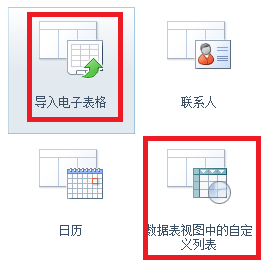
创建“导入电子表格列表”
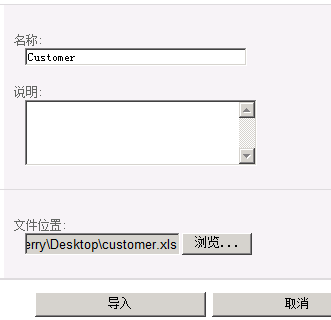
单击“导入”
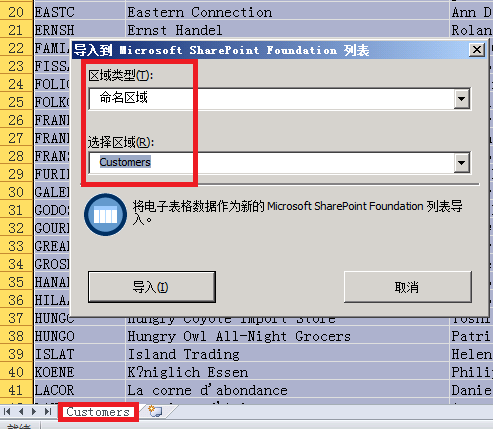
单击“导入”
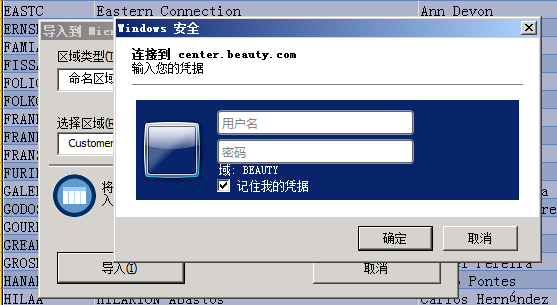
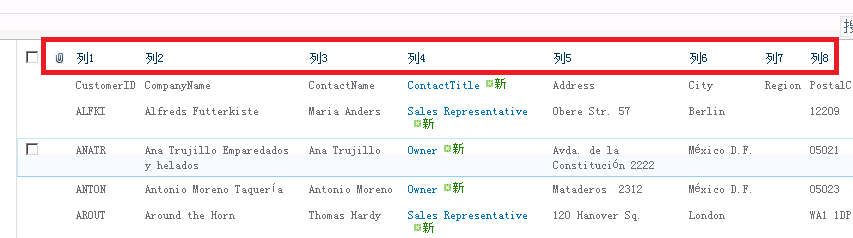
这些列名称不好用 我们需要修改为我们自己的列名称
修改前
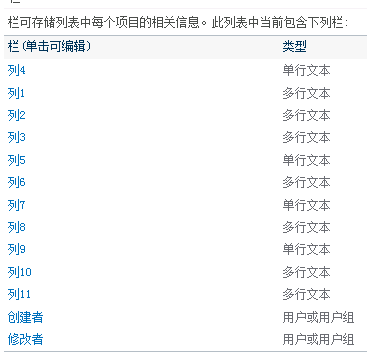
修改后:
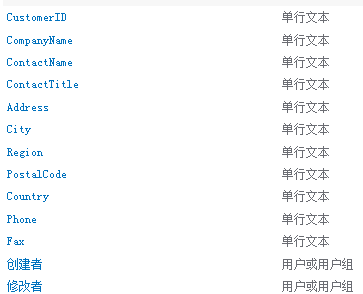
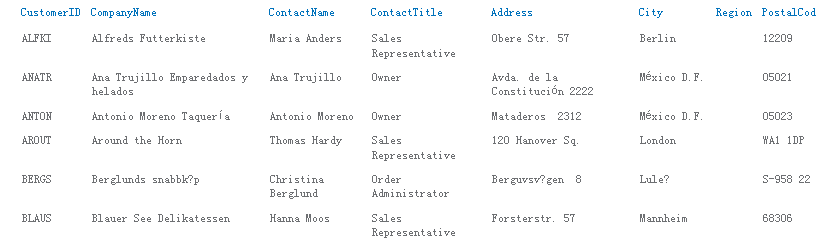
我们启用 视图的直接编辑属性

现在看看数据的编辑

这个编辑是不是很简单啊。
数据表视图中的自定义列表 这个没什么好说的,主要是数据浏览很好用,如果你和我一样用的是office64的话,会用“未安装与 Microsoft SharePoint Foundation 兼容的数据表组件”错误

需要安装“AccessDatabaseEngine.exe”来解决。
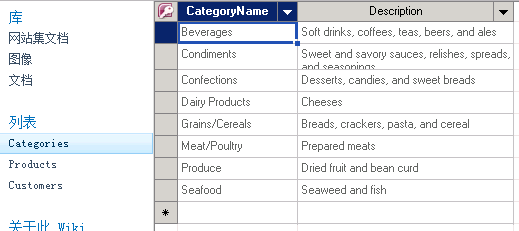
这个页面是不是很好 编辑数据啊。
SharePoint中还有一个外部列表,这里有比较详细的介绍:
http://www.cnblogs.com/chenxizhang/archive/2010/05/01/1725531.html
http://www.cnblogs.com/chenxizhang/archive/2010/05/01/1725576.html
http://www.cnblogs.com/chenxizhang/archive/2010/05/01/1725711.html
现在切换到我们的正题 “关联列表” ,相信大家对Northwind数据库比较熟悉,这里我们用Categories和Products表来演示关联关系。
首先 列表的创建代码 很简单 如下:
Guid id = web.Lists.Add("Categories", string.Empty, SPListTemplateType.GenericList);
SPList list = web.Lists[id];
列表 列的创建也很简单 如下:
string fieldname = list.Fields.Add("Description", SPFieldType.Text, true);
SPField field = list.Fields.GetFieldByInternalName("Description");
大家都应该知道sharepoint自定义列表由很多预定义好的列,典型的就是 ID(编号) 和Title(标题),这里Categories和Products都有自增长字段,用这个ID
来做是在好不过了。
field = list.Fields["ID"];
field.Title = "CategoryID";
field.StaticName = "CategoryID";
field.Update();
还有在我们列表默认有一个 “所有项目”的视图,该视图有一个附件列,这里我们需要移除它。
SPView view = list.Views.OfType<SPView>().FirstOrDefault(x => x.DefaultView);
SPViewFieldCollection viewFields = view.ViewFields;
//附件
SPField field = list.Fields.GetFieldByInternalName("Attachments");
viewFields.Delete(field);
创建Categories列表如下:
  public static void CreateCategories()

        {

            SPSecurity.RunWithElevatedPrivileges(() =>

          {

              using (SPSite site = new SPSite(siteUrl))

              {

                  using (SPWeb web = site.RootWeb)

                  {

                      bool originalupdate = web.AllowUnsafeUpdates;

                      web.AllowUnsafeUpdates = true;

                      Guid id = web.Lists.Add("Categories", string.Empty, SPListTemplateType.GenericList);

                      SPList list = web.Lists[id];

                      SPView view = list.Views.OfType<SPView>().FirstOrDefault(x => x.DefaultView);

                      SPViewFieldCollection viewFields = view.ViewFields;

                      //附件

                      SPField field = list.Fields.GetFieldByInternalName("Attachments");

                      viewFields.Delete(field);

                      field = list.Fields["ID"];

                      field.Title = "CategoryID";

                      field.StaticName = "CategoryID";

                      field.Update();

                      // viewFields.Add(field);

                      field = list.Fields.GetFieldByInternalName("Title");

                      field.Title = "CategoryName";

                      field.StaticName = "CategoryName";

                      field.EnforceUniqueValues = true;

                      field.Indexed = true;

                      field.Update();

                      string fieldname = list.Fields.Add("Description", SPFieldType.Text, true);

                      field = list.Fields.GetFieldByInternalName("Description");

                      viewFields.Add(field);

                      list.OnQuickLaunch = true;

                      view.Update();

                      list.Update();

                      //web.Update();

                      web.AllowUnsafeUpdates = originalupdate;

                  }

              }

          });

        }
创建关联列我们需要用到SPFieldLookup对象,它需要指定关联那个列表那个列,具体实现如下:
SPList categorList = web.Lists.TryGetList("Categories");
string fieldname = list.Fields.AddLookup("CategoryID", categorList.ID, true);
SPFieldLookup categoryID = list.Fields.GetFieldByInternalName(fieldname) as SPFieldLookup;
categoryID.Required = true;
categoryID.Indexed = true;
categoryID.LookupField = "ID";// categorList.Fields["CategoryID"].InternalName;
categoryID.RelationshipDeleteBehavior = SPRelationshipDeleteBehavior.Cascade;
categoryID.Update();
viewFields.Add(categoryID);
这里指定关联到Categories列表的CategoryID列(内部名称是ID),关联行为 是级联删除。 我们还可以添加依赖的列,依赖列需要指定那个关联列和查找列
fieldname = list.Fields.AddDependentLookup("CategoryName", categoryID.Id);
SPFieldLookup categoryName = (SPFieldLookup)list.Fields.GetFieldByInternalName("CategoryName");
categoryName.LookupField = "Title";// categorList.Fields["标题"].InternalName;
viewFields.Add(categoryName);
categoryName.Update();
Products列表创建代码 如下:
 public static void CreateProducts()

        {

            SPSecurity.RunWithElevatedPrivileges(() =>

            {

                using (SPSite site = new SPSite(siteUrl))

                {

                    using (SPWeb web = site.RootWeb)

                    {

                        bool originalupdate = web.AllowUnsafeUpdates;

                        web.AllowUnsafeUpdates = true;

                        Guid id = web.Lists.Add("Products", string.Empty, SPListTemplateType.GenericList);

                        SPList list = web.Lists[id];

                        SPView view = list.Views.OfType<SPView>().FirstOrDefault(x => x.DefaultView);

                        SPViewFieldCollection viewFields = view.ViewFields;

                        //Remove Attachments

                        SPField field = list.Fields.GetFieldByInternalName("Attachments");

                        viewFields.Delete(field);

                        field = list.Fields.GetFieldByInternalName("ID");

                        field.Title = "ProductID";

                        field.StaticName = "ProductID";

                        field.Update();

                        // viewFields.Add(field);

                        field = list.Fields.GetFieldByInternalName("Title");

                        field.Title = "ProductName";

                        field.StaticName = "ProductName";

                        field.EnforceUniqueValues = true;

                        field.Indexed = true;

                        field.Update();

                        SPList categorList = web.Lists.TryGetList("Categories");

                        string fieldname = list.Fields.AddLookup("CategoryID", categorList.ID, true);

                        SPFieldLookup categoryID = list.Fields.GetFieldByInternalName(fieldname) as SPFieldLookup;

                        categoryID.Required = true;

                        categoryID.Indexed = true;

                        categoryID.LookupField = "ID";// categorList.Fields["CategoryID"].InternalName;

                        categoryID.RelationshipDeleteBehavior = SPRelationshipDeleteBehavior.Cascade;

                        categoryID.Update();

                        viewFields.Add(categoryID);

                        fieldname = list.Fields.AddDependentLookup("CategoryName", categoryID.Id);

                        SPFieldLookup categoryName = (SPFieldLookup)list.Fields.GetFieldByInternalName("CategoryName");

                        categoryName.LookupField = "Title";// categorList.Fields["标题"].InternalName;

                        viewFields.Add(categoryName);

                        categoryName.Update();

                        fieldname = list.Fields.Add("UnitPrice", SPFieldType.Number, true);

                        SPFieldNumber numberfield = list.Fields[fieldname] as SPFieldNumber;

                        numberfield.DisplayFormat = SPNumberFormatTypes.TwoDecimals;

                        viewFields.Add(numberfield);

                        field.Update();

                        list.OnQuickLaunch = true;

                        view.Update();

                        list.Update();

                        //web.Update();

                        web.AllowUnsafeUpdates = originalupdate;

                    }

                }

            });

        }
现在列表已经创建好了,我们需要相应的代码来做删除操作,这里Categories原本可以直接删除,可是Products关联它的,所以必须先删除Products列表才能删除Categories,而Products列表中有关联列,默认是不能直接删除该列表,所以在删除列表前必须先删除相应的关联列,并且在删除关联列前也必须先删除依赖列,具体实现如下:
 public static void DeleteList(string listname)

        {

            SPSecurity.RunWithElevatedPrivileges(() =>

            {

                using (SPSite site = new SPSite(siteUrl))

                {

                    using (SPWeb web = site.RootWeb)

                    {

                        SPList list = web.Lists.TryGetList(listname);

                        if (list == null) return;

                        SPFieldLookup[] lookupFields = list.Fields.OfType<SPFieldLookup>().Where(c => c.IsRelationship).ToArray();

                        if (lookupFields != null && lookupFields.Count()>)

                        {

                            foreach (SPFieldLookup field in lookupFields)

                            {

                                SPFieldLookup[] depentFields = list.Fields.OfType<SPFieldLookup>().Where(c => c.IsDependentLookup && c.PrimaryFieldId == field.Id.ToString()).ToArray();

                                foreach (SPFieldLookup item in depentFields)

                                {

                                    item.Delete();

                                }

                                field.Delete();

                            }

                        }

                        list.Delete();

                        web.Update();

                    }

                }

            });

        }
现在需要向这2个列表导入数据,这个就没什么特别
SPListItem item = list.Items.Add();
item["CategoryName"] = row["CategoryName"].ToString();
item["Description"] = row["Description"].ToString();
item.SystemUpdate();
导入数据后 列表如图:
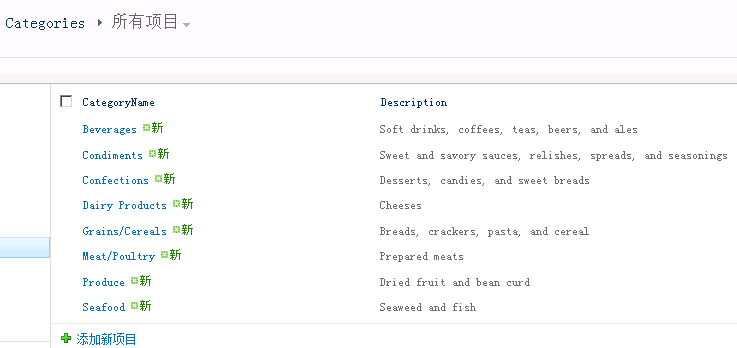
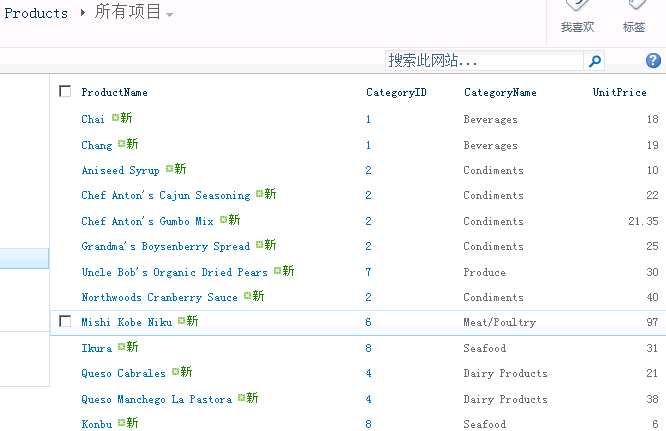
现在该说查询的事情,关联查询需要用到SPQuery的Joins和ProjectedFields属性,这2个属性这里不是很好设置,我做这个demo在这个花费了4个小时都没搞定,最后用ling来实现,把相应的caml拷贝出来才实现该功能。
/*
* 不过Joins 和ProjectedFields 对于字段有很多限制,join的表不支持多行文本,不支持用户或用户组
SPQuery查询列表查不出结果,提示“一个或多个域类型未正确安装。请转到列表设置页删除这些域”。
原因: 查询的时候,字段名称需要输入字段的内部(InternalName)名称,而不是显示名称(DisplayName)。
*/
SPList list = web.Lists.TryGetList("Products");
SPQuery query = new SPQuery();
query.Query = @"<Where>
<And>
<BeginsWith>
<FieldRef Name='ContentTypeId' />
<Value Type='ContentTypeId'>0x0100</Value>
</BeginsWith>
<Gt>
<FieldRef Name='UnitPrice' />
<Value Type='Number'>30</Value>
</Gt>
</And>
</Where>";
query.Joins = @"<Join Type='LEFT' ListAlias='CategoryID'>
<Eq>
<FieldRef Name='CategoryID' RefType='ID'/>
<FieldRef List='CategoryID' Name='ID' />
</Eq>
</Join>";
query.ProjectedFields = @"<Field Name='CategoryTitle' Type='Lookup' List='CategoryID' ShowField='Title' />
<Field Name='CategoryDescription' Type='Lookup' List='CategoryID' ShowField='Description' />";
query.ViewFields = @" <FieldRef Name='ID' />
<FieldRef Name='Title' />
<FieldRef Name='UnitPrice' />
<FieldRef Name='CategoryTitle' />
<FieldRef Name='CategoryDescription' />";
query.RowLimit = 10;
SPListItemCollection items = list.GetItems(query);
在joins里面<FieldRef List='CategoryID' Name='ID' />这句我不知道我们非要写成CategoryID(Products里面的关联列名),而不是Categories(关联的列表名称),网上也没有找到相应的说明。如果大家有人知道原因还请赐教一下。个人建议用Linq to SharePoint来实现关联查询(用它来生成这里的caml也可以啊)。
完整的代码如下:
public partial class Programs
{
static string siteUrl = "http://center.beauty.com/sites/wiki/"; public static void DeleteList(string listname)
{ SPSecurity.RunWithElevatedPrivileges(() =>
{
using (SPSite site = new SPSite(siteUrl))
{ using (SPWeb web = site.RootWeb)
{
SPList list = web.Lists.TryGetList(listname);
if (list == null) return;
SPFieldLookup[] lookupFields = list.Fields.OfType<SPFieldLookup>().Where(c => c.IsRelationship).ToArray();
if (lookupFields != null && lookupFields.Count()>)
{
foreach (SPFieldLookup field in lookupFields)
{
SPFieldLookup[] depentFields = list.Fields.OfType<SPFieldLookup>().Where(c => c.IsDependentLookup && c.PrimaryFieldId == field.Id.ToString()).ToArray();
foreach (SPFieldLookup item in depentFields)
{
item.Delete();
}
field.Delete();
}
}
list.Delete();
web.Update();
}
}
});
}
public static void CreateCategories()
{
SPSecurity.RunWithElevatedPrivileges(() =>
{
using (SPSite site = new SPSite(siteUrl))
{ using (SPWeb web = site.RootWeb)
{
bool originalupdate = web.AllowUnsafeUpdates;
web.AllowUnsafeUpdates = true;
Guid id = web.Lists.Add("Categories", string.Empty, SPListTemplateType.GenericList);
SPList list = web.Lists[id];
SPView view = list.Views.OfType<SPView>().FirstOrDefault(x => x.DefaultView);
SPViewFieldCollection viewFields = view.ViewFields;
//附件
SPField field = list.Fields.GetFieldByInternalName("Attachments");
viewFields.Delete(field); field = list.Fields["ID"];
field.Title = "CategoryID";
field.StaticName = "CategoryID";
field.Update();
// viewFields.Add(field); field = list.Fields.GetFieldByInternalName("Title");
field.Title = "CategoryName";
field.StaticName = "CategoryName";
field.EnforceUniqueValues = true;
field.Indexed = true;
field.Update(); string fieldname = list.Fields.Add("Description", SPFieldType.Text, true);
field = list.Fields.GetFieldByInternalName("Description");
viewFields.Add(field); list.OnQuickLaunch = true;
view.Update();
list.Update();
//web.Update();
web.AllowUnsafeUpdates = originalupdate;
}
}
});
}
public static void CreateProducts()
{ SPSecurity.RunWithElevatedPrivileges(() =>
{
using (SPSite site = new SPSite(siteUrl))
{ using (SPWeb web = site.RootWeb)
{
bool originalupdate = web.AllowUnsafeUpdates;
web.AllowUnsafeUpdates = true;
Guid id = web.Lists.Add("Products", string.Empty, SPListTemplateType.GenericList);
SPList list = web.Lists[id];
SPView view = list.Views.OfType<SPView>().FirstOrDefault(x => x.DefaultView);
SPViewFieldCollection viewFields = view.ViewFields;
//Remove Attachments
SPField field = list.Fields.GetFieldByInternalName("Attachments");
viewFields.Delete(field); field = list.Fields.GetFieldByInternalName("ID");
field.Title = "ProductID";
field.StaticName = "ProductID";
field.Update();
// viewFields.Add(field); field = list.Fields.GetFieldByInternalName("Title");
field.Title = "ProductName";
field.StaticName = "ProductName";
field.EnforceUniqueValues = true;
field.Indexed = true;
field.Update(); SPList categorList = web.Lists.TryGetList("Categories");
string fieldname = list.Fields.AddLookup("CategoryID", categorList.ID, true);
SPFieldLookup categoryID = list.Fields.GetFieldByInternalName(fieldname) as SPFieldLookup;
categoryID.Required = true;
categoryID.Indexed = true;
categoryID.LookupField = "ID";// categorList.Fields["CategoryID"].InternalName;
categoryID.RelationshipDeleteBehavior = SPRelationshipDeleteBehavior.Cascade;
categoryID.Update();
viewFields.Add(categoryID); fieldname = list.Fields.AddDependentLookup("CategoryName", categoryID.Id);
SPFieldLookup categoryName = (SPFieldLookup)list.Fields.GetFieldByInternalName("CategoryName");
categoryName.LookupField = "Title";// categorList.Fields["标题"].InternalName;
viewFields.Add(categoryName);
categoryName.Update(); fieldname = list.Fields.Add("UnitPrice", SPFieldType.Number, true);
SPFieldNumber numberfield = list.Fields[fieldname] as SPFieldNumber;
numberfield.DisplayFormat = SPNumberFormatTypes.TwoDecimals;
viewFields.Add(numberfield);
field.Update(); list.OnQuickLaunch = true;
view.Update();
list.Update();
//web.Update();
web.AllowUnsafeUpdates = originalupdate;
}
}
}); } public static void ImportData()
{
string constr = "Data Source=192.168.1.21;Initial Catalog=Northwind;Integrated Security=SSPI;";
string sql = "SELECT CategoryName, Description FROM Categories";
DataTable dt = new DataTable();
using (SqlConnection con = new SqlConnection(constr))
{
SqlDataAdapter ap = new SqlDataAdapter(sql, con);
ap.Fill(dt);
}
SPList list;
using (SPSite site = new SPSite(siteUrl))
{
using (SPWeb web = site.RootWeb)
{
list = web.Lists.TryGetList("Categories");
foreach (DataRow row in dt.Rows)
{
SPListItem item = list.Items.Add();
item["CategoryName"] = row["CategoryName"].ToString();
item["Description"] = row["Description"].ToString();
item.SystemUpdate();
} }
} //add Products
sql = "SELECT ProductName, CategoryID, UnitPrice FROM Products";
dt = new DataTable();
using (SqlConnection con = new SqlConnection(constr))
{
SqlDataAdapter ap = new SqlDataAdapter(sql, con);
ap.Fill(dt);
}
using (SPSite site = new SPSite(siteUrl))
{
using (SPWeb web = site.RootWeb)
{
list = web.Lists.TryGetList("Products");
foreach (DataRow row in dt.Rows)
{
SPListItem item = list.Items.Add();
item["ProductName"] = row["ProductName"].ToString();
item["CategoryID"] = int.Parse(row["CategoryID"].ToString());
item["UnitPrice"] = double.Parse(row["UnitPrice"].ToString());
item.SystemUpdate();
} }
}
}
public static void GetListItems()
{ SPSecurity.RunWithElevatedPrivileges(() =>
{
using (SPSite site = new SPSite(siteUrl))
{ using (SPWeb web = site.RootWeb)
{
try
{
//var context = new NwindDataContext(siteUrl); //var qry = from p in context.Products
// where p.标题 == "demo"
// select new { ProductID = p.Id, Title = p.标题, UnitPrice = p.UnitPrice, CategoryName = p.CategoryID.标题, Description = p.CategoryID.Description };
//context.Log = Console.Out;
//var result = qry.ToList(); /*
* 不过Joins 和ProjectedFields 对于字段有很多限制,join的表不支持多行文本,不支持用户或用户组
SPQuery查询列表查不出结果,提示“一个或多个域类型未正确安装。请转到列表设置页删除这些域”。
原因: 查询的时候,字段名称需要输入字段的内部(InternalName)名称,而不是显示名称(DisplayName)。
*/
SPList list = web.Lists.TryGetList("Products");
SPQuery query = new SPQuery();
query.Query = @"<Where>
<And>
<BeginsWith>
<FieldRef Name='ContentTypeId' />
<Value Type='ContentTypeId'>0x0100</Value>
</BeginsWith>
<Gt>
<FieldRef Name='UnitPrice' />
<Value Type='Number'>30</Value>
</Gt>
</And>
</Where>"; query.Joins = @"<Join Type='LEFT' ListAlias='CategoryID'>
<Eq>
<FieldRef Name='CategoryID' RefType='ID'/>
<FieldRef List='CategoryID' Name='ID' />
</Eq>
</Join>";
query.ProjectedFields = @"<Field Name='CategoryTitle' Type='Lookup' List='CategoryID' ShowField='Title' />
<Field Name='CategoryDescription' Type='Lookup' List='CategoryID' ShowField='Description' />";
query.ViewFields = @" <FieldRef Name='ID' />
<FieldRef Name='Title' />
<FieldRef Name='UnitPrice' />
<FieldRef Name='CategoryTitle' />
<FieldRef Name='CategoryDescription' />";
query.RowLimit = ;
SPListItemCollection items = list.GetItems(query);
foreach (SPListItem item in items)
{
string productID = item["ProductID"].ToString();
string productionname = item["ProductName"].ToString();
string unitePrice = item["UnitPrice"].ToString();
string categoryName = new SPFieldLookupValue(item["CategoryTitle"].ToString()).LookupValue;
string categoryDescription = new SPFieldLookupValue(item["CategoryDescription"].ToString()).LookupValue;
Console.WriteLine(string.Format("ProductID={0},ProductName={1},CategoryName={2},UnitPrice={3}",
productID, productionname, categoryName, unitePrice));
} }
catch (Exception ex)
{ throw;
}
}
}
});
}
}
}
public partial  class  Programs

    {

        static void Main(string[] args)

        {

            DeleteList("Products");

            DeleteList("Categories");

            CreateCategories();

            CreateProducts();

            ImportData();

            GetListItems();

        }

    }
SharePoint2010 对象模型 关联列表的更多相关文章
- sharepoint2010 创建自定义列表
转:http://boke.25k5.com/kan77298.html 如何创建自定义列表 首先了解创建自定义列表中涉及到的几个名词:栏.内容类型. ①栏:栏即列.字段(Field),MSDN中给出 ...
- 匿名用户访问sharepoint2010中的列表
Allow anonymous users to access listitems on a publishing site in SharePoint 2010 https://knowledge. ...
- 客户端对象模型之列表数据导出到Excel
1,废话不多话,直接上代码,留着以后做类似功能时Copy一下!有需要的朋友也可以参考一下. <!DOCTYPE html> <html xmlns="http://www. ...
- Sharepoint 列表
1.将SharePoint 2010列表数据使用Access打开 在SharePoint 2010新增加了对列表在Access客户端的打开,可以在Microsoft Access 中处理列表中的项目, ...
- 【SharePoint学习笔记】第3章 SharePoint列表新特性以及数据访问
第3章 SharePoint列表新特性以及数据访问 使用CAML查询语言 CAML:协作应用程序标记语言 Collaboration Application Markup Language ...
- 使用NPOI生成Excel级联列表
目录 1 概要 1 2 磨刀不误砍柴工——先学会Excel中的操作 2 3 利用NPOI生成导入模板 7 3.1 设置workbook&sheet ...
- 更快实现Android多级树形选择列表
快速实现Android多级树形列表,这个库是在鸿洋多级树形列表demo中修改而来. 解决的问题: 1. 支持ID为int类型和String类型. 2. 支持多级复选框选中,使用只需一行代码. 3. 支 ...
- discuz功能列表
导航旁边的+就可以把其加入到常用操作 上 首页 管理中心首页 文件校验,在线成员,管理团队留言.系统信息.开发 团队介绍. 常用操作管理 名称和URL 全局 站点信息 站点名称.网站名称,网站URL. ...
- C#:列表视图操作类
using System; using System.Collections.Generic; using System.Linq; using System.Text; using System.W ...
随机推荐
- Android组件化方案及组件消息总线modular-event实战
背景 组件化作为Android客户端技术的一个重要分支,近年来一直是业界积极探索和实践的方向.美团内部各个Android开发团队也在尝试和实践不同的组件化方案,并且在组件化通信框架上也有很多高质量的产 ...
- leetcode 两数之和 python
两数之和 给定一个整数数组和一个目标值,找出数组中和为目标值的两个数. 你可以假设每个输入只对应一种答案,且同样的元素不能被重复利用. 示例: 给定 nums = [2, 7, 11, 1 ...
- 中断 http请求 正在加载 取消http请求
中断 http请求 正在加载 取消http请求
- BZOJ.3680.吊打XXX(模拟退火/爬山算法)
题目链接 一个比较好的解释? 模拟退火(Simulated Annealing,SA): (1)初始化一个温度(充分大).初始解状态S.每个T值的迭代次数. (2)对i=1,...,L,做(3)至(7 ...
- 【Tsinsen-A1486】树(王康宁) 点分治 + Trie
A1486. 树(王康宁) 时间限制:1.0s 内存限制:512.0MB 总提交次数:455 AC次数:97 平均分:52.62 查看未格式化的试题 提交 试题讨论 试题来源 ...
- 单源最短路模板 + hdu - 2544
Floyd Floyd 本质上类似一种动态规划,dp [ i ] [ j ] = dp [ i ] [ k ] + dp[ k ] [ j ]. /** * Night gathers, and no ...
- Visual Studio 2019 preview中体验C# 8.0新语法
准备工作: Visual Studio 2019 Preview版本中并没有包含所有的C# 8.0的新功能,但目前也有一些可以试用了.在开始之前,需要进行入两项设置: 将Framework设置为.ne ...
- 使用Java进行串口SerialPort通讯
1.准备工作 在进行串口连接通讯前,必须保证你当前操作电脑上有可用且闲置的串口.因为一般的电脑上只有一个或者两个串口,如COM1或COM2,但大多数情况下,这些串口可能会被其他的程序或者 ...
- [置顶] Redis String类型数据常用的16条命令总结
Redis String类型数据常用的16条命令总结 描述:String 类型是最简单的类型,一个Key对应一个Value,String类型是二进制安全的.Redis的String可以包含任何数据,比 ...
- Why I Left the .NET Framework
The .NET Framework was good. Really good. Until it wasn't. Why did I leave .NET? In short, it constr ...