
Android -- 系统和自定义Notification
Notification是一种让你的应用程序在不使用Activity的情况下警示用户,Notification是看不见的程序组件警示用户有需要注意的事件发生的最好途径。
作为UI部分,Notification对移动设备来说是最适合不过的了。用户可能随时都带着手机在身边。一般来说,用户会在后台打开几个程序,但不会注意它们。在这样的情形下,当发生需要注意的事件时,能够通知用户是很重要的。
Notification由NotificationManger统一管理,目前包含的能力有:
- 创建一个状态条图标。
- 在扩展的状态条窗口中显示额外的信息(和启动一个Intent)。
- 闪灯或LED。
- 电话震动。
- 发出听得见的警告声(铃声,保存的声音文件)。
调用系统API的Notification
public void click1(View view) {

        //1.获取系统通知的管理者

         NotificationManager nm = (NotificationManager) getSystemService(NOTIFICATION_SERVICE);

        //2.初始化一个notification的对象

         Notification notification = new Notification(R.drawable.notification, "我是滚动的文本",  System.currentTimeMillis() );

        //3.设置notification的具体参数

         notification.flags = Notification.FLAG_AUTO_CANCEL;

        // notification.sound = Uri.parse(uriString);

         Intent intent = new Intent();

         intent.setAction(Intent.ACTION_VIEW);

         intent.setData(Uri.parse("http://www.baidu.com"));

         PendingIntent contentIntent = PendingIntent.getActivity(this, 0, intent, 0);

         notification.setLatestEventInfo(this, "我是大的标题", "我是标题下面的内容", contentIntent);

         //4.直接把消息给 notification的管理者

         nm.notify(0, notification);

    }
自定义Notification
public class MainActivity extends Activity {

    protected int mProgress;

    private Notification notification;

    private RemoteViews rv;

    private NotificationManager nm;

    private PendingIntent contentIntent;

    @Override

    protected void onCreate(Bundle savedInstanceState) {

        super.onCreate(savedInstanceState);

        setContentView(R.layout.activity_main);

    }

    public void clicklala(View view)

    {

        //1.获取系统通知的管理者

        nm = (NotificationManager) getSystemService(NOTIFICATION_SERVICE);

        //2.初始化一个notification的对象

        long when = System.currentTimeMillis();

        String tickerText = "iiiipppp";

        notification = new Notification(R.drawable.ic_launcher,tickerText,when);

        //3.设置notification的具体参数

        //不能手动清理掉

        notification.flags = Notification.FLAG_AUTO_CANCEL;

        // notification.contentView = 自定义的notification view

        rv = new RemoteViews(getPackageName(), R.layout.notify);

        rv.setTextViewText(R.id.tv_rv, "我是自定义的notification");

        rv.setProgressBar(R.id.pb_rv, 100, 0, false);

        notification.contentView = rv;

        Intent intent = new Intent();

        intent.setAction(Intent.ACTION_VIEW);

        intent.setData(Uri.parse("http://www.baidu.com"));

        contentIntent = PendingIntent.getActivity(this, 0, intent, 0);

        notification.contentIntent = contentIntent;

        //4.直接把消息给 notification的管理者

        nm.notify(0, notification);

        // 启动多线程更新Notification提醒。

        new Thread(new Runnable() {

            public void run() {

                for (int i = 0; i < 20; i++) {

                    mProgress = (i + 1) * 5;

                    try {

                        if (i < 19) {

                            Thread.sleep(1000);

                        } else {

                            Thread.currentThread().interrupt();

                        }

                    } catch (InterruptedException e) {

                        e.printStackTrace();

                    }

                    Message message = new Message();

                    mHandler.sendMessage(message);

                }

            }

        }).start();

    }

    private Handler mHandler = new Handler() {

        public void handleMessage(Message message) {

            //设置RemoteView组件中进度条的进度值。

            rv.setProgressBar(R.id.pb_rv, 100, mProgress, false);

            rv.setTextViewText(R.id.tv_rv, "Download:" + mProgress + "%");

            //给Notification设置布局。

            notification.contentView = rv;

            /给Notification设置Intent,单击Notification会发出这个Intent。

            notification.contentIntent = contentIntent;

            //发送Notification提醒。

            nm.notify(0, notification);

            super.handleMessage(message);

        }

    };

}
布局:
<?xml version="1.0" encoding="utf-8"?>

<LinearLayout

  xmlns:android="http://schemas.android.com/apk/res/android"

  android:orientation="vertical"

  android:layout_width="match_parent"

  android:layout_height="match_parent">

 <TextView

  android:id="@+id/tv_rv"

  android:layout_width="wrap_content"

  android:layout_height="wrap_content"

  android:text="haha"

 />

<ProgressBar

  style="@android:style/Widget.ProgressBar.Horizontal"

  android:id="@+id/pb_rv"

  android:layout_width="wrap_content"

  android:layout_height="wrap_content"

 />

</LinearLayout>
我是天王盖地虎的分割线
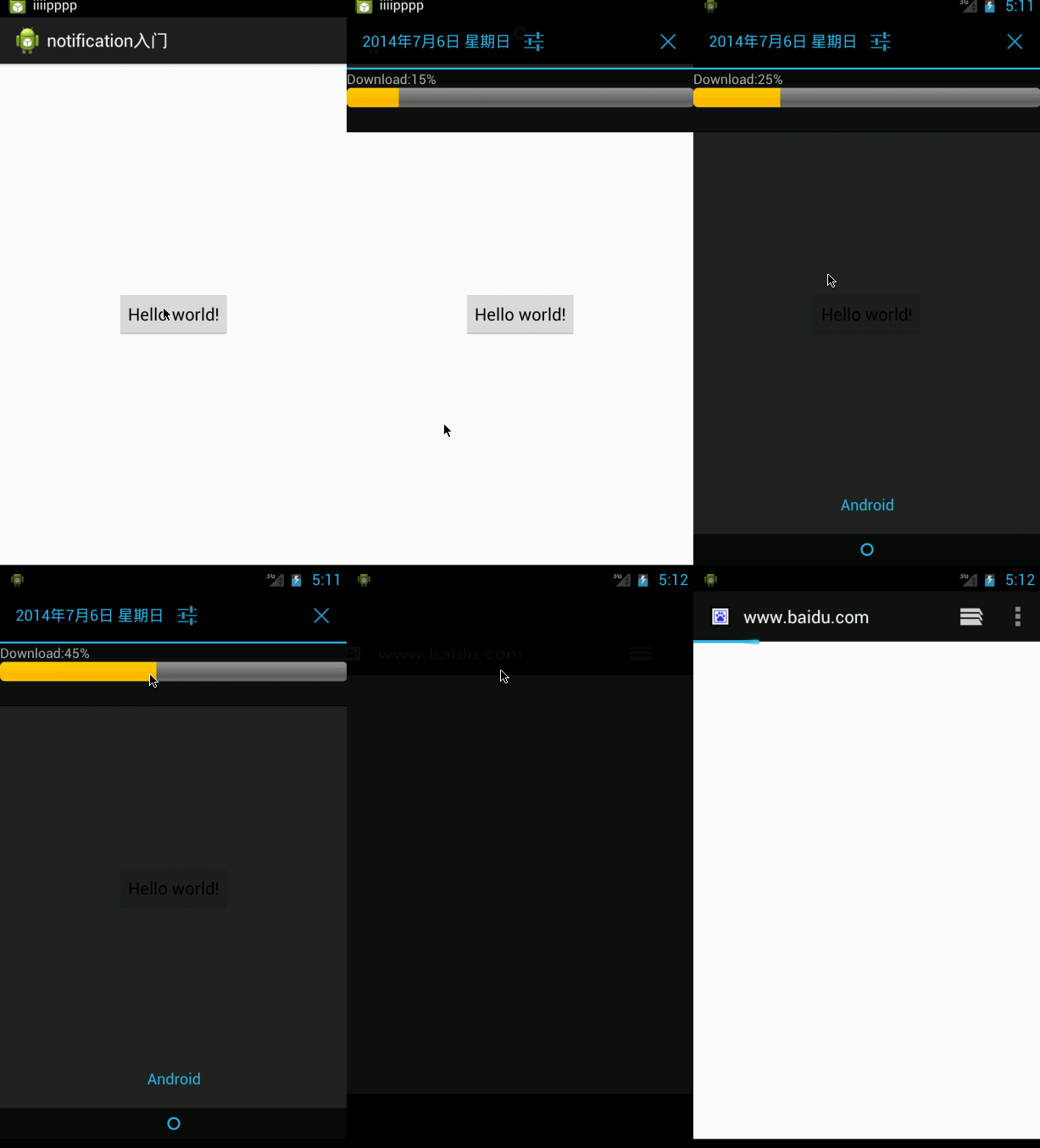
源代码:http://pan.baidu.com/s/1dD1Qx01
notification入门.zip
转载请注明出处:http://www.cnblogs.com/yydcdut
Android -- 系统和自定义Notification的更多相关文章
- Android系统对话框——自定义关闭
Android系统对话框--自定义关闭 Dialog是我们在项目中经常用到的,5.x以后的Dialog也很好看,很安卓风,Android也给我们提供了新的包,低版本可以显示一样的效果.我们在使用的导入 ...
- Android系统中自定义按键的短按、双击、长按事件
在项目中碰到这样的问题: 由于系统中的按键在底层做了重新定义或者新增了按键,此时需要在APP层对按键事件(keyevent)做分解处理,模拟Android系统做法,把keyevent分解成: 1.单击 ...
- android:使用RemoteView自定义Notification
//网上相关内容较少,遂记录下来,备忘. //依然以音乐播放器demo为例. 效果截图 //锤子手机上的效果 step1 准备自定义layout 常规的实现方式,并不会因为是用于notificatio ...
- Android系统修改之Notification布局修改(一)
源码基于Android4.4 相关布局文件的位置: frameworks/base/core/res目录下: 1. notification_template_base.xml 2. notifica ...
- 第13讲- Android之消息提示Notification
第13讲 Android之消息提示Notification .Notification Notification可以理解为通知的意思一般用来显示广播信息,通知可以显示到系统的上方的状态栏(status ...
- Android系统编程入门系列之应用级文件在应用程序间的共享
在上篇文章了解到应用级文件只能被其所创建的应用程序所访问,那么其他应用程序是不是就无论如何都无法访问了呢?肯定不是的,只要文件经过其创建的应用程序授权,还是可以被其他应用程序所访问的.这也就是应用级文 ...
- Android自定义Notification并没有那么简单
背景 最近需要实现一个自定义Notification的功能.网上找了找代码,解决方案就是通过RemoteViews来实现.但是在实现过程中遇到不少问题,网上也没有很好的文章描述这些问题,所以在这里做个 ...
- Android系统在新进程中启动自定义服务过程(startService)的原理分析
在编写Android应用程序时,我们一般将一些计算型的逻辑放在一个独立的进程来处理,这样主进程仍然可以流畅地响应界面事件,提高用户体验.Android系统为我们提供了一个Service类,我们可以实现 ...
- 【转】Android 系统菜单与自定义菜单
Android 系统菜单与自定义菜单实现方法如下:系统菜单显示DefaultMenu.java package com.wxz.menu; import com.wxz.menu.R; import ...
随机推荐
- BZOJ1171 : 大sz的游戏
f[i]=min(f[j])+1,线段j与线段i有交,且l[i]-l[j]<=L. 线段j与线段i有交等价于y[j]>=x[i],x[j]<=y[i]. 因为l[i]递增,所以可以维 ...
- Gunicorn部署部分的翻译
部署Gunicorn 文档建议Gunicorn最好是用在代理服务器后面.(等于前面最好加一个反向代理) Nginx Configuration 文档建议用Nginx,当然用其他也可以,但是要确保当你用 ...
- 20172308《Java软件结构与数据结构》第二周学习总结
教材学习内容总结 第 3 章 集合概述--栈 集合:一种聚集.组织了其他对象的对象 软件系统中的另一个类或对象通过集合预定的方式与该集合进行交互来使用这些集合 多年以来软件开发和研究人员定义了一些特定 ...
- HDU 5744 Keep On Movin 贪心
Keep On Movin 题目连接: http://acm.hdu.edu.cn/showproblem.php?pid=5744 Description Professor Zhang has k ...
- 一、java概述
一.概述 java不仅仅是一门编程语言,还是一个由一系列计算机软件和规范形成的技术体系. 提供了完整的开发和跨平台部署的支持环境.用途广泛. 结构严谨.面向对象.摆脱硬件平台的束缚. ...
- effective C++ 读书笔记 条款08
条款08 别让异常逃离析构函数: 假设在析构函数其中发生了异常,程序可能会过早结束或者导致不明白行为(异常从析构函数传播出去) 看代码: #include <iostream> usin ...
- C++获取和设置时区
一. 获取当前系统时区信息 使用API函数GetTimeZoneInformation可以获得当前时区的相关信息,函数原型为 DWORD GetTimeZoneInformation( LPT ...
- Java知识回顾 (3)运算符
位运算符 Java定义了位运算符,应用于整数类型(int),长整型(long),短整型(short),字符型(char),和字节型(byte)等类型. 位运算符作用在所有的位上,并且按位运算.假设a ...
- Linux下eclipse编译C/C++程序遇到 undefined reference to `pthread_create'的异常解决办法
解决方法:右键点击的当前project—>properties—>C/C++ Build—>Settings—>Tool Settings选项卡—>GCC C Linke ...
- python测试开发django-31.admin后台一对多操作ForeignKey
前言 平常的网页上有很多一对多的场景,比如填写银行卡信息的时候,会从银行列表下拉框选择对应的银行信息.一般会建两张表,一张表放银行的信息,一张表放银行卡信息. 每个银行可以对应多个银行卡,每个银行卡只 ...