
将百度编辑器ueditor用在easyui中
又一个自己想深爱却一直被拖着的对象——百度编辑器(ueditor)

但终究逃不过再次把它“供奉”起来的宿命,这不今天又得好好研究一下它的使用方法,以免自己今后再次使用时的各种不便……
百度编辑器官网:http://ueditor.baidu.com/website/index.html
使用情景:在easyui中使用ueditor
1.下载好最新的easyui包(https://files.cnblogs.com/files/zhengyeye/jquery-easyui-1.5.3.zip)以及ueditor包(https://files.cnblogs.com/files/zhengyeye/ueditor.zip);
2.使用thinkjs新建好项目(thinkjs官网:https://thinkjs.org/zh-cn/doc/3.0/create_project.html);
3.将easyui以及ueditor引入到该项目中;
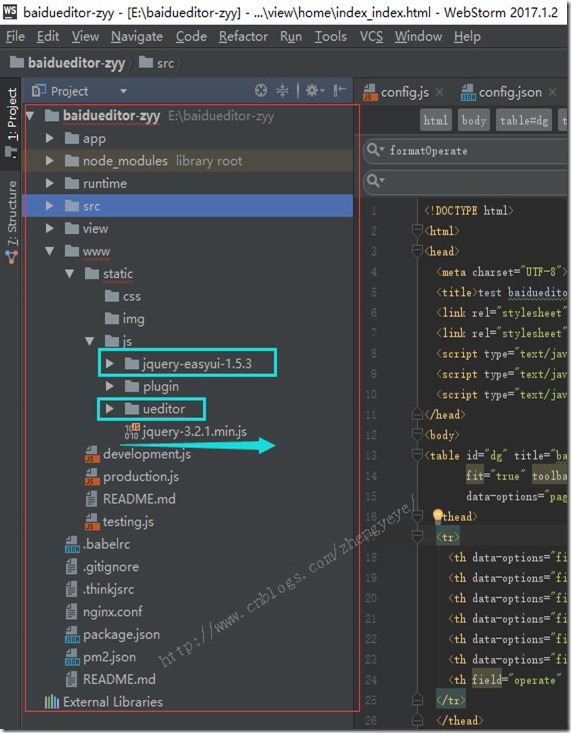
4.正常运行完项目后:
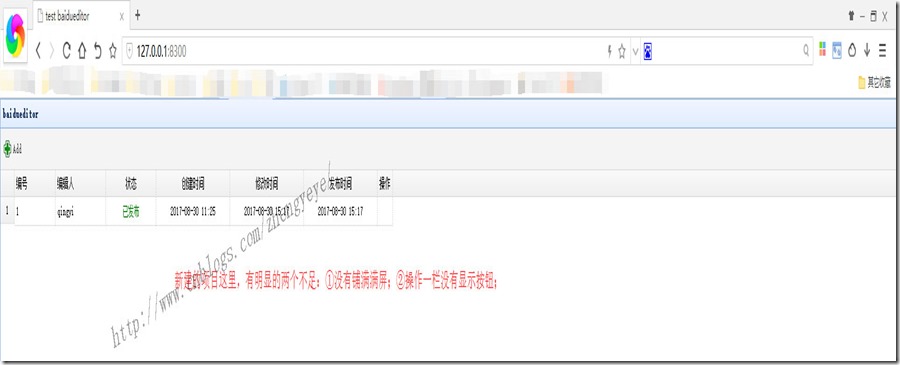
居然有两个“小瑕疵”:列表没有铺满整个屏幕;操作栏不显示操作按钮;仔细看后原来是easyui的属性没写全:
<table id="dg" title="baidueditor" pagination="true" rownumbers="true" fitColumns="true"

       fit="true" toolbar="#tb"

       data-options="pageSize:25,pageList:[10,15,25,50,100],singleSelect:true,showFooter: true">

  <thead>

  <tr>

    <th data-options="field:'id',width:80">编号</th>

    <th data-options="field:'author',width:100">编辑人</th>

    <th data-options="field:'state',width:100,align:'center',formatter:formatState">状态</th>

    <th data-options="field:'createtime',width:150,align:'center',formatter:formatReg">创建时间</th>

    <th data-options="field:'uptime',width:150,align:'center',formatter:formatReg">修改时间</th>

    <th data-options="field:'retime',width:150,align:'center',formatter:formatReg">发布时间</th>

    <th field="operate" align="center" data-options="formatter:formatOperate">操作</th>

  </tr>

  </thead>

</table>
fitColumns="true" ---->让列表铺满整个屏幕;
操作栏不显示图片,是因为在html中写的图片地址下没有图片;
完整的index_index.html:
<!DOCTYPE html>
<html>
<head>
<meta charset="UTF-8">
<title>test baidueditor</title>
<link rel="stylesheet" type="text/css" href="/static/js/jquery-easyui-1.5.3/themes/default/easyui.css">
<link rel="stylesheet" type="text/css" href="/static/js/jquery-easyui-1.5.3/themes/icon.css">
<script type="text/javascript" src="/static/js/jquery-3.2.1.min.js"></script>
<script type="text/javascript" src="/static/js/jquery-easyui-1.5.3/jquery.easyui.min.js"></script>
<script type="text/javascript" src="/static/js/jquery-easyui-1.5.3/locale/easyui-lang-zh_CN.js"></script>
</head>
<body>
<table id="dg" title="baidueditor" pagination="true" rownumbers="true" fitColumns="true"
fit="true" toolbar="#tb"
data-options="pageSize:25,pageList:[10,15,25,50,100],singleSelect:true,showFooter: true">
<thead>
<tr>
<th data-options="field:'id',width:80">编号</th>
<th data-options="field:'author',width:100">编辑人</th>
<th data-options="field:'state',width:100,align:'center',formatter:formatState">状态</th>
<th data-options="field:'createtime',width:150,align:'center',formatter:formatReg">创建时间</th>
<th data-options="field:'uptime',width:150,align:'center',formatter:formatReg">修改时间</th>
<th data-options="field:'retime',width:150,align:'center',formatter:formatReg">发布时间</th>
<th field="operate" align="center" width="110" data-options="formatter:formatOperate">操作</th>
</tr>
</thead>
</table> <!--查询导航开始-->
<div id="tb">
<div style="margin-top: 5px;margin-bottom: 5px;">
<a href="javascript:openAddDialog()" class="easyui-linkbutton"
data-options="plain:true,iconCls:'icon-add'" plain="true">Add</a>
</div>
</div>
<!--查询导航结束--> <!--新增弹框开始-->
<div id="dlg" class="easyui-dialog" style="width:80%;height:90%;" closed="true" resizable="true" buttons="#dlg-buttons"
overflow-y="scroll">
<form id="fm">
<input type="hidden" id="id" name="id">
<table cellpadding="5px" >
<tr>
<td>编辑器:</td>
<td id="UEDiv">
<script id="container" name="content" style="width:98%;height:350px;" type="text/plain"></script>
</td>
</tr>
</table>
</form>
</div>
<div id="dlg-buttons">
<a href="javascript:save()" class="easyui-linkbutton" iconCls="icon-ok">提交</a>
<a href="javascript:cancel()" class="easyui-linkbutton" iconCls="icon-cancel">取消</a>
</div> <!-- 配置文件 -->
<script type="text/javascript" src="/static/js/ueditor/ueditor.config.js"></script>
<!-- 编辑器源码文件 -->
<script type="text/javascript" src="/static/js/ueditor/ueditor.all.js"></script>
<script type="text/javascript" charset="utf-8" src="/static/js/ueditor/lang/zh-cn/zh-cn.js"> </script>
<script type="text/javascript" src="/static/js/plugin/moment.js"></script>
<script type="text/javascript">
//实例化编辑器
var ue = UE.getEditor('container', { //初始化编辑器
theme: "default", //皮肤
lang: 'zh-cn', //语言
allowDivTransToP: false
});
function formatState(value, row, index) {
if (value == -2) {
return '<font color="red">已删除</font>'
}
if (value == -1) {
return '<font color="blue">已保存</font>'
}
if (value == 1) {
return '<font color="green">已发布</font>'
}
}
function formatReg(value, row, index) {
if (value)return moment.unix(value).format("YYYY-MM-DD HH:mm");
}
function formatOperate(value, row, index) {
var edit = '<a onclick="openEditDialog(' + index + ')" href="javascript:void(0)" title="修改" class="linkbutton" data-options="plain:true,iconCls:\'icon-page_edit\'"></a>';
var del = '<a onclick="del(' + index + ')" href="javascript:void(0)" title="删除" class="linkbutton" data-options="plain:true,iconCls:\'icon-delete\'"></a>';
return edit + " "+del;
}
jQuery('#dg').datagrid({
url: '/home/index/list',
onLoadSuccess: function (data) {
jQuery('.linkbutton').linkbutton();
}
}); function openAddDialog(){
jQuery("#addForm").form("reset");
url="/article/circle/add";
jQuery("#dlg").dialog("open").dialog("setTitle", "添加");
}
</script>
</body>
</html>
接着就该在项目中引入ueditor了,可是接下来问题便来了:
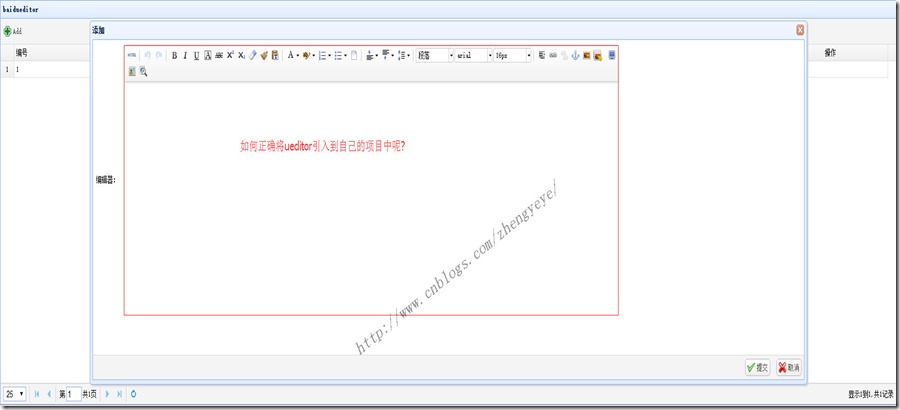
在index_index.html中的紫色部分的代码就是用来显示弹框内容的,而其中的红色部分便是显示ueditor;只是ueditor需要前后端同时配置正确方可使用。
重要的部分来了,来了,来了
关于ueditor的配置(这里用自己实际项目举例)
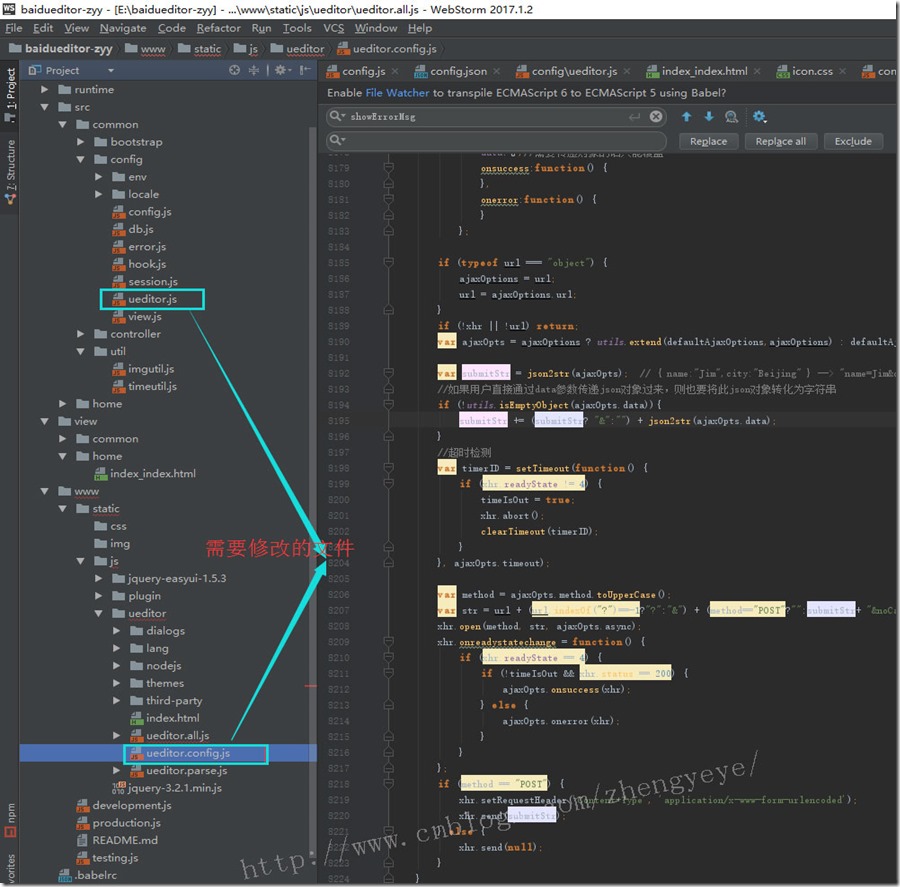
而至于为什么要修改呢,过程真的很复杂,总之一句话:找到合适的对象,然后在原有的基础上改吧改吧就能使用了。
写在最后的:有兴趣的小伙伴可以下载代码运行起来瞧一瞧~
https://files.cnblogs.com/files/zhengyeye/baiduueditor-zyy.zip

将百度编辑器ueditor用在easyui中的更多相关文章
- 百度编辑器ueditor 在vs2008中的使用方法
个人觉得百度编辑器ueditor还是不错的,虽然出生的时间比较短,但某些方面相比其它富文本编辑器更优秀,免费.可定制等等. 由于在官方下载的ueditor包是在vs2012下开发的,可以在vs2010 ...
- 关于百度编辑器UEditor的一点说明
大家在使用的时候要特别注意editor_config.js中的“URL”这个参数 我的理解:1.这个参数是editor整个结构的总路径 2.首先要把这个路径配置好了.才能正常的显示, ...
- 百度编辑器ueditor插入表格没有边框颜色的解决方法
附:从word excel 中 复制的表格提交后无边框,参考这个同学的,写的很详细: http://blog.csdn.net/lovelyelfpop/article/details/51678 ...
- 百度编辑器ueditor插入表格没有边框,没有颜色的解决方法 2015-01-06 09:24 98人阅读 评论(0) 收藏
百度富文本编辑器..很强大.. - - ,不过有些BUG..真的很无解.. 最近用这个,发现上传的表格全部没有表框.. 解决办法如下: 转载的.. 百度编辑器ueditor插入一个表格后,在编辑过程中 ...
- 百度编辑器ueditor 异步加载时,初始化没办法赋值bug解决方法
百度编辑器ueditor 异步加载时,初始化没办法赋值bug解决方法 金刚 前端 ueditor 初始化 因项目中使用了百度编辑器——ueditor.整体来说性能还不错. 发现问题 我在做一个编辑页面 ...
- 工具,如何去掉百度编辑器 ueditor 元素路径、字数统计等
去掉如下截图: 在百度编辑器 ueditor 根目录下: ueditor.config.js 文件中 搜索并将参数elementPathEnabled设置成false即可 常用功能开关如下: ,ele ...
- [转载]百度编辑器-Ueditor使用
前段时间发表过一篇关于“KindEditor在JSP中使用”的博文.这几天在沈阳东软进行JavaWeb方面的实习工作,在一个CMS系统的后台和博客板块中又要用到文本编辑器,突然发现了这个——百度编辑器 ...
- 百度编辑器 ueditor .net开发
ueditor1.4.3 下载地址:http://pan.baidu.com/s/1bnCQVtd <!--editor--> <script type="text/j ...
- 百度编辑器ueditor前台代码高亮无法自动换行解决方法
这两天本站成功安装整合了百度编辑器ueditor,用着还挺不错,但是遇到了点小问题 问题描述: 在内容里面插入代码高亮显示,后台编辑器中是可以自动换行的,但是发表后,在前台查看,发现代码不能自动换 ...
随机推荐
- 相似变换 SimilarityTransform 以及skimage源码
http://scikit-image.org/docs/dev/api/skimage.transform.html#skimage.transform.SimilarityTransform ht ...
- Linux 下如何处理包含空格和特殊字符的文件名
Linux 下如何处理包含空格和特殊字符的文件名 作者: Avishek Kumar 译者: LCTT zpl1025 | 2015-07-08 07:47 评论: 12 收藏: 9 分享: 1 ...
- tornado上传大文件以及多文件上传
tornado上传大文件问题解决方法 tornado默认上传限制为低于100M,但是由于需要上传大文件需求,网上很多说是用nginx,但我懒,同时不想在搞一个服务了. 解决方法: server = H ...
- JDBC存储过程调用
在讨论JDBC Statement教程文章时,我们已经学习了如何在JDBC中使用存储过程. 本教程文章与该部分类似,但它将讲解演示有关JDBC SQL转义语法的其他信息. 就像Connection对象 ...
- linux 系统安装配置 zabbix服务(源码安装)
简介: zabbix是一个基于WEB界面的提供分布式系统监视以及网络监视功能的企业级的开源解决方案. zabbix能监视各种网络参数,保证服务器系统的安全运营:并提供灵活的通知机制以让系统管理员快速定 ...
- Java Decompiler Plugin For Eclipse IDE
1. 下载JAD , 1.5.8版本的jad在 http://www.softpedia.com/progDownload/JAD-Download-85911.html 将展开后的jad.exe放到 ...
- VS 调试 无法启动IIS Express Web 服务器(进程不存在)
拷贝VS2015项目 出现无法启动IIS Express Web 服务器 一.把你们拷贝刀本机的解决方案文件中的隐藏文件夹.vs删除掉 重新生产解决方案就可以启动iis express了.
- C# winform右击导入手机号码
private void 导入手机号ToolStripMenuItem_Click(object sender, EventArgs e) { using (OpenFileDialog Openfi ...
- 阿里云Centos6.9安装图形化界面
yum -y groupinstall "X Window System" "Chinese Support" "Desktop"
- webService(SOAP)性能测试脚本
本文以天气预报的webService为基础进行学习 webService地址:http://www.webxml.com.cn/WebServices/WeatherWebService.asmx ...