
python selenium-7自动发送邮件
https://jingyan.baidu.com/article/647f0115b78f8d7f2148a8e8.html
1.发送HTML格式的邮件
import smtplib

from email.mime.text import MIMEText

from email.header import Header

#发送邮箱服务器

smtpserver = "smtp.126.com"

#发送邮箱用户/密码

user = "发送邮箱@126.com"

password = "登陆密码"

#发送邮箱

sender = "发送邮箱@126.com"

#接收邮箱

receiver = "接收邮箱@qq.com"

#发送邮箱主题

subject = "python发送邮件"

#编写HTML类型的邮箱正文

msg=MIMEText('<html><h1>给QQ邮箱发送邮件</h1></html>','html','utf-8')

msg['Subject']=Header(subject,'utf-8')

msg['From']="张三"

msg['To']=receiver

smtp = smtplib.SMTP()

smtp.connect(smtpserver)

smtp.login(user,password)

try:

    smtp.sendmail(sender, receiver, msg.as_string())

    print("发送成功")

except smtplib.SMTPDataError as e:

    print("发送失败")

finally:

    smtp.quit()
2.发送文本内容的邮件
import smtplib

from email.mime.text import MIMEText

from email.header import Header

msg_from = '发送邮箱@qq.com'

passwd = '授权码'

msg_to = '收件人邮箱@126.com'

subject = "python邮件测试"

content = "这是我使用python smtplib及email模块发送的邮件"

msg = MIMEText(content)

msg['Subject'] = subject

msg['From'] = "发送方"

msg['To'] = "接收方"

try:

    s = smtplib.SMTP_SSL("smtp.qq.com", 465)

    s.login(msg_from, passwd)

    s.sendmail(msg_from, msg_to, msg.as_string())

    print("发送成功")

except s.SMTPDataError as e:

    print("发送失败")

finally:

    s.quit()
其中 s = smtplib.SMTP_SSL("smtp.qq.com", 465)#相当于以下2行
s = smtplib.SMTP()
s.connect("smtp.qq.com")
3.发送带附件的邮件
import smtplib

from email.mime.text import MIMEText

from email.mime.multipart import MIMEMultipart

smtpserver = "smtp.126.com"

sender = "发送邮箱@126.com"

receiver = "接收邮箱@qq.com"

user = "发送邮箱@126.com"

password = "发送邮箱密码"

subject = "测试附件3"

sendfile = open("/Users/chenshanju/PycharmProjects/SeleniumOfJenkins/report/log.txt","rb").read()

att = MIMEText(sendfile,"base64","utf-8")

att["Content-Type"] = "application/octet-stream"

att["Content-Disposition"] ="attachment;filename='log.txt'"

msgRoot = MIMEMultipart("related")

msgRoot["Subject"] = subject

msgRoot["From"] = sender

msgRoot["To"] = receiver

msgRoot.attach(att)

smtp = smtplib.SMTP()

smtp.connect(smtpserver)

smtp.login(user,password)

smtp.sendmail(sender,receiver,msgRoot.as_string())

smtp.quit()
4.查找最新的测试报告
import sys,os

#获取当前脚本的目录

script_path=sys.path[0].split("/")

#获取工程的主目录

end_index=script_path.index("SeleniumOfJenkins")+1

#report所在的目录

report_dir="/".join(script_path[:end_index])+"/report"

#查看当前的文件生成列表

list_file=os.listdir(report_dir)

#对文件按照创建时间进行排序

list_file.sort(key=lambda file:os.path.getmtime(report_dir+"/"+file))

print(list_file[-1])
5.自动发送测试报告
import unittest,os,sys

from time import strftime

from HTMLTestRunner import HTMLTestRunner

import smtplib

from email.mime.text import MIMEText

from email.header import Header

def get_new_report(report_dir):

    "get_new_report()方法传入一个参数(测试报告所在目录),得到最新的report文件"

    file_list = os.listdir(report_dir)

    file_list.sort(key=lambda file:os.path.getmtime(report_dir+"/"+file))

    return report_dir+"/"+file_list[-1]

def send_email(new_report):

    "send_email()接收一个参数(new_report),发送邮件"

    f = open(new_report,"rb")

    mail_body=f.read()

    f.close()

    sender = "发送邮箱@126.com"

    receiver = "接收邮箱@qq.com"

    msg = MIMEText(mail_body,"html","utf-8")

    msg['Subject'] = Header("自动化测试报告","utf-8")

    msg['From'] = sender

    msg['To'] = receiver

    smtp = smtplib.SMTP()

    smtp.connect("smtp.126.com")

    smtp.login("发送邮箱@126.com","发送邮箱密码")

    try:

        smtp.sendmail(sender,receiver,msg.as_string())

        print("发送成功")

    except :

        print("发送失败")

    finally:

        smtp.quit()

if __name__=="__main__":

    """1.执行测试 2.获取最新报告 3.发送邮件"""

    current_dir_list = sys.path[0].split("/")

    index = current_dir_list.index("SeleniumOfJenkins") + 1

    if index == len(current_dir_list):

        home_dir = "/".join(current_dir_list)

    else:

        home_dir = "/".join(current_dir_list[:index])

    report_dir = home_dir + "/" + "report"

    test_dir = home_dir + "/testcase/testsearch"

    discover = unittest.defaultTestLoader.discover(test_dir, pattern="test*.py")

    filename="report/"+strftime("%Y_%m_%d_%H_%M_%S")+"_result.html"

    fp = open(filename,"wb")

    runner=HTMLTestRunner(stream=fp,title="百度搜索报告",description="用例执行情况")

    runner.run(discover)

    fp.close()

    new_report = get_new_report(report_dir)

    send_email(new_report)
FAQ:
1.qq邮箱需要开启imap和smtp权限

## 2.从126邮箱发送qq邮箱抛出异常smtplib.SMTPDataError
smtplib.SMTPDataError: (554, b'DT:SPM 126 smtp1,C8mowABHGtEduABcQk94BA--.46414S2 1543551006,please see http://mail.163.com/help/help_spam_16.htm?ip=125.122.53.172&hostid=smtp1&time=1543551006')
解决方法:需要对msg['From']和msg['To']赋值
## 3.发送的附件不是指定的文件名,而是tcmime.*.bin类型的文件
原因:att["Content-Disposition"] ="attachment;filename='log.txt'"误写为Content-Dispostion
## 4.自动发送测试报告中,qq邮箱样式丢失,126邮箱正常
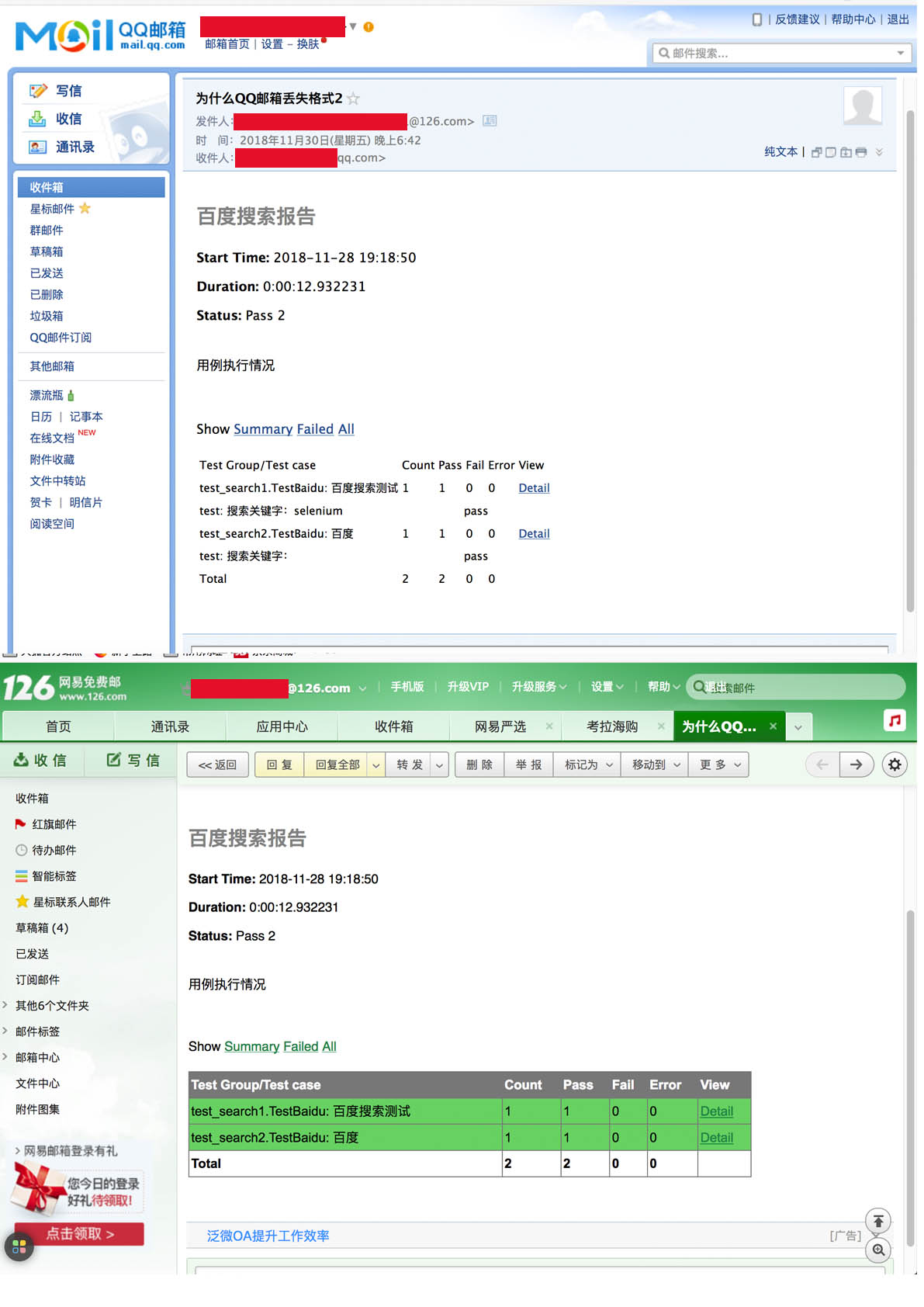
使用附件可以解决这个问题
```#python
import smtplib,os,sys
from email.mime.multipart import MIMEMultipart
from email.mime.text import MIMEText
def get_home_dir():
"获取最新的报告"
current_path_list=sys.path[0].split("/")
index = current_path_list.index("SeleniumOfJenkins")+1
if index == len(current_path_list):
home_path=sys.path[0]
else:
home_path="/".join(current_path_list[:index])
return home_path
def get_new_file():
"获取最新的报告"
file_list=os.listdir(report_path)
file_list.sort(key=lambda file:os.path.getmtime(report_path+file))
return file_list[-1]
def send_email():
"发送邮件"
new_file_name = get_new_file()

new_file = report_path + new_file_name

server = "smtp.126.com"

sender="发送邮箱@126.com"

receiver="接收邮箱@qq.com"

subject = "测试报告见附件3"

sendfile= open(new_file,"rb").read()

att = MIMEText(sendfile,"base64","utf-8")

att['Content-Type'] = "application/octet-stream"

att['Content-Disposition'] = "attachment;filename='%s'" % new_file_name

msgRoot = MIMEMultipart('related')

msgRoot['Subject'] = subject

msgRoot['From'] = sender

msgRoot['To'] = receiver

msgRoot.attach(att)

smtp = smtplib.SMTP()

try:

    smtp.connect(server)

    smtp.login("发送邮箱@126.com","发送邮箱密码")

    smtp.sendmail(sender,receiver,msgRoot.as_string())

    print("发送成功")

except:

    print("发送失败")

finally:

    smtp.quit()
if name=="main":
home_path = get_home_dir()
report_path = home_path + "/report/"
send_email()
python selenium-7自动发送邮件的更多相关文章
- 开源you-get项目爬虫,以及基于python+selenium的自动测试利器
写在前面 爬虫和自动测试,对于python来说是最合适不过也是最擅长的. 开源的项目也很多,例如you-get项目https://github.com/soimort/you-get.盗链和爬虫神器. ...
- Python+Selenium学习--自动生成HTML测试报告
前言 在脚本运行完成之后,除了在log.txt 文件看到运行日志外,我们更希望能生一张漂亮的测试报告来展示用例执行的结果. HTMLTestRunner 是Python 标准库的unit ...
- Python+selenium整合自动发邮件功能
主要实现的目的是:自动将测试报告以邮件的形式通知相关人员 from HTMLTestRunner import HTMLTestRunner import HTMLTestReport from em ...
- 批量群发,营销必备!Python代码实现自动发送邮件!
在运维开发中,使用 Python 发送邮件是一个非常常见的应用场景.今天一起来探讨一下,GitHub 的大牛门是如何使用 Python 封装发送邮件代码的. 一般发邮件方法 SMTP是发送邮件的协议, ...
- Python selenium 文件自动下载 (自动下载器)
MyGithub:https://github.com/williamzxl 最新代码已经上传到Github,以下版本为stupid版本. 由于在下载过程中需要下载不同文件,所以可以把所有类型放在Va ...
- python+selenium实现自动抢票
使用说明 程序运行开始,需要输入出发地,目的地,出发时间,乘客信息,车次:乘客信息和车次可以输入多个 刚刚开始学习爬虫,selenium仅仅是解放了双手,运行效率不是很高: 程序运行时会打开chrom ...
- python selenium 练习 自动获取豆瓣阅读当前特价书籍 chrome 元素定位 窗口切换 元素过期
豆瓣原创电子书每周推出数十本限时免费数目,一周免费期过后恢复原价.想着豆瓣原创书中有不少值得一看,便写了个脚本,免去一个个添加的烦恼. 使用了Windows下selenium+Python的组合,有较 ...
- python QQ邮箱自动发送邮件
于初学者来讲在写发送邮件代码时常见的错误有SMTPAuthenticationError535,有点懵逼,检查用户名,密码正确就是报错, 想当年笔者也是这么过来的,现在就给大家分享一下个人经验: 一, ...
- python+selenium之自动生成excle,保存到指定的目录下
进行之自动化测试,想把自动生成的excle保存到指定的目录下.网上百度的代码如下: import xlwt import time time = time.strftime ('%Y%m%d%H%M% ...
- 用Python自动发送邮件
用Python自动发送邮件 最近需要在服务器上处理一些耗时比较长的任务,因此想到利用python写一个自动发送邮件的脚本,在任务执行完毕后发送邮件通知我.以下代码以163邮箱为例: 开通163 ...
随机推荐
- CUDA ---- Kernel性能调节
Exposing Parallelism 这部分主要介绍并行分析,涉及掌握nvprof的几个metric参数,具体的这些调节为什么会影响性能会在后续博文解释. 代码准备 下面是我们的kernel函数s ...
- Windows 7 + PHP 5.3 + WAMP 下 Imagick 扩展安装
1.首先,下载 ImageMagick 安装包.下载地址 下载后运行此安装包.在系统环境变量中添加 MAGICK_HOME 变量,指向安装目录下的modules\coders. 2.下载 Imagic ...
- React Native笔记整理
判断一个APP页面时原生还是H5:http://www.cnblogs.com/sonice-cinsy/p/5671324.html 写给移动开发者的React Native指南:http://bl ...
- header 输出原始的php报头文件
header() 函数向客户端发送原始的 HTTP 报头. 认识到一点很重要,即必须在任何实际的输出被发送之前调用 header() 函数 (在 PHP 4 以及更高的版本中,您可以使用输出缓存来解决 ...
- SWIFT中数字格式
SWIFT中格式化数字比较常用的应该就是以下几种格式了. var formatter = NSNumberFormatter() //formatter.numberStyle = NSNumberF ...
- a 标签解决,新窗口打开跨域问题
<a href="https://xxxx.vip/home" rel="nofollow noreferrer" target="_blank ...
- jquery deferred promise
<script type="text/javascript">/* Deferredstate (then,done, fail, always,pipe, progr ...
- HDU1081 最大字段和 压缩数组(单调队列优化)
最大字段和题型,推荐做题顺序: HDU1003 HDU1024 HDU1081 ZOJ2975 ZOJ2067 #include<cstdio> #include<cstdlib& ...
- 洛谷 1192:台阶问题(递推,DP)
题目描述 有 N 级的台阶,你一开始在底部,每次可以向上迈最多 K 级台阶(最少 1 级),问到达第 N 级台阶有多少种不同方式. 输入输出格式 输入格式: 两个正整数N,K. 输出格式: 一个正整数 ...
- HDU 1002:A + B Problem II(大数相加)
A + B Problem II Time Limit: 2000/1000 MS (Java/Others) Memory Limit: 65536/32768 K (Java/Others) ...