
Hololens开发笔记之Gesture手势识别(单击,双击)
本文使用手势识别实现识别单击及双击手势的功能,当单击Cube时改变颜色为蓝色,当双击Cube时改变颜色为绿色。
手势识别是HoloLens交互的重要输入方法之一。HoloLens提供了底层API和高层API,可以满足不同的手势定制需求。底层API能够获取手的位置和速度信息,高层API则借助手势识别器来识别预设的手势( 包括,单击、双击、长按、平移等等) 。
本部分为高级API使用,通过输入源来识别手势。每个手势对应一个SourceKind输入源,大部分手势事件都是系统预设的事件,有些事件会提供额外的上下文信息。只需要很少的步骤就能使用GestureRecognizer集成手势识别:
1. 创建GestureRecognizer实例
2. 注册指定的手势类型
3. 订阅手势事件
4. 开始手势识别
1、添加手势管理脚本,在Manager上添加脚本GestureManager.cs
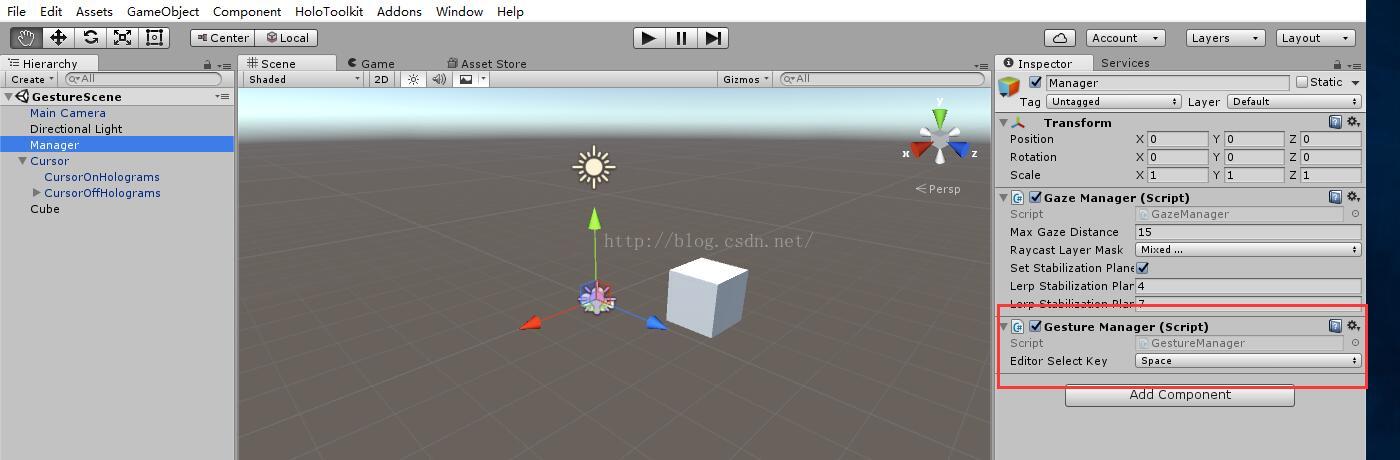
GestureManager脚本内容如下,其中注册了Tapped事件,当发生tap事件时,判断是单击还是双击事件
// Copyright (c) Microsoft Corporation. All rights reserved.

// Licensed under the MIT License. See LICENSE in the project root for license information.

using System;

using UnityEngine;

using UnityEngine.VR.WSA.Input;

namespace HoloToolkit.Unity

{

    /// <summary>

    /// GestureManager creates a gesture recognizer and signs up for a tap gesture.

    /// When a tap gesture is detected, GestureManager uses GazeManager to find the game object.

    /// GestureManager then sends a message to that game object.

    /// </summary>

    [RequireComponent(typeof(GazeManager))]

    public partial class GestureManager : Singleton<GestureManager>

    {

        /// <summary>

        /// Key to press in the editor to select the currently gazed hologram

        /// </summary>

        public KeyCode EditorSelectKey = KeyCode.Space;

        /// <summary>

        /// To select even when a hologram is not being gazed at,

        /// set the override focused object.

        /// If its null, then the gazed at object will be selected.

        /// </summary>

        public GameObject OverrideFocusedObject

        {

            get; set;

        }

        /// <summary>

        /// Gets the currently focused object, or null if none.

        /// </summary>

        public GameObject FocusedObject

        {

            get { return focusedObject; }

        }

        private GestureRecognizer gestureRecognizer;

        private GameObject focusedObject;

        public bool IsNavigating { get; private set; }

        public Vector3 NavigationPosition { get; private set; }

        void Start()

        {

            //  创建GestureRecognizer实例

            gestureRecognizer = new GestureRecognizer();

            //  注册指定的手势类型,本例指定单击及双击手势类型

            gestureRecognizer.SetRecognizableGestures(GestureSettings.Tap

                | GestureSettings.DoubleTap);

            //  订阅手势事件

            gestureRecognizer.TappedEvent += GestureRecognizer_TappedEvent;

            //  开始手势识别

            gestureRecognizer.StartCapturingGestures();

        }

        private void OnTap()

        {

            if (focusedObject != null)

            {

                focusedObject.SendMessage("OnTap");

            }

        }

        private void OnDoubleTap()

        {

            if (focusedObject != null)

            {

                focusedObject.SendMessage("OnDoubleTap");

            }

        }

        private void GestureRecognizer_TappedEvent(InteractionSourceKind source, int tapCount, Ray headRay)

        {

            if (tapCount == )

            {

                OnTap();

            }

            else

            {

                OnDoubleTap();

            }

        }

        void LateUpdate()

        {

            GameObject oldFocusedObject = focusedObject;

            if (GazeManager.Instance.Hit &&

                OverrideFocusedObject == null &&

                GazeManager.Instance.HitInfo.collider != null)

            {

                // If gaze hits a hologram, set the focused object to that game object.

                // Also if the caller has not decided to override the focused object.

                focusedObject = GazeManager.Instance.HitInfo.collider.gameObject;

            }

            else

            {

                // If our gaze doesn't hit a hologram, set the focused object to null or override focused object.

                focusedObject = OverrideFocusedObject;

            }

            if (focusedObject != oldFocusedObject)

            {

                // If the currently focused object doesn't match the old focused object, cancel the current gesture.

                // Start looking for new gestures.  This is to prevent applying gestures from one hologram to another.

                gestureRecognizer.CancelGestures();

                gestureRecognizer.StartCapturingGestures();

            }

#if UNITY_EDITOR

            if (Input.GetMouseButtonDown() || Input.GetKeyDown(EditorSelectKey))

            {

                OnTap();

            }

#endif

        }

        void OnDestroy()

        {

            gestureRecognizer.StopCapturingGestures();

            gestureRecognizer.TappedEvent -= GestureRecognizer_TappedEvent;

        }

    }

}
2、在Cube上添加处理脚本CubeScript.cs

CubeScript脚本如下,定义两个方法,OnTap将Cube的颜色设置为蓝色, OnDoubleTap将Cube的颜色设置为绿色
using UnityEngine;

using System.Collections;

public class CubeScript : MonoBehaviour {

    // Use this for initialization

    void Start () {

    }

    // Update is called once per frame

    void Update () {

    }

    private void OnTap()

    {

        gameObject.GetComponent<MeshRenderer>().material.color = Color.blue;

    }

    private void OnDoubleTap()

    {

        gameObject.GetComponent<MeshRenderer>().material.color = Color.green;

    }

}
3、运行测试
当发生单击事件
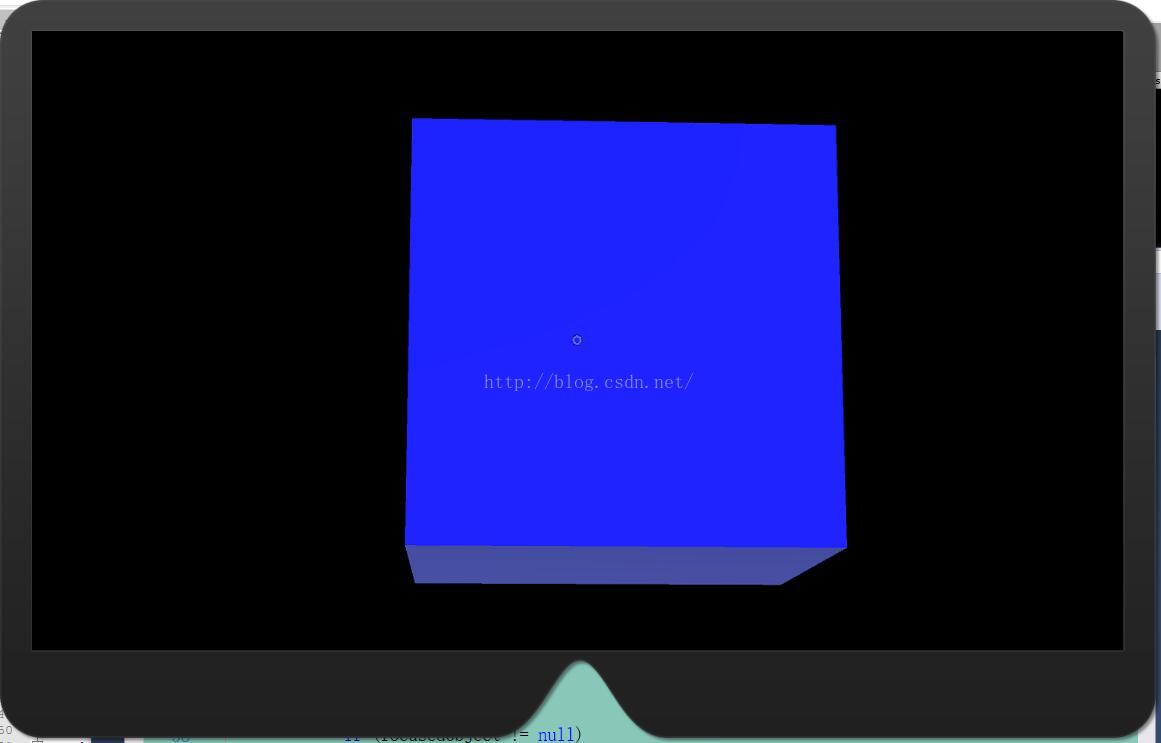
当发生双击事件(该处存在一点小问题,双击时首先识别到单击事件,所以会看到先变成蓝色,然后变成绿色)

Hololens开发笔记之Gesture手势识别(单击,双击)的更多相关文章
- Hololens开发笔记之Gesture手势识别(基本介绍)
手势识别是HoloLens交互的重要输入方法之一.HoloLens提供了底层API和高层API,可以满足不同的手势定制需求.底层API能够获取手的位置和速度信息,高层API则借助手势识别器来识别预设的 ...
- Hololens开发笔记之Gesture手势识别(Manipulation手势控制物体旋转)
Manipulation gesture:保持点击手势,在3D世界中绝对运动 当你想要全息图像1:1响应用户手部移动时,操纵手势能被用于移动.缩放或旋转全息图像.如此的一个用处是使得用户可以在世界中绘 ...
- Hololens开发笔记之Gesture手势识别(Manipulation手势控制物体平移)
Manipulation gesture:保持点击手势,在3D世界中绝对运动 当你想要全息图像1:1响应用户手部移动时,操纵手势能被用于移动.缩放或旋转全息图像.如此的一个用处是使得用户可以在世界中绘 ...
- Hololens开发笔记之Gesture手势识别(手势检测反馈)
本文实现当使用者手出现在Hololens视野范围内时,跟踪手并给出反馈的效果. 1.在Manager上添加HandsManager脚本组件,用于追踪识别手 HandsManager.cs如下(直接使用 ...
- HoloLens开发笔记之Gesture input手势输入
手势是HoloLens三个首要输入形式之一.一旦你使用凝视定位了一个全息图像,手势允许你与它交互.手势输入允许你使用手或者点击器原生地与全息图像交互. 手势之外,你也可以在应用中使用语音输入来交互. ...
- Hololens开发笔记之使用Unity开发一个简单的应用
一.Hololens概述 Hololens有以下特性 1.空间映射借助微软特殊定制的全息处理单元(HPU),HoloLens 实现了对周边环境的快速扫描和空间匹配.这保证了 HoloLens能够准确地 ...
- Android 手势识别——单击/双击
为什么需要手势识别? 手势对于我们的app有很多的地方都在使用,比如右滑关闭界面等.手势控制分为触发动作(Touch Mechanics,用户手指在屏幕上如何动作)和触发行为(Touch Activi ...
- Hololens开发笔记之连接PC实现资源共享
官网原文介绍:https://developer.microsoft.com/en-us/windows/holographic/using_the_windows_device_portal Hol ...
- Hololens开发笔记:UDP接收数据
Hololens的应用需要与其他设备通信的时候,UDP是比较方便的一种方式,Unity3d 2017.3 C#开发的时候可以用Windows.Networking.Sockets.DatagramSo ...
随机推荐
- ios基础篇(十八)——Delegate 、NSNotification 和 KVO用法及其区别
一.Delegate Delegate本质是一种程序设计模型,iOS中使用Delegate主要用于两个页面之间的数据传递.iphone中常用@protocol和delegate的机制来实现接口的功能. ...
- [转载]MySQL将DateTime时间类型格式化
DATE_FORMAT(date,format) 根据format字符串安排date值的格式. select from_unixtime(time,'%Y-%m-%d %H:%i:%s'); ...
- [原]Wpf应用Path路径绘制圆弧
1. 移动指令:Move Command(M):M 起始点 或者:m 起始点比如:M 100,240或m 100,240使用大写M时,表示绝对值; 使用小写m时; 表示相对于前一点的值,如果前一点没 ...
- Android学习(未完)
Android四大组件1.Activity活动活动Activity是一种可以包含用户界面的组件,主要用于和用户进行交互活动之间使用intent进行通信,激活组件,分为1.显式intent2.隐式int ...
- Java中类型的长度
介绍: Java中有8种基本类型,分别是boolean, char, byte, short, int, long, float, double.他们的长度固定,不是对象.对于有必要将基本类型作为对象 ...
- Rhel6-torque作业调度系统配置文档
系统环境: rhel6 x86_64 iptables and selinux disabled 主机: 192.168.122.121 server21.example.com 计算节点 192.1 ...
- C#学习笔记----枚举、结构、方法及构造函数的总结
一.枚举 语法: [public] enum 枚举名 { 值1, 值2, 值3, ........ } public:访问修饰符.公开的公共的,哪都可以访问. enum:关键字,声明枚举的关键字 枚举 ...
- Cloudera-Manager修改集群的IP
1.业务需求说明:由于公司网络进行了整改,随之而来的就是对应的ip网段发生了变化,其中我的hadoop的集群各主机的ip也相应的发生了改变,因此需要对各主机进行修改ip. 2.具体操作: 首先停止cd ...
- android开发之在activity中控制另一个activity的UI更新
转自:http://blog.csdn.net/jason0539/article/details/18075293 第一种方法: 遇到一个问题,需要在一个activity中控制另一个acitivit ...
- 集合运算(A-B)U(B-A)
实质是两个数组的合并(顺序表最好是有序的) #include<iostream> using namespace std; //创建顺序表 void create(int A[],int ...