
How to Use Rsync to Sync New or Changed/Modified Files in Linux
As a system administrator or Linux power user, you may have probably come across or even on several occasions, used the versatile Linux Rsync tool, which enables users to expeditiously copy or synchronize files locally and remotely. It is as well a great tool popularly used for backup operations and mirroring.
Some of its eminent features and advantages include; it is exceptionally versatile in that, it can copy locally, to/from a remote shell or remote rsync, it is also remarkably flexible, allowing users to specify any number of files to copy.
Suggested Read: 10 Practical Examples of Rsync Command in Linux
Furthermore, it permits copying of links, devices, file or directory owner, groups and the permissions. It also supports usage without root privileges coupled with many more.
One imperative differential of rsync in comparison to other file-coying commands in Linux is its use of the remote-update protocol, to transfer only the difference between files or directory content.
Therefore, in this article, we shall examine how rsync can help us only sync new or changed files or directory content while making backups and beyond in Linux.
To start with, you need remember that the conventional and simplest form of using rsync is as follows:
# rsync options source destination
That said, let us dive into some examples to uncover how the concept above actually works.
Syncing Files Locally Using Rsync
Using the command below, am able to copy files from my Documents directory to /tmp/documentsdirectory locally:
$ rsync -av Documents/* /tmp/documents
In the command above, the option:
-a– means archive mode-v– means verbose, showing details of ongoing operations
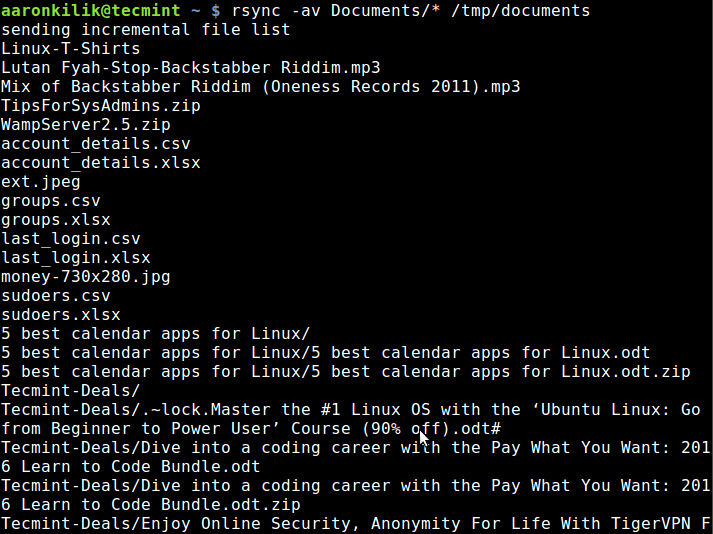
Sync Files Locally
By default, rsync only copies new or changed files from a source to destination, when I add a new file into myDocuments directory, this is what happens after running the same command second time:
$ rsync -av Documents/* /tmp/documents
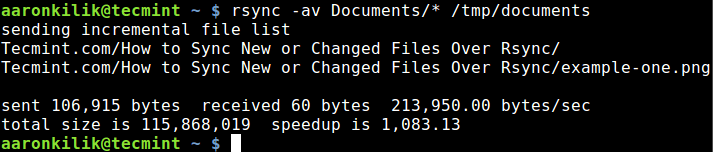
Sync New Updated Files
As you can observe and notice from the output of the command, only the new file is copied to the destination directory.
Suggested Read: How to Sync Two Apache Web Servers/Websites Using Rsync
The --update or -u option allows rsync to skip files that are still new in the destination directory, and one important option, --dry-run or -n enables us to execute a test operation without making any changes. It shows us what files are to be copied.
$ rsync -aunv Documents/* /tmp/documents
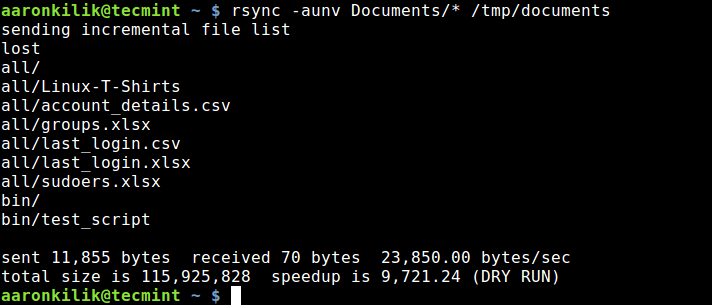
Dry Run Rsync Before Syncing Files
After executing a test run, we can then do away with the -n and perform a real operation:
$ rsync -auv Documents/* /tmp/documents
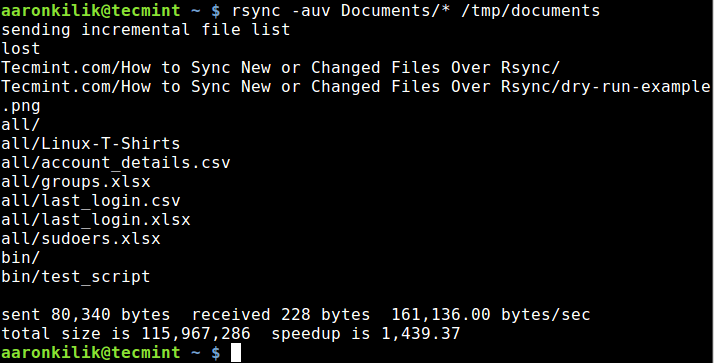
Sync Updated Files
Syncing Files From Local to Remote Linux
In the example below, I am copying files from my local machine to a remote sever with the IP address –10.42.1.5. So as to only sync new files on the local machine, that do not exist on the remote machine, we can include the --ignore-existing option:
$ rsync -av --ignore-existing Documents/* aaronkilik@10.42.1.5:~/all/
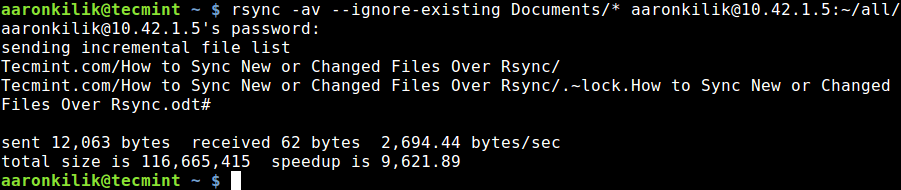
Sync Files Local to Remote Linux
Subsequently, to sync only updated or modified files on the remote machine that have changed on the local machine, we can perform a dry run before copying files as below:
$ rsync -av --dry-run --update Documents/* aaronkilik@10.42.1.5:~/all/

$ rsync -av --update Documents/* aaronkilik@10.42.1.5:~/all/
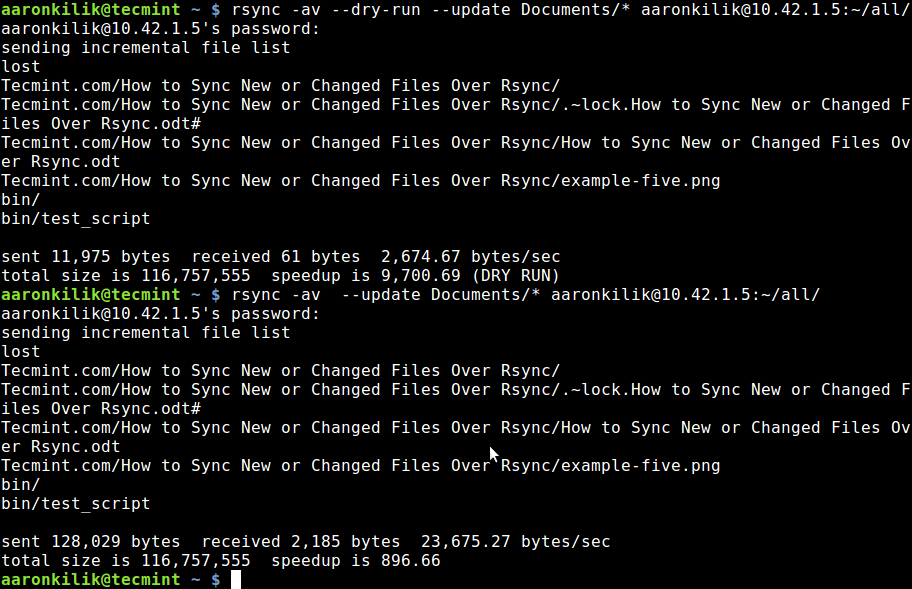
Check Sync Only Updated Files
To update existing files and prevent creation of new files in the destination, we utilize the --existing option.
You can run through the rsync man page to discover additionally useful options for advanced usage, as I had mentioned earlier on, rsync is a very powerful and versatile Linux tool and many System Administrator and Linux power users know just how advantageous it is.
Most importantly, you can as well share your view on the examples we have covered here or even better still, offer us valuable tips on using this vital command line tool through the comment section below.
How to Use Rsync to Sync New or Changed/Modified Files in Linux的更多相关文章
- External file changes sync may be slow: Project files cannot be watched (are they under network mount?)
if some files are on a mounted disk: go to Settings | Notifications | File Watcher Messages and tune ...
- Linux命令——rsync
参考:Rsync (Remote Sync): 10 Practical Examples of Rsync Command in Linux How to Sync Files/Directorie ...
- 【转载】CentOS 6.3下rsync服务器的安装与配置
一.rsync 简介 Rsync(remote synchronize)是一个远程数据同步工具,可通过LAN/WAN快速同步多台主机间的文件,也可以使用 Rsync 同步本地硬盘中的不同目录. Rsy ...
- CentOS 6.3下rsync服务器的安装与配置
一.rsync 简介 Rsync(remote synchronize)是一个远程数据同步工具,可通过LAN/WAN快速同步多台主机间的文件,也可以使用 Rsync 同步本地硬盘中的不同目录. Rsy ...
- CentOS6 下rsync服务器配置
一.rsync 简介 Rsync(remote synchronize)是一个远程数据同步工具,可通过LAN/WAN快速同步多台主机间的文件,也可以使用 Rsync 同步本地硬盘中的不同目录. Rsy ...
- Server Data Synchronization Via Linux rsync、rsync+inotify Between Load Balance Server
目录 . 远程文件同步的应用场景 . rsync+crontab . rsync+inotify 1. 远程文件同步的应用场景 在负载均衡集群的应用场景中,往往在多台web server的前端有一个提 ...
- rsync 使用示例
导读 Rsync(remote sync) 是用于同步某一位置文件和目录到另一位置的有效方法.备份的位置可以在本地服务器或远程服务器.本站之前亦有介绍rsync的安装配置和教程,详看<rsync ...
- linux服务之rsync
http://www.cnblogs.com/itech/archive/2010/06/13/1757952.html rsync与mfs好像有点类似,都是传输块的chunk,chunk的 1)软件 ...
- rsync常用命令及格式
rsync在同步文件夹内容这个工作上应用非常广泛,但是rsync本身命令还是比较复杂,本文总结一下: rsync = remote sync的简称 ,它 被用于在linux/unix系统中执行备份操作 ...
随机推荐
- linux如何安装MyEclipse 2014
http://jingyan.baidu.com/article/0320e2c1cced031b87507b08.html
- HTML第七天学习笔记
今天主要是学习如何使用JS,第一个就是先是使用JS输出"Hello world" <!doctype html> <html lang="en" ...
- github 多帐户使用
同一台电脑有2个github账号?咋办 比如一个公司账号一个个人账号. 私人账号如下: 邮箱example@126.com 账号:example 公司工作账号如下: work@xx.com 账号:my ...
- Nutch搜索引擎系列
下面是Nutch搜索系列目录,希望对研究Nutch的同学有所帮助. 目录安排: 1)Nutch搜索引擎(第1期)_ Nutch简介及安装[下载] 2)Nutch搜索引擎(第2期)_ Solr简介及安装 ...
- python基于http协议编程:httplib,urllib和urllib2<转>
httplib实现了HTTP和HTTPS的客户端协议,一般不直接使用,在python更高层的封装模块中(urllib,urllib2)使用了它的http实现. httplib.HTTPConnecti ...
- 利用css中的border生成三角,兼容包括IE6的主流浏览器
1.生成四个不同颜色方向的梯形 #ladder{ width:20px; height:20px; border:10px solid; border-color:#ff3300 #0000ff #3 ...
- Android Studio开发JNIproject
使用Android Sutdio创建一个新的project后,接下来记录创建NDKproject的基本步骤. 本文将达到: 1. 创建NDKproject 2. 在JNI中输出Log语句 3. 指定编 ...
- Codeforces Round #309 (Div. 2) C. Kyoya and Colored Balls 排列组合
C. Kyoya and Colored Balls Time Limit: 20 Sec Memory Limit: 256 MB 题目连接 http://codeforces.com/contes ...
- UIBezierPathStudyDemo
import UIKit import XCPlayground //创建view let myView = UIView(frame:CGRectMake(0, 0, 300, 200)) //实时 ...
- $parse/$eval和$observe/$watch如何区分
大家在看angular的时候,有时候偶尔会看到$parse,$eval和$observe,$watch这两对语法,随着深入使用angular,就不可避免使用到它.文章从内部运行机制跟实际需求的角度来解 ...